A Thanksgiving food drive volunteer sign-up sheet
Last updated October 29, 2026
To run a Thanksgiving food drive volunteer sign-up, start a list on anonylist, add each shift as a sign-up row with its date and time, and put the link on the flyer and in the group chat. Volunteers open it, tap Sign up on a shift and their name goes on it — and every section counts how many shifts are still open. It’s free, and nobody needs an account or an app.
- Start a list and name it — Food Drive 2026.
- Add a note at the top: where to drop food, which days, and when the boxes go out.
- Add a section per job — the collection table, sort & pack night, delivery drivers — with a sign-up row per shift.
- Share the link on the flyer, in the bulletin and in the group chat. Each heading counts what’s still open.
Thanksgiving is Thursday, November 26, 2026. The example drive below collects food November 14–20 and hands the boxes out the weekend before, on Saturday, November 21, so families have everything in time to cook. Volunteers don’t need a form or a login; they need to see the open shifts and put their name on one. That fits on one link.
Opens instantly. No account, no email.
What the sheet looks like
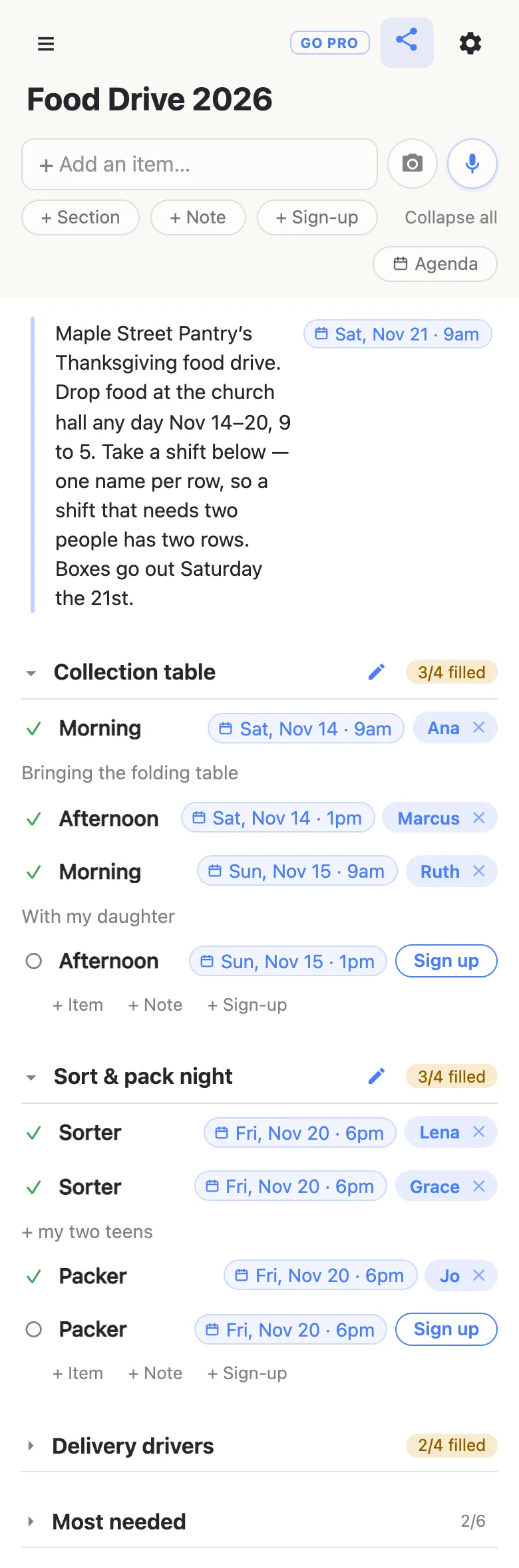
Here is the example sheet from the screenshots below, as text. Shifts are sign-up rows a volunteer claims; the most-needed foods are plain checkboxes the coordinator ticks.
Note: Maple Street Pantry’s Thanksgiving food drive. Drop food at the church hall any day Nov 14–20, 9 to 5. Take a shift below — one name per row, so a shift that needs two people has two rows. Boxes go out Saturday the 21st. Saturday, November 21, 2026, 9am.
Collection table
- Morning, Saturday, November 14, 9am — Ana: “Bringing the folding table”
- Afternoon, Saturday, November 14, 1pm — Marcus
- Morning, Sunday, November 15, 9am — Ruth: “With my daughter”
- Afternoon, Sunday, November 15, 1pm — open
Sort & pack night
- Sorter, Friday, November 20, 6pm — Lena
- Sorter, Friday, November 20, 6pm — Grace: “+ my two teens”
- Packer, Friday, November 20, 6pm — Jo
- Packer, Friday, November 20, 6pm — open
Delivery drivers
Note: Pick up boxes at the hall at 9. Your route sheet is on the table by the door.
- Route 1, Saturday, November 21, 9am — Dev: “Minivan, fits 8 boxes”
- Route 2, Saturday, November 21, 9am — Priya: “SUV”
- Route 3, Saturday, November 21, 9am — Sam: “Pickup truck, can do two runs”
- Route 4, Saturday, November 21, 9am — open
Most needed
- ☑ Canned pumpkin
- ☑ Stuffing mix
- ☐ Cranberry sauce
- ☐ Gravy packets
- ☐ Instant mashed potatoes
- ☐ Paper grocery bags
Every shift is a row a volunteer claims
Add a section for each job — Collection table, Sort & pack night, Delivery drivers — and use the + Sign-up link at the end of each one to add the shifts. Pressing Enter chains straight into the next row, so a whole week of shifts takes a few minutes.
Give each shift its day and time by typing them into the row — Morning Nov 14 9am — and tapping the offer that appears. The words become a chip on the row, Sat, Nov 14 · 9am, and the row keeps the short name Morning. Typing @ at the start of a word opens a small calendar instead, if you’d rather pick. More on dates on a list.
A sign-up row holds one name. A shift that needs two sorters is two rows called Sorter with the same time — that way the count says exactly how many places are left, and nobody has to guess whether “Sorting, Friday” already has enough people.
See which shifts are still open
Each section heading carries a counter — 3/4 filled — that stays amber while anything in it is open and turns green with a tick once every shift has a name. The open rows are the ones still showing a Sign up button, so the gaps are visible from the top of the sheet without reading every row.
That makes the reminder easy to write. A week out, glance at the headings and post the gaps by name — “still need a Sunday afternoon at the table, one packer Friday and a fourth driver” gets answers where “we still need volunteers!” gets scrolled past. Whoever answers taps the row, and the counter moves on everyone’s phone.
Volunteers sign up from the flyer or the group chat
Whoever opens the link gets the sheet and a Sign up button beside every open shift — no app, no account, no password to invent. The first time, it asks what to call them, and whatever they type is the name that appears on the rows they claim. A box then opens under their name for a word about the shift: “Minivan, fits 8 boxes”, “+ my two teens”.
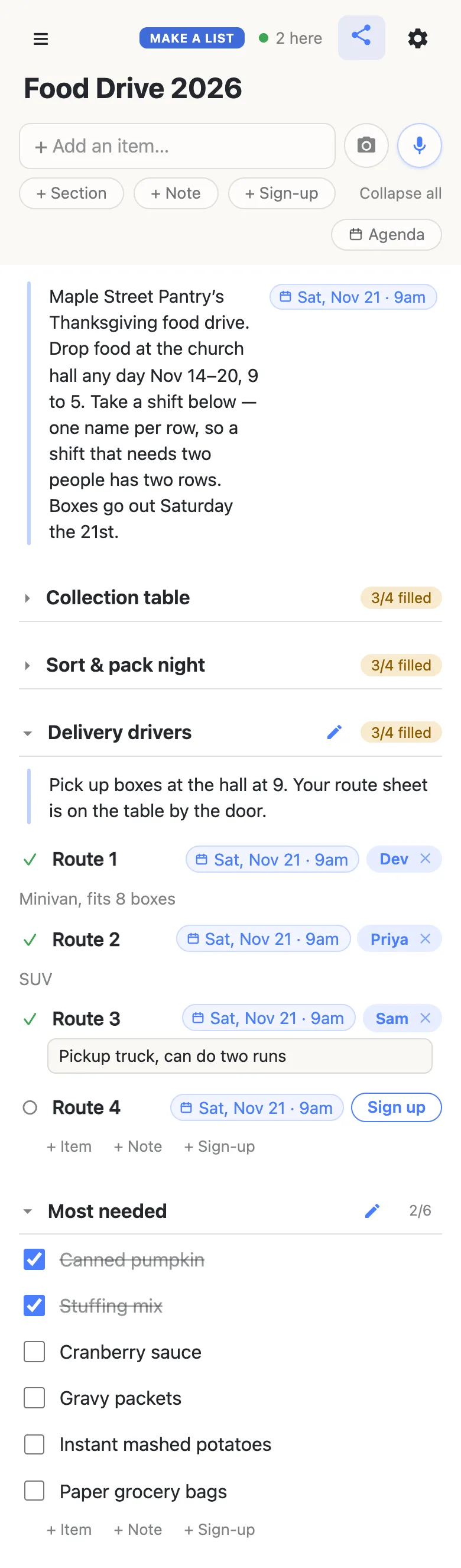
Sign-ups appear on every open phone as they happen, so two volunteers reading the sheet at once can’t both take the last driver’s route. The 2 here chip in the header is live presence — tap it for the names.
Plans change in November, and the sheet bends with them. A volunteer taps the ✕ beside their own name to give a shift back, and the row is open again for everyone. To sign up somebody else — the neighbor who said yes at church but never opened the link — tap Sign up, then tap the name chip and type theirs. Clearing somebody else’s sign-up asks first, so nobody loses their shift by accident.
The first time a volunteer opens the link, the sections are folded shut with their counts showing, and only what sits above the first section is open. Keep the note at the very top, and the drop-off place and dates are the first thing everyone reads.
Every shift by day
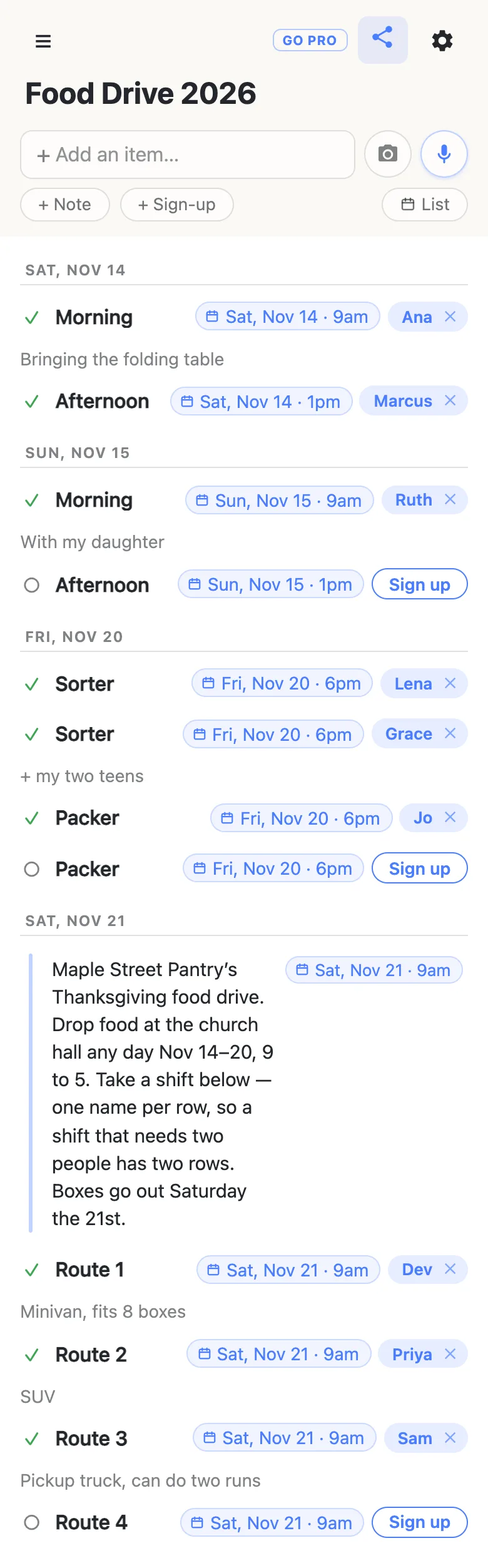
Once shifts have dates, an Agenda button appears under the add box. Tap it and the same rows regroup under their days — Saturday’s table shifts, Sunday’s, Friday’s sort night, Saturday’s routes — with the timed rows in time order and the sign-up buttons still working. It’s the view to check the night before a shift: who is coming tomorrow, and which slot still has nobody. Tap List to go back to the sections. More on the agenda view.
Shifts can go into a real calendar too. The gear icon → Calendar feed gives the sheet a calendar address that Google Calendar or Apple Calendar can subscribe to: every dated shift becomes an event, titled with the volunteer’s name once it’s claimed and marked OPEN while it isn’t. How to subscribe.
A most-needed list donors can read
Donors open the same link to find out what to bring. Give them a Most needed section of plain checkbox rows — cranberry sauce, gravy, stuffing mix, paper bags — and tick each one off when the hall has enough of it. Ticking asks to confirm first; the row then stays on the list with a line through it, so a donor reading at the grocery store skips what is covered and buys what isn’t. The heading counts how many are done, 2/6.
A community Thanksgiving dinner works the same way
Serving a meal instead of handing out boxes? Same sheet, different sections: Kitchen shifts from early Thursday morning, Serving in two waves, Setup and Cleanup, and Rides for guests who need one. Date each row for Thursday, November 26, 2026, put the address and the parking in the note at the top, and keep the pies on a sign-up section of their own so the bakers can see what is already coming. In the Agenda view, Thursday reads as one day’s rota from first shift to last.
Keep the drive running smoothly
- Keep families off the link. Anyone with the link can open the sheet, so it holds shifts and volunteers’ first names, never the names or addresses of the households receiving boxes. Route sheets stay on paper at the hall, as in the example note.
- One shift per row, one name per shift. A shift that needs three people is three rows; the count then tells the truth.
- Print the link where people stand. The flyer, the bulletin, the box by the door. Paper wants a QR code (any free generator will make one from the link) with the address printed underneath.
- Pin it in the chat. Every phone that opens the sheet also keeps it in the ☰ drawer, so volunteers find their way back without the flyer.
When the flyer goes up in public
A sign-up taped to the grocery store’s notice board reaches people you have never met, and you may want every one of them able to sign up without anyone renaming shifts or deleting a route.
That’s what owning the list is for. The sheet stays yours and you choose what visitors may do: leave signing up on, switch adding, editing, deleting and reordering off, and the link becomes sign-up-only for everyone but you. Volunteers notice nothing — same link, still no account, still one tap. Add your co-coordinators as admins by email so they can run their own shifts, and claim a short, readable address for the flyer.
See what anonylist pro does Only you need an account. Everyone else still just opens the link.
The rest of the season
The drive is one part of the season; the Thanksgiving planning checklist is the host’s whole countdown at home, and links every Thanksgiving guide. The same sign-up rows run the meal itself: the Thanksgiving potluck sign-up sheet for relatives on Thursday, and a Friendsgiving sign-up sheet for friends the weekend before. When December’s giving starts, the angel tree sign-up works the same way, with each wish claimed by a donor.
Questions
- When should a Thanksgiving food drive put out its volunteer sign-up?
- By the first week of November. For a drive collecting November 14–20, 2026, with boxes going out on Saturday, November 21 — the weekend before Thanksgiving on November 26 — post the sheet around November 1. People start looking for somewhere to volunteer in early November, and three weeks leaves time to post the open shifts by name before collection starts.
- Can a family or a youth group volunteer together?
- Yes. One person signs up for the shift and says who is coming in the note that opens under their name, such as “+ my two teens”. A group that fills several places takes several rows: the leader can tap Sign up on each, then tap the name chip on each row and type in who is actually doing it.
- How do donors know which foods the drive still needs?
- Give the sheet a Most needed section of plain checkbox rows — cranberry sauce, gravy, stuffing mix — and tick each one when the hall has enough. A ticked row stays on the list with a line through it, so a donor reading the link in the grocery store can skip it and buy what is still unticked.
- Can the same sheet cover a community Thanksgiving dinner?
- Yes. Add sections for the dinner’s kitchen, serving, setup, cleanup and rides shifts, each dated for Thursday, November 26, 2026, and put the address and parking in the note at the top. The section counts show which crew is short, and the Agenda view reads the day as one rota in time order.
- Where do the families’ names and addresses go?
- Not on the sheet. Anyone with the link can open it, so it should hold shifts and volunteers’ first names only. Keep the households’ details on the route sheets the drivers collect at the hall, and use the sheet to say where those are, as the example’s Delivery drivers note does.
Opens instantly. No account, no email.