Dates on a shared list: type them, don’t pick them
Last updated August 18, 2026
Every shared list collects dates as plain words — “Weds 19th - cleaners”, “Fri 21st - Tesco 11-12”. On anonylist those words can become real dates without a date picker in sight: the list reads what you typed and offers the date it understood. One tap attaches it; ignore it and your text stays exactly as written.
Opens instantly. No account, no email.
Type the date the way you already do
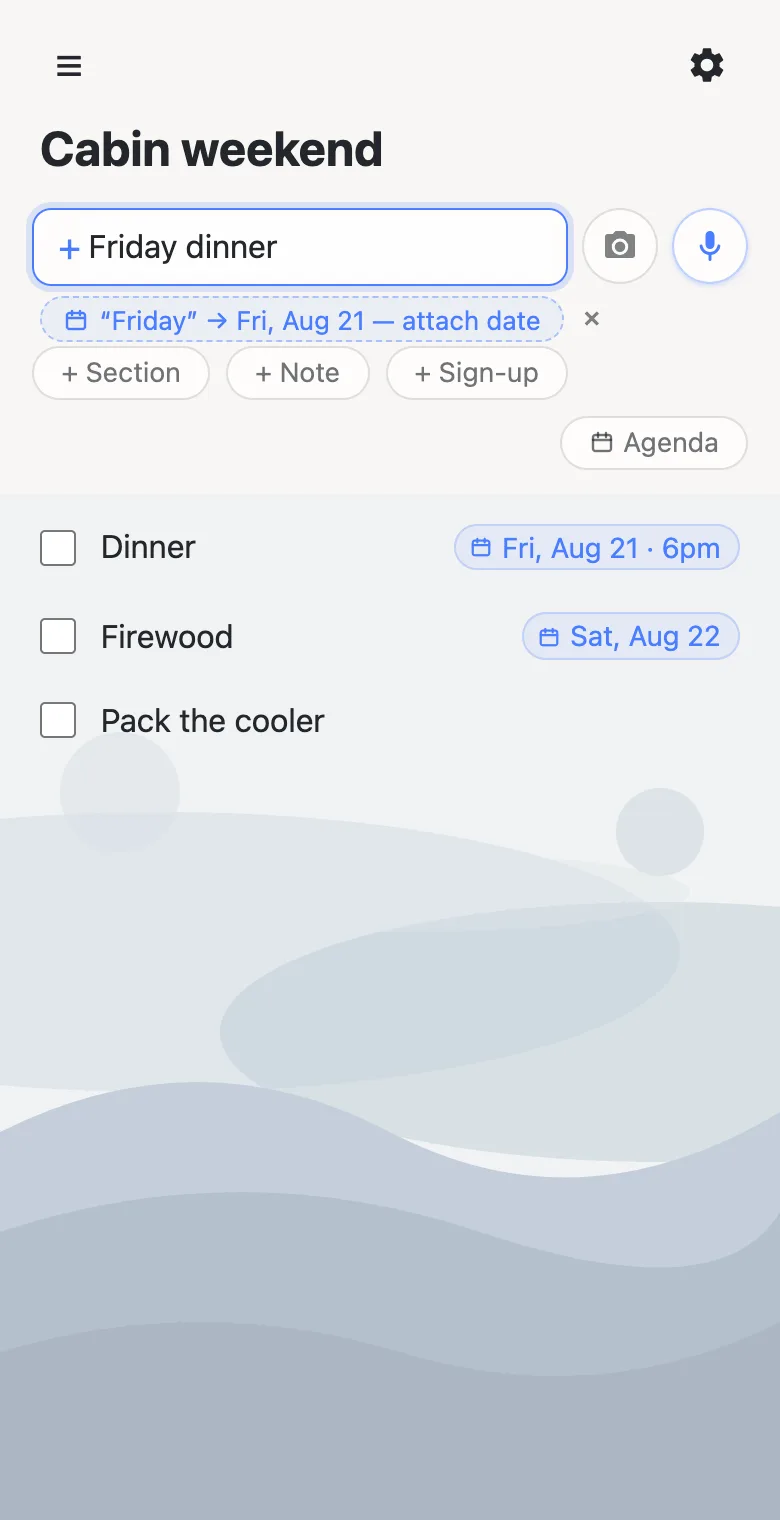
Write “Friday dinner”, “Weds 26th”, “Sept 12”, “tomorrow night”, “next friday”, or “movie at 7pm”, and a quiet chip appears under the box: “Friday” → Fri, Aug 21 — attach date. Tap it and the row wears a date chip on its right edge. Dismiss it and that phrase stays dismissed. Nothing is ever attached silently — a date exists only because you confirmed it, which matters on a list other people rely on.
Times, without timezone homework
Add a time the same way: “dinner friday 6pm” becomes Fri, Aug 21 · 6pm. Times are wall-clock on purpose — the dinner is at 6pm where the dinner is — because shared lists coordinate real gatherings, not conference calls. Schedule prose like “Suzanne 2:30-5:30” is deliberately left as text: a range is a note, not an event start.
Change it by editing the words
Everything stays text underneath, so editing works the way you’d hope: change “friday” to “thursday” in a dated row and the chip offers to move — it never silently rewrites a date you confirmed. The chip’s × removes the date; typing a new day offers again. On sign-up sheets the whole flow works too, so “Friday dinner” can carry its date right next to whoever claimed it.
The agenda view: your list, by day
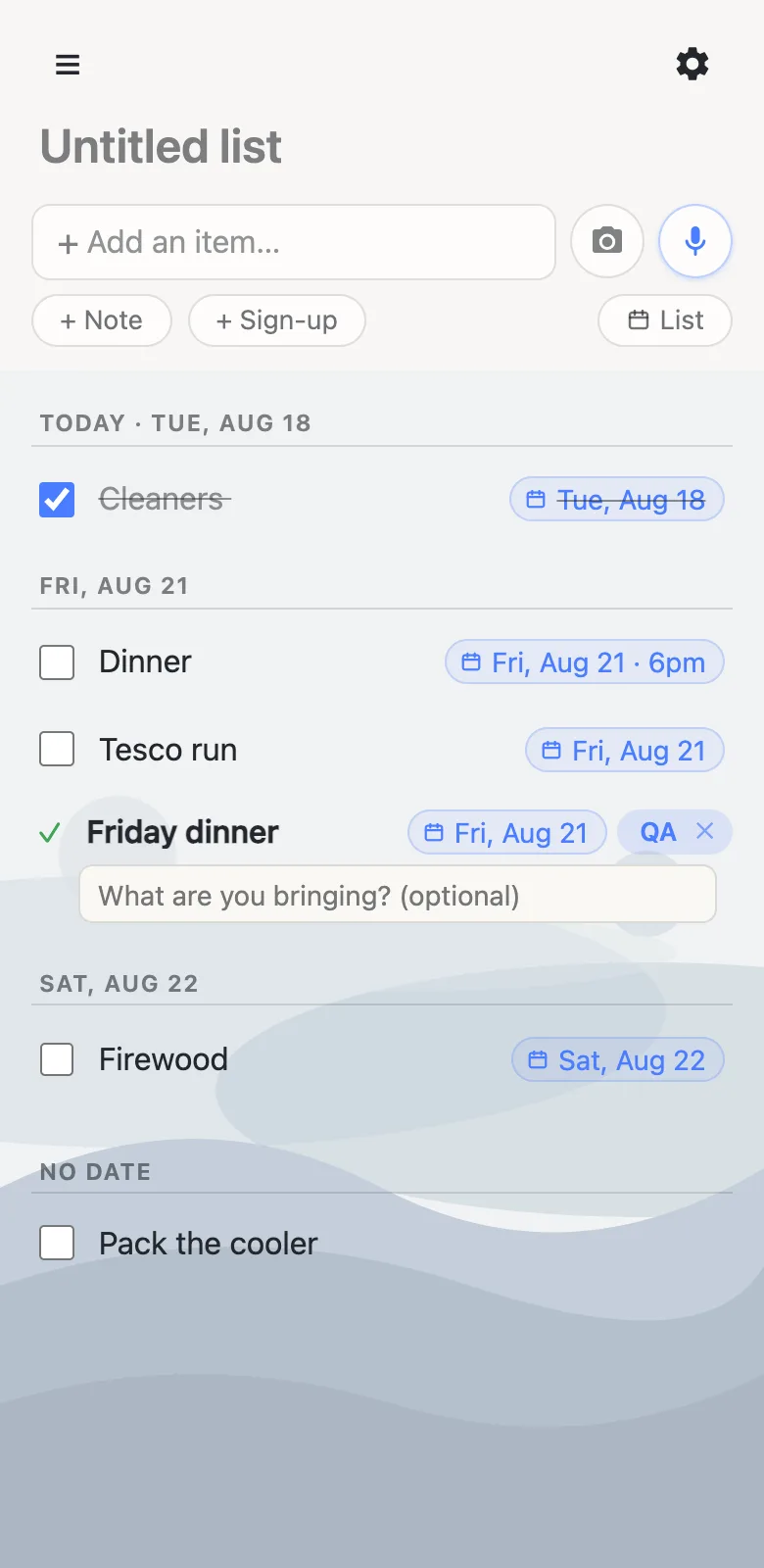
Once anything is dated, an Agenda toggle appears. It regroups the same rows under day headers — Today, Tomorrow, then the dates ahead — with timed rows first in each day and everything undated collected at the bottom. They’re the real rows: check things off, claim sign-up slots, edit text, all from the agenda. It’s the closest thing to a calendar a link-shared list can be, with nothing new to learn.
Why no date picker?
A picker is a modal, a calendar grid, and six taps — heavy machinery for “this is on Friday”. Reading what you already typed keeps the add box fast, works with dictation, and never interrupts. The trade is honesty about ambiguity: “April 25” could be a date or a month-and-year, so the offer always shows its interpretation and waits for your tap. A wrong guess costs one dismissal, never a wrong calendar entry.
Questions
- Why is there no date picker?
- Because people already type dates — “Weds 19th”, “friday 6pm”. anonylist reads what you typed and offers the resolved date; one tap confirms it. Nothing is ever attached without you confirming it.
- Do dates handle timezones?
- Deliberately not. A time like 6pm is wall-clock time — the dinner is at 6pm where the dinner is. Shared lists coordinate physical gatherings, so floating times are the honest choice.
- Does everyone on the list see the dates?
- Yes. The date lives inside the row’s shared text, so it syncs live like everything else, and the agenda view is available to everyone with the link.
- What date formats are understood?
- Weekdays (“friday”, “Weds 26th”), month-days (“Sept 12”, “9/12”), relative phrases (“tomorrow night”, “next friday”, “in two weeks”), “the 19th”, and times like “6pm” or “at 7pm”. Time ranges such as “2:30-5:30” are left alone as text.