A free Doodle alternative for group plans — the date and the plan on one link
Last updated October 20, 2026
Planning anything with a group has two halves. First, when: eight people, four possible Saturdays, and somebody who can only do evenings. Then, everything else: who’s bringing what, who’s borrowing the chairs, what time to turn up and where to park. A poll tool stops after the first half.
anonylist does both, on one link that is open to everyone: the dates go on the list, people sign up under the ones they can make, and the winning date becomes the top of the plan. Nobody makes an account — not the guests, not you — nobody sees an ad, and it is free.
Opens instantly. No account, no ads, nothing to install.
Pick the date on the same list
Add a section for each date you are offering — Sat Nov 14, Sat Nov 21 — and under each a sign-up row per guest, all labelled I’m in. Everyone taps Sign up under every date they can make, and each heading keeps a live count — 7/9 filled — so the winner is obvious at a glance. The full walkthrough is here.
When the count is in, keep the link. The winning date becomes the top row of the plan, and the link everybody already has is now the one with every detail on it.
Everything after the date, on one link
Here is a Friendsgiving the week after its poll closed. The winning date is a row at the top with a chip on it, the ground rules are a note, the dishes are sign-up rows with a counter on the section — 4/7 filled — and the jobs that aren’t dishes are plain checkboxes with their own dates.
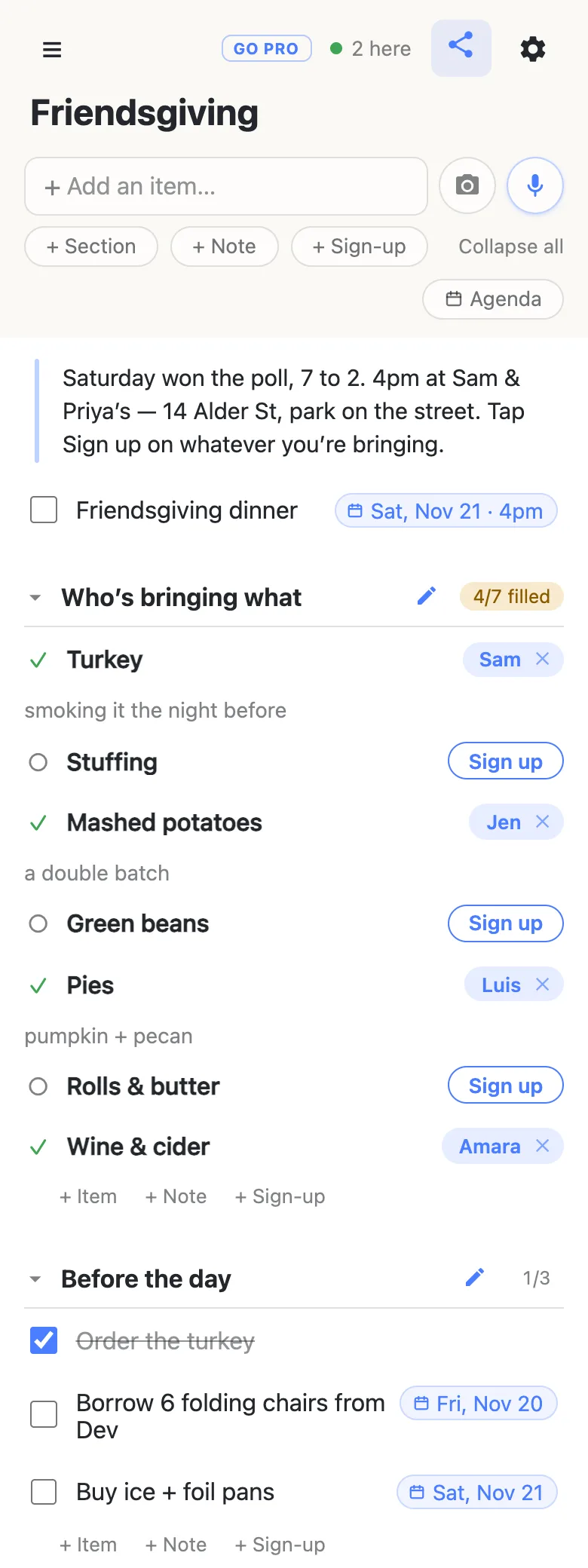
Guests open the link and do the obvious thing. They tap Sign up on the dish they’re bringing, it turns into their name, and they can add a note under it — pumpkin + pecan. The name lands on everyone else’s screen the same second, without a refresh; the 2 here chip at the top says who else is looking. If somebody drops out, they clear their own row, or hand it to someone else by tapping the name. Nobody signs in, and that includes you.
The date got onto that top row by being typed: write Friendsgiving dinner Nov 21 4pm and the list offers to turn it into a date; tap the offer and the words become the chip. Typing @ at the start of a word opens a small calendar instead, if you’d rather pick. Times are wall-clock times at the event, with no timezone attached — 4pm means 4pm at the house, which is what a dinner invitation means too. There’s a full guide to dates on a list if you want the details.
Getting the date into everyone’s calendar
Once the date is set, it belongs in everyone’s calendar. On anonylist that’s the list’s calendar feed, under the gear menu.
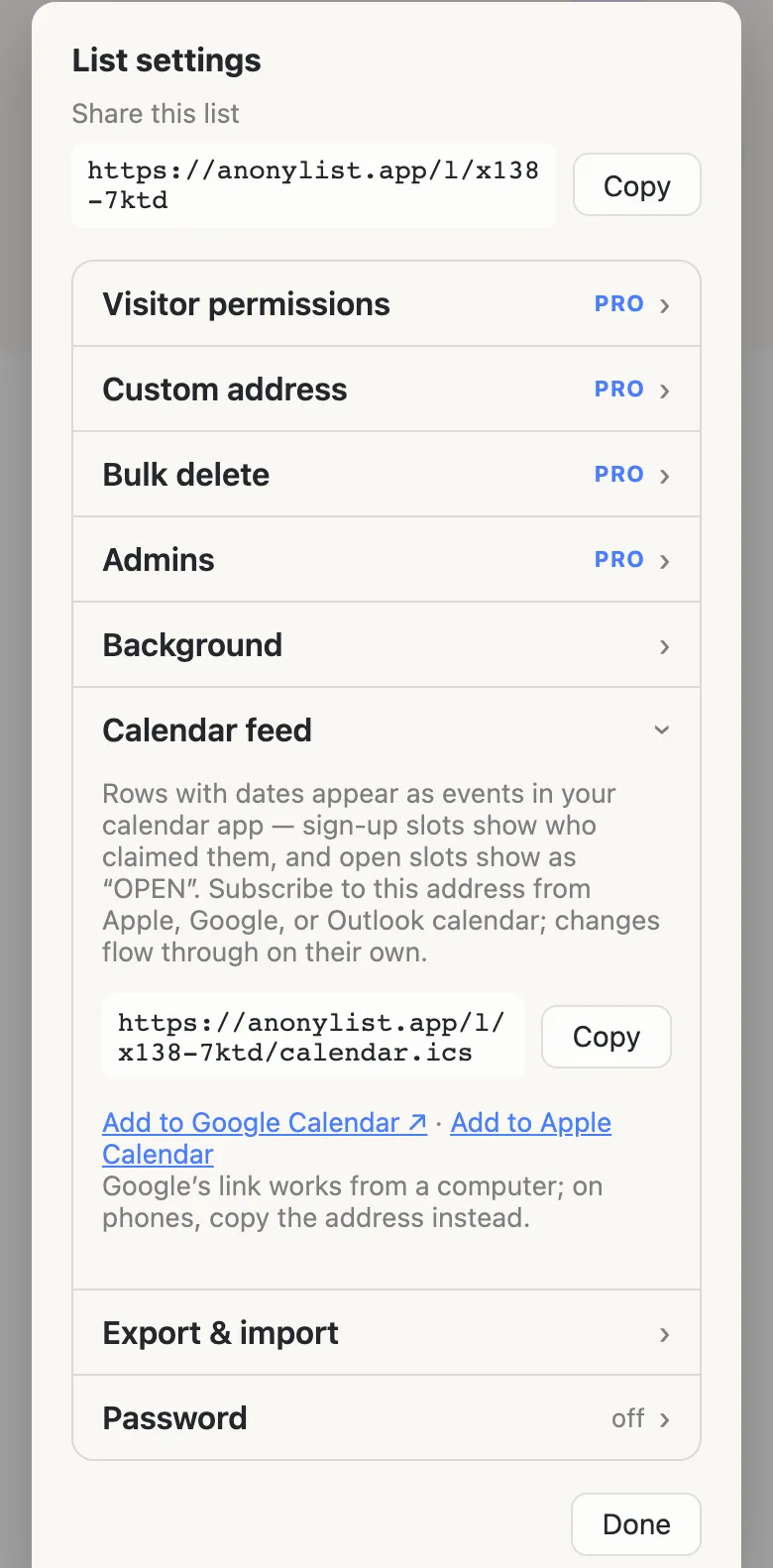
Post that address in the group chat alongside the list. Anyone who subscribes from Apple, Google or Outlook calendar gets every dated row as an event: the dinner itself, and the chair run on Friday for whoever volunteered for it. If the plan moves a week, change the date on the row and the calendars follow on their next refresh. There’s no invite to accept: the events simply appear.
Why a list beats a poll for group plans
- The date and the plan live together. The dates go on the list, the count picks the winner, and the plan grows under it — nobody hunts for a second link once Saturday is decided.
- There’s stuff to divide up. Dishes, gear, lifts, jobs on the day. That’s a sign-up sheet, and every gap is visible to everybody, so the stuffing gets claimed without you chasing anyone.
- The plan keeps changing. Address, timing, “bring a chair if you can” — edit the note and it’s updated for everyone holding the link, now, instead of a correction lost forty messages up the thread.
- You want no ads and no accounts. Nobody is shown a banner and nobody makes an account: not the guests, not you. It’s free for exactly that shape — a list that is just a link.
If you run the same plan every year
For a one-off dinner among friends, the open list is the right shape. For the thing you organise every year — the reunion, the club’s holiday party, the family’s big weekend — the arithmetic shifts: a bigger group, a link that travels further, and somebody tidying away a row you needed.
That’s what an owned list is for. The plan stays yours, and you decide what guests may do: leave signing up and claim notes on, turn editing and deleting off, and people get a plan they can fill in but not rewrite. Add a co-organiser as an admin by email so you aren’t the only one who can fix the address, and give the list a readable address people can find again next year. Guests notice nothing: same link, still no account, still one tap.
See what anonylist pro does Only the organiser needs an account. Guests still just open the link.
Questions
- Is Doodle still free?
- There is still a free Doodle plan, and people answering a poll do not need an account. Per Doodle’s own help centre, the free plan shows ads to organisers and participants, limits how many time slots a group poll or sign-up sheet can offer, and leaves deadlines, automated reminders and hidden participant details to the paid plans. On anonylist the whole thing — the date, the plan, the calendar feed — is free, with no ads for anyone.
- Can anonylist run a date poll?
- Yes, for a group plan. Add a section per date with a few identical sign-up rows; everyone signs up under each date they can make, and each heading’s “n/m filled” count is the tally, live on every phone. When the count is in, the same list becomes the plan.
- What is the quickest free way to poll a group for a date?
- Put the dates on a list and post the link in the group chat. Everyone opens it, taps Sign up under every date that works, and the counts on the headings show the winner — no account, no app, no ads. The same link then holds the plan.
- Once the date is decided, how does it get into everyone’s calendar?
- Put the date on a row — type “Nov 21 4pm” and tap the offer, or type @ to pick one — and then hand out the list’s calendar feed from the gear menu. Anyone who subscribes gets every dated row as an event, and if the plan moves, the event moves with it. There is no invite to accept; the feed is the list itself, read by a calendar app.
- Do guests need to sign up for anything to use the plan?
- No. They open the link, tap Sign up on the dish they’re bringing and it turns into their name. The name is the one they gave their own phone the first time they opened a list; there is no email, no password and no app to install. The organiser doesn’t need an account either.
Opens instantly. No account, no ads, nothing to install.