Google Forms as a sign-up sheet — and why a live sheet beats it
Last updated October 20, 2026
Google Forms is most people’s first sign-up sheet: a form with one question — which shift can you take? — is five minutes’ work. Then the festival is two weeks out, three parents have picked the same booth, nobody can see that the clean-up shift is still empty, and you are the only person who can open the spreadsheet that would tell them.
That’s because a form is a way to collect answers, one person at a time, into a table only you look at. A sign-up sheet is a different shape — a page where the answers are the page, and everyone can see which gaps are left. Here is that difference, and how to run a live sheet with nobody making an account.
Opens instantly. No account, no email, no spreadsheet.
What a form is doing when you use it as a sign-up sheet
A form asks questions and files each person’s answers as a row in a spreadsheet. That is exactly right for a questionnaire, and it has consequences the moment the question is which slot do you want:
- A choice never gets taken. A multiple-choice option stays on the menu however many people pick it, so two volunteers choose the same booth in good faith and you find out on Friday. Forms has no idea a slot is a slot.
- Nobody sees the gaps but you. Respondents see their own answers and, at most, a summary chart. The names are in the Responses tab, which only you can open. So “what still needs doing?” is a question that has to come through you, every time.
- Changing your mind is a message to the organiser. Unless you switched on response editing, someone who can’t make it any more tells you, and you edit the sheet by hand.
- The settings you want cost your volunteers a sign-in. “Limit to one response” and “collect email addresses” both require respondents to sign in to Google — and those are the two settings a sign-up form usually wants.
If you’ve ever kept a second, hand-written tally next to a Forms spreadsheet so you could see what was still open, you’ve already built the thing this guide is about.
A live sheet is the responses
Here is the same job as a list instead of a form: one row per thing that needs doing, a Sign up button on each row that turns into the volunteer’s name when they tap it, and a counter on every section — 2/4 filled — so the gaps are visible to everyone holding the link, without a spreadsheet and without asking you. There is nothing behind the page; the page is the sheet.
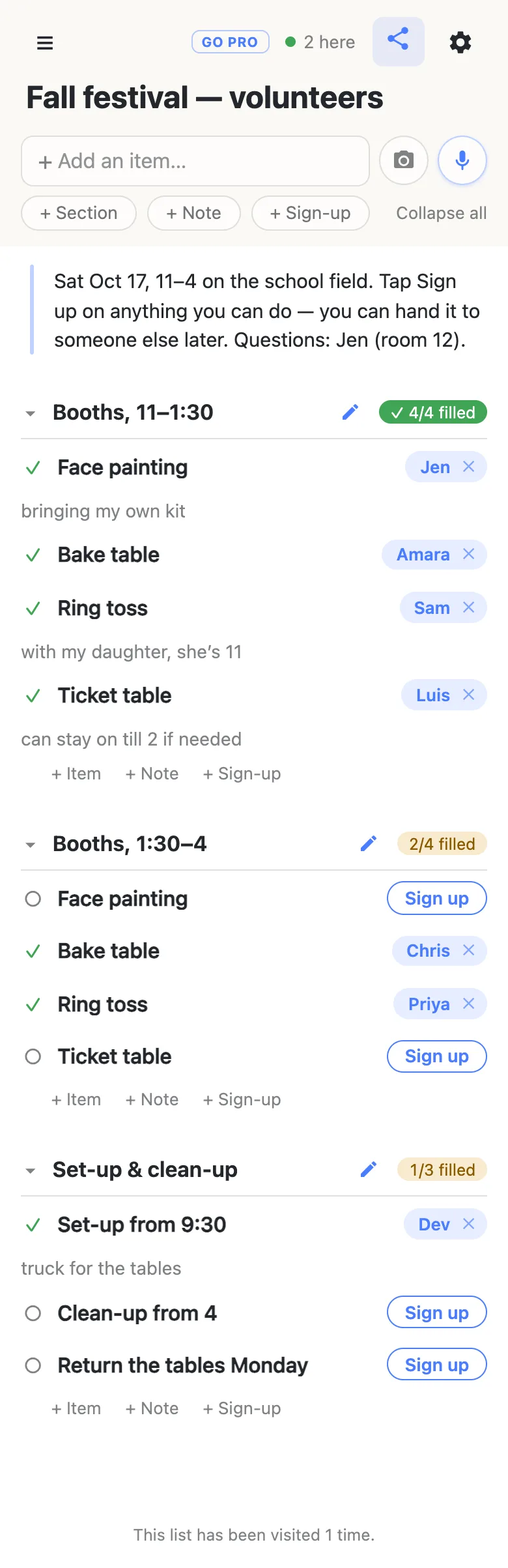
Two things in that picture have no equivalent in a form. The 2 here chip says somebody else is looking at the sheet at the same moment, and when they sign up, the name lands on your screen without a refresh. And the little notes under the names — truck for the tables — are where the one detail that matters about a sign-up goes, right on the row, instead of in a free-text column you have to read across.
Signing up, from the volunteer’s side
They open the link. There is no account, no sign-in and no submit button. They tap Sign up on a row they can take, it turns into their name, and if there’s something worth saying about it they type it underneath — as Sam is doing here, having just taken the ring toss.
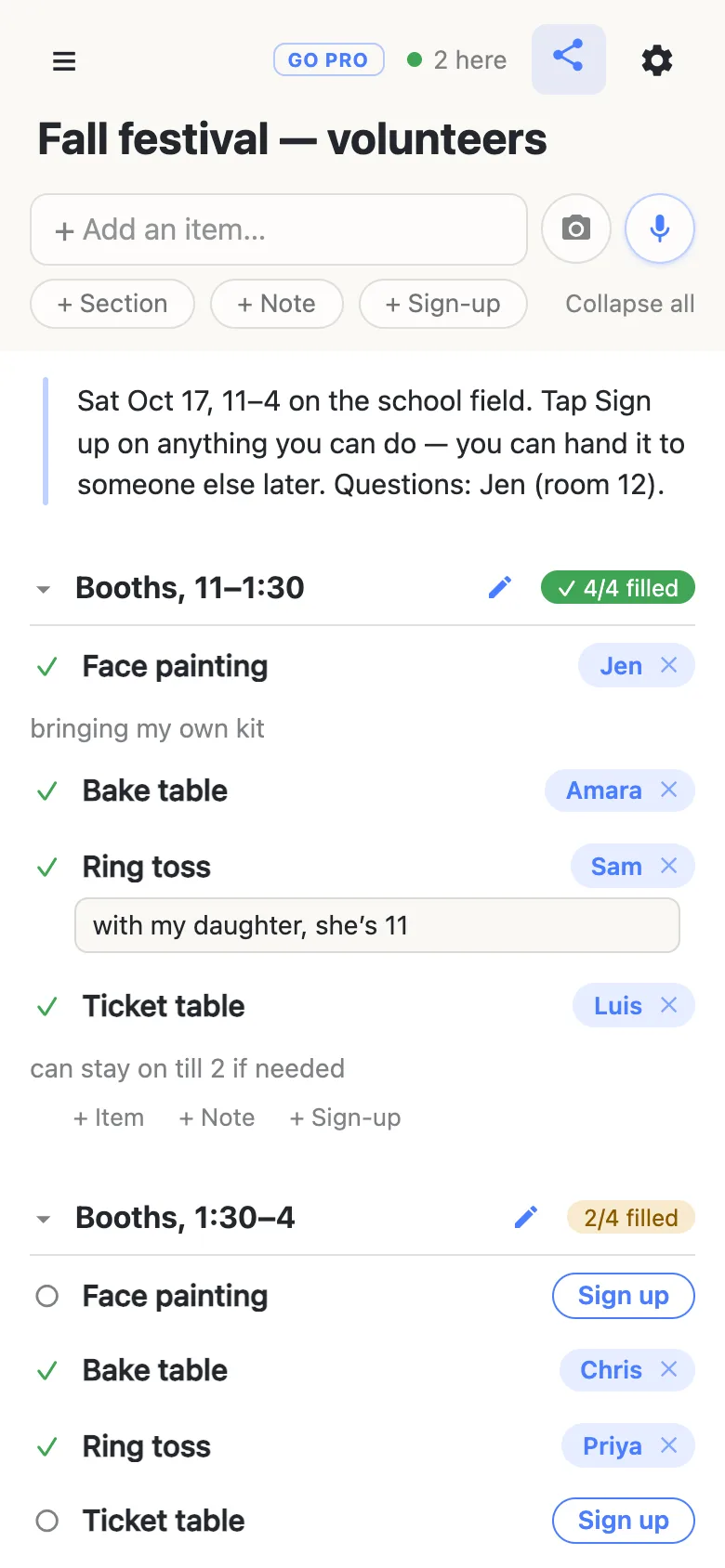
The name is the one they gave their own phone the first time they opened a list — no form field, no email. If they can’t make it after all, they clear their own claim, or hand the row to somebody else by tapping the name and typing a different one (people sign their spouses up all the time). Clearing somebody else’s sign-up asks for a confirmation first, and that is the whole of the ceremony. It works like a clipboard on a counter: anyone can pick up the pen.
Why a live sheet works better for sign-ups
- Each thing needs taking once. Booths, shifts, dishes, the bake-sale table, who’s bringing the cooler. The row is the slot, the name is the answer, and the counter says when it’s full.
- Everyone should see the gaps. That’s what makes a sheet fill itself: people take the empty row because they can see it’s empty, instead of picking the popular shift a fourth time.
- Plans change. Swaps, hand-offs and drop-outs happen on the page, by the people involved, without a message to you.
- It needs to work from a text message. Nobody signs in to anything, ever — not the organiser either. The link is the whole product.
- The sheet is also the plan. The date and the ground rules go in a note at the top; the jobs that aren’t sign-ups (book the bouncy castle) go in as ordinary checkboxes; rows with a date on them feed a calendar. It’s a list that happens to have sign-ups in it, not a form pretending to be one.
Moving a Forms sign-up over
It takes a few minutes: start a list, tap + Sign-up once per shift or dish, and for the ones already spoken for, tap Sign up and then tap the name to change it to theirs — anyone can put anyone’s name on a row, which is the same trust that lets people sign up their partner. Then post the new link where the group already reads. There’s a step-by-step walk-through if you’d like it slower.
If the sheet is going somewhere public
For a link printed in a newsletter or posted on a public page, you may want people to sign up without rewriting the sheet.
That is what an owned list is for. The sheet stays yours, and you choose what visitors may do: leave signing up and claim notes switched on, turn adding, editing and deleting off, and people get a page they can fill in but not rewrite. Add a co-organiser as an admin by email so you aren’t the only one who can fix a typo, and claim a readable address the newsletter can carry. Nothing changes for the volunteers: same link, still no account, still one tap.
See what anonylist pro does Only the organiser needs an account. Everyone signing up still just opens the link.
Questions
- Can Google Forms take a choice off the list once somebody has picked it?
- Not on its own. A multiple-choice question keeps every option available however many people choose it, so two volunteers can both pick “Ring toss, 11–1:30” and neither of them knows. On a live sheet the row itself is the slot: once a name is on it the Sign up button is gone, and the next person sees who has it.
- Do people need a Google account to fill in a Google Form?
- Usually not. A plain form opens for anyone with the link. Two of the organiser’s settings change that: limiting people to one response and collecting verified email addresses both require respondents to sign in to Google, which is exactly the setting a sign-up sheet tends to want. On anonylist there is no account for anyone at any point; the link is the whole thing.
- Can people see who else has signed up on a Google Form?
- Not by default. Respondents see their own answers and, if the organiser turns it on, a summary of the charts; the names live in the Responses tab or the linked spreadsheet, which only the organiser and whoever they share it with can open. A live sheet is the opposite by design: everyone with the link sees every name, which is what lets a group fill the gaps without asking you.
- Can somebody change their answer after they have submitted a form?
- Only if the organiser has switched on “allow response editing”, and then only through the edit link in the person’s own confirmation. Otherwise the fix is a message to you and a hand edit of the spreadsheet. On a sign-up sheet a claim is never final: anyone can hand a row to somebody else by tapping the name, or clear it, and clearing someone else’s sign-up asks for a confirmation first.
- Can I get the sign-ups out of anonylist into a spreadsheet?
- You can export the whole list as a JSON file from the gear menu at any time — sections, notes and sign-ups included — and it is yours to keep, edit or import into a fresh list.
Opens instantly. No account, no email, no spreadsheet.