A SignUpGenius alternative where nobody makes an account
Last updated October 20, 2026
Nobody goes looking for an alternative to a tool that’s working. When people search this one, it’s usually the same short list: the ads on the free tier, the account — yours, and the email address every volunteer hands over — or the price of the plan that clears the ads.
Here’s the alternative: a sheet that’s just a link, live on every phone, with no account and no ads for anyone — you or the forty people you hand it to.
Opens instantly. No account, no email.
The short version
What you get with anonylist:
- Nobody makes an account. Not the volunteers, not you. There is no sign-in on the way to the sheet.
- It’s free, and there’s no advertising on it — no banner over the sheet, nothing sponsored beside the thing you’re asking people to bring.
- It’s a live page, not a form. Everyone looking at it sees the same sheet change as it changes, which is the difference between “is the 1–3 shift taken?” and knowing.
- One sheet holds more than sign-ups — claimable slots, ordinary checkboxes and long notes, in sections, on one page.
- The link is the entire thing. Paste it in a text, a newsletter or a group chat and you’re done; there’s nothing to invite anybody to.
What you get instead of a form
A sign-up sheet here is a list with sign-up rows on it. Each one is a named need with a space for exactly one name — “Ring toss · 1–3”, “Two dozen cookies” — and being filled is its state, so there’s no box to tick and nothing to submit. Anyone opening the link sees a blue Sign up button next to whatever is still open, and one tap puts their name on it for everybody else.
Group the rows into sections and each header keeps a counter: 4/5 filled, amber while there are gaps and green once it’s covered. That counter is most of what an organizer actually wants, because it answers “what’s still missing” without reading anything.
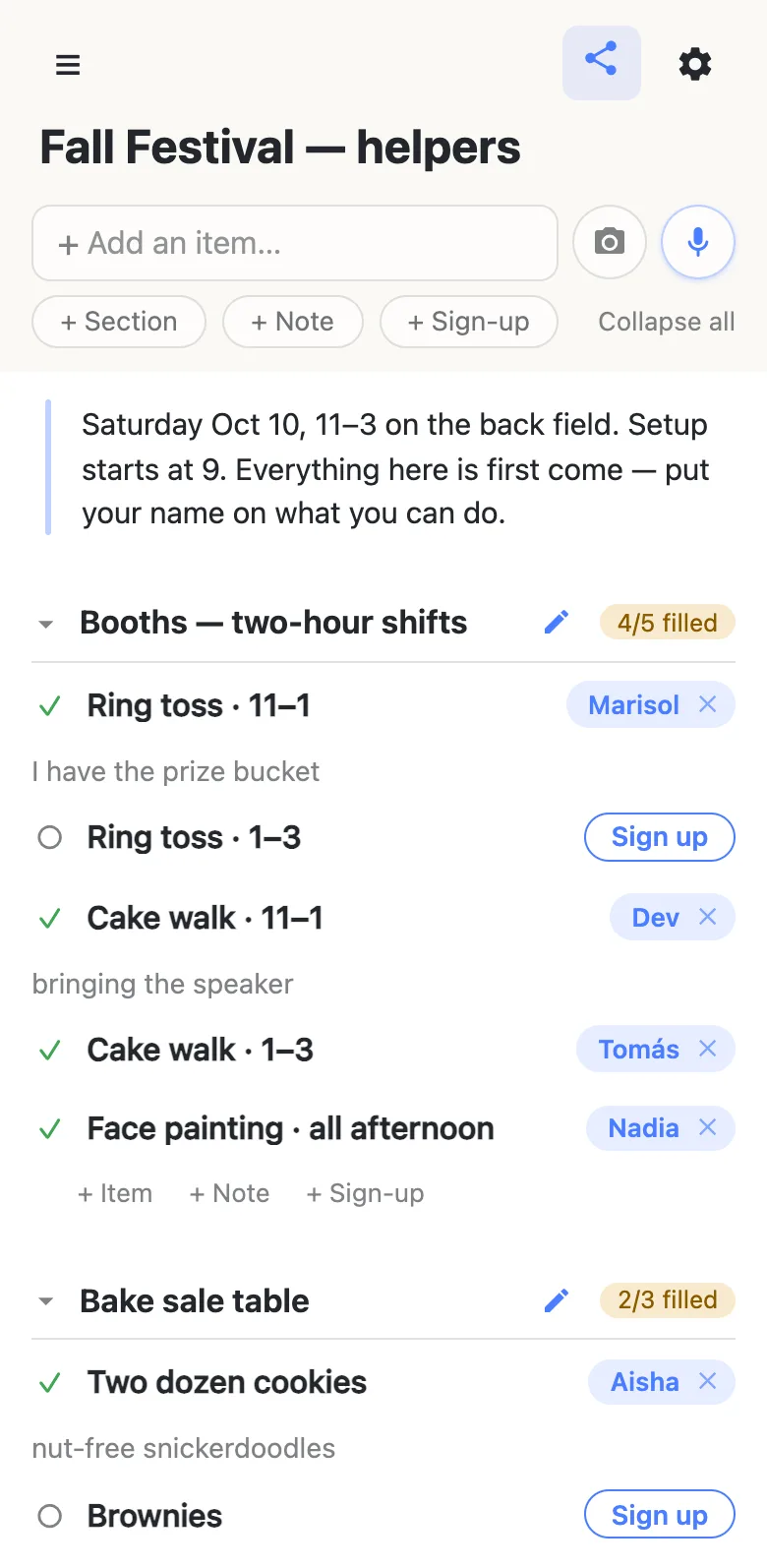
The name comes from whatever that device calls itself — set once, then forgotten about. It’s a name on a sheet, exactly like a clipboard on a table, and anyone can fix a row: tap a name chip to hand a shift to somebody else, or tap the × to put it back in the open pile. Clearing your own is instant; clearing someone else’s asks you to confirm, because their note goes with it.
Anything that isn’t a sign-up can live on the same page. The errands nobody claims — “pick up the folding tables”, “float for the bake sale” — go in as ordinary checkbox items, and the instructions everyone needs to read go in a note at the top. That’s the part that’s awkward when the sheet is a form: a form collects answers, so the jobs list ends up somewhere else.
It’s live, which a form isn’t
Open the same link on two phones and they’re the same page. A sign-up lands on both immediately, a counter moves on both, and while somebody is typing in a row the others see their name against it rather than a stale copy they’re about to overwrite. When more than one person is on the sheet, a small chip counts them.
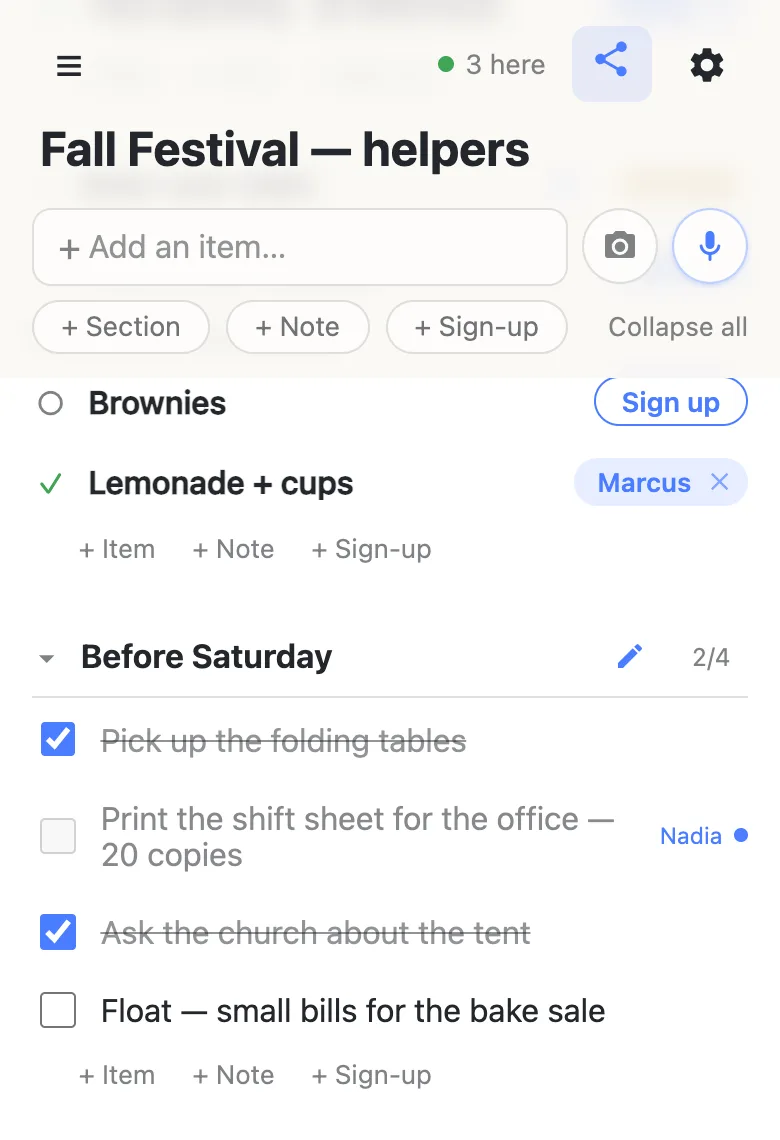
It matters most in the ten minutes after you send the link, which is when half the sheet fills up. Two people reaching for the last shift see each other doing it.
Reminders, from the calendar people already use
Re-posting the link in the thread the group already reads is the nudge for most groups, and it lands where they’ll actually see it. Rows can carry dates — type Setup 9am and a chip offers you the date it thinks you meant, which you tap to pin — and once anything is dated, the gear menu offers a calendar feed: a subscribe link that puts those rows into whatever calendar app people already keep their week in. Their own calendar does the reminding, which is where most people would rather be reminded anyway.
If you need the sheet to be fill-in-only
For a school or a congregation, you may want volunteers to sign up without rearranging the sheet. An owned list does exactly that, without changing anything for the people signing up.
You keep the sheet, and you choose what visitors may do with it: leave signing up and claim notes switched on, turn adding, editing and deleting off, and it becomes fill-in-only. Same link, still no account for them, still one tap to sign up. You can add a co-organizer as an admin by email so you’re not the only one who can fix a typo, and claim a readable address so the sheet in next term’s newsletter isn’t a string of random characters.
See what anonylist pro does Only the organizer has an account. Everyone else still just opens the link.
Moving a sheet over
Bringing a sheet across takes a couple of minutes for twenty rows, and two shortcuts make it faster. The microphone takes plain instructions: add sign-ups for two ring-toss shifts, the cake walk and face painting is one sentence. And the camera reads a photograph of a printed sheet — headings become sections, rows become sign-ups, and nothing is added until you’ve ticked through what it found, so a misread costs a glance rather than a cleanup.
Going the other way is a file: Export on the gear menu writes the whole sheet out as plain JSON you can keep, edit, and import into a fresh list next year. That’s the closest thing here to “last year’s sheet”, and it lives on your disk rather than in an account.
Questions
- How do volunteers get reminded about their shift?
- Through the calendar they already use. Put a date on any row — type “Setup 9am” and tap the offer — and the gear menu’s calendar feed puts every dated row into Apple, Google or Outlook calendar for anyone who subscribes, with the volunteer’s name on a claimed slot. Re-posting the link in the group chat is the other nudge, and it lands where people already look.
- Do I need an account to run the sheet?
- No, and neither does anyone signing up. Making a list is one tap and produces a URL; whoever holds that URL has the sheet, with no email address, password or app in between. That is the whole model rather than a free trial of one — the sheet does not become read-only or start asking for a card after a fortnight.
- Can I move an existing sign-up sheet over?
- Yes — for a sheet of twenty rows it is a couple of minutes, and two shortcuts help. The microphone takes a spoken instruction, so “add sign-ups for two ring-toss shifts, the cake walk and face painting” is one sentence instead of eight taps. And the camera reads a photograph of a printed sheet: headings on the page become sections, rows become sign-ups, and nothing is added until you have ticked through what it found.
- Can volunteers swap or hand off a slot?
- Yes. Tap the name chip to hand a slot to somebody else — what people do when they sign up a spouse — or tap the × to put it back in the open pile. Clearing your own is instant; clearing someone else’s asks first, because their note goes with it. Every change lands on every open phone straight away.
- Can I run timed shifts on it?
- Yes. Each shift is a sign-up row — “Ring toss · 11–1” — grouped into a section per day or station, and each section keeps a count of what is filled. Two people on one shift is two rows, and a list holds up to 1,000 of them.
- If there are no ads and no accounts, how is it free?
- The free lists are the product, and anonylist pro — owned lists with permissions, admins and a custom address — is what pays for them. Nobody signing up sees an ad or hands over an email, on any list.
Opens instantly. No account, no email.