An Evite alternative for who brings what to the potluck
Last updated October 22, 2026
Evite is built for the invitation: the design, the guest list, the RSVPs. It has a potluck feature too — an Event Sign-ups list inside the invitation, where guests RSVP and then claim an item. But a potluck’s real work isn’t the invite. It’s who brings the main, whether anybody is bringing ice, and making sure the one guest with a nut allergy can eat something.
That part fits on one link. Every dish becomes a row somebody claims by name, a note on the claim says what exactly they’re making, and a count on every heading shows what nobody has picked up yet. It updates on every phone as people sign up. Nobody makes an account — including you — and there are no ads. Here’s a potluck built that way, and how it sits beside an Evite you may already have sent.
Opens instantly. No account, no email.
Courses as sections, one sign-up per dish
Make a list and name it after the gathering — Fall potluck. Add a section per course: Mains, Sides, Desserts, Drinks & supplies. Under each one, the + Sign-up link at the section’s end adds a row per dish you need, and pressing Enter chains straight into the next. Need two mains? Add two Main dish rows.
A sign-up row has no checkbox. It’s a need with a Sign up button beside it, and being claimed is its whole state. Each row holds one name, so once dessert is taken, dessert is taken — which is what stops three people quietly turning up with potato salad.
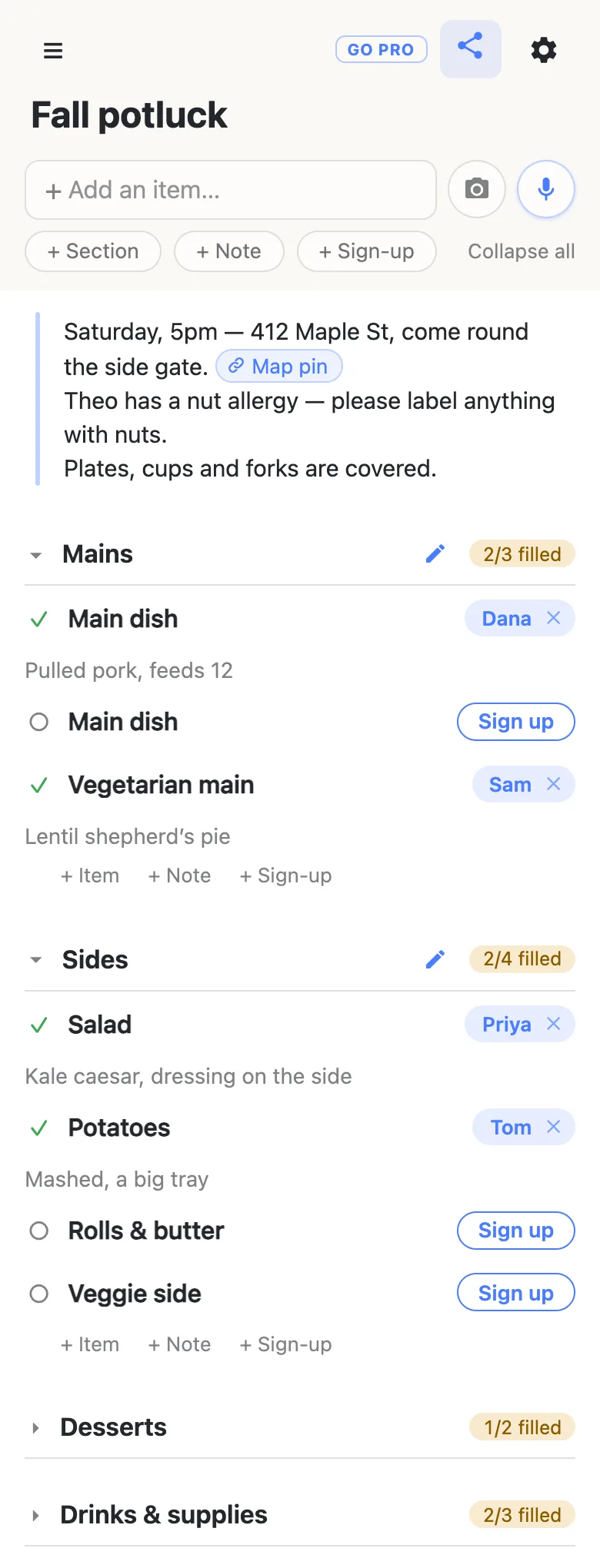
The address and the allergies go in one note at the top
Tap the + Note pill under the add box. A note is a block of longer text rather than a row, and it answers the questions you’d otherwise get texted all week: when, where, which door. Paste a map link into it and the sheet offers to name it, so it reads Map pin rather than a wall of characters.
Put dietary needs in the same note — “Theo has a nut allergy — please label anything with nuts.” Everybody choosing a dish reads it on the way to the Sign up button, which is exactly when it matters. Keep the note above the first section: the first time somebody opens the link, the sections are folded shut with their counts showing, and what sits above them is open.
Signing up takes one tap, and the details ride along
A guest opens the link, unfolds Desserts, and taps Sign up on Cookies or bars. Their name lands on the row and a box opens beneath it — What are you bringing? — for the specifics: “Brown butter blondies, nut-free.” The note is optional, and anyone can tap it later to fix it. There’s no form to fill in before the sheet, and no RSVP step in front of the food.
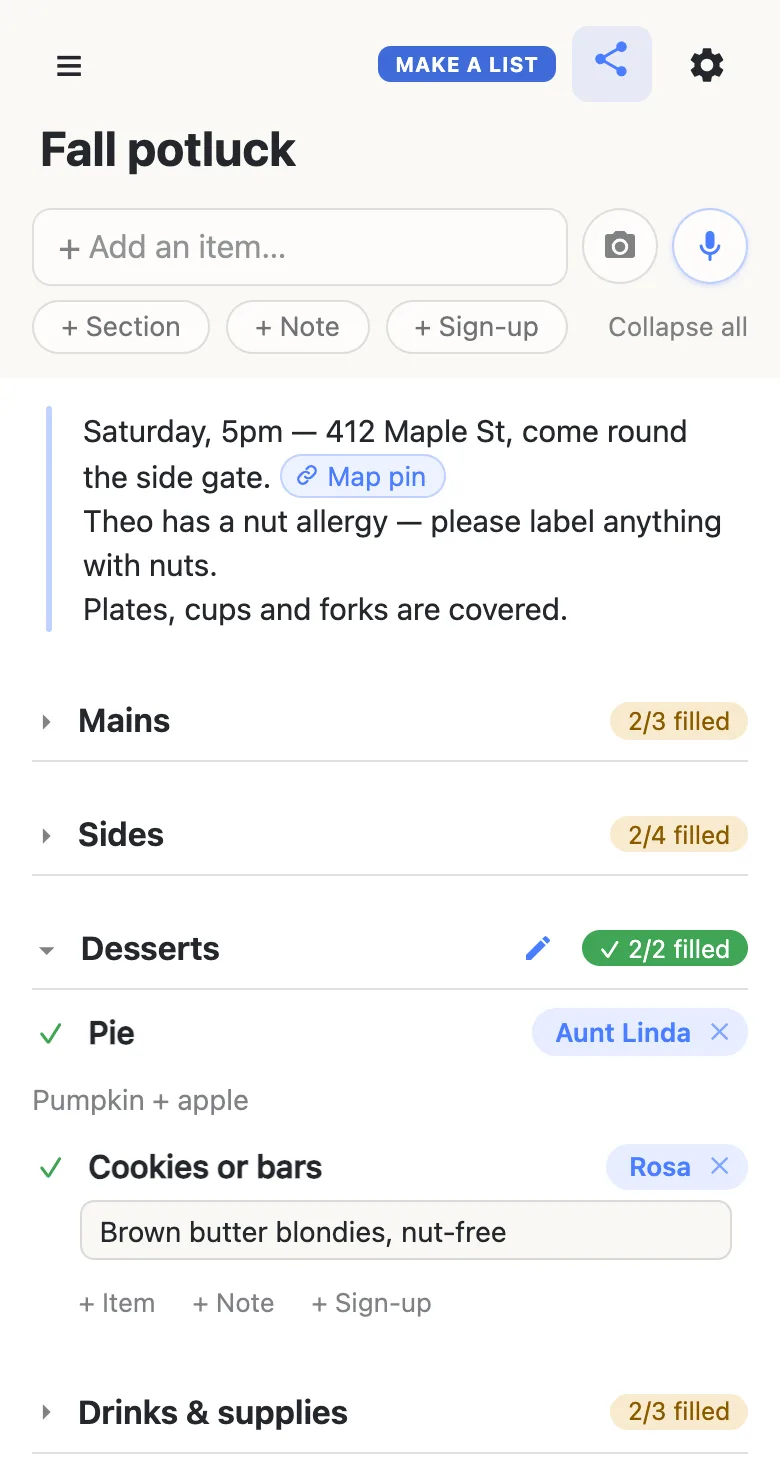
What a potluck list does well
- Everyone sees the gaps. Each heading keeps a count — 2/4 filled — and turns green when the course is covered, so the open Rolls & butter row is visible to every guest, not only to you.
- You can sign somebody up. Aunt Linda said “I’ll do pies” on the phone? Tap Sign up on Pie, then tap your name on the row and type hers. People sign up spouses, kids and grandparents the same way.
- Swaps don’t go through you. A guest whose plans change taps the × on their own name, and the dish is open again on every phone. Clearing somebody else’s name asks first.
- The link forwards cleanly. The link is the sheet, so a guest can pass it to their partner or drop it in another group chat and everyone lands on the same live list.
- The menu adjusts as the guest list does. Ten more people coming? Add two more Main dish rows and the count on the heading updates for everyone.
Side by side
| Evite Event Sign-ups | anonylist | |
|---|---|---|
| Host account | An Evite account — managing the event, editing sign-ups and copying the share link all start with logging in | None |
| Guests | No account needed to RSVP | No account needed |
| Claiming a dish | RSVP first, then sign up in the invitation’s sign-ups section | Tap Sign up on the row |
| Details on a claim | A description, optional or required by the host | A note under every name, editable later |
| Assigning a dish to someone | Not currently — guests choose their own items | Yes — tap the name on a row and type theirs |
| Ads | Shown on free invitations; removed with Premium, from $17.99 per event | None |
| Price | Free invitations, or Premium at $17.99–$99.99 per event by guest count | Free |
Evite details from Evite’s help centre, checked October 22, 2026: “Event Sign-ups”, “How to RSVP”, “Shareable Link for Invitation”, “Premium vs. Free” and “Premium Pricing”.
Already sent the Evite? Add the list to it
The two work well together: the invitation carries the date and the RSVPs, and the list carries the food. Evite lets a host message the whole guest list from the Manage Event page, so send the sheet’s link that way — “Here’s the food list, grab a dish.” Then the potluck coordination lives in one place everyone can see, updating as people claim.
Skipping the invitation altogether? Drop the link in the group chat. For a lot of potlucks — the office, the block, the extended family — the group chat already is the invitation, and one link is all it needs.
When the link goes to a big group
Sending the sheet to a whole community — a church, a school, a whole office floor? Own the list and choose what guests may do: leave signing up on, switch adding, editing and deleting off, and the sheet becomes fill-in-only for everyone except you and the co-hosts you add as admins.
See what anonylist pro does Only you need an account. Guests still just open the link.
Questions
- Does Evite have a potluck sign-up feature?
- Yes. Evite’s Event Sign-ups adds a list to an invitation where you set the items and quantities you need, and guests claim them after they RSVP. On anonylist the sign-up sheet is the whole page: every dish is a row with a Sign up button, and the link works on its own or alongside an invitation you have already sent.
- Do guests need an Evite account to sign up for a dish?
- Evite’s help centre says guests do not need an account to RSVP, and the sign-ups sit inside the invitation after that step. On anonylist nobody needs an account at all, the host included: you make the list, share the link, and guests tap Sign up on the dish they are bringing.
- Can I assign a potluck dish to a specific guest?
- On anonylist, yes. Tap Sign up on the dish, then tap your own name on the row and type the guest’s name instead — handy when someone told you on the phone what they are bringing. You can add their note too, like “pumpkin + apple”. Evite’s help centre says its Event Sign-ups do not currently let a host assign items; guests choose their own.
- Can I send an Evite and keep the food on a separate list?
- Yes, and the two work well together. Send the invitation as usual, then use Evite’s option to message your guest list from the Manage Event page and include the anonylist link. The invitation keeps the RSVPs; the list shows every guest which dishes are still open, live.
- What if more people come than there are dishes on the list?
- Add rows. Anyone with the link can add a sign-up under any course — a second Main dish, another Dessert — and the count on that heading updates for everyone straight away. If you would rather only you and your co-hosts change the menu, an owned list with anonylist pro can leave guests able to sign up but not add or edit rows.
Opens instantly. No account, no email.