A sign-up sheet with comments on it
Last updated September 8, 2026
A sign-up sheet without comments only ever tells you half the story. “Marcus — wheelbarrows” doesn’t say whether that’s one wheelbarrow or three; “Priya — coffee” doesn’t say whether she’s bringing cups. Every sheet ends up needing somewhere for the detail to go, and if there isn’t one it goes into a group text instead, where nobody signing up later will ever see it.
On anonylist the comment isn’t a separate column or an extra field to switch on. It hangs off the claim itself: the moment someone puts their name on a row, a box opens underneath asking what they’re bringing. What they type stays under their name, on the sheet, for everyone who opens the link.
Opens instantly. No account, no email — for you or for them.
Sign up, then say what you’re bringing
A sign-up row is a slot: one need, waiting for one person. It shows a Sign up button until somebody taps it, and tapping it does two things at once — your name lands on the row, and a comment box opens below it reading “What are you bringing? (optional)”. Type, press Enter, done. No dialog, no submit step, and nothing to send back to whoever made the sheet.
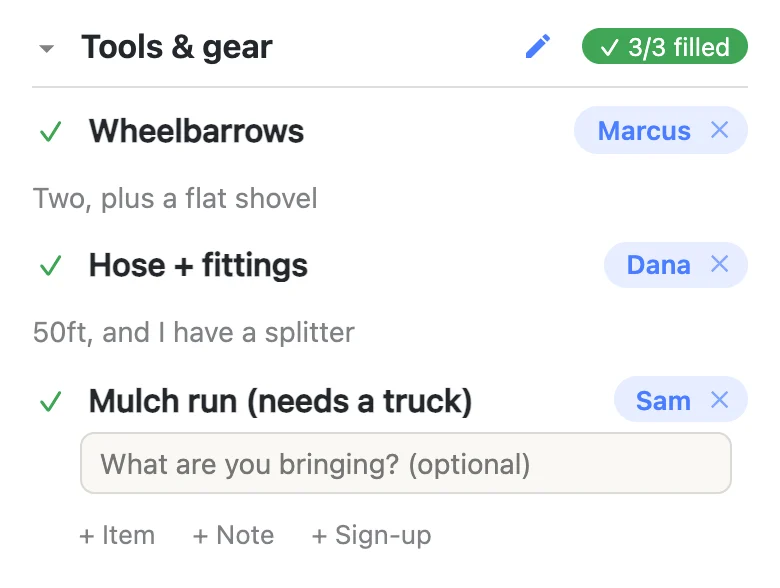
It’s worth saying what didn’t happen there: no account was made, no email was typed, and no confirmation arrived. The person signing up is whoever has the link, and the name on the row is the display name their device is using — they can change it on the row itself if it’s wrong.
The comment is optional, every single time
The box opens by default because it’s usually wanted, but it says optional and means it. Tap anywhere else and the sign-up stands with no comment at all. Some rows are almost entirely comment — “Main dish”, “Dessert” — and some genuinely don’t need one, like “Chairs” or “Unlock the hall at 8”.
There’s room for about a thousand characters, which is a few sentences. It reads best short, because it’s meant to be taken in at a glance beside the row rather than opened and studied.
If you skip the box and then think better of it, the way back is the ✕ beside your name: clear your own sign-up, tap Sign up again, and the comment box is there waiting. Changing a comment that already exists is simpler — you just tap the comment.
Everyone can read them — and anyone can fix one
Tap a comment and it opens for editing, whoever left it. That is deliberate, and it follows from there being no accounts: on a sheet where everyone is equal, there’s no “your comment” to lock. In practice it’s the useful behavior — you write the comment for the person you just signed up, you correct a typo somebody made on their phone in a parking lot, or you turn “biscuits” into “biscuits & gravy” once the plan firms up.
The name works the same way. Tap the name chip on a row and you can change who’s signed up, which is how people put down a spouse, a kid, or a neighbor who doesn’t use their phone much. Editing a comment never changes the name, and changing the name never wipes the comment.
Clearing a sign-up takes its comment with it
The ✕ beside a name clears the row back to open. The comment goes with it, because a comment belongs to a commitment — a sheet should never be left showing “50ft, and I have a splitter” with nobody attached to it.
Clearing your own sign-up is one tap. Clearing somebody else’s asks first, and the question says out loud that their comment goes too. It’s one of very few places in the app that stops to ask, and it’s there because dropping someone from a rota by accident is the mistake worth a second of friction. Note that clearing a claim isn’t deleting the row: the need stays, back to open, ready for the next person.
What people actually put in there
Once there’s somewhere for the detail, it turns out to be most of the information on the sheet:
- Amounts — “two dozen”, “enough for 15”, “one big tray, one small”.
- Timing — “arriving 8:15”, “can only stay till noon”, “dropping it the night before”.
- Constraints — “nut-free”, “vegetarian”, “needs a plug near the table”.
- Logistics — “can take 3 kids”, “bringing the folding tables too”, “meet me at the gate”.
- Exactly which one — the brand, the size, a link to the thing they’re buying.
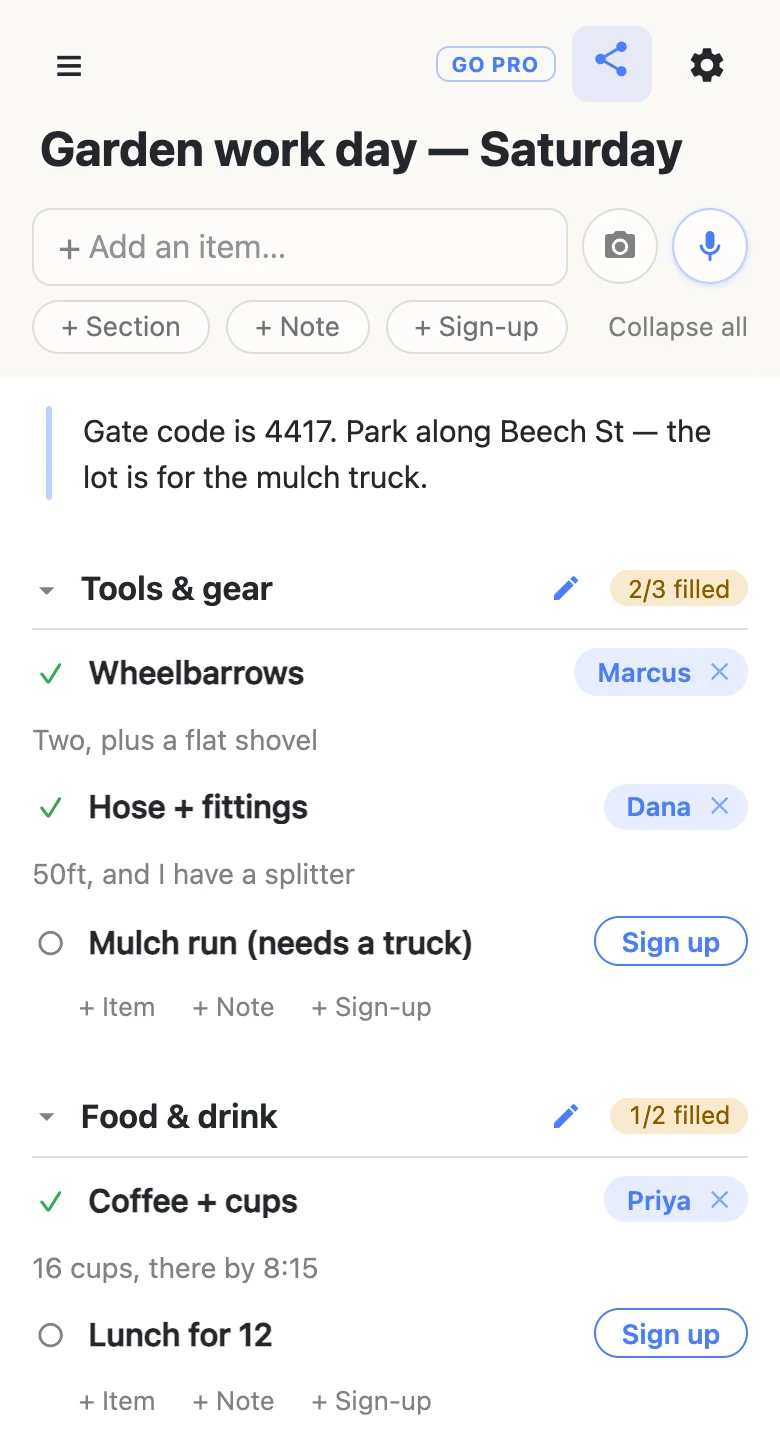
What doesn’t belong there is anything the whole group needs to read. That’s what a note block is for — the paragraph at the top of the sheet in the picture above, holding the gate code and where to park. A comment is one person’s, a note is everyone’s, and keeping them apart is what stops the same instruction being repeated on nine rows.
The comments travel with the sheet
They aren’t a display-only flourish. They go wherever the sheet goes:
- Into a calendar. If a row has a date on it, the sheet’s calendar feed turns it into an event — and the comment becomes the event’s description, so “16 cups, there by 8:15” shows up in the phone reminder rather than only on the page.
- Into an export. The gear menu’s export writes a JSON file carrying every row, who claimed it and what they wrote. The sheet is the responses — there is no separate responses tab to go and find, and nothing to keep in step with anything.
- Through the assistant. Tap the mic and say “sign me up for the mulch run — I’ve got a truck and can take two loads”, and the name and the comment both land on the row.
No form builder, no responses spreadsheet
This is the real difference from filling in a form. With a form, a comment goes into a row of a spreadsheet that only the organiser opens, which means the next person to sign up can’t see that somebody is already bringing sixteen cups. Here the comment is on the sheet, live, next to the need it explains — so the sheet reads like a plan rather than a list of submissions.
And there’s nothing to sign into. Everyone works from the same link, sees the same rows change as they change, and the “2/3 filled” counter beside each heading says how much is still open without anyone opening a thing. If you want the whole build from scratch, making a sheet takes about a minute.
If you’re running a big one
An open link means an open sheet: anyone holding it can sign up, comment, and also rename rows or remove them. For a work day among neighbors that’s exactly right. For something you’ve sent to two hundred people, you may want the claiming and commenting left wide open while the shape of the sheet stays yours — that’s an owned list on anonylist pro, where each of those is a switch you set per sheet. How the permission switches work covers it, and either way nobody signing up ever needs an account.
Questions
- Do people have to write a comment when they sign up?
- No. The comment box opens on its own the moment somebody claims a row, but it says “optional” and tapping away leaves it empty. The sign-up still counts either way — some rows want a comment (“Main dish”) and some really don’t (“Chairs”). If somebody skips the box and wants it back, clearing their own sign-up with the ✕ and tapping Sign up again reopens it.
- Can I fix a comment somebody else left?
- Yes. Tap any comment and it opens for editing, whoever wrote it. That is deliberate on a sheet with no accounts: you often write the comment on behalf of the person you just signed up, and a typo or a changed plan shouldn’t need the original person to be holding their phone. Editing a comment never touches who is signed up — that’s the name chip beside it.
- How long can a sign-up comment be?
- About a thousand characters, which is a few sentences — plenty for a dish, a seat count, an arrival time and a caveat. It is meant to be read at a glance next to the row, so shorter is better. If the detail is long enough that everybody needs it rather than one claimer, put it in a note block at the top of the sheet instead, where it sits above every row.
- Do the comments come with the sheet if I export it?
- Yes. The gear menu’s export writes a JSON file with every row, who claimed it and what they wrote, so the sheet is its own record of responses — there’s no separate responses tab to go and find. Dated rows carry their comment into the calendar feed too, as the event’s description.