How to edit a sign-up sheet response — change it, move it, or cancel
Last updated September 27, 2026
You signed up to pick up the pizza, and now you’re working late on Saturday. Or you typed “Priya” onto the wrong row. Or the cupcakes turned into two dozen and the note underneath still says one. Signing up was the easy part; changing it afterwards is where most sign-up sheets get awkward.
With a form, your answer goes into a spreadsheet only the organiser can see. Changing it means finding an edit link in a confirmation email — Google Forms only offers one if the organiser switched on response editing — or messaging the organiser and asking them to fix it for you. On anonylist there is no separate responses tab. The sheet is the responses: your sign-up is a row everybody can see, and you change it right where it sits.
Opens instantly. No account, no email, nothing to submit.
Every change, and the tap that makes it
A sign-up row — a slot — holds three things: the job (“Drinks & ice”), the name of whoever took it, and an optional note. Each one is edited on its own:
- Fix the name. Tap the name. It opens for typing with the old name already selected, so you just type over it, then press Enter or tap anywhere else. Leaving the box empty doesn’t take the name off — it keeps the one that was there, because emptying a row is the ✕’s job.
- Change your note. Tap the note under the name, change it, press Enter. To remove a note, empty the box; the sign-up itself stays.
- Drop out. Tap the ✕ beside your name. The row goes back to open, its Sign up button comes back, and the counter on the section heading drops by one.
- Move to a different job. ✕ on the one you’re leaving, then Sign up on the one you want. Your note doesn’t come with you — the note box opens as soon as you sign up, so type it again there.
- Swap with someone. Retype the name on each row. The notes stay with the rows rather than the people, so fix those too, or “bringing the 10×10” ends up under the wrong person.
- Change the job itself. Tap the row to select it, tap the pencil that appears, and retype — “Cupcakes” becomes “Cupcakes (2 dozen)”. Whoever signed up for it stays signed up.
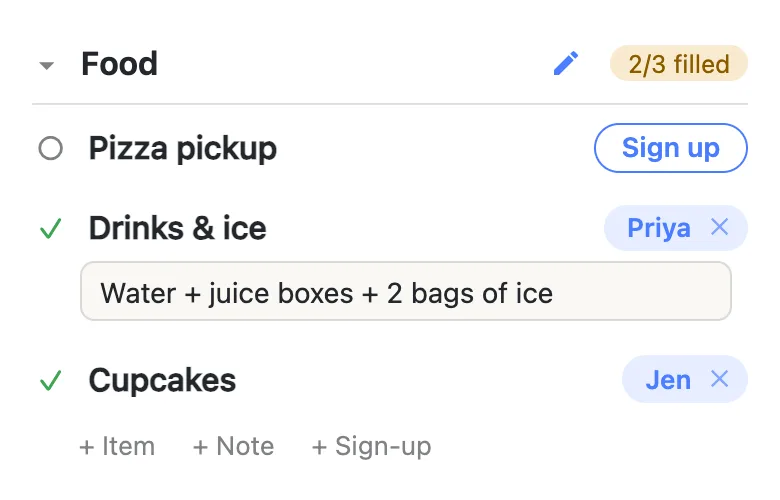
The one change that takes a detour is adding a note you skipped. The note box opens once, when you sign up. If you tapped past it, the row has no note for you to tap later. You can fix that two ways. Tap ✕ on your own sign-up and then Sign up again: your own sign-up clears with one tap, and this time the box opens. Or ask the assistant behind the microphone button: “add a note to my cupcakes sign-up saying nut-free”.
Clearing somebody else’s sign-up asks first
Changing a name never stops to ask, because nothing is lost: the row stays filled and the note stays put. Clearing a row is different. It empties the row back to open and throws the note away with it, so when the name on the row isn’t yours, the sheet asks first:
“Clear Marcus’s sign-up? Their note goes with it.”
Your own sign-up clears with one tap and no question. The sheet decides what’s yours by comparing the name on the row with the name your phone uses — the one under Your name in the ☰ menu. That has two harmless side effects. A sign-up typed as “Pri” on a phone called “Priya” will ask. And a row you filled in for your husband counts as his.
There is no undo for a cleared sign-up. The five-second undo that follows deleting a row doesn’t cover it. If you clear the wrong one, tap Sign up, put the name back, and retype the note if you remember it. That’s why the question exists at all: it’s one of very few places the app stops you, and knocking someone off a rota by accident is the mistake that deserves it.
Everyone sees the change at once
Every edit lands live on every phone that has the sheet open. There’s no “update your response” step and nothing to submit. Below, Marcus moved from pizza to trash duty with two taps on his own phone. On Priya’s phone, the pizza row opened back up and the Food counter dropped to 2/3 without a reload.
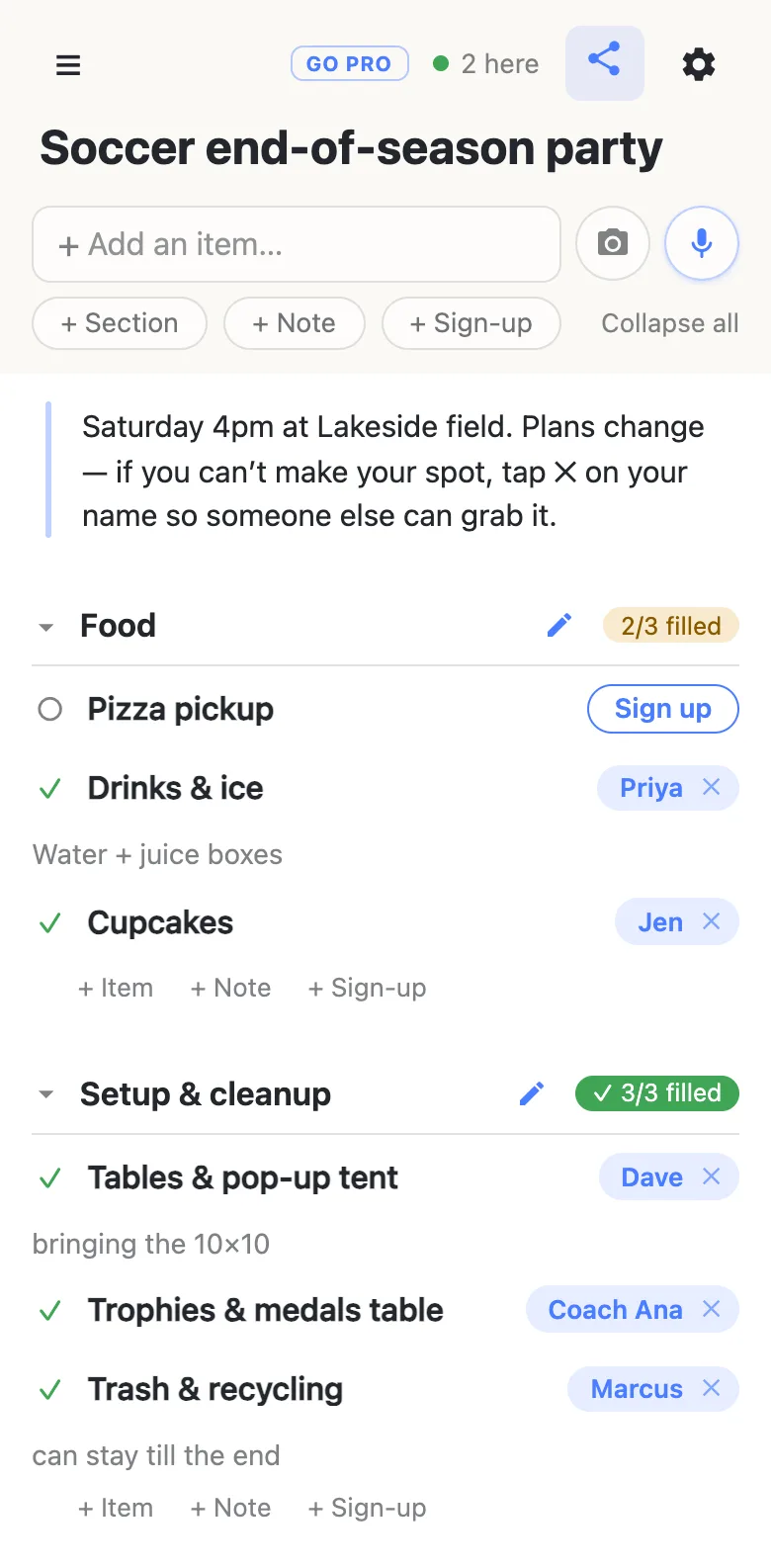
Nobody gets an email about it. The counter beside each heading is the notification: “2/3 filled” tells the organiser there’s a gap, and the open row with its Sign up button shows everyone which one. If the sheet is on someone’s calendar through its calendar feed, the change reaches that calendar the next time the app checks for updates, which can take a few hours.
Organisers can help this along with one line at the top of the sheet. The note in the example says it plainly: if you can’t make your spot, tap ✕ so someone else can take it. A dropout on Wednesday is a gap somebody can fill. A no-show on Saturday is a party without pizza.
Why anyone can edit any response
A sheet can only lock each response to its author if it knows who the author is, and that means an account for every volunteer. Accounts are exactly what stop people signing up in the first place. anonylist has none, so a name on a row is text somebody typed. Anyone with the link can fix a typo, swap two shifts, or tidy up after a change of plans, including on your row.
For a sheet shared in a team chat, a class group or a street, where the link itself is the membership and every change shows up live, that’s a fair trade. It’s also why the organiser never ends up re-typing half the sheet from text messages. How anonymous shared lists work covers the trade in full.
When the sheet goes to people you don’t know
Put the link on a public flyer or a school-wide newsletter, and you may want the jobs themselves to stay the way you wrote them. That’s what owning the list is for. With anonylist pro you choose what visitors can do: leave signing up on so anybody can still take, change or drop a sign-up, and turn off renaming, adding, deleting and reordering the rows. Your co-organisers can be admins who keep full control.
One honest limit: signing up, changing a name and clearing a sign-up sit behind the same switch. You can’t allow sign-ups while stopping people from clearing each other’s — that stays covered by the question above, for everyone.
See what anonylist pro does Only you need an account. Everyone else still just opens the link.
Questions
- How do I cancel my sign-up on a shared sign-up sheet?
- Tap the ✕ beside your name. Your own sign-up clears with one tap and no question: the row goes back to open with its Sign up button, and the counter on the section heading drops by one so the organiser can see the gap. Any note you left goes with it. Nobody is emailed — the open row is how everyone else finds out.
- Do I need the organiser to change my response?
- No. There is no edit link to find and nothing to log in to. Anyone holding the sheet’s link can change a name, rewrite a note, move to a different job or drop out, straight on the row, and the change shows up on every open phone at once. That includes the organiser, so if you can’t get to it yourself, asking them still works.
- Does the organiser get notified when someone changes a sign-up?
- Not by email or push notification — anonylist has no accounts to send one to. The sheet itself shows the current state to whoever opens it, and the “n/m filled” counter beside each heading shows where the gaps are the moment someone drops out.
- Can I get back a sign-up I cleared by mistake?
- Not with an undo — the five-second undo that follows deleting a row doesn’t cover a cleared sign-up. Tap Sign up on the row, put the name back, and retype the note if you remember it. This is why clearing somebody else’s sign-up asks first: it is one of very few places the app stops to check.
- Why does the sheet ask me to confirm clearing my own sign-up?
- The sheet decides a sign-up is yours by comparing the name on the row with the name your phone uses, set under Your name in the ☰ menu. If you typed a different spelling when you signed up, or you filled the row in for somebody else, the names don’t match and it asks. Confirming is safe; it only means the sheet couldn’t tell it was you.