Talk to your list: an AI assistant that can’t delete it
Last updated September 17, 2026
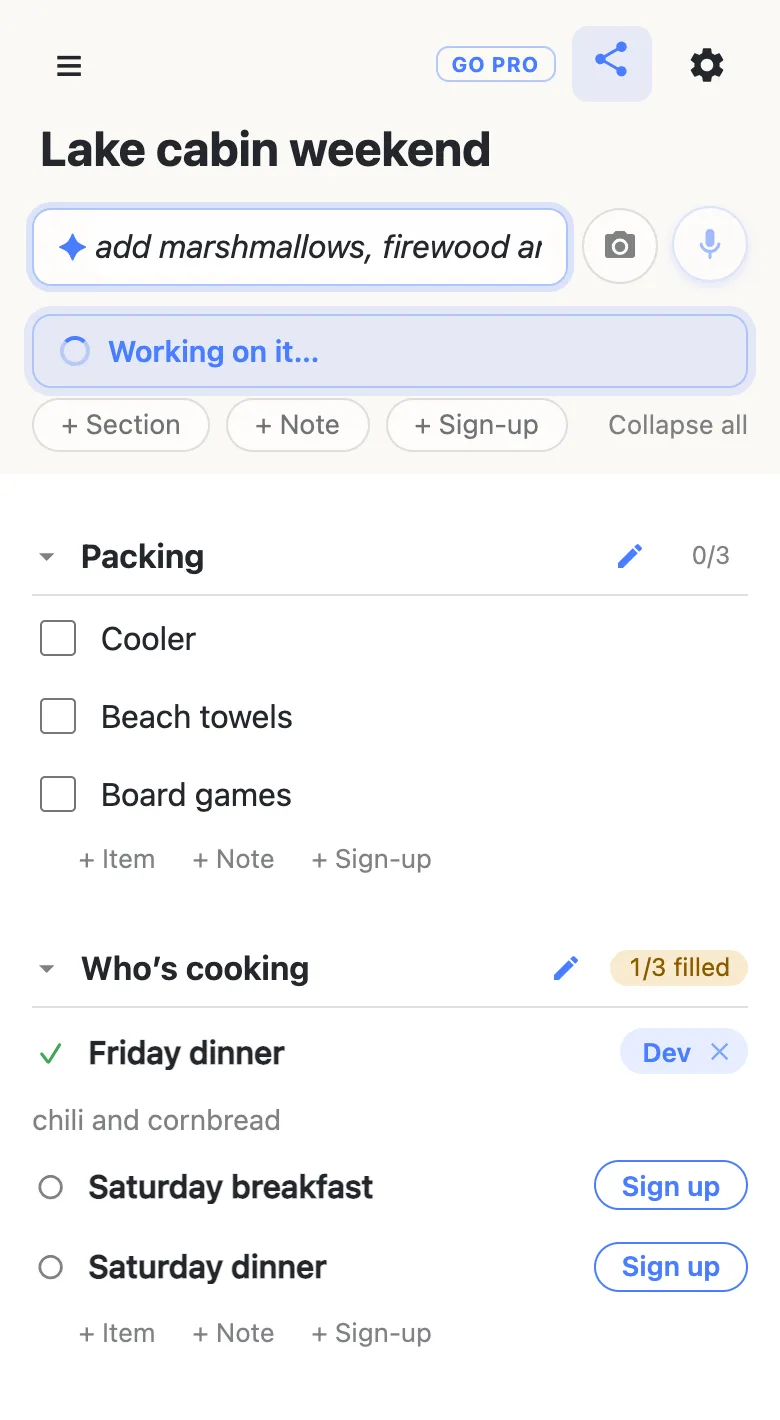
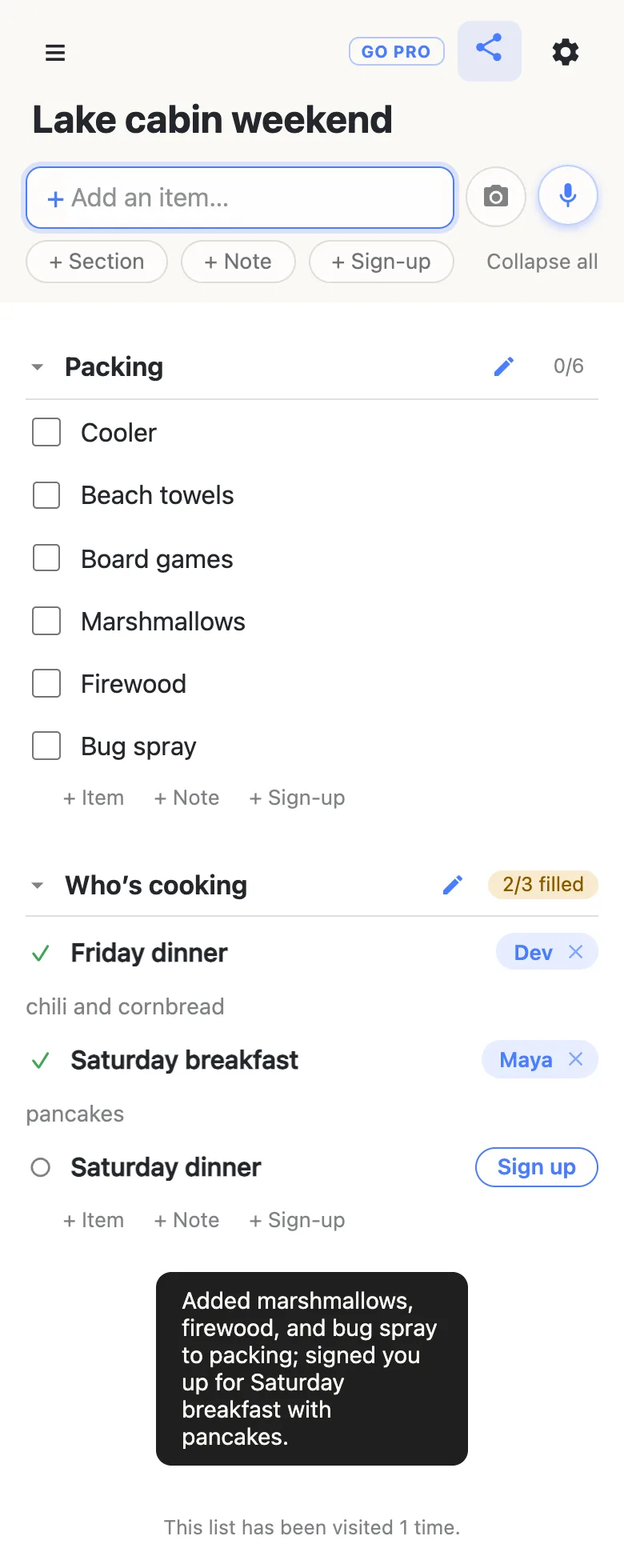
Some list changes are quicker to say than to do. “Add marshmallows, firewood and bug spray to packing, and sign me up for Saturday breakfast” is one sentence; by hand it’s three rows typed into the right section and a slot claimed further down the page, on a phone, with a bag of groceries in the other hand.
Every anonylist list has an assistant for exactly that, behind the microphone button beside the add box. You say or type what you want, it makes the changes, and everyone on the list watches them land. It’s free and needs no account, like the rest of the list. This guide covers what it can do, what it deliberately can’t, and where your words go — because on a list other people rely on, the second and third matter as much as the first.
Opens instantly. No account, no email.
Tap the mic, then say it or type it
Tap the microphone to the right of the add box and the box turns into the assistant’s: its + becomes a ✦ and the placeholder reads “Tell the assistant…”. If your browser can do dictation, it’s already listening — your words stream into the box as you speak, so you can see what it heard. Tap the mic again when you’re done, or just stop talking: after a few seconds of quiet it sends itself. (A single dictation tops out at a minute.)
If your browser can’t do dictation, the same tap opens the same box and you type the command and press Enter. Nothing else is different — dictation is a convenience, not a separate feature. Changed your mind while typing? Tap the mic again, or press Escape, and the box goes back to adding items; nothing is sent. While it’s listening, though, a tap on the mic means “done — send it”, so Escape is the way to back out of a dictation.
While it works, the box shows your command and a “Working on it…” line sits underneath. When it’s finished you get one short sentence saying what it did.
What you can ask it for
Anything in this list, in whatever words come naturally — and several at once, as in the example above:
- Add items, as many as you like in one go, into a particular section or onto the main list. “Add milk, eggs and coffee to groceries.”
- Check things off, or uncheck them. “Check off everything in produce.” “Uncheck the cooler.”
- Organize. Make a section, rename one, and move existing items into or out of one. “Make a section called Sunday and move the pancake stuff into it.”
- Write a note — the long-form blocks for addresses and instructions — and move notes between sections.
- Work a sign-up sheet. Create sign-up slots, and fill one: “sign me up for Saturday breakfast” claims it under the name your device uses on the list, and “put Dev down for Friday dinner, he’s making chili” signs up someone else, note and all. It will clear or reassign a claim when you clearly ask, never as a side effect of something else.
- Name the list. “Call this Lake cabin weekend.”
It’s forgiving about how dictation mangles things — “add to matoes” gets you tomatoes — and it’s told to do exactly what was asked and nothing extra. It won’t pad your grocery list with things it thinks you forgot.
On a brand-new, still-empty list, the first command also creates the list, the same way typing a first item would. So “start a packing list with a tent, two sleeping bags and a stove” works from a blank page.
What it can’t do — by construction, not by instruction
The assistant cannot delete anything. Not an item, not a section, not a note. It also can’t reorder your rows, and it can’t touch a list’s password or its custom address. Ask for one of those and it skips that part and says so.
That isn’t a rule it has been asked to follow; a rule like that is only as good as the model’s mood. The assistant acts on a list through a short, fixed set of tools — add, check, organize, note, sign up, title — and the tools for deleting and reordering don’t exist. There is nothing for a misheard sentence or a cleverly worded request to reach.
The reason is the kind of list this is. On anonylist, deleting a row is permanent once its five-second undo has passed, and the list usually belongs to a group rather than to you. An over-eager add costs someone a moment of tidying. An over-eager delete costs somebody their work. So the worst the assistant can do is leave rows you didn’t want — and removing them stays a job for a person who can see what they’re removing.
Two smaller limits in the same spirit. It doesn’t rewrite the wording of an item — what a row says stays with whoever wrote it. And checking a row off through the assistant does what checking it by hand does: the text freezes for everyone until someone unchecks it, so ask for that the way you’d do it yourself — on purpose.
Edits to a note wait for a person
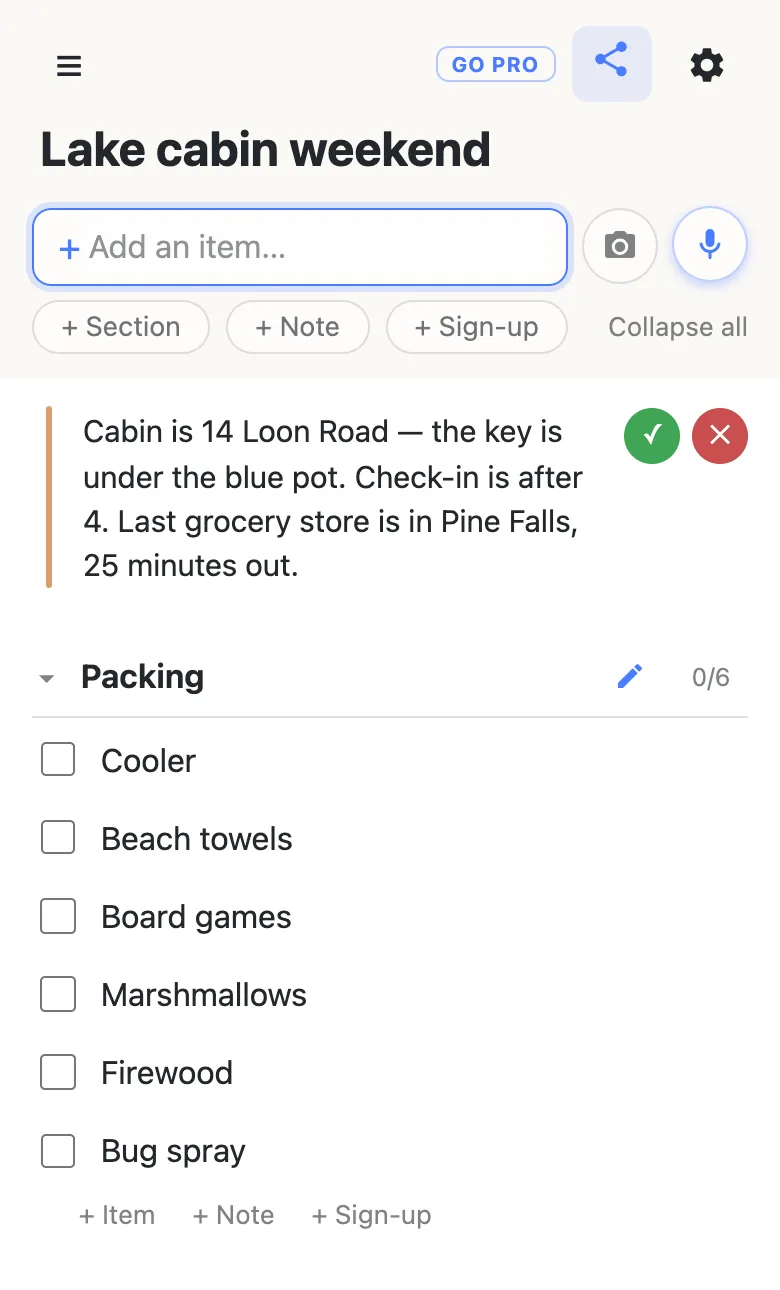
Notes are the one place the assistant will change words that already exist, because “change check-in to after 4” is a fair thing to ask. But a note is someone’s prose, so the edit arrives pending: the new text shows straight away with a green ✓ and a red ✕ beside it, and it stays that way until a person on the list taps one. ✓ keeps it. ✕ puts back the last wording a human approved — even if the assistant has edited the note twice since.
It is cautious before it gets that far, too. If the list has several notes and your command doesn’t clearly pick one out, it changes nothing and asks — “Which note — store hours, turkey prep, or bread?”
Everyone sees it happen
The assistant’s changes are ordinary list changes. They appear on every open phone as they’re made, the same way a row typed by hand does — nobody refreshes, and nobody needs to know an assistant was involved. The sentence telling you what it did shows only on your screen.
It works on one command per list at a time. If someone else’s request is still running, yours is turned away with “The assistant is already working on this list” — send it again a moment later. There’s also an hourly limit per list, which a household will never meet and a script will.
And it acts as you, with your reach and no more. On an owned list where the owner has switched something off for visitors — adding rows, say, or claiming slots — the assistant is refused the same things your hands would be. See a shared checklist where you choose what others can change.
Where your words go
Dictation happens in your browser, using its built-in speech recognition; we never receive audio. What reaches our server is the text of the command. To act on it, that text and the contents of the list are sent to Anthropic, whose model picks which of the tools above to use.
So the honest advice is the one on the privacy page: don’t point the assistant at a list holding anything sensitive. It’s there when you tap the mic and not otherwise — adding, checking and claiming by hand involve no AI at all.
Questions
- Can the anonylist assistant delete items from my list?
- No, and not because it has been told not to. The assistant works through a fixed set of tools — add, check off, uncheck, make or rename a section, move rows between sections, write or edit a note, create or fill a sign-up slot, set the title — and there is no delete tool in that set, no reorder tool, and nothing that touches a password or a custom address. If you ask it to delete something it skips that part and tells you so. Deleting a row stays a thing only a person’s hands can do.
- Do I need an account or a subscription to use the assistant?
- No. The microphone button is on every list, free, with no account and nothing to install. There is an hourly limit on how many commands one list and one connection can send, and it handles one command per list at a time — if somebody else’s request is still running you’ll be told it’s busy, and you can send yours a moment later.
- Which browsers let me speak to the list instead of typing?
- Dictation uses the speech recognition built into your browser, so it works where the browser provides one — Chrome and Safari do on most phones and computers today, and Firefox doesn’t. Where it isn’t available the same button simply opens the assistant box for typing, and everything else works identically. If the browser asks for microphone permission and you decline, you’ll see “Microphone access was blocked” and can type the command instead.
- What happens when the assistant edits a note somebody else wrote?
- The new text appears straight away, but marked as pending: a green ✓ and a red ✕ sit beside the note until a person on the list taps one. ✓ keeps the edit; ✕ puts back the last wording a human approved — even if the assistant has edited the note more than once since. It is also deliberately cautious here: if a list has several notes and your command doesn’t clearly single one out, it changes nothing and asks which one you meant.
- Where does what I say to the assistant go?
- The audio never reaches us: your browser’s own speech recognition turns it into text. The text of your command, together with the contents of the list it has to work on, is sent to Anthropic, whose model decides which changes to make. That is why the advice on the privacy page applies — don’t use the assistant on a list holding anything sensitive. Adding rows by hand involves no AI at all.