See who’s on your shared list right now
Last updated August 30, 2026
You send someone a list and then wonder about it: are they actually looking? Did they see the three things you added on the way to the car? An anonylist list is just a link, and nobody signs in to open it — but the list still tells you who has it up at this moment, by name. This guide covers the people chip and the roster behind it, where those names come from when there are no accounts, what it means when a row says somebody is typing in it, and how quickly all of that clears when people wander off.
Opens instantly. No account, no email.
A dot and a count, only when you’re not alone
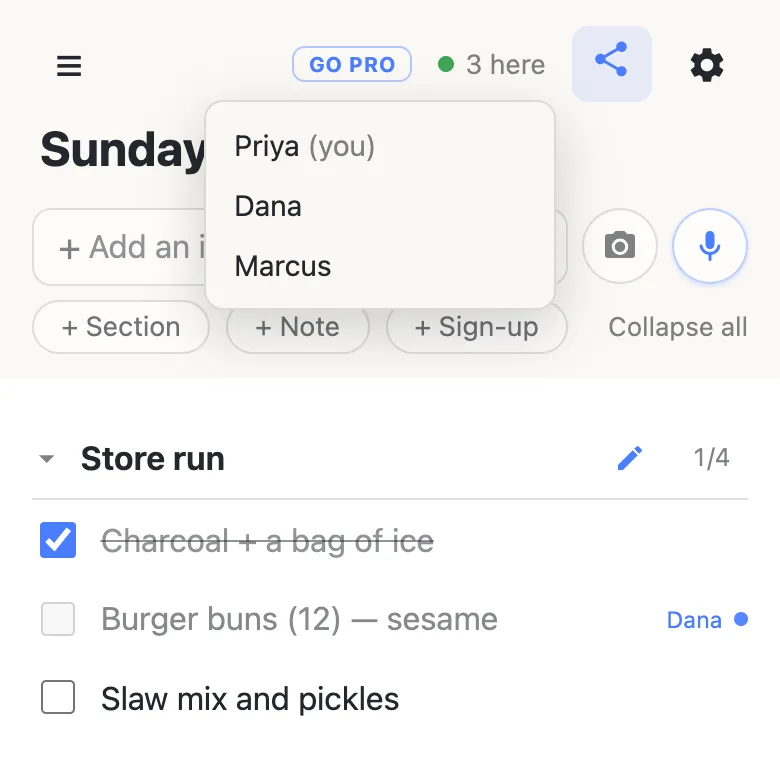
At the top of every list, beside the share and settings buttons, is a small green dot with a number: 3 here. On a list you have to yourself it isn’t there at all — being told you’re alone is noise. The moment a second person opens the link it appears on both screens.
Tap it and it opens the roster: one line per person, with (you) beside your own name. That list is strictly the present tense — everyone in it has the page open at that second, nobody who has closed it is in there, and there is no history behind it to scroll.
Where the names come from
There are no accounts here, so there is nothing for the list to look up. Instead, each browser keeps its own display name. You’re asked for one the first time you open a list, and anything does — a first name is what most people type. Skip the question and you get a generated one, like Quiet Otter, which is a real answer rather than a placeholder: it’s stable, it’s pronounceable, and it does the one job a name has to do here, which is to tell three people apart.
That name is stored in your browser and never saved onto the list or attached to anything you write. While you have a list open it travels along so other people have something to call you; close the tab and it’s gone with the connection. Change it whenever you like — open the ☰ menu at the top-left and edit Your name; clearing the box rolls a fresh generated one. One name covers every anonylist list you open in that browser.
The row someone is typing in
The chip answers “who’s here”. The rows answer “who’s where”. Start editing a row and it’s held for you: on everyone else’s screen it greys out with your name beside it, and on a row that’s still blank the placeholder reads “Dana is typing…”. Nobody else can type into that row while you’re in it — which is the whole guard against two people overwriting the same line — but every other row stays completely theirs.
The hold is light. Tap out of the row and it’s released instantly, and if a phone goes into a pocket mid-edit it frees itself after about ten seconds, so an abandoned row never stays locked. What it deliberately isn’t is a permission: anyone can edit anything on a shared list, just not the exact row you’re inside at that moment.
When somebody leaves
Close the tab and the count drops for everyone else straight away. The awkward case is a phone that walks out of signal without closing anything — there, the list works out that the connection is gone and clears the name within a minute or so, so the roster doesn’t keep claiming somebody is around.
One honest detail: it counts open pages, not people. A list you have up on your phone and your laptop shows as two, with your name in the roster twice. The list can see connections; it can’t see people.
What it’s actually good for
On a phone call, it’s the cheapest possible screen share: you say “adding it now”, they watch the row appear, and neither of you installs anything. Splitting a shop between two aisles, seeing that the other person is on the list is what tells you the list in your hand is the current one. And when you’ve just sent a link to someone who doesn’t use apps like this, their name showing up in the roster is confirmation that the link worked — no read receipt to enable, no reply needed.
What presence never does is interrupt. Nobody is notified that you opened a list, nothing pings, and there are no emails. It’s something you look at when you happen to wonder, and invisible the rest of the time.
The roster is names, not roles: everyone appears the same way, on your own list or one you were sent. If you want the list itself to treat people differently — a list you own, where visitors can add and check things off but can’t delete them — that’s what anonylist pro adds. The free list stays exactly as it is.
Questions
- Why don’t I see a people count on my list?
- Because you’re the only one on it. The count appears only from two people upward — a list you’re reading alone doesn’t need to tell you so. The moment somebody else opens the link it appears on both screens, and it disappears again when they leave.
- Can I see who opened the list earlier today?
- No. Presence is strictly right-now: everyone in the roster has the page open at that second, and nobody who has left is listed. The only backward-looking figure is the line at the bottom of every list — “This list has been visited 14 times” — which is a count, never names.
- Does having the list open show my name even if I don’t change anything?
- Yes — reading counts as being here, so your device’s display name appears in the roster to anyone who taps the chip. That’s all it shows: not what you read, not where you are, and nothing that outlives the moment you close the tab.
- Do two tabs on the same list count as two people?
- Yes. It counts open pages, so a list you have up on both a phone and a laptop shows as two, with your name in the roster twice. It’s a small honesty of the design rather than a bug: the list can see connections, not people.
- Can I use a different name on one list than on another?
- Not currently — the name lives in your browser, so one name covers every anonylist list you open there, and changing it changes it everywhere. You can edit it any time in the menu, and a different browser or phone can carry a different name.