What is a sign-up sheet — and how does one work?
Last updated August 19, 2026
A sign-up sheet is a list of needs with room for a name against each one. The paper version has hung on clipboards forever: dishes for the potluck, shifts at the bake sale, drivers for the away game, and people write themselves in. The online version is the same object — except everyone holds the clipboard at once, and it’s always current.
Opens instantly. No account, no email.
The building block is a slot, not a checkbox
A checklist and a sign-up sheet look alike, but their rows do different jobs. A checklist row is a task — it gets ticked by whoever did it, after the fact. A sign-up row is a need — “Main dish”, “Cleanup crew” — and what it collects is a name, committed in advance. On anonylist that row is called a slot, and being filled is its whole state: there’s nothing to tick, because a slot with a name on it is done, and a slot without one is the gap you still have to cover.
How claiming works
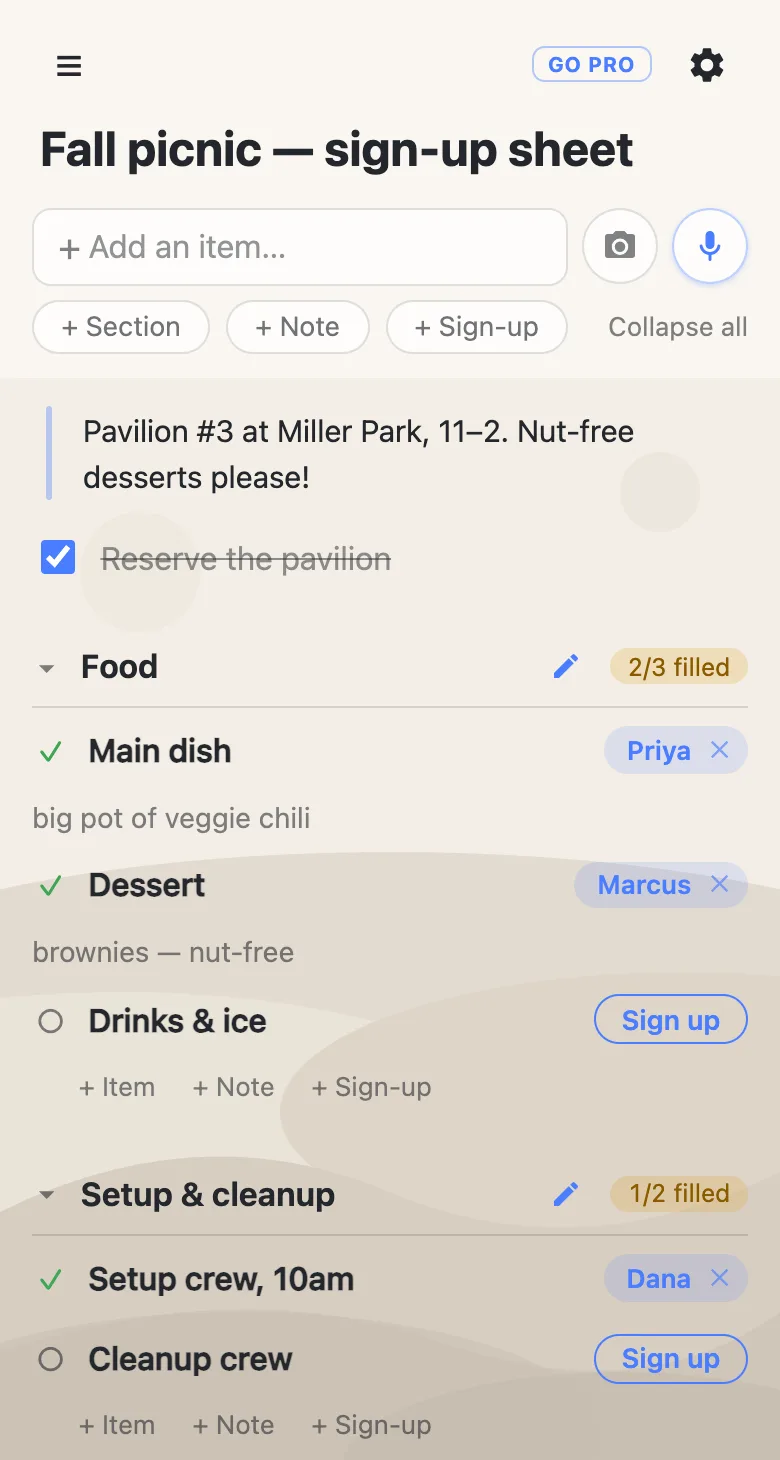
Whoever you send the link to opens it and taps Sign up next to a slot. Their name lands on it instantly, for everyone — no account, no app, no form to submit. A claim can carry a short note right where the commitment is: “big pot of veggie chili”, “can take 3 kids”, “arriving at 9:30”.
Real groups need to fix things, so the sheet trusts you to. Tap a name to change it — people sign up spouses and kids all the time. The small × clears a claim; removing your own is immediate, and clearing someone else’s asks you to confirm first, since their note goes with it.
The sheet answers its own questions
Group the slots into sections — days, crews, courses — and each section shows a counter like 2/3 filled, turning into a check when everything’s covered. That’s the organizer’s view of the whole event in one glance: the filled slots are settled, and the open ones are your remaining problem. Because every claim shows up live, nobody claims a job that’s already taken — the third potato salad gets caught before it’s cooked, not at the party.
Slots, items and notes on one sheet
A sign-up sheet is still a list, so it can mix three kinds of row. Slots hold the needs people claim. Checkbox items hold your own to-dos — “Reserve the pavilion” gets ticked when it’s done. Notes hold the context that isn’t a task at all: the address, the timing, the nut-free warning every claimer should read. One link carries the whole plan, and anyone opening it sees all three.
If you’re the one running the sheet
A sheet anyone can edit is the right default for a group of friends. For a bigger crowd — forty parents, a whole congregation — you might want the slots themselves locked while people still sign up freely. That’s what an owned list adds: you keep the structure, set what visitors can change, and hand the sheet to next year’s organizer without changing the link.
See anonylist pro The people signing up never need an account either way.
Questions
- What goes on a sign-up sheet?
- The needs: dishes for a potluck, shifts at an event, supplies for a classroom, rides to practice. Each need is one slot with room for a name, and the sheet can carry ordinary checklist items and notes alongside them for tasks and instructions.
- How do people put their name on a sign-up sheet?
- They open the link and tap Sign up next to a slot — their name lands on it instantly and everyone else sees it. There is no account, no app, and no form to submit.
- How do I remove a name from a sign-up sheet?
- Tap the small × beside the name. Removing your own sign-up is immediate; clearing someone else’s asks you to confirm first, since their note goes with it.
- How do I know when a sign-up sheet is full?
- Each group of slots shows a counter like 2/3 filled, and it turns into a check mark when every slot has a name. The open slots are the gaps — you can read coverage without opening anything.
- Can a sign-up sheet include tasks and instructions too?
- Yes. A sheet is just a list, so it can mix slots with regular checkbox items for the organizer’s own to-dos and notes for logistics — the address, the timing, the nut-free warning — all at the same link.
Opens instantly. No account, no email.