How to reuse a sign-up sheet every week without a new link
Last updated August 16, 2026
Most sign-up sheets are single-use. You make one for Saturday, everyone fills it in, and next Saturday you make another — new sheet, new link, and the same round of “can someone resend that?” in the group chat.
A recurring sign-up sheet is the version that doesn’t need remaking. You write the slots once, save that empty sheet, and after each round you clear it back to empty at the same address. The link you sent in September still works in March.
What this is good for
Anything where the same jobs come round again with different names against them:
- Snack rotasTeam snacks, class treats, coffee hour — the same list of items every week.
- Volunteer shiftsSet-up, clean-up, door, scorekeeping. The shifts don’t change; the volunteers do.
- Meal trainsDinner for a family, one night per person, restarted for the next stretch.
- Carpool and drivingWho’s driving to which practice, cleared and refilled each week.
- Potluck dishesStarters, mains, sides, pudding — reset between events so nothing carries over.
- Equipment and kitWho’s bringing the cooler, the nets, the first-aid bag, the spare kit.
How a sign-up slot works
A sign-up slot isn’t a checkbox. A checkbox gets ticked by whoever does the thing; a slot holds a name, claimed in advance, with room for a note beside it. That’s the difference between a checklist and a sign-up list, and it’s why “who’s bringing the oranges” has an answer you can read at a glance instead of reconstructing from a chat thread.
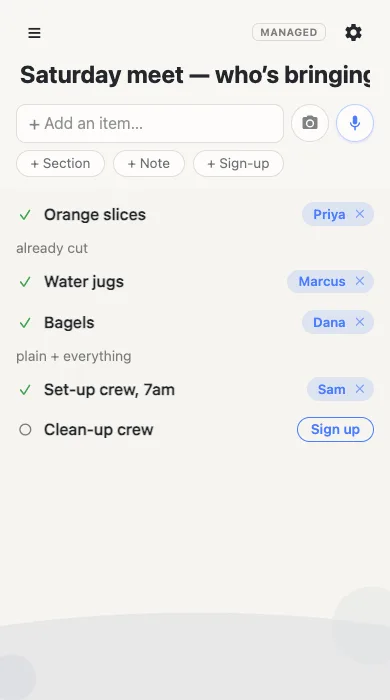
Nobody signing up needs an account. They open the link, tap Sign up, type a name and they’re done — no app, no password, no email address. People sign each other up too, which is how it works in real life: one parent claims a slot for the one who’s actually driving.
Reusing the sheet: save it empty, reset it after
Here’s the whole trick. Before you share the sheet, open ⚙ → Baseline and save it while it’s still empty. That saved version is what each round starts from.
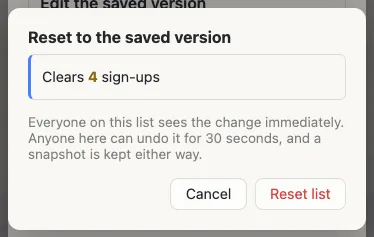
When the round is over, open the same menu and reset the list. Every name clears, any slot someone deleted comes back, and anything added since goes away — so the sheet is exactly as you wrote it, ready for next week. You see precisely what will change before you confirm.
Nothing is lost when you clear it
Clearing a sheet full of names should not be a leap of faith. Every reset keeps a restore point first, and the last ten sit in the Baseline menu — so you can look back at who signed up for an earlier round, or put one back wholesale. There’s also 30 seconds of undo the moment you reset, for the plain mistake.
Or let it clear itself
If the sheet runs on a rhythm, give it a schedule: every Monday at 5am, say, and it resets itself before anyone’s awake to notice. A scheduled clear-out gets a five-minute undo window instead of thirty seconds, keeps its restore point like any other, and the sheet says plainly that it reset automatically — so whoever opens it first sees why it’s empty rather than assuming something broke.
Making one
A sign-up sheet itself is free and needs no account, from either side. Start with a blank list, add a slot per job with the + Sign-up button, and send the link.
Make a sign-up sheet Free, no account, about a minute.
Reusing one round after round — saving the empty version and resetting to it, on a schedule or by hand — is part of anonylist pro, on lists you own. The people signing up never need an account either way. See how baseline works.
Questions
- How do I reuse a sign-up sheet for the next week?
- Save the empty sheet as its baseline once. When the round is over, reset the list to it: every name clears and the slots go back to how you wrote them, at the same address. You never make a second sheet, so nobody has to be sent a new link.
- Do people need an account to sign up?
- No. They open the link, tap Sign up next to a slot and type their name. There’s no app, no password and no email. Only the person who owns the sheet has an account.
- Can I keep a copy of who signed up last time?
- Yes. Every reset keeps a restore point first, and the last ten are listed in the sheet’s Baseline menu, so you can look back at an earlier round or put one back entirely.
- Can the sign-up sheet clear itself automatically?
- Yes — pick a day and an hour and it resets on that schedule, in your time zone. There’s a five-minute undo window for a scheduled run and a restore point kept regardless, and the sheet says it reset automatically so nobody meets an empty list wondering what happened.
- What’s the difference between a sign-up slot and a checklist item?
- A checklist item gets ticked off by whoever does it. A sign-up slot holds a name — it’s a job someone claims in advance, with room for a note like “already cut” or “nut-free”. A sheet can mix both.