Save a list’s shape. Put it back whenever.
Some lists are the same list every week. The grocery run, the opening checklist, the gear that goes in the van. They get ticked off, added to, and quietly wrecked — and then you rebuild them from memory.
Baseline saves the version you meant. Let the list get messy all week, then put it back in one tap: same list, same link, same people. Nobody gets re-invited, nothing gets re-shared, and no one has to hunt for the new copy in an old message.
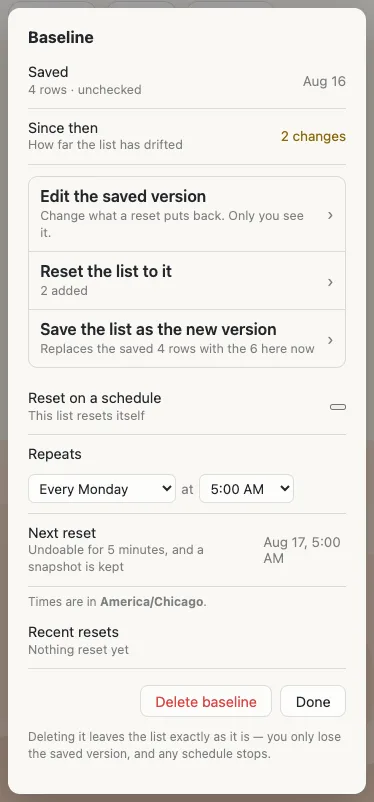
- Save the version you meanGet the list how it should start, then save that from ⚙ → Baseline. Ticked rows are saved unticked, and sign-ups are saved empty — you're saving the list, not this week's progress.
- Use it however you likeAdd, edit, tick, sign up, delete. The menu keeps a quiet count of how far the list has drifted from what you saved.
- Put it backOne tap. You see exactly what will change before it happens, anyone on the list can undo it, and the version before it is kept either way.
Change the saved version whenever
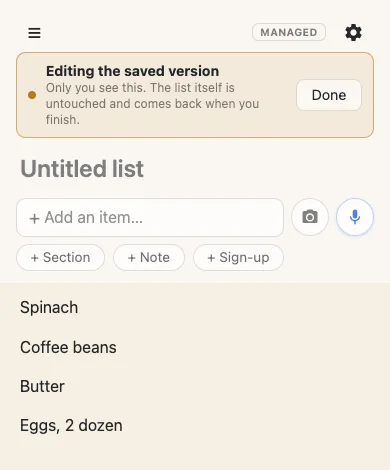
The saved version isn't frozen. Open Edit the saved version and the list on your screen becomes the template — add to it, rename things, take things out, using the list exactly as you always do. Tap Done and your real list comes back.
Nobody else sees any of it. While you're in there the live list is untouched, so the people using it carry on without their screen changing under them. Nothing about it is a mode the whole group has to sit through.
It’s the same list, not a copy
The obvious way to do this is to keep a template and make a fresh copy each week. That means a new link every time, and the real cost lands on everyone else: re-sharing, re-bookmarking, and someone inevitably adding to last week's list.
A reset changes only the rows that actually differ. Rows that exist in both the saved version and the live list keep their identity, so a person typing when a reset lands doesn't lose what they were writing. A forty-row list with three changes moves three rows.
Nothing here is a one-way door
Every reset keeps a snapshot first. Anyone on the list can undo it for 30 seconds — five minutes if the reset was scheduled, because whoever opens the app isn't necessarily whoever triggered it. After that the snapshot is still there: the last ten are restorable from settings.
And deleting the baseline never touches the list. You lose the saved version, that's all.
Or let it reset itself
Pick a day and an hour and the list resets on its own, in your time zone — every Monday at 5am, say, so the week starts from the version you meant. A restore point is kept exactly as with a manual reset, the undo window is five minutes rather than thirty seconds because whoever opens the app isn't whoever triggered it, and the list says plainly that it reset automatically. Somebody meeting a cleared list on Monday morning sees why, instead of assuming the worst.
Part of pro
Baseline comes with anonylist pro, alongside owned lists, permissions and an address people can remember. Everyone else still just opens the link — no account, ever.
Questions
- What happens to the link when a list resets?
- Nothing. It’s the same list at the same address — that’s the whole point. Nobody has to be re-invited and nothing has to be re-shared. A copy would mean a new link and a scramble to get everyone onto it.
- Does everyone lose what they were typing?
- No. Rows that exist in both the saved version and the current list keep their identity, so somebody mid-edit isn’t yanked out from under. Only the rows a reset actually changes move.
- Can a reset be taken back?
- Yes. There’s 30 seconds of undo — five minutes for a scheduled one, since whoever finds the list may not be whoever triggered it. After that it’s still there: the last ten resets are listed under Recent resets, and any of them puts the list back. Restoring keeps a restore point too, so that isn’t a one-way door either.
- Can the list reset itself on a schedule?
- Yes — pick a day and an hour and it resets itself, in your time zone. A snapshot is kept exactly as with a manual reset, and a system line says the reset was automatic so nobody meets a cleared list wondering what happened.
- Who is allowed to reset the list?
- The owner and the admins they appoint — nobody else, and there’s no switch to open it up. Resetting throws away everyone’s week, which is not a power to hand to whoever happens to hold the link.