A classroom party sign-up sheet parents fill from a text message
Last updated October 20, 2026
Room parent is a job with one recurring problem, and it isn’t the party. It’s finding out who is actually bringing the cupcakes. You post the list in the class thread, four people reply “I can do juice!” in the same minute, nobody answers about plates, and by Wednesday you are scrolling back through sixty messages trying to reconstruct a list that only exists in your head. So you buy the plates yourself, just in case.
A classroom party sign-up sheet fixes that by giving the thread something to point at: one link, one live sheet, every need with a space for a name. Parents open it, tap the thing they’re taking, and their name is on it for everyone. No form, no account, no reply-all — and free.
Opens instantly. No account, no email.
What goes on the sheet
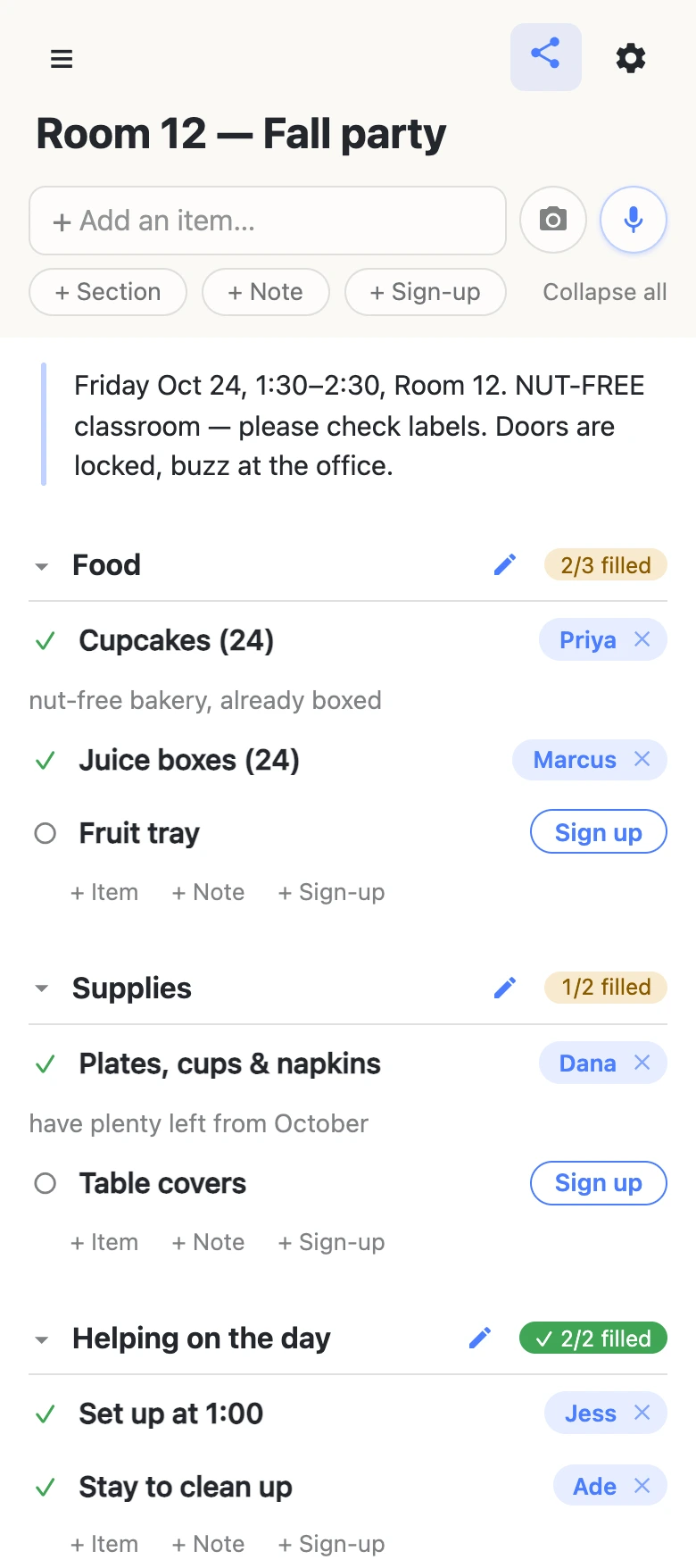
Start a list, name it after the room and the party, and write out what the afternoon needs — one sign-up slot per thing. A slot isn’t a checkbox; it’s a need with a space for a name, so “Cupcakes (24)” is either taken or it isn’t. The + Sign-up pill under the add box makes them.
Group them with sections — Food, Supplies, Helping on the day — and each section header keeps its own counter: 2/3 filled, 1/2 filled, turning into a check when everything’s covered. That counter is the whole reason to do this. “Does anyone know if we have plates” stops being a question you ask thirty people and becomes something you answer by looking.
How a parent signs up
They tap the link in the class thread and the sheet opens — no install, no sign-in, no “create a password to continue”. Next to anything still open there’s a Sign up button. One tap puts their name on it, live, for everyone else looking. Then the sheet offers a note: “What are you bringing? (optional)”. That’s where “nut-free bakery, already boxed” or “only have 12, someone grab the rest” goes — attached to the thing it describes instead of four more messages in the chat.
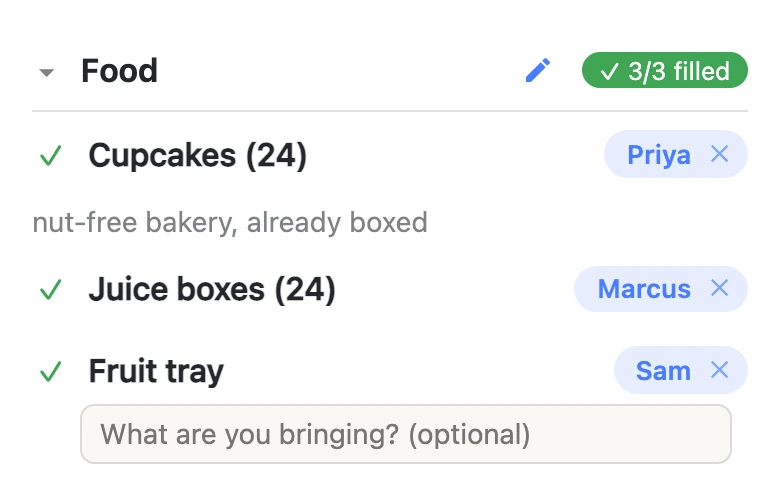
The name comes from whatever that device calls itself, which parents set once and forget; there are no accounts underneath it, so nothing is verified and nothing is stored about them. It’s a name on a sheet, the way it would be on a clipboard by the classroom door.
Put the rules where people will actually read them
Every classroom party has constraints that matter more than the snacks: the nut-free rule, the 1:30 start, the locked door and the office buzzer, the twenty-four-not-thirty head count. Those aren’t tasks, so they don’t belong in checkboxes — they go in a note, a long-text block you can drop at the top of the sheet. A parent reads it on the way to claiming something, which is the one moment they’re paying attention.
Times can live on the rows too. Type a row like “Set up — friday 1pm” and a small chip offers you Fri, Oct 24 · 1pm; tap it and the date pins to the row’s right edge, ignore it and your words stay ordinary text. Nothing gets a date unless somebody confirmed it.
When plans change, and they will
Somebody’s kid gets sick on Thursday. The sheet expects it. Tap a name chip to hand that job to someone else — parents sign each other up constantly, and a spouse doing the pickup is the normal case, not an abuse of the system. Tap the small × to clear a claim entirely and put the row back in the open pile: removing your own is instant, and clearing somebody else’s asks you to confirm first, because their note goes with it.
If the sheet started life on paper — and a lot of them do, scribbled on the back of a newsletter — the camera button beside the add box photographs it and reads the rows back to you, with headings on the page becoming sections. Nothing is added until you’ve ticked through what it found, so a misread word costs a glance rather than a mess on a sheet thirty parents are watching.
If it’s the whole grade, not one classroom
Sending it to the whole grade? You may want parents to sign up without rewriting the sheet.
That’s what an owned list is for. You keep the sheet, and you choose what visitors can do with it — leave signing up and notes switched on, turn adding, editing and deleting off, and it becomes fill-in-only. Nothing changes for the parents: same link, still no account, still one tap. You can add the co-room parent as an admin by email so you’re not the only one who can fix a typo, and claim a readable address so next year’s newsletter doesn’t carry a string of random characters.
See what anonylist pro does Only the organizer has an account. Everyone else still just opens the link.
Keep the sheet running smoothly
- Keep it to what it’s for. Snacks, plates and who’s staying to sweep up. Children’s full names, allergies tied to a child, home addresses and phone numbers belong with whatever the school already uses.
- Fold, don’t delete. Clear a claim rather than deleting the slot, so the need stays on the sheet for the next parent.
- Keep the link handy. Text yourself the link the day you make it — your phone also keeps it in the ☰ drawer — and export a copy from the gear menu (Export & import) whenever you want a file of it.
Questions
- How do parents sign up for a classroom party without making an account?
- They open the link from the class thread and tap Sign up next to whatever they’re taking. Their name lands on that row for everyone, instantly. There is no account to create, no app to install and no email address to hand over — the link is the whole thing, which is why it survives contact with a group of thirty parents who all use different phones.
- Can I put the classroom’s allergy rules where every parent will see them?
- Yes — add a note row at the top of the sheet. Notes are long-text blocks rather than checkboxes, so the nut-free rule, the party time and the “buzz at the office” instruction sit above the sign-ups instead of in a message that scrolled away. Anyone opening the sheet reads them before they claim anything.
- What if a parent signs up and then can’t come?
- Anybody can fix it from the sheet. Tap the name chip to hand the job to someone else — parents sign up spouses constantly — or tap the small × to clear the claim and put the row back in the open pile. Clearing your own is immediate; clearing someone else’s asks you to confirm first, because their note goes with it.
- Can the other room parent help run the sheet?
- On a free list there is nothing to share — you both just have the link, and the link is the permission. Everyone holding it can add rows, rename them and reorder them, which is fine for two room parents and worth knowing before you send it to the whole class.
- Is a link-only sign-up sheet safe to put in a school newsletter?
- Yes, for snacks, supplies and who’s staying to clean up — that is what it’s for. Keep children’s full names, medical details, home addresses and phone numbers in whatever the school already uses.
Opens instantly. No account, no email.