The Thanksgiving potluck sign-up sheet that runs the whole dinner
Last updated October 24, 2026
To make a Thanksgiving potluck sign-up sheet, start a list on anonylist, add each dish as a sign-up row, and send the link to the family group chat. Relatives open it, tap Sign up beside the dish they’re bringing and their name goes on it for everyone, so there are no three green bean casseroles and no missing rolls. It’s free, and nobody needs an account or an app.
- Start a list and name it — Thanksgiving at Mom’s.
- Add a note at the top with the time, the oven plan and the allergies.
- Add a section for the food, and a sign-up row per dish under it.
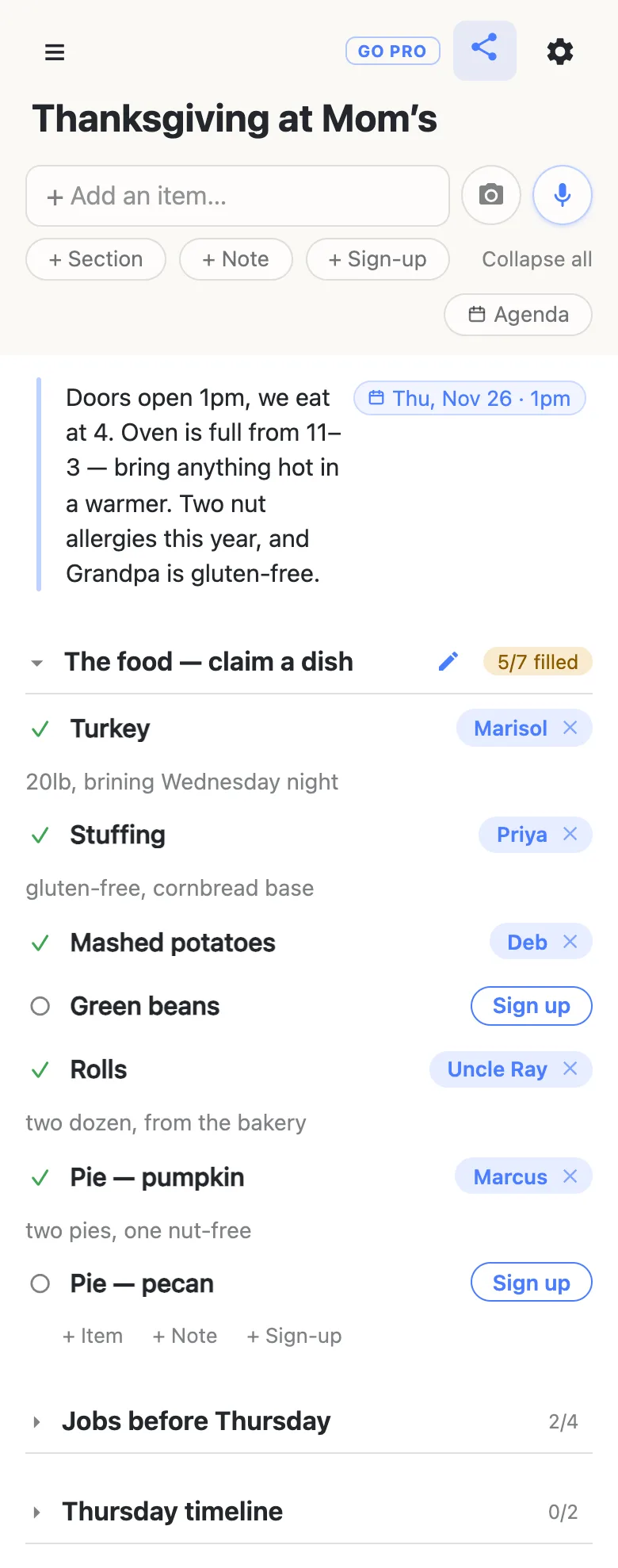
- Send the link to the family thread. The heading counts what’s still open — 5/7 filled.
Thanksgiving is Thursday, November 26, 2026. Send the sheet in the first week of November and the dishes are spoken for well before anyone shops.
Opens instantly. No account, no email.
What the sheet looks like
Here is the example list from the screenshots below, as text. The food is sign-ups relatives claim; the jobs are checkboxes; the day itself is a note.
Note: Doors open 1pm, we eat at 4. Oven is full from 11–3 — bring anything hot in a warmer. Two nut allergies this year, and Grandpa is gluten-free. Thursday, November 26, 2026, 1pm.
The food — claim a dish
- Turkey — Marisol: “20lb, brining Wednesday night”
- Stuffing — Priya: “gluten-free, cornbread base”
- Mashed potatoes — Deb
- Green beans — Tía Carmen: “Casserole, no almonds on top”
- Rolls — Uncle Ray: “two dozen, from the bakery”
- Pie — pumpkin — Marcus: “two pies, one nut-free”
- Pie — pecan — open
Jobs before Thursday
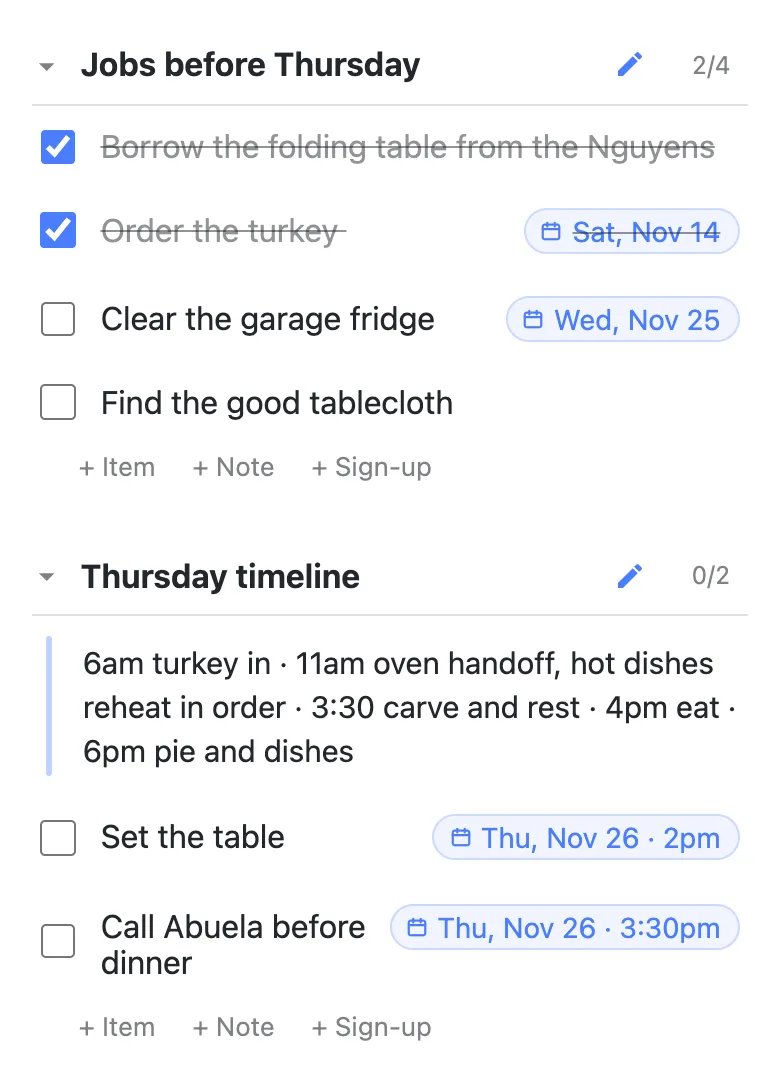
- Borrow the folding table from the Nguyens — done
- Order the turkey (Sat, Nov 14) — done
- Clear the garage fridge (Wed, Nov 25)
- Find the good tablecloth
Thursday timeline
- Note: 6am turkey in · 11am oven handoff, hot dishes reheat in order · 3:30 carve and rest · 4pm eat · 6pm pie and dishes
- Set the table (Thu, Nov 26, 2pm)
- Call Abuela before dinner (Thu, Nov 26, 3:30pm)
One sheet, three kinds of row
Thanksgiving isn’t one plan, it’s three. There’s the food, which everybody wants to talk about; the unglamorous jobs — the extra table, the garage fridge, the good tablecloth — which nobody does; and Thursday itself, an oven schedule that lives in the host’s head. A list here isn’t only checkboxes, which is what lets all three live on one page:
- Sign-up rows for the dishes — a named need with a space for one name. “Green beans” is either taken or it’s open, and being filled is its state, so there’s no box to tick.
- Items for the jobs — ordinary checkboxes, because “clear the garage fridge” isn’t something anybody claims, it’s something that gets done.
- Notes for the things that aren’t tasks at all — the allergies, the arrival time, the oven schedule. Long-text blocks that sit in the list where people will read them.
Group them with sections — The food, Jobs before Thursday, Thursday timeline — and each section header keeps its own counter. Dish sections read 5/7 filled, amber while gaps remain and green once everyone’s in. Job sections read 2/4. That counter is most of the value: “does anyone know if we have a pecan pie” stops being a question you ask fourteen people and becomes something you answer by looking.
How a relative claims a dish
They tap the link in the family thread and the sheet opens — no install, no sign-in, no “create a password to continue”. The first time, it asks what to call them; whatever they type is the name on the dishes they claim. Next to anything still open there’s a Sign up button. One tap puts their name on it, live, for everyone else looking at the same page.
Then the sheet offers a note: What are you bringing? That’s where “20lb, brining Wednesday night”, “gluten-free, cornbread base” or “two pies, one nut-free” goes — attached to the dish it describes instead of four more messages in the chat. It’s optional; tap away and the claim stands on its own.
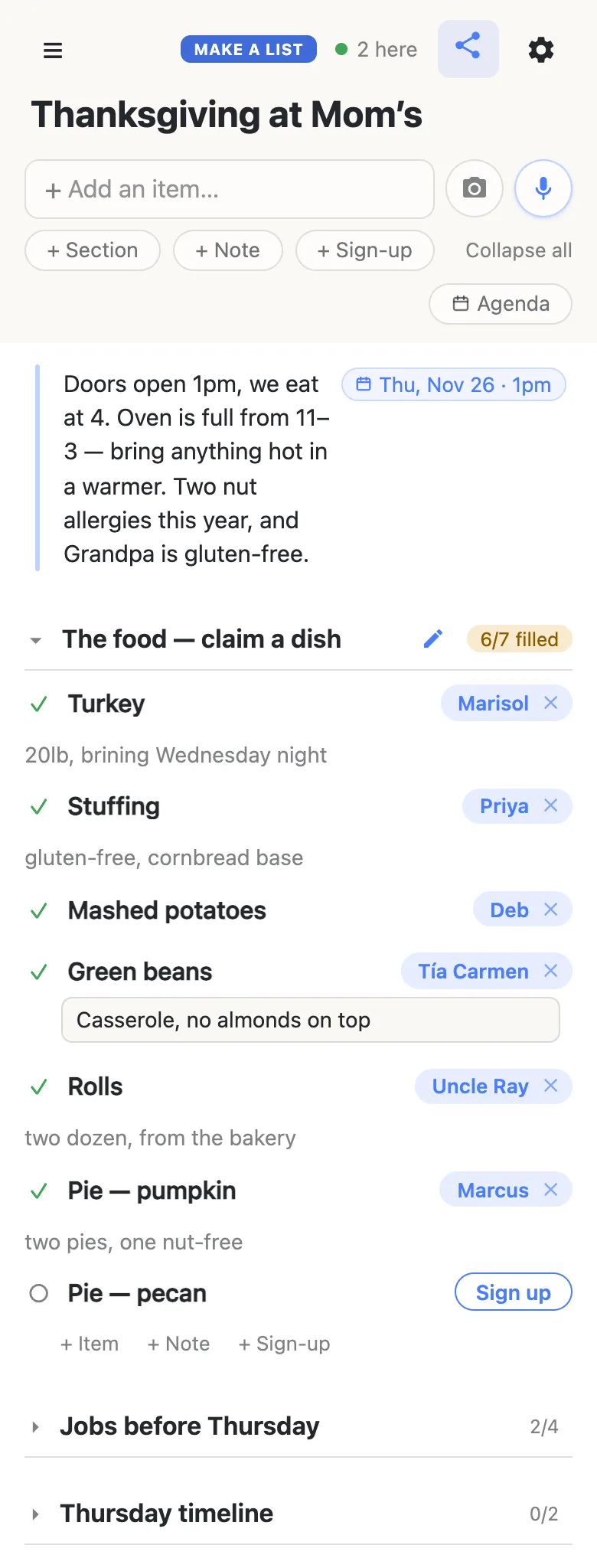
Claims appear on every open phone as they happen, so two cousins reading the sheet at the same moment can’t both take the green beans. The 2 here chip in the header is live presence — tap it for the names.
It’s a name on a sheet, exactly like a clipboard on the kitchen counter, which makes it easy to fix: tap a name chip to hand the dish to somebody else (people sign up their spouses constantly), or tap the small × to clear a claim and put it back in the open pile. Clearing your own is instant; clearing somebody else’s asks you to confirm first, because their note goes with it.
The jobs nobody signs up for
Under the food, a plain checklist section carries the errands. These are items, not sign-ups — you don’t want a name on “find the good tablecloth”, you want it ticked. Completing one asks you to confirm, and the row stays visible with a line through it rather than vanishing, so on Wednesday night the list still shows what’s been handled.
Anything with a deadline can carry a date. Type a row like Order the turkey Nov 14 and a small chip offers Sat, Nov 14; tap it and the date pins to the row’s right edge. Or type @ at the start of a word and a small calendar opens — Today and Tomorrow are one tap, and a time can go with the date. Nothing gets a date unless a person chose it.
Thursday, hour by hour
The last section is the one that usually only exists in the host’s head. A note holds the shape of the day — 6am turkey in · 11am oven handoff · 3:30 carve and rest · 4pm eat — and the few things somebody else can do get their own dated rows underneath it.
Once anything on the list has a date, an Agenda button appears under the add box. It regroups the same rows under Today / Tomorrow / the days ahead, timed rows first, with everything undated parked at the bottom — the same sheet read as a schedule rather than as a plan. The gear menu also offers a Calendar feed: a subscribe link that drops the dated rows into whatever calendar app you already use, so “set the table, 2pm” turns up where you’d look for it anyway.
If it’s the whole extended family, or the church hall
Sending it to the whole extended family, or the church hall? You may want people to claim dishes without rewriting the sheet.
That’s what an owned list is for. You keep the sheet and choose what visitors may do with it — leave signing up and claim notes switched on, turn adding, editing and deleting off, and it becomes fill-in-only. Nothing changes for the people signing up: same link, still no account, still one tap. You can add your co-host as an admin by email so you aren’t the only one who can fix a typo, and claim a readable address so the sheet you post next November isn’t a string of random characters.
See what anonylist pro does Only the host has an account. Everyone else still just opens the link.
Next November
The sheet you spent an hour building is worth keeping. From the gear menu, Export writes the whole thing to a file — sections, rows and all — which is plain, readable JSON you can edit over the summer. Next year, import it into a fresh list and you start from last year’s structure with none of last year’s claims.
If you’d rather keep the same link, import can overwrite instead of appending: it replaces every row on the list, for everyone, with the imported ones — a clean reset for a sheet people have bookmarked. Export first if you want to keep this year’s record.
Two shortcuts worth knowing when you’re building the thing in the first place. If the plan started on paper — the back of an envelope on the fridge, which is where a lot of these start — the camera button beside the add box photographs it and reads the rows back to you, with headings on the page becoming sections; nothing is added until you’ve ticked through what it found. And the microphone next to it takes plain instructions: add sign-ups for turkey, stuffing, two pies and ice is one sentence instead of five taps.
Keep the sheet running smoothly
- Keep it to what it’s for. Dishes, chores and what time dinner is — the things the whole family should be able to read.
- Fold, don’t delete. Clear a claim rather than deleting the sign-up it sat on, so the dish stays on the sheet for somebody else.
- Keep the link handy. Text yourself the link the day you make it — your phone also keeps it in the ☰ drawer — and export a copy from the gear menu (Export & import) whenever you want a file of it.
Running more of the season off lists? The angel tree sign-up works the same way for a church or office giving tree, and the Christmas gift list you share with your spouse keeps December’s shopping on one link.
Questions
- How do I stop three people bringing the same dish?
- Write the dishes out as sign-up rows rather than as a list of suggestions. A sign-up is a named need with a space for exactly one name, so “Green beans” is either taken or it is open, and everyone opening the link sees which. Duplicates happen when the plan lives in a group chat where two people can answer the same message a minute apart without seeing each other; a sheet everybody is looking at removes that gap.
- When should I send the Thanksgiving potluck sign-up sheet?
- About three weeks ahead. For Thursday, November 26, 2026, that means the first weekend of November: early enough that relatives claim a dish before anyone shops, and close enough that it is still on their minds. Look again the weekend before Thanksgiving — any dish without a name is the one to ask about by name in the family chat, and whatever is still open on Tuesday is your shopping list.
- Do I need to know who’s coming before I make the sheet?
- No. There is nobody to invite and nothing to import — you make the list, and whoever ends up with the link can use it. That means you can send it to the family thread before the guest list is settled, and a cousin who gets added in November opens the same link and claims a dish without an account, an email address or an app.
- Where do the allergies and the oven schedule go?
- In a note row. Notes are long-text blocks rather than checkboxes, so the two nut allergies, the gluten-free grandparent and the “oven is full from 11 to 3, bring hot dishes in a warmer” instruction sit right on the sheet. Put one at the very top, above the dishes, and people read it on their way to claiming something — which is the one moment they are paying attention.
- Can I use the same sheet again next Thanksgiving?
- Yes, and there are two ways. Export the sheet to a file from the gear menu this year, then import it into a fresh list next year — the file is plain JSON you can edit in between. Or reuse the same link and use import’s overwrite option, which replaces every row on the list for everyone, so last year’s claims are gone and the structure stays. Overwrite deletes rows permanently and there is no undo for it, so export first if last year’s record matters to you.
Opens instantly. No account, no email.