Share a Christmas gift list with your spouse
Last updated September 21, 2026
Two people shopping for the same eleven people is a coordination problem wearing a Santa hat. You buy your mother the slippers on your lunch break. He buys your mother the slippers on the way home from work. Meanwhile nobody has bought the one thing your nephew actually asked for, because you both assumed the other one had.
The usual fix is a screenshot of somebody’s notes app, texted over at 9pm and out of date by 9:15. What you want instead is one list that is the same list on both phones — so that the moment one of you orders something, the other one can see it.
That is what a shared anonylist list is. It lives at a link. You send the link once, and from then on you are both looking at the same thing, live. Neither of you makes an account, and there is nothing to install on either phone.
Opens instantly. No account, no email — for you or for them.
A section per person, an item per gift
Tap the title and name it — “Christmas 2026” does fine. Then use the + Section pill under the add box to make a heading for each person you are buying for: your mother, his parents, each kid, the neighbours. Under every heading is a quiet + Item link; tap it, type a gift, press Enter, and it opens a fresh row underneath so you can empty your head in one go.
Beside each heading sits a counter — 1/3, 2/3 — so the state of December is legible from the top of the screen without opening anything. Sections also move as a block if you drag one, and folding one shut is per-device, so tidying your own view never rearranges his.
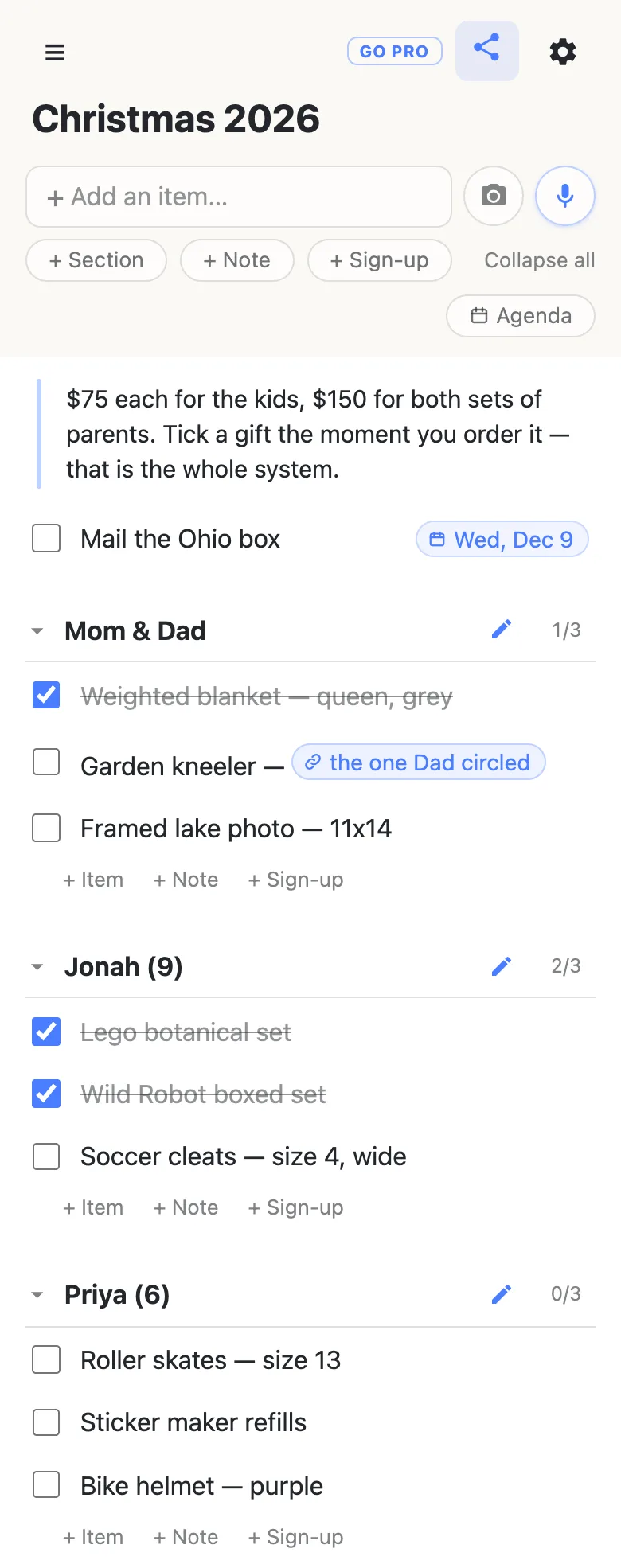
Anything that is not a gift goes in a note — the block at the top of the list above. Budgets, his mother’s new address, the sizes you keep forgetting. Notes sit in the flow like rows but hold paragraphs, and they are the right home for the standing rules of the operation.
The tick is the whole system
Check the box when you order it, not when it turns up. That single habit is what stops the duplicate, because the other person’s phone shows the strike-through a second later, wherever they are standing.
The first time you check something off, the list asks: “Check off Weighted blanket — queen, grey?”, with a note that checked items can’t be edited until they’re unchecked. That is not the app being fussy about a tick — it’s warning you that completing a row freezes its text for everyone, so the line you both rely on can’t be quietly rewritten afterwards. Unchecking never asks, and it hands the row straight back to editing.
Checked gifts stay where they are, with a line through them, instead of vanishing. That is deliberate: by the 20th of December the struck-out half of the list is the useful half — it is the record of what you have actually bought, which is exactly what you need when you are trying to work out whether your father-in-law has enough to open.
Both phones, the same second
There is nothing to refresh and nothing to re-send. When you are both in the list, a chip in the header says 2 here, and the row somebody is typing on wears their name while they type — so you can watch him add the cleats rather than being told about them later.
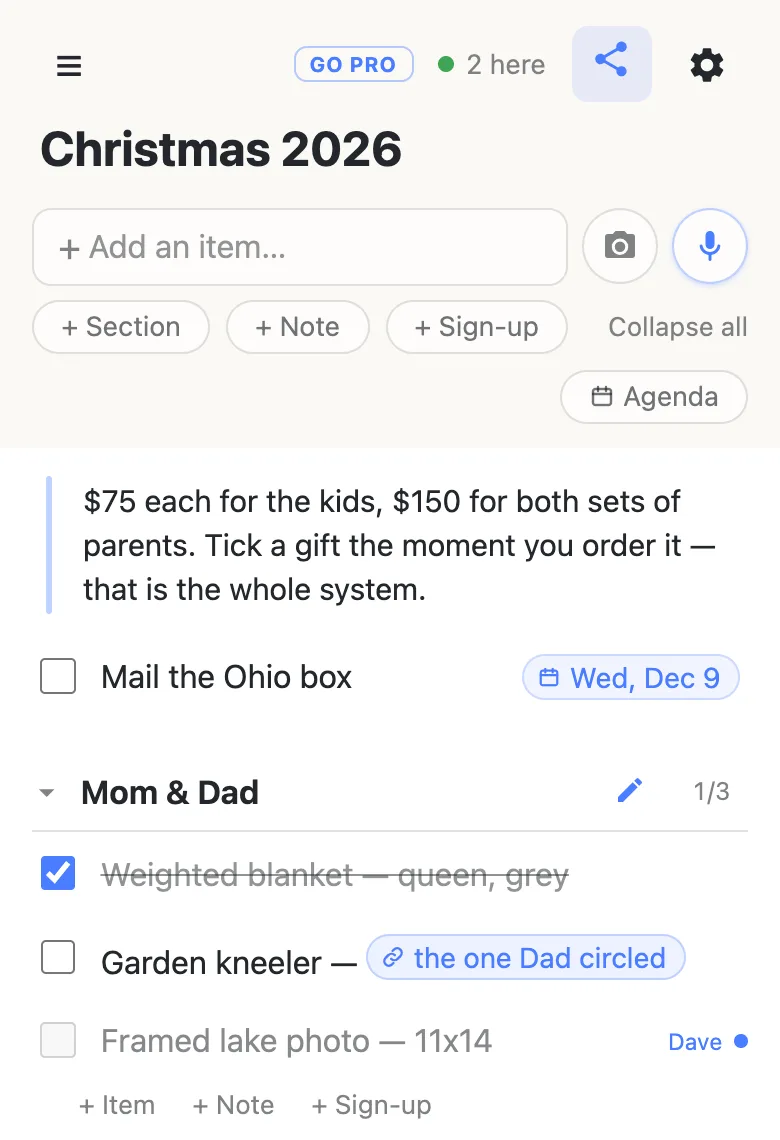
Names are whatever each device calls itself — set once in the drawer, kept on the phone, not an account. And because every change lands over the ordinary web, a bad signal in a shop basement doesn’t lose anything: the list catches up when the phone does.
Paste the link to the actual thing
Half of Christmas shopping is a URL somebody sent you. Paste one into a row you are editing and the list offers to name it, so the row reads “Garden kneeler — the one Dad circled” rather than sixty characters of tracking parameters. Tap the row once to select it, then tap the chip, and it opens in a new tab — the two-step is there so a stray thumb on a moving list never launches a shop.
Links keep working under the strike-through, which matters more than it sounds: the “where did I order that from” question arrives in January, when the row has been checked off for weeks.
Put the cutoffs on it
Shipping deadlines are the other half of December. Type a date into a row — “Dec 9”, “next Friday” — and the list offers a chip for it rather than attaching anything behind your back; tap the offer and the date pins itself to the right-hand end of the row. Typing @ at the start of a word opens a small calendar instead, for when you’d rather point at it.
Once anything is dated, an Agenda toggle appears above the list and regroups the whole thing by day — Today, Tomorrow, then the dates, with everything undated parked at the bottom. It is the same rows, read the other way round, and it is how you find out on the 8th that the Ohio box goes tomorrow. Dates on a shared list covers the whole thing.
Who else can see it — the honest part
The link is the key. There are no accounts here, so anyone holding the URL can open the list and change it, and the list has no way to tell one of them from another. For a gift list between two people that is mostly a feature: it is why your husband was reading it four seconds after you sent it, on a phone you have never had to set anything up on.
But it means the obvious things are true. Send the link in the thread that is only the two of you, not the family group chat. Any device that has opened the list keeps it in its drawer, so if the shared tablet on the coffee table has been on the list, use Forget this list in that drawer to take it off. And a nine-year-old who gets the link gets the list.
The gear menu can put a password on it, which is worth knowing exactly what it does: it is a gate for new visitors. Anyone already inside stays inside, anyone inside can remove it, and it changes nothing about the fact that the URL travels. It helps if a link has leaked somewhere you can’t take it back from; it is not a promise about who has seen the list.
Lists aren’t indexed by search engines and the addresses are random, so nobody stumbles onto yours. Still: treat the link like the key to the drawer where the presents are.
When more than two of you are shopping
Sometimes the list isn’t a couple — it is four siblings dividing up what to get one set of parents, or a group of cousins covering a grandmother. Then the useful question stops being “is it bought” and becomes “who is getting it”, and the row type changes with it: a sign-up row is a need with a name on it, claimed in one tap, with room for a note underneath (“ordering Tuesday, arrives the 14th”).
Worth knowing before you pick: a sign-up row has no checkbox, because being claimed is its state. So a couple splitting the shopping usually wants plain items and the strike-through; a bigger group usually wants sign-up rows and the names. A list can hold both, but a single section reads best if it sticks to one.
Say it instead of typing it
Beside the add box are a microphone and a camera. The mic runs the assistant: “add roller skates size 13 and a bike helmet in purple under Priya” lands both rows in the right section, which is the difference between capturing an idea in the car park and losing it. The camera photographs the scrap of paper the whole thing started on and turns it into rows — and shows you what it read, to tick through, before a single one lands on the list you share.
Neither of them can delete anything. The assistant has no deletion tool at all, by design, so the worst a misheard sentence does is put a row somewhere odd.
In January
When it’s over, the gear menu’s Export & import writes the whole list — sections, rows, what was checked — to a JSON file you keep. That file is the answer to “what did we get his parents last year”, which is a question that will definitely be asked, and it imports straight into a fresh list next December if you’d rather start the next one from the old one.
You can also just keep the link: your drawer remembers every list this device has opened, and its “Manage lists” panel copies the whole set out as text to paste somewhere safe. Don’t bank on any list living forever, though — lists may be removed after long inactivity — so if you want this year on the record, export it.
And nothing about any of this is December-specific. The same list shape — a section per person, a tick when you order — runs a birthday, a wedding registry run, or the anniversary you’re both quietly planning to forget.
Questions
- Does my husband need an account or an app to see the list?
- No. He needs the link and a browser. Tapping it opens the list on whatever phone, tablet or laptop he already has — nothing to install, no email to confirm, no password to invent — and he can tick and type immediately. That is the trade anonylist makes: because there are no accounts, there is nothing for either of you to sign up for, and because there are no accounts, the link is the only thing between the list and anyone who gets hold of it. Send it in the thread that is just the two of you.
- Can our kids open the gift list if they find the link?
- Yes. Anyone holding the link can open the list and change it, because there is nobody for the list to check them against. In practice that means keeping the link out of the family group chat, and using “Forget this list” in the drawer on any shared tablet or laptop that has been on it. The gear menu’s password adds a gate for new visitors, which is useful if a link has escaped — but everyone already inside stays inside, and anyone inside can take the password off again, so it is a gate rather than a guarantee about who has already looked.
- What happens if we both check off the same gift at the same time?
- It ends up checked, which is what you both meant. The list’s rule is that the last change wins, and two people agreeing is not a conflict — the only cost is a moment where one of you sees the other’s tick land. Checking a row also freezes its text until it is unchecked, so a line you both rely on can’t be rewritten from under you. The genuinely awkward case would be two people retyping the same row in the same breath, and that is rarer than it sounds, because a row somebody is editing carries their name while they type.
- Can we keep this year’s list for next Christmas?
- Export it. The gear menu’s Export & import writes every section and row to a JSON file on your device, checked state included, and that file imports into a fresh list whenever you want it back — which makes next year’s list a starting point rather than a blank page. Keeping the link works too, since your drawer remembers the lists this device has opened, but don’t treat any list as permanent: lists may be removed after long inactivity, so the file is the copy that is actually yours.