A baby shower planning checklist you and your cohosts run from one link
Last updated September 15, 2026
A baby shower with cohosts has a particular failure mode. Three people are each holding a third of the plan, the group chat is where the thirds meet, and by the second week nobody can find the message where somebody said they’d do the cake. Two cakes are ordered, or none. Somebody buys prizes twice. The set-up time lives in a voice note.
A baby shower planning checklist that the cohosts share — one link, each duty with a name on it, everyone’s progress visible to everyone — fixes most of that on its own. Nobody installs anything, nobody makes an account, and the mom-to-be never has to see it. Free.
Opens instantly. No account, no email.
Give it the shape of the day
Start a list and name it — Nora’s baby shower. Add a note at the top (the + Note pill) for the things everyone keeps asking: the date and time, the address and which gate, and the cover story if it’s a surprise. A note is a long-text block with no checkbox, and it stays at the top where a new cohost reads it first.
Then add a section for each part of the job. Four covers nearly every shower: Guests & invites, Food & cake, Decor & games, and On the day. Each section gets quiet + Item + Note + Sign-up links at its end, so a cohost fills in their own part without scrolling through the rest.
Duties are sign-ups; jobs are checkboxes
The trick is to use two kinds of row and keep them straight. A job — send the invites, print the game cards, buy three small prizes — is an ordinary item with a checkbox. It belongs to the shower rather than a person, and whoever does it ticks it.
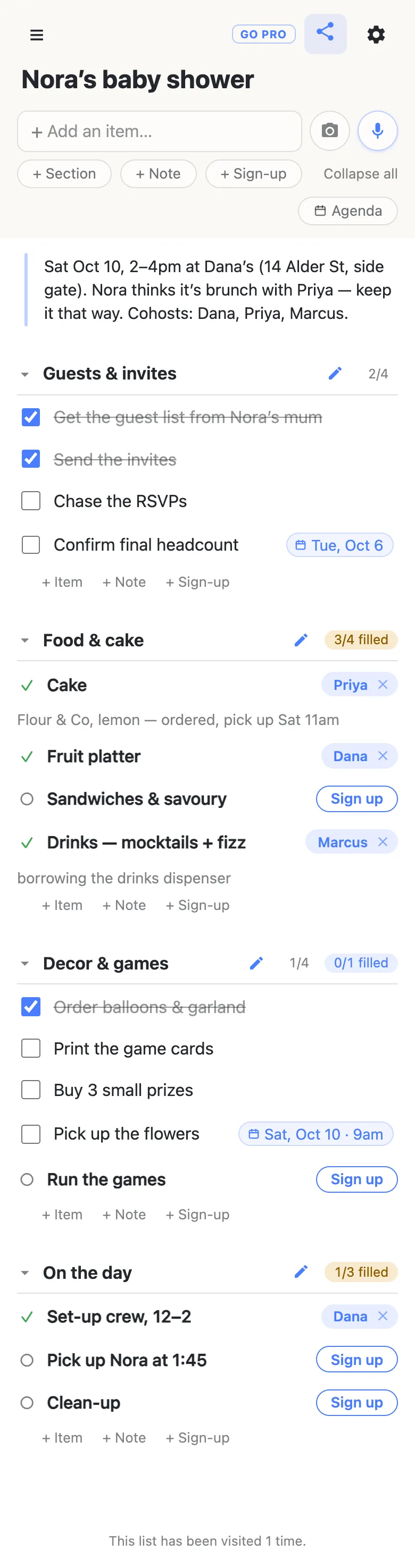
A duty — the cake, drinks, set-up crew, 12–2, pick up Nora at 1:45 — is a sign-up slot, from the + Sign-up pill. It has no checkbox; it’s a need with a space for a name, and one tap puts a cohost’s name on it. Then the sheet offers an optional note, which is where “Flour & Co, lemon — ordered, pick up Sat 11am” goes: on the row it describes, not in a reply to a reply.
Both kinds live in the same section, and the heading counts them separately — 1/4 for the jobs, 3/4 filled for the duties, amber until every duty has a name and green once it does. So a folded heading tells you which of two different things is wrong: behind on the prep, or short of a person.
Put dates on the rows that have one
Most rows don’t need a date. Two or three do: the day the final headcount is due, the morning the flowers get collected, the cake pickup. Type it as you’d say it — confirm final headcount Tuesday, pick up the flowers Saturday 9am — and the row offers to attach it as a date chip. Accept it and the chip pins to the row’s right edge, as in the picture above.
Once anything is dated, an Agenda pill appears in the header that regroups the same rows under Today, Tomorrow, and the days after — useful in the last week, when what matters is what’s due, not which section it sits in. There’s also a calendar feed on the gear icon that any cohost can subscribe to, so the pickup lands in their own calendar. For three dates that’s optional; for a shower with a venue, a caterer and a delivery it earns its place.
What you see while the others are on it
This is where a shared list beats a shared thread. When a cohost opens the link, the header shows 2 here — tap it for names. When she claims the sandwiches, the Sign up button on that row is replaced by her name on your screen at the same moment, so nobody else takes it. And while she’s typing in a row, her name and a small dot sit beside it and the row is held until she’s done. There’s nothing to refresh and nothing to scroll back for.
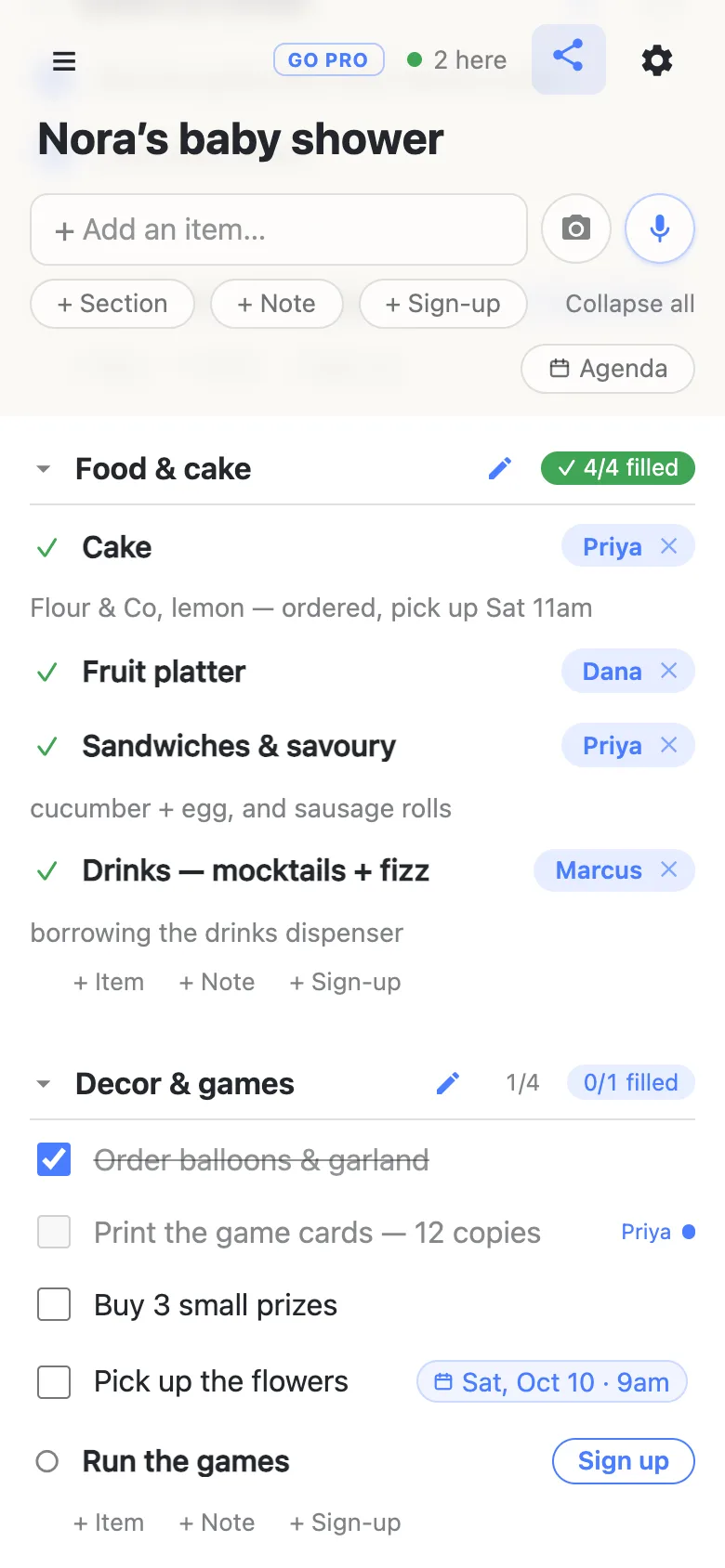
The names come from each cohost’s device: a display name, set once, that nothing verifies and no account sits under. People sign each other up all the time — tap a name chip to reassign a duty to somebody else — and clearing a claim that isn’t yours asks you to confirm first, so a stray tap can’t quietly un-cake the shower.
Keeping it a surprise
Be straight about what the link is: it’s the key. Anyone who has it can read the list and change it, there is no login to prove anybody is who they say, and forwarding it is the same as handing it over. For three cohosts that is exactly the right amount of ceremony — it’s why none of them had to make an account. It also means a surprise shower stays a surprise by where the link goes: the cohosts’ own thread, never the group the mom-to-be is in, never a shared family calendar she can open.
A password can be added from the gear icon, and it’s worth knowing what that is: a gate in front of the link, not privacy. Anyone given the password is through it, and the list still isn’t a place for her address list, anything medical, or a guest’s phone number. Those stay where they already live.
When the guest list gets a link too
Some showers put a second, guest-facing sheet out — bring a dish, or a diaper-raffle sign-up — and send that link to forty people rather than three. That changes the arithmetic. It only takes one guest tidying a section away, or renaming a row instead of claiming it, to undo an evening’s work the week of the shower.
That’s what owning the list is for. It stays yours and you choose what guests may do with it: leave signing up on and turn adding, editing, deleting and reordering off, and the sheet becomes fill-in-only for everyone but you and the cohosts you add as admins. Nothing changes for the guests — same link, still no account, still one tap.
See what anonylist pro does Only you need an account. Everyone else still just opens the link.
After the shower
Two habits for a list other people are on. Deleting a row is permanent once the five-second undo has passed, so drag finished rows into a Done section rather than removing them — the ticked jobs make a decent record of who did what, anyway. And there’s no account to get the list back from: your own phone remembers it in the ☰ drawer, but send yourself the link as well. Lists may be removed after long inactivity.
If a shower is a thing your group does every couple of years, export the list from the gear icon (Export & import) once the wrapping paper is cleared. The file carries the sections, the rows and the names, and next time you can import it into a fresh list and clear the claims — or tick Overwrite when you import into this same link, which replaces every row for everyone and asks you to confirm before it does, because that one can’t be undone.
Questions
- How do cohosts split up baby shower duties without a spreadsheet?
- Put each duty on the list as a sign-up slot — the + Sign-up pill — rather than as a task. A slot has no checkbox; it is a need with a space for a name, and a cohost claims it with one tap. “Cake”, “drinks”, “set-up crew, 12–2” are all slots. After claiming, the list offers an optional note, so “Cake — Priya” can carry “Flour & Co, lemon, pick up Sat 11am” right on the row. Nothing is assigned by anyone: each cohost picks what they will do, and the sheet shows the result to all of you at once.
- Can I tell which cohost is doing what, and what is still unclaimed?
- Yes — that is the whole point of the sheet. A claimed duty shows the cohost’s name on the row; an open one shows a Sign up button. Every section heading also carries a counter, “3/4 filled”, amber while something is still open and green with a tick once the section is covered, and it stays on the heading when the section is folded. The tasks with checkboxes count separately, as done-over-total. So a glance at the folded headings tells you whether food is covered and how far along the decor is.
- Will the mom-to-be be able to see the baby shower list?
- Only if somebody sends her the link — and that is the honest limit to remember. On anonylist the URL is the key: anyone who has it can read the list and change it, and there is no account underneath to say who is who. So a surprise shower stays a surprise by keeping the link in the cohosts’ own thread and out of any group she is in. A password can be added from the gear icon, but it is a gate in front of the link, not privacy: anyone given the password is in. Keep her address list and anything medical out of it altogether.
- What should a baby shower planning checklist include?
- Four sections cover almost every shower. Guests & invites: the guest list, invitations sent, RSVPs chased, and a final headcount with a date on it. Food & cake: the cake, one or two savoury things, fruit, and drinks — as slots, so each has a name. Decor & games: balloons or a garland, a banner, game cards printed, prizes bought, flowers, and someone to run the games. On the day: a set-up crew with a time, whoever collects the mom-to-be, and clean-up. A note at the top holds the venue, the time, and the cover story. Lists on anonylist are shared by link and free, so the same shape works whether there are two cohosts or five.
- What happens when two cohosts edit the same row at once?
- The list is live for everyone on it, so it rarely comes to that. A claim lands on every cohost’s screen the moment it is tapped, and the Sign up button on that row is gone before anyone else can press it. While one cohost is typing in a row, the others see her name and a small dot beside it and the row is held until she is done. The header shows how many people are on the list right now — tap it for their names — so you can see that a cohost is on the sheet before you both start on the same section.
Opens instantly. No account, no email.