A wedding weekend itinerary your guests can actually open
Last updated October 20, 2026
A wedding is one day. A wedding weekend is a welcome dinner, a shuttle, a ceremony somewhere with bad parking, a reception, and a brunch the next morning that half the guests have forgotten about — plus the aunt landing at 2pm who needs collecting.
Most of that gets written down once, in March, as a PDF attached to an email. By October the shuttle leaves fifteen minutes earlier, the brunch has moved to the hotel, and the version in everyone’s phone is wrong. Nobody re-reads an attachment, and the group chat where the correction went has scrolled past it four times over.
A wedding weekend itinerary works better as a link. One page, always current, that a guest opens on their phone in an airport queue — no app, no password, no “create an account to view this schedule”.
Opens instantly. No account, no email.
A section per part of the weekend
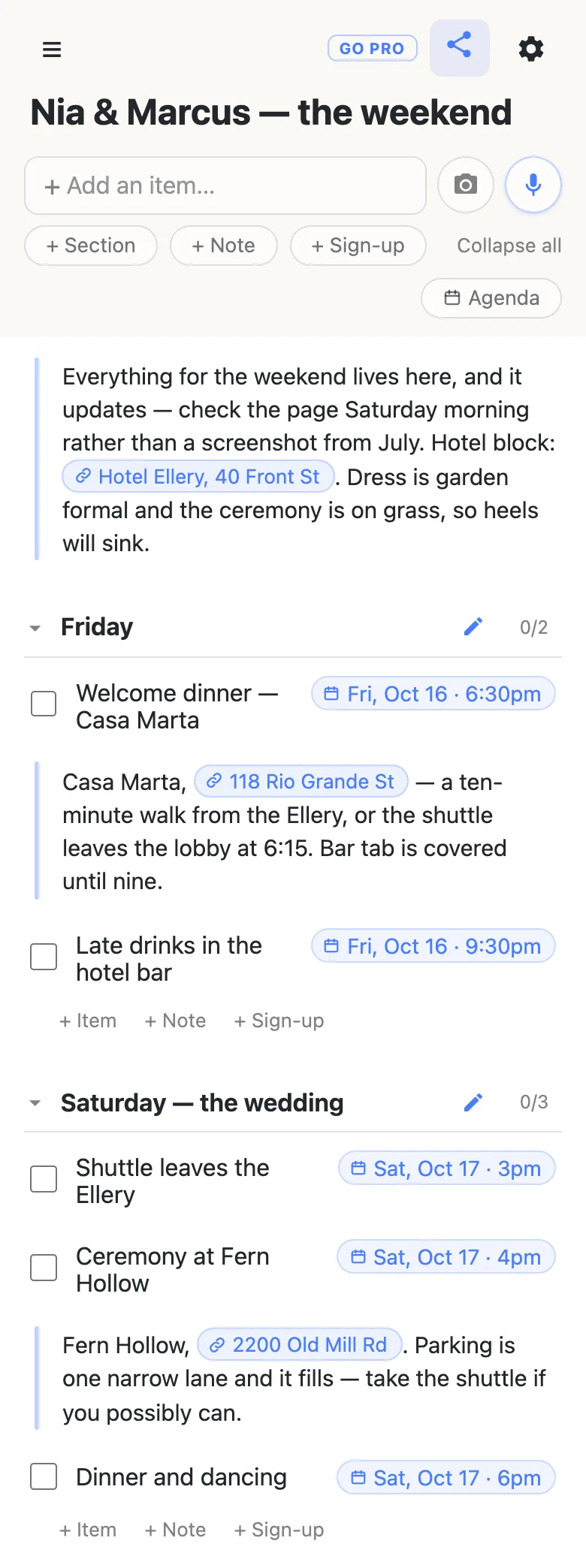
Give the list a section for each block of the weekend — Friday, Saturday — the wedding, Sunday — and put the actual events inside as rows. Times go on the rows themselves, so a guest reads the shape of a day in one scroll rather than in five paragraphs of prose.
The rows are not all the same kind, which is what lets the whole weekend live on one page:
- Items for the events — dinner, shuttle, ceremony, brunch. They carry a checkbox, which is mostly beside the point for a guest and quite useful on the day for whoever is running things.
- Notes for what a row title can’t hold — the venue address, the dress code, the fact that parking is one narrow lane. Paste a web address into a note and it becomes a tappable chip you can name, so “118 Rio Grande St” opens the guest’s maps app instead of making them copy a URL.
- Sign-ups for anything a guest can take on — the airport run, driving grandma, returning the chairs on Sunday. A sign-up is a need with a space for exactly one name, and being claimed is its state.
Times you type, not times you pick
Write the row the way you’d say it — Ceremony at Fern Hollow friday 4pm — and a small chip appears offering the date it thinks you meant. Tap it and the date pins to the row’s right edge; ignore it and your words stay ordinary text. Nothing gets a date unless a person confirmed it, so a guess is never silently wrong. If you’d rather choose, typing @ at the start of a word opens a small calendar right there.
Times are deliberately floating — 4pm means 4pm at the wedding, not 4pm converted into the timezone of whichever guest is looking. For a weekend where everyone ends up in the same place, that is the only reading that doesn’t cause an argument.
Once anything is dated, an Agenda toggle appears at the top of the list. It regroups the same rows under day headers, timed things first, with anything undated parked at the bottom — the same page read as an itinerary rather than as a plan. It is the view to send a guest to.
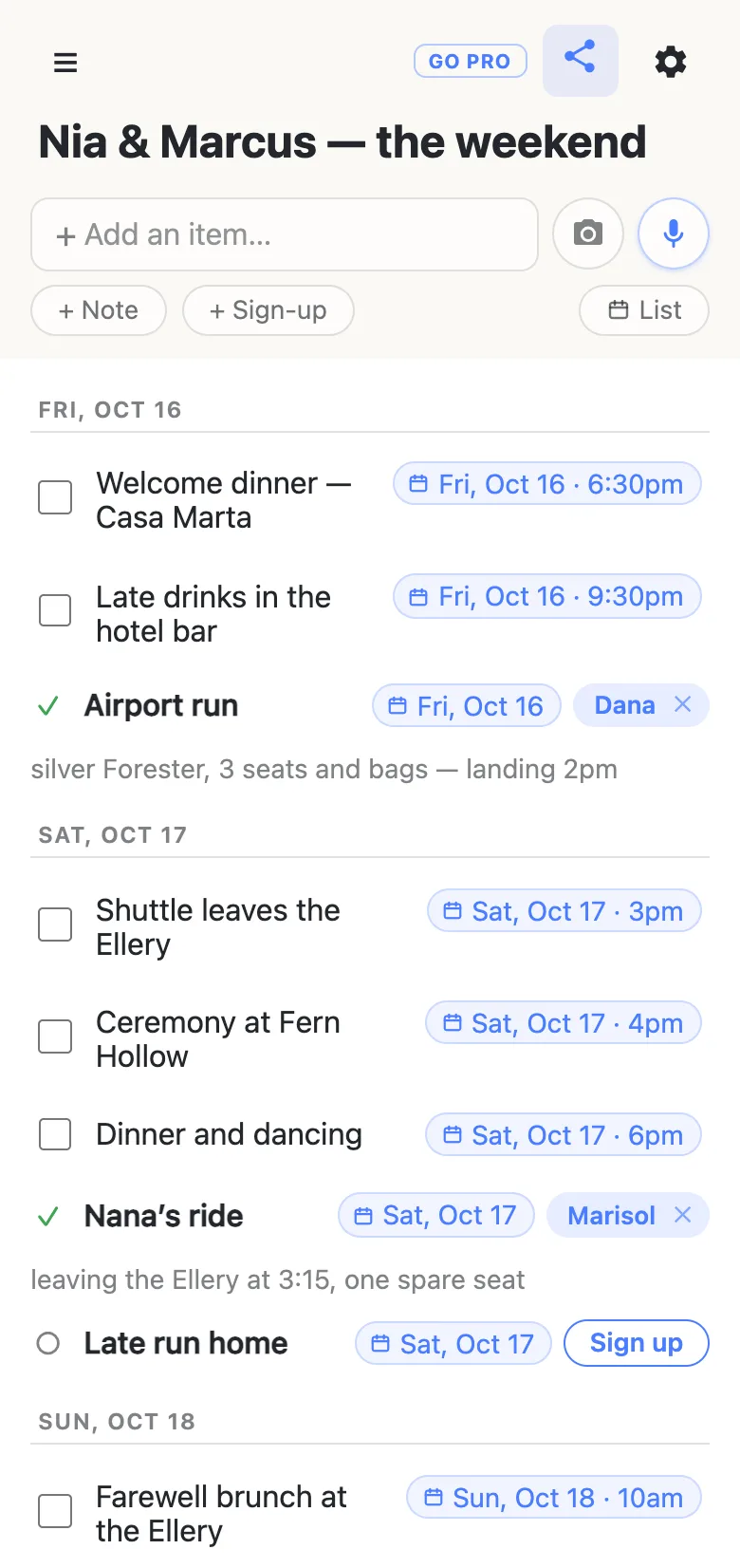
The gear menu also offers a Calendar feed — a subscribe link that drops the dated rows into whatever calendar app a guest already uses, so “shuttle, 3pm” turns up where they’d look for it anyway. Send it to the people who want it; the rest can just open the page.
Rides, and the jobs somebody has to do
Every wedding weekend has a handful of favours that get arranged badly: three separate texts about airport pickups, a cousin who assumed somebody else was collecting grandma, and the chairs that need returning while everyone is at brunch.
Write each one as a sign-up row. A guest taps Sign up, their name goes on it live for everyone else, and the app then offers a note — “silver Forester, 3 seats and bags”, “leaving the Ellery at 3:15, one spare seat” — attached to the thing it describes instead of four more messages in the chat. The section heading keeps a counter, 2/4 filled, so the gap is visible without reading a single row.
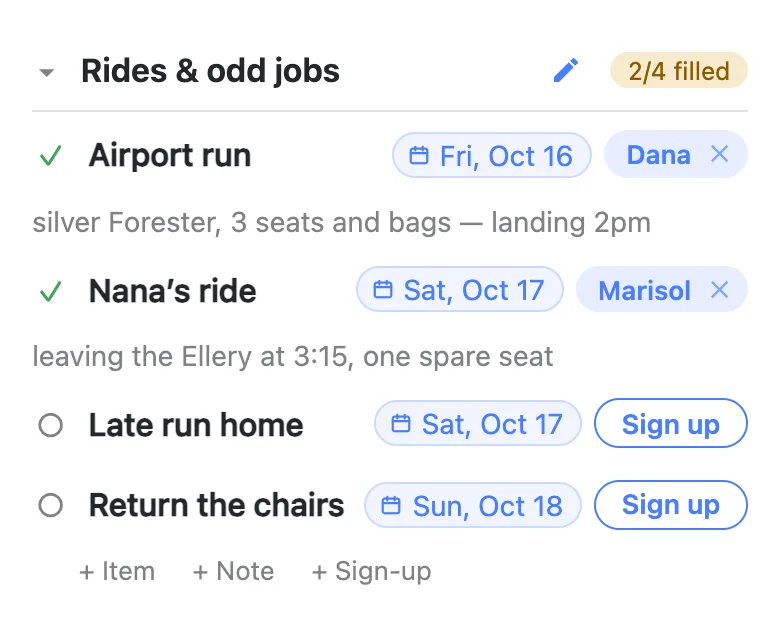
The name on a claim is whatever that device calls itself, set once and then forgotten. Nothing is verified — there are no accounts underneath any of it — so it works exactly like a clipboard by the door, with the same amount of trust. That also means anyone can fix anything: tap a name chip to hand a ride to somebody else (people sign up their spouses constantly), or tap the small × to clear a claim and put it back in the open pile. Clearing your own is instant; clearing somebody else’s asks you to confirm first, because their note goes with it.
The morning the shuttle moves
This is the part a PDF can’t do. Change the row, and every guest holding the link has the new time — the ones who opened it last night, the ones opening it in the taxi. There is nothing to resend and no version to be behind.
Because it is live, two people editing at the same moment is a normal thing rather than a problem: a row someone is typing in is held while they type, and their name shows against it. A small chip in the header — a dot and a count — says how many people are on the page right now, which on a Saturday morning is a slightly addictive thing to watch.
Say so in the note at the top — “this page updates, check it rather than a screenshot” — because the habit people bring from every other wedding is to screenshot the schedule and never look again.
If it’s going to a hundred and forty people
Putting the link on the wedding website, in front of every guest and their plus-one? You may want guests to sign up without rewriting the itinerary.
That’s what an owned list is for. The itinerary stays yours, and you choose what visitors may do with it — leave signing up and claim notes switched on, turn adding, editing and deleting off, and guests get a page they can read and sign up on but not rewrite. Nothing changes on their side: same link, still no account, still one tap. Add your partner and the planner as admins by email so you aren’t the only person who can fix a typo, and claim a readable address so the invitation carries something a person could retype.
See what anonylist pro does Only you need an account. Guests still just open the link.
Two lists beat one
Guests want the schedule, the addresses, and maybe a ride. The wedding party has a different list entirely — the rings, the vendor balances, who is settling the bar tab, who is collecting the arch on Sunday. Keeping them apart means nobody scrolls past jobs that aren’t theirs to find out what time the ceremony starts.
Make both, then put a named link to each in a note on the other. Tapping through is one tap in either direction, and the two pages stay honest about who they’re for.
Two shortcuts for building the thing in the first place. If the plan already exists on paper — the venue’s printed schedule, a page from a planning binder — the camera button beside the add box photographs it and reads the rows back to you, with headings on the page becoming sections; nothing is added until you’ve ticked through what it found. And the microphone next to it takes plain instructions: add sign-ups for the airport run, grandma’s ride and returning the chairs is one sentence rather than nine taps.
Keep the itinerary running smoothly
- Keep it to what it’s for. Shuttle times, venue addresses and who’s driving. Guest phone numbers, home addresses and vendor invoices belong in your own files.
- Fold, don’t delete. Clear a claim rather than deleting the row it sat on, so the job stays on the page for the next volunteer.
- Keep the link handy. Text yourself the link the day you make it — your phone also keeps it in the ☰ drawer — and export a copy from the gear menu (Export & import) whenever you want a file of it.
Questions
- What happens if a time changes after we’ve sent the itinerary out?
- Nothing, from your side — you change the row and everyone holding the link sees the new time. That is the difference between a link and a PDF: a PDF emailed in March is still saying 3pm in October, sitting in eighty inboxes with no way to correct it. A shared list is one page everybody is looking at, so moving the shuttle from 3:00 to 3:15 is one edit rather than a mass email people skim past. It is worth saying in a note at the top that the page updates, so guests check it on the day instead of trusting a screenshot they took in the summer.
- Does this replace the wedding website?
- No, and it is not trying to. A wedding website does invitations, RSVPs, the registry and the story of how you met — things that want a designed page and a guest list. This is the working half: what is happening, when, where, and who is driving. Plenty of couples use both and put the list’s link on the website’s schedule page, because the website is written once and the itinerary keeps moving until the morning of.
- Where do addresses, the dress code and parking go?
- In note rows. A note is a long-text block rather than a checkbox, so it holds the paragraph that a row title cannot: the venue address, the fact that parking is one narrow lane, the reminder that the ceremony is on grass. Paste a web address into a note and it becomes a tappable chip, and you can give it a name — so a guest reads “118 Rio Grande St” and taps straight through to their maps app instead of copying forty characters of URL. Put one note under each event’s heading, where somebody looking up the venue will already be looking.
- Should the wedding party and the guests share one link?
- Usually two lists work better than one. Guests want the schedule, the addresses and maybe a ride; the wedding party has a different list entirely — who has the rings, who is returning the chairs, who is settling the bar tab. Both are shared lists and either can point at the other with a named link, so nobody has to scroll past jobs that are not theirs to find out what time the ceremony starts.
- Can a guest change the itinerary by accident?
- The app is built to make accidents hard: a first tap on a row only selects it, editing takes a second tap, checking something off asks you to confirm, and deleting a row leaves about five seconds of undo. If the link is going to a hundred and forty people rather than a wedding party, an owned list lets you keep the itinerary yours and hand out a version guests can read and sign up on but not rewrite.
Opens instantly. No account, no email.