A free weekly family planner that’s just a shared list
Last updated August 20, 2026
Family planner apps mostly fail the same way: the plan lives wherever the app is, and the app is only on the phones that installed it, made an account, and stayed signed in. The alternative is smaller than an app — a shared list at one link. Everyone in the house opens the same URL, sees the same week, and edits it live. No accounts, nothing to install, free.
Opens instantly. No account, no email.
Type the week the way you’d text it
Open a list, call it “Family week”, and put the entries in as fast as you’d type them into the group chat: “Soccer practice friday 5pm”, “Dentist tomorrow 9:15”, “Library books back thursday”. As you type, a quiet chip under the box shows the date it understood — “friday 5pm” → Fri, Aug 21 · 5pm. Tap it and the date attaches, riding the row’s right edge as a chip; ignore it and your words stay plain text. Nothing is ever attached without that tap. (The full story of typed dates — formats, times, and why there’s no date picker — is in the dates guide.)
One tap turns the list into the week
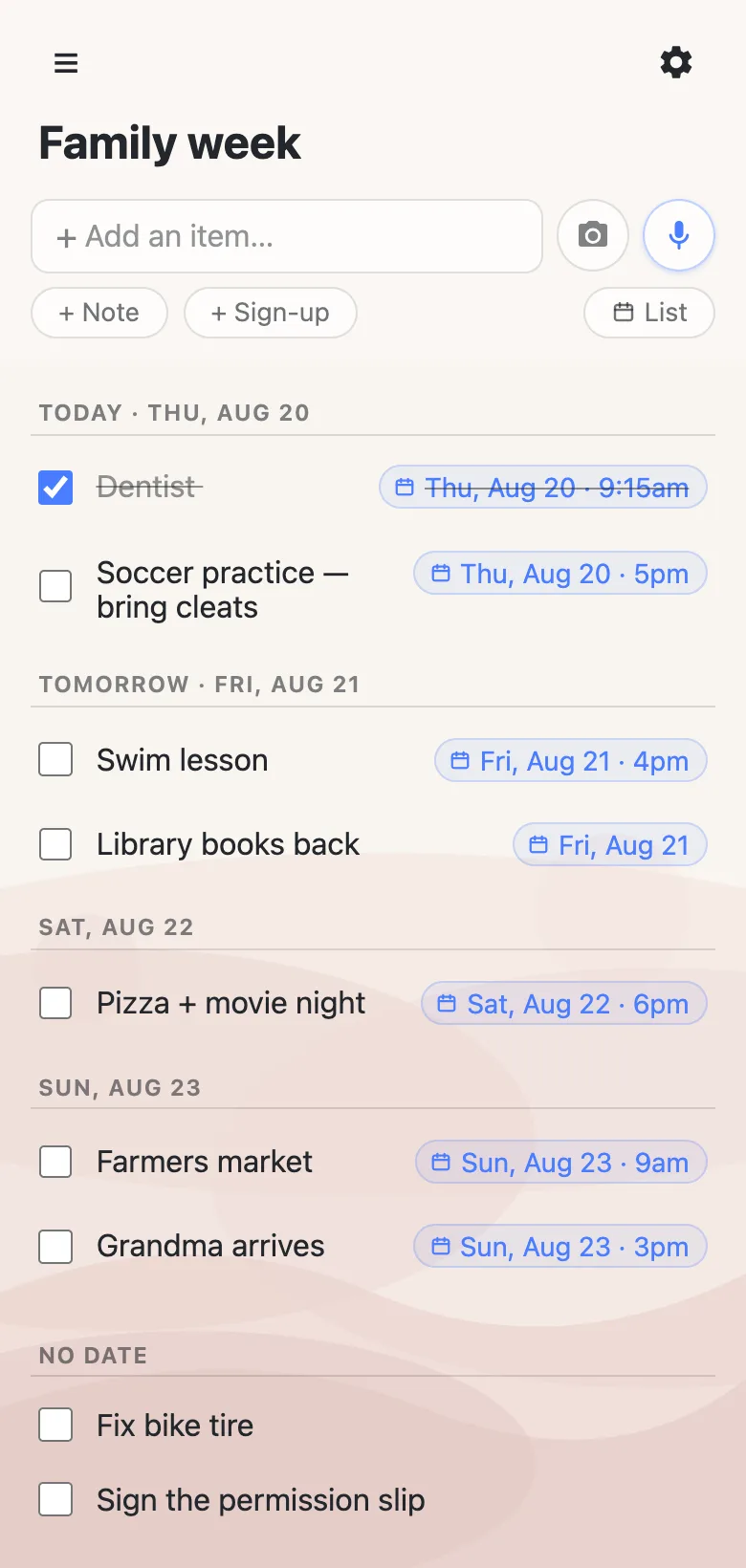
Once anything is dated, an Agenda button appears in the row of controls under the add box. Tap it and the same rows regroup by day: Today first, then Tomorrow, then each date ahead. Within a day, timed entries sort to the top in time order — the 9:15 dentist before the 5pm practice — and everything undated collects at the bottom under “No date”. Days already gone dim instead of disappearing. And these are the real rows, not a report: check things off, fix a typo, and everyone else’s view updates as you do.
Sections by person, agenda by day
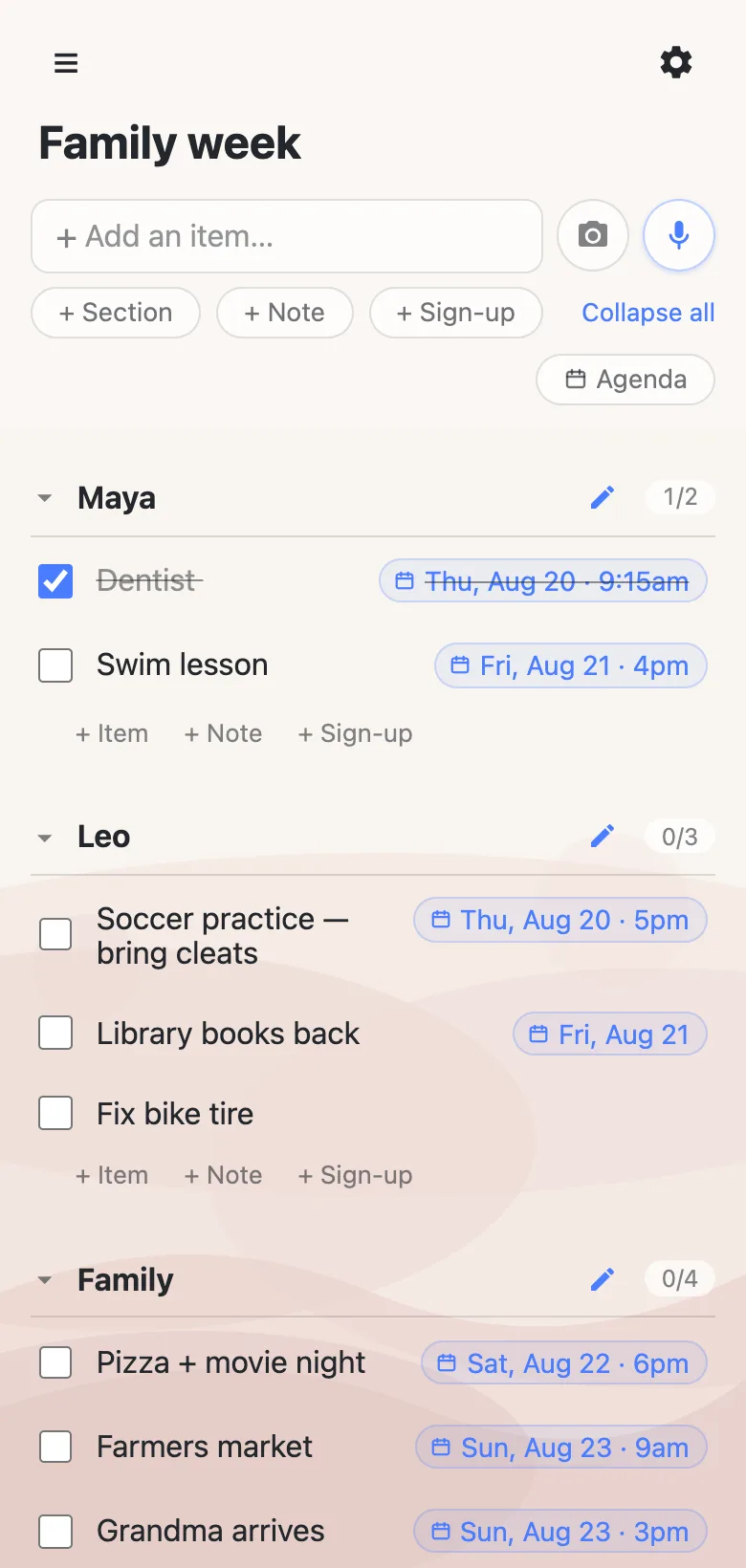
In list view, sections keep the week owned: one per kid, one for the household. The agenda deliberately ignores them — Saturday morning doesn’t care whose section the market run lives in — so the same week has two readings: by person when you’re planning it, by day when you’re living it. The toggle flips between them and changes nothing about the list itself.
The “No date” pile is half the planner
A family week is a schedule plus a backlog — things that have a time, and things that just have to happen. Type the backlog straight in without dates and it waits under “No date”: visible every time anyone opens the agenda, committed to no day. When “fix the bike tire” finally becomes “saturday”, open the row, type the day, tap the offer — and the row moves onto Saturday for everyone at once.
What this planner deliberately isn’t
It’s a list, not a calendar. It sends no notifications, has no repeating events, and a time is plain wall-clock time. If part of the family lives in their calendar, every list has a calendar feed (gear icon → Calendar feed) that Apple or Google Calendar can subscribe to — the dated rows appear there as events and follow along as the list changes. And because the planner is a shared link, it’s exactly as open as that sounds: anyone who has the URL can edit. That’s the right trade inside a household, and the wrong one for anything you’d call sensitive.
Questions
- Do the kids need their own accounts or phones set up?
- No. The planner is a link — drop it in the family group chat and it opens in any browser, on any phone, with no account and nothing to install. Add it to a home screen if you want an icon.
- Can it remind us before something starts?
- No — it’s a list, not a calendar, and it sends no notifications. If someone in the family lives by reminders, every list has a calendar feed (gear icon → Calendar feed) that Apple or Google Calendar can subscribe to, and the calendar’s own alerts take it from there.
- Can each family member have their own section?
- Yes. In list view, sections keep the week grouped by person — one per kid, one for the house. The agenda view deliberately ignores sections and regroups everything by day; the toggle flips between the two readings without changing the list.
- How do we plan the next week?
- The same list rolls forward: check things off as the week burns down, re-date whatever moved, and type the new week in. Days already past dim in the agenda rather than disappearing. Deleting a row is permanent after a 5-second undo, so many families let checked rows stand as the record.