A digital chore chart your kids can tap
Last updated September 11, 2026
Every house has had a go at the chore chart. The magnet board nobody moves the magnets on. The whiteboard that was accurate until Tuesday. The app that wanted a family account, a login per child and a subscription before anybody had swept anything. Writing the chart is never the hard part — getting it in front of the people doing the chores is.
On anonylist a chore chart is one link. You open it, type the chores, and send the link to whoever needs it: a kid’s phone, the family tablet propped on the counter, the other parent at work, the babysitter at the door. Everyone opens the same chart, ticks their own rows, and watches the rest of them tick themselves off live. It’s free, there’s nothing to install, and nobody makes an account — least of all the kids.
Opens instantly. No account, no email — yours or theirs.
A section per child, and the counter does the nagging
Tap + Section under the add box and name it after a child. Then use the quiet + Item link at the end of that section to type their chores — Enter starts the next one, so a child’s whole week goes in without your hands leaving the keyboard.
The bit that earns its keep is the counter on the heading. Each section counts its own rows — 2/4 — and turns green with a tick when everything under it is done. That’s the number a seven-year-old reads from across the kitchen, and it’s why the chart gets looked at when nobody is being asked to look at it.
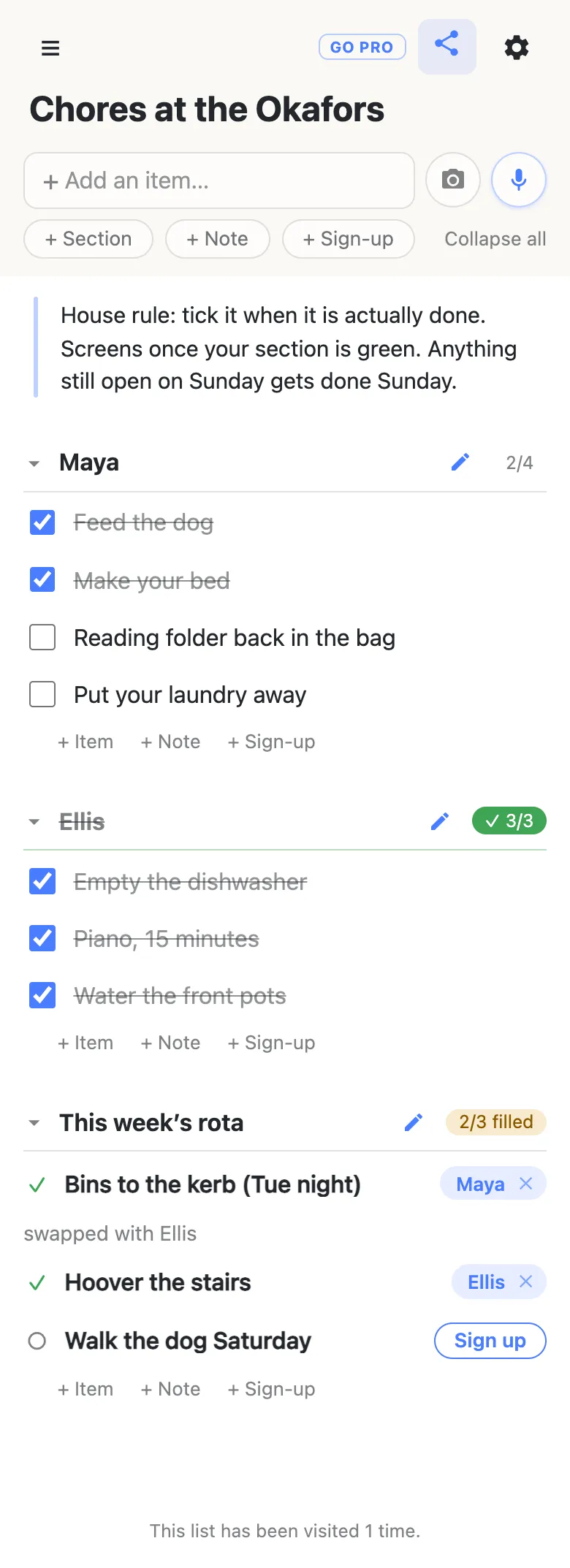
Sections aren’t only for names. Some houses split by room — Kitchen, Bathroom, Yard — and some by day. Whichever you pick, a section moves as one piece: drag the heading and its chores travel with it, so reshaping the chart in September doesn’t mean retyping it.
The standing rules go in a note at the top — the paragraph in the picture above. A note is a block of text rather than a checkbox, which makes it the right home for the things that are true every week: what counts as done, when screens happen, who to ask. Everyone reads it once at the top of the chart instead of hearing it from you on Thursday.
Ticking a chore is one tap, and it asks once
A child taps the checkbox and gets one small question: Check off “Reading folder back in the bag”?, with a line underneath explaining that checked items can’t be edited until they’re unchecked.
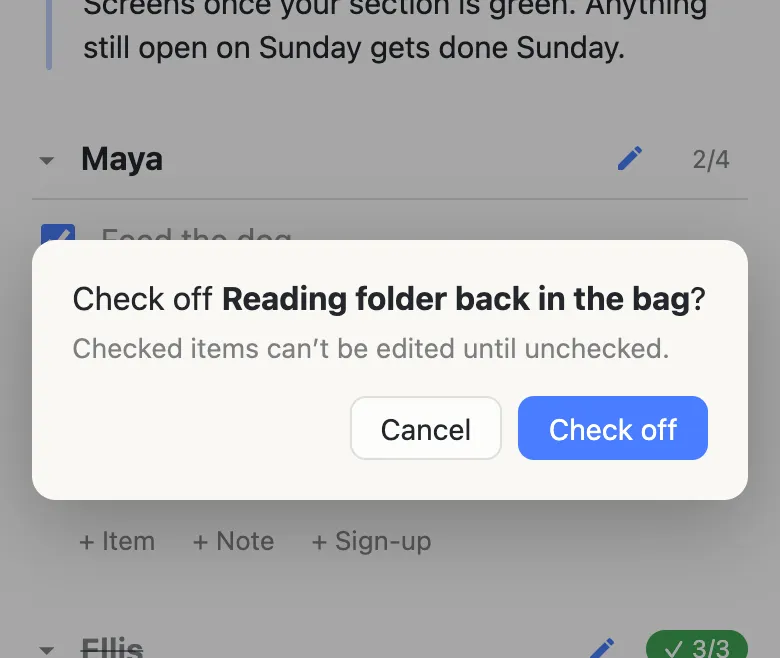
The question isn’t there to make anyone prove they did it. It guards the freeze: a ticked chore’s text can’t be edited by anybody, so “clean your room properly” can’t quietly become “tidy your room” after the fact. On a chart two people are looking at, that’s the difference between a record and an argument.
Unticking never asks. It’s instant, for anyone, which makes a wrong tap a one-second problem and makes the weekly reset fast. A ticked chore also stays exactly where it is, struck through rather than hidden, so Friday’s chart still shows the whole week rather than an empty screen that says nothing about what happened.
Sunday night, reset in place
There’s no “new week” button and nothing to copy. You run down the chart unticking, which nothing interrupts, and the chores keep their wording — the chart you spent twenty minutes getting right in August is the chart you use in March. The link never changes either, so nothing has to be re-sent to anyone, and a child who put it on their home screen is still looking at the live one.
Unticking is also the moment to change things, because an unticked row is editable again: reword the chore that never quite landed, drag one from Maya to Ellis because they’ve swapped, add the one you keep forgetting. And nothing on the chart ever removes itself — no row expires, no week rolls over on its own. What’s there is what somebody put there.
For the jobs that rotate: sign-up rows
Some chores don’t belong to anybody in particular — the bins, hoovering the stairs, walking the dog on Saturday. Those want the third row type: tap + Sign-up and you get a row with no checkbox, because the question isn’t whether it’s done, it’s whose it is this week.
Anybody opening the chart can tap Sign up, put a name on it, and add a short note — swapped with Ellis, doing it after football. The section counts those separately (2/3 filled), so the jobs still going begging are visible without reading a thing. Names can be changed by anyone, which is deliberate: parents sign kids up constantly. Clearing somebody else’s name asks first, because taking a job off a child who’d agreed to it is the mistake worth a second of friction. How sign-up rows work covers the row type in full.
No kid accounts, and an icon on the family tablet
Everything above happens in a browser. There’s no app, no age gate, no “create a password for your child”, and no email address collected from anyone — which matters more for a chore chart than for most things, because the people you most want using it are the people you’d least like handing over an email address.
If it’s going to live on the counter, give it an icon: on Android, Chrome offers to install the chart as its own app; on an iPhone or iPad, the share sheet’s Add to Home Screen does the same job. Either way it’s a shortcut to the same live link, not a copy of it.
Do keep the link somewhere you’ll find it again. The app remembers lists you’ve opened on that device in its drawer, and there’s no account to recover from if a phone is wiped — so paste it into the family chat once, where it’ll still be sitting when you need it.
What it deliberately doesn’t do
It doesn’t remind anybody. No notifications, no emails, no nagging — a chart with no accounts has nowhere to send them, which is exactly why nobody had to sign up. If somebody in the house runs on alerts, every list has a calendar feed their own calendar app can subscribe to, and the alerting stays their calendar’s job.
It doesn’t do points, stars, streaks or allowance maths. It’s the fridge chart, shared and live; whatever deal you have with your kids stays yours to run.
And it doesn’t record who ticked what. Without accounts there’s nobody to attribute a tap to, so the chart says what’s done, not who did it — which is why the names sit on the sections and the rota rows, where a person can read them.
When the chart needs one grown-up in charge
For a family, the open version is the right one: everybody holding the link can tick, add, reword and reorder, the same way everybody in the kitchen can pick up the pen. The chart is small, the people on it are in your house, and an unticked row is never more than a tap from being right again.
It’s worth thinking about when the same chart goes further out — a shared house of six, a co-parenting handover between two homes, a club or a troop where the link ends up in a chat you don’t run. There the question stops being “can everyone use it” and becomes “can anyone rewrite it”. That’s what anonylist pro is for: a chart you own, where visitors can tick chores off but can’t edit or delete them, plus a readable address you can write on the fridge. Same link for everybody, same one-tap ticking — you just get the say over what else can happen to it. How the permission switches work goes through them one by one.
Questions
- Can I see which child ticked something off?
- No. There are no accounts anywhere in the app, so nothing records who tapped a checkbox — the chart tells you what is done, not who did it. That is why the names live on the sections and on the rota rows: “Maya” as a heading, or a name on a sign-up row, is how a chart says whose job something was. While somebody has the chart open you will see their device name in the presence roster and beside a row they are editing, but that is who is here, not who ticked.
- How do we start a fresh week?
- Untick everything. Unticking never asks for confirmation — that is deliberate, so a reset is a fast run down the list — and the rows keep their wording, so nothing is retyped and the link stays the same one everybody already has. Unticking also unfreezes a row, which is the moment to reword a chore that was not quite right, drag it to a different child, or add the one you forgot.
- Does it hand out points, stars or rewards?
- No, and it is not going to. There is no scoring, no streaks, no badges and no pocket-money maths — it is the chart on the fridge, shared and live, and the deal you have with your kids stays yours to run. What it does give you is the state of the week at a glance: each section counts its own chores, and turns green when they are all done.
- What stops a small child ticking everything at once?
- Ticking a chore asks first — a small dialog naming the row, because checking something off freezes its text for everyone until it is unchecked. That is enough to stop a stray tap, and nothing stops a determined six-year-old, which is the honest answer. Unticking is free and instant, so putting the chart back is quicker than wrecking it. If you want a chart that visitors can tick but not rewrite or delete, that is what an owned list’s permission switches are for.
- Can a babysitter or a grandparent use the same chart?
- Yes — send them the link. It opens in whatever browser is on their phone, shows the same chart, and ticks through the evening live, with no invite to accept and no app to install. Treat the link the way you would treat a key: on a free list, anybody holding it can change anything on the chart, which is exactly what makes it one tap for the people you meant to send it to.