A church potluck sign-up sheet that staffs the crews too
Last updated October 20, 2026
Every fellowship hall runs on the same two lists. One is the food — the clipboard by the door, the sheet in the bulletin, the reply-all thread that produced five pans of scalloped potatoes and no vegetable. The other is quieter and more urgent: who is setting the tables up at four, and who is still there at eight doing the dishes.
They are the same event, and they fail together. A hall full of food nobody can serve because the tables are still stacked is a Sunday everybody remembers. So put both on one link: a section per course, a section per crew, and a count on every heading saying what is still open. Nothing to install, nobody makes an account, free.
Opens instantly. No account, no email.
Start with the hall, not the food
Make a list and name it after the date — Fellowship potluck — Oct 12. Then, before anything else, put a note at the top: the + Note pill under the add box gives you a block of long text rather than a row with a checkbox, and it is the right home for the things everyone asks in the group chat anyway. When the doors open, when you eat, how many ovens are free, whether anything can be plugged in, and the reminder to bring a serving spoon.
It saves you answering the same question eleven times, and it sits above every row so nobody has to scroll for it.
Dishes are sign-up slots, not checkboxes
For the food, use the + Sign-up pill rather than the ordinary one. A sign-up slot has no checkbox at all: it is a need with a space beside it for a name, and being claimed is its state. “Vegetarian main” is either spoken for or it isn’t, which is the only question a member opening the link is actually asking.
Write the needs rather than the dishes — Main dish, Soup — large pot, Fruit tray, Ice — 2 bags — and let people fill in what they’re bringing. Tapping Sign up puts their name on the row and then offers an optional note, prompted with “What are you bringing? (optional)”. That is where “No nuts, dressing on the side” and “Bringing it warm, needs a table near an outlet” belong: attached to the row they describe instead of three replies deep in a thread.
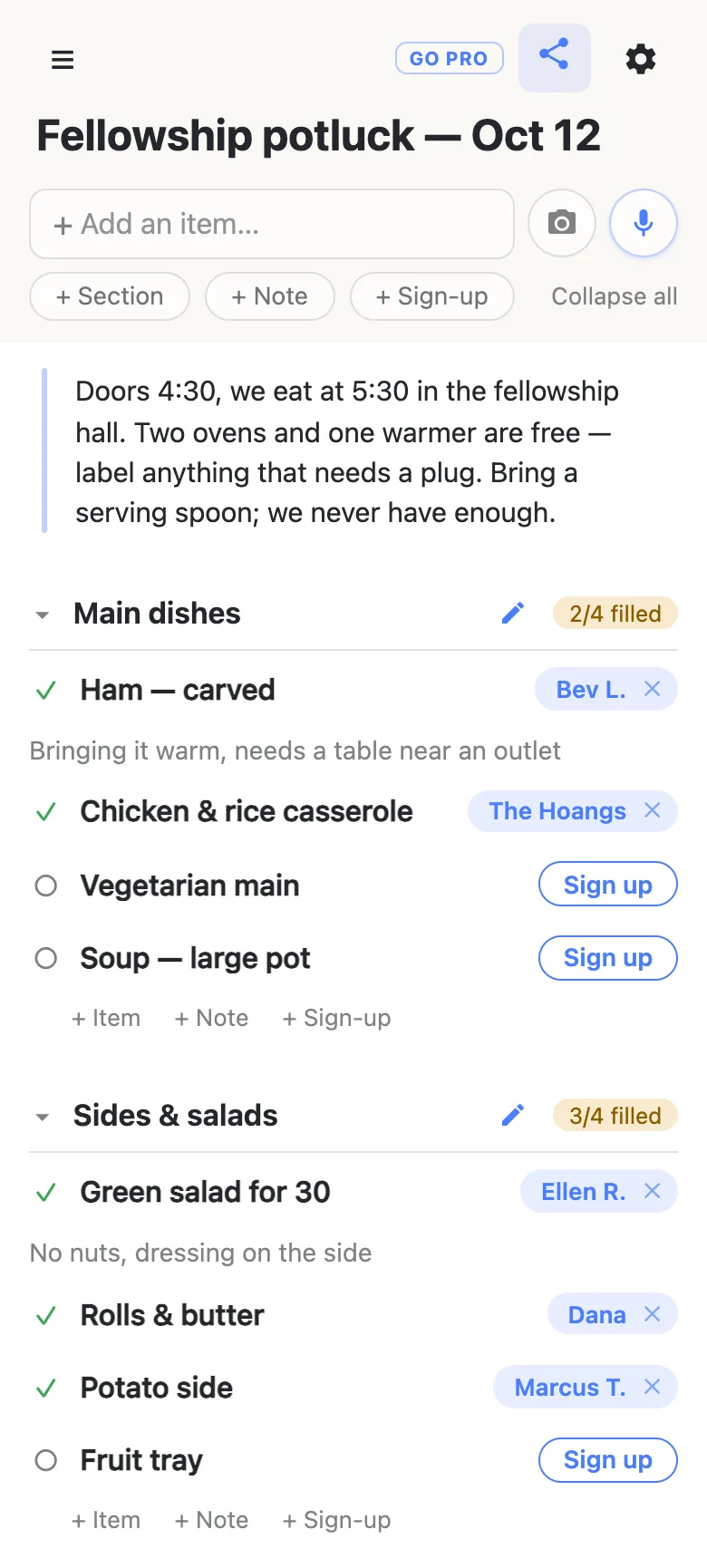
Group the food with sections: Main dishes, Sides & salads, Desserts & drinks. Each heading keeps its own count — 2/4 filled — so one glance says the mains are short and the salads are covered. Each section also has quiet + Item + Note + Sign-up links at its end, so somebody who notices there’s no gluten-free option can add the row themselves instead of texting you to do it.
The crews go on the same sheet
Add two more sections — Setup crew — 4:00 and Cleanup crew — 7:00 — and fill them with slots the same way: Tables & chairs, Drinks table & ice, Coffee urns on, Wipe & stack tables, Kitchen & dishes, Trash out, lock up. Naming the jobs rather than asking for “helpers” is most of the work: “trash out, lock up” is a thing somebody can picture themselves doing on the way home, and “can anyone help clean up?” is not.
Because the crews are sections like any other, they get the same counter. Tap the food sections shut — or Collapse all in the header — and the sheet becomes the short column a coordinator actually wants on Saturday night: five headings, five numbers, and the gaps between them.
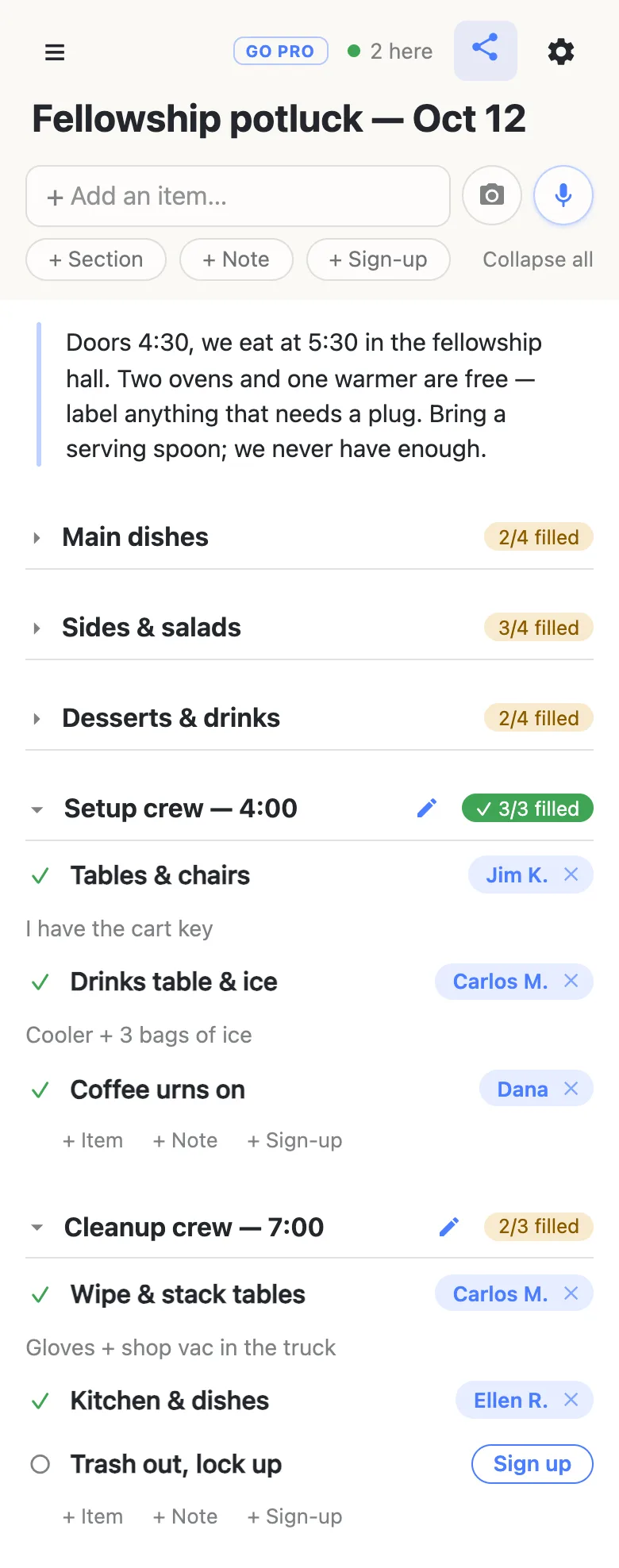
Folding is per device. Tidying your own view moves nothing on anybody else’s phone.
What happens when you send it out
Share the link: the church text thread, the WhatsApp group, the weekly email, a QR code on the bulletin insert. There is nothing to install and nothing to join — the sheet opens, and next to anything still open there is a Sign up button.
The name on a row is whatever that phone calls itself, set once and never again. Nothing is verified and there are no accounts underneath it, which is the point: this is a congregation, not a database. It also means signing somebody else up is normal rather than a workaround — tap a name chip to change it, and if you clear a claim that isn’t yours the sheet asks first, because their note goes with it.
Claims land on every open phone as they happen, so two people reading the sheet at the same moment don’t both take the ham. That 2 here chip in the header is live presence — tap it for the names — and it matters most in the twenty minutes after the announcement, which is when half the sign-ups arrive.
At the foot of every sheet is a line saying how many times it has been visited. It’s a blunt number, as of when the page loaded, but it is the honest answer to “did anybody open the link in the bulletin?” — worth knowing before you print another two hundred.
When the whole congregation has the link
Putting the link in a church-wide email? You may want members to sign up without rewriting the sheet.
That is what owning the list is for. The sheet stays yours and you choose what visitors may do with it: leave signing up switched on, turn adding, editing, deleting and reordering off, and it becomes fill-in-only for everyone but you. Nothing changes for members — same link, still no account, still one tap. You can add the deacon running setup, or next month’s coordinator, as an admin by email so they can fix their own section, and claim a readable address so the bulletin carries something a person could retype.
See what anonylist pro does Only you need an account. Everyone else still just opens the link.
Next month’s potluck
A monthly potluck is the case for keeping one link rather than minting a new one — it’s the address the congregation already has saved. Before you reset it, export the sheet (gear → Export & import): the file carries the rows, the sections and the names on them, and it’s the only copy that doesn’t depend on us.
Then import it back with Overwrite ticked, and the sheet returns to its empty shape on the same address. That one clears every row for everyone, so it asks you to confirm and the button then reads “Replace with N rows” instead of pretending to be safe. If you would rather keep the history, start a fresh list and import the file into that — the old link stays exactly as it was.
Keep the sheet running smoothly
- Keep it to what it’s for. Dishes, tables and the coffee urn. Member addresses, phone numbers and anything pastoral belong in the systems the church office already runs.
- Fold, don’t delete. Fold a finished section away instead of clearing it, and the record is there for next year.
- Keep the link handy. Text yourself the link the day you make it — your phone also keeps it in the ☰ drawer — and export a copy from the gear menu (Export & import) whenever you want a file of it.
Questions
- Do the dishes and the setup crew belong on one sheet or two?
- One sheet, with a section each. They are the same event and they fail together — a hall full of food nobody can serve because the tables are still stacked is the classic fellowship-hall Sunday. Keeping them together also means one link to send, so nobody has to be told which of two links is the one for them. Sections are what stop that becoming a mess: “Main dishes”, “Sides & salads”, “Desserts & drinks”, then “Setup crew — 4:00” and “Cleanup crew — 7:00”. Anybody can fold the sections they are not in, which is per device and changes nothing for anyone else.
- How do members who don’t use a smartphone get on the sheet?
- Somebody else puts them on it, which the sheet expects rather than merely tolerates. Names are typed in, not verified, so you can claim a row as “Bev L.” from your own phone after she tells you at coffee hour. Tapping a name chip lets you change it later — people sign their spouses up constantly. If you are the one collecting names on paper in the narthex, you can enter the whole page in a couple of minutes and everyone else sees it appear as you go.
- What if the cleanup crew is still empty the day before?
- Let the counter do the asking. “Cleanup crew 1/3 filled” is a more effective message in the group text than “can anyone help?”, because it says how many people are needed and which jobs are left. The counter goes green with a tick when a section is full, so the announcement writes itself.
- Can the link go in the printed bulletin?
- Yes, and a QR code is usually the better half of it — most people are holding a phone anyway. The raw address is a short random one, which is fine in a text message and awkward in print, so if the sheet is going on paper it is worth claiming a readable address for it (that one needs anonylist pro) and printing that under the code. Either way there is nothing for a member to install and nothing to join: the link opens the sheet, and next to anything still open there is a Sign up button.
- Our potluck is monthly — do we make a new link every time?
- You can do either, and the same link is usually kinder to the congregation, because it is the one they already have saved. Before you reset it, export the sheet from the gear icon — the file carries the rows, the sections and the names, and it is the only copy that does not depend on us. Then import it back with Overwrite ticked and the sheet returns to its blank shape on the same address. Overwrite clears every row for everyone, so it asks you to confirm and the button then reads “Replace with N rows” rather than pretending to be safe.
Opens instantly. No account, no email.