A neighborhood cleanup volunteer sign-up, zone by zone
Last updated October 20, 2026
Cleanup days go wrong in two predictable ways. Forty people turn up at the same corner of the park while the creek bank gets nobody, and everyone brings gloves while nobody brings the one thing that matters at eleven o’clock: a truck for the dump run.
Both are the same problem — you can’t see who is going where, or who is bringing what, until the morning itself. So put the whole day on one link: a section for each zone, a slot for each person you need in it, and the tools and trucks as rows somebody claims by name. A count on every heading says where you are short. Nothing to install, nobody makes an account, free.
Opens instantly. No account, no email.
The logistics go in one note at the top
Make a list and name it after the day — Maple Hill cleanup — Oct 18. Then tap the + Note pill under the add box. A note is a block of long text rather than a row with a checkbox, and it is where the questions everybody would otherwise text you belong: where to meet and when, what to wear, whether gloves and bags are provided, where full bags go, whether kids can come, and the rain date.
Keep it above every section, not inside one. The first time somebody opens the link, the sheet shows them its sections folded shut with their counts on the headings — only what sits above the first section is open. That is exactly the right first view for a stranger who scanned a flyer: the meeting point, then a short column of zones.
One section per zone, one slot per volunteer
Split the neighborhood into pieces a small crew can finish by noon — Zone 1 — Linden Park, Zone 2 — Maple St to the creek, Zone 3 — School fence line — and make each one a section. Inside each, use the + Sign-up link at the section’s end to add a row per person you need: a Zone lead and three or four Pickers.
A sign-up slot has no checkbox. It is a need with a Sign up button beside it, and being claimed is its whole state. Tapping the button puts the volunteer’s name on the row and opens an optional note, which is where the useful detail lands: “Me + my 10-year-old”, “Waders — I’ll take the creek bank”, “I’ll bring the printed map”.
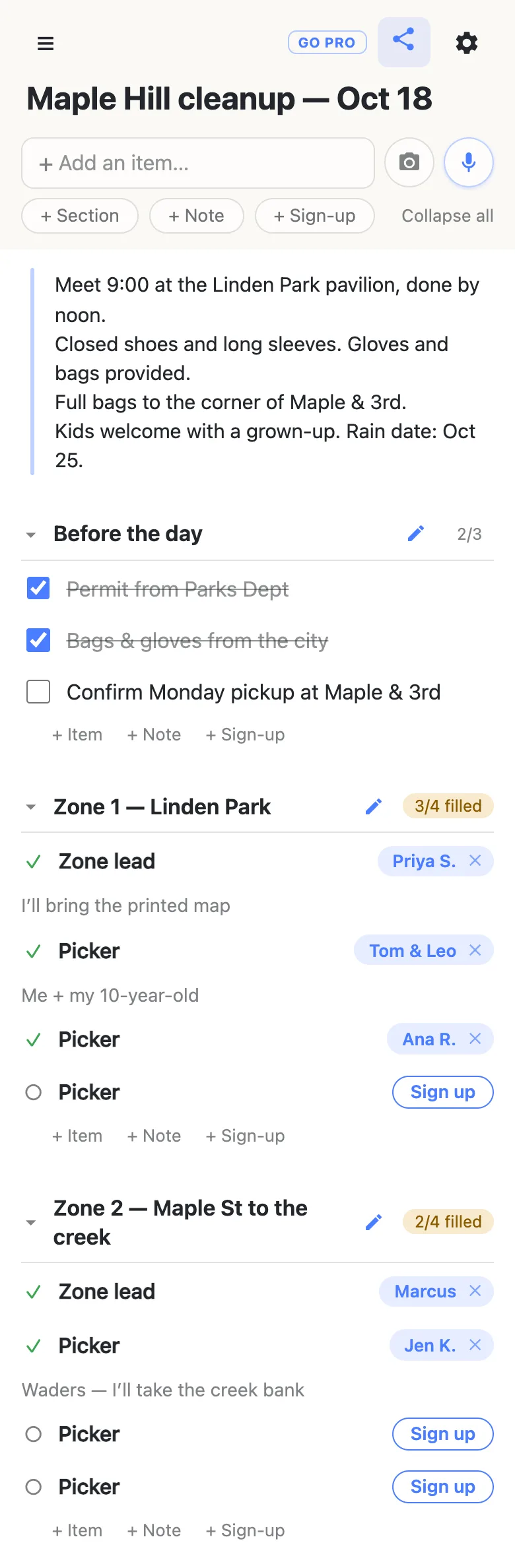
The counter on each heading — 3/4 filled, 2/4 filled — is the point. A zone that’s full turns green with a tick; a zone with no lead is obvious at a glance, and that is the one you ask about in the group chat. Naming the job does the recruiting for you: “Picker, Zone 3” is something a neighbor can picture doing on a Saturday morning; “we need volunteers!” isn’t.
Your own jobs can live on the same sheet. A Before the day section of ordinary checkbox rows — the permit, the bags and gloves from the city, confirming the pickup — gives the organizing crew a shared to-do list, with its own 2/3 on the heading.
Tools and trucks are slots too
Equipment fails the same way people do: everyone assumes somebody else is bringing the rakes. Add a Tools & trucks section and make each thing a slot — Rakes, Grabbers, Wheelbarrow, Dump-run truck, Water & snacks, First-aid kit. The claim note turns “I’ll bring rakes” into a quantity you can plan around: “3 rakes + a leaf blower”, “F-150, can do two runs”, “Library lends 6”.
Nobody has to choose between helping and lending. The same neighbor can take a picker slot in Zone 1 and the first-aid kit, and the sheet shows both.
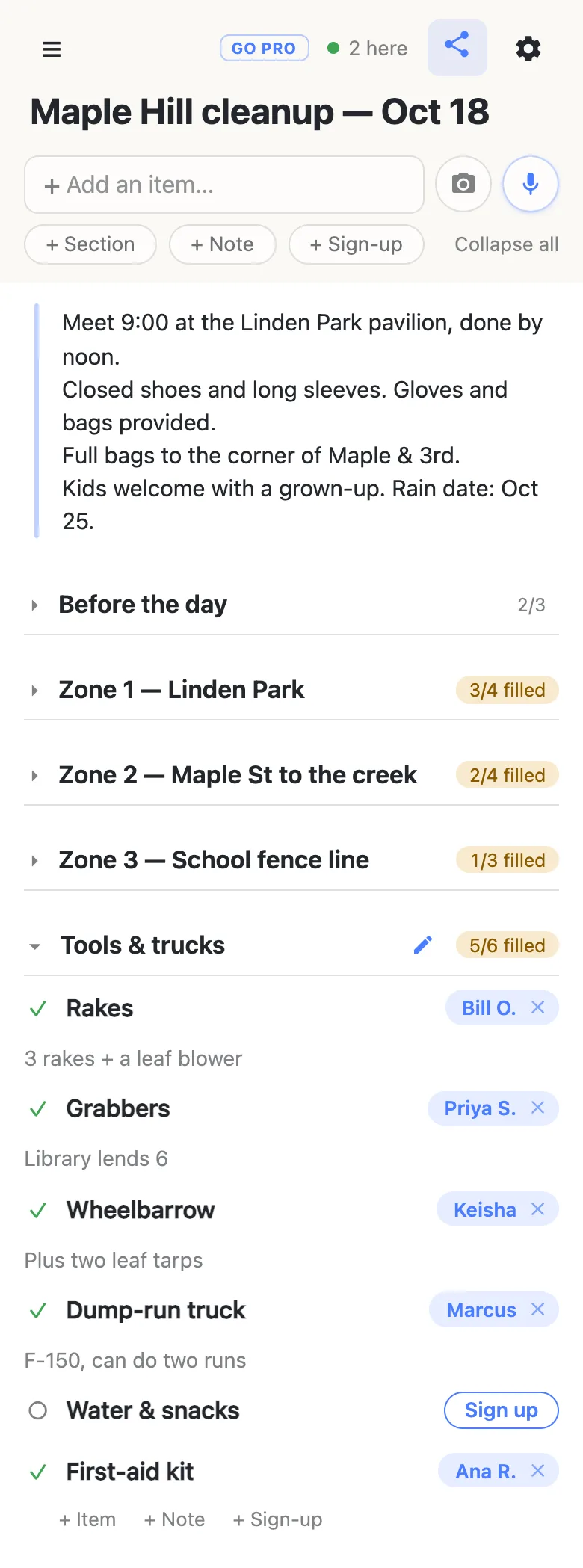
Folding is per device: tap a heading, or Collapse all in the header, and your view shrinks to five headings and five numbers. Nobody else’s phone moves.
One link on the flyer, the group chat and the neighborhood app
Share the link wherever your neighbors already are — the street’s group text, a neighborhood forum, a school newsletter, and the flyer at the library and the café. Paper wants a QR code (any free generator will make one from the link) with the address printed underneath for anyone whose camera won’t cooperate.
Whoever opens it gets the sheet and a Sign up button next to every open row — no app, no account, no password to invent. The first time, it asks what to call them, and whatever they type is the name that appears on the rows they claim. Nothing is verified, which is what makes “sign up my neighbor, she doesn’t text” normal rather than a workaround: tap a name chip to change it, and if you clear somebody else’s claim the sheet asks first — “Clear Marcus’s sign-up? Their note goes with it.”
Claims appear on every open phone as they happen, so two people reading at once don’t both take the last picker slot in Zone 2. The 2 here chip in the header is live presence — tap it for the names. And at the foot of every sheet is a line saying how many times it has been visited, counting the same visitor at most once an hour — the blunt answer to “did anyone actually scan the flyer?”
When a stranger can scan the flyer
Putting the link on a flyer taped up in a café? You may want neighbors to sign up without rewriting the sheet.
That is what owning the list is for. The sheet stays yours and you choose what visitors may do: leave signing up on, switch adding, editing, deleting and reordering off, and the flyer link becomes fill-in-only for everyone but you. Neighbors notice nothing — same link, still no account, still one tap. Add your zone leads as admins by email so they can fix their own section, and claim a readable address the flyer can print in type a person could retype.
See what anonylist pro does Only you need an account. Neighbors still just open the link.
If it rains, and next spring
Change the note. Everyone who opens the link afterwards sees the new date, and anyone with it already open sees the edit land. Then post “rain date is on, same sheet” in the same places you shared the link.
For the next cleanup, keep the link — it’s the one the neighborhood already has. Before you reset it, export the sheet from the gear icon (Export & import); the file keeps this year’s zones, names and notes on your own disk. Then import it back with Overwrite ticked to return the sheet to its blank shape at the same address. Overwrite clears every row for everyone, so it asks first and the button reads “Replace with N rows”. To keep this year intact instead, start a fresh list and import the file into that. More on reusing a sheet.
Keep the sheet running smoothly
- Keep it to what it’s for. Zones, tools and first names with an initial. Phone numbers, home addresses and anything about who is home when are better collected some other way.
- Fold, don’t delete. Fold a finished section away rather than clearing it, and next spring’s cleanup starts from this one.
- Keep the link handy. Text yourself the link the day you make it — your phone also keeps it in the ☰ drawer — and export a copy from the gear menu (Export & import) whenever you want a file of it.
Questions
- How do I split cleanup volunteers into zones?
- Make each zone a section — “Zone 1 — Linden Park”, “Zone 2 — Maple St to the creek” — sized so a small crew can finish it in the morning. Inside each, add a sign-up slot per person you need, usually a zone lead and three or four pickers. Volunteers pick the zone themselves by tapping Sign up on an open row, and each heading keeps a count like “3/4 filled”, so the zone nobody chose is obvious before the day rather than at 9 o’clock.
- Can one volunteer sign up for a zone and bring equipment too?
- Yes. Tools and trucks are slots in their own section, and nothing stops the same name appearing in a zone and on the wheelbarrow. The optional note on each claim is where the quantity goes — “3 rakes + a leaf blower”, “F-150, can do two runs” — so you know what is actually arriving, not just that somebody said they would help.
- Is it safe to put the sign-up link on a public flyer?
- Yes. Keep it to zones, tools and first names — phone numbers, home addresses and anything about who is home when are better collected some other way. For a flyer in a public place, anonylist pro lets you own the sheet and make it fill-in-only for visitors.
- What if the cleanup gets rained out?
- Edit the note at the top of the sheet with the new date. Everyone who opens the link sees it, and anyone who already has it open sees the change arrive. The sign-ups stay exactly as they were, so nobody has to sign up again. Then post the change wherever you first shared the link.
- How can I tell whether people actually scanned the flyer?
- The foot of every sheet says how many times it has been visited, counting the same visitor at most once an hour. It is a blunt number, as of when the page loaded, but it answers whether the flyer and the group post are reaching anyone before you print more. The counts on the zone headings answer the other half: how many of those visitors signed up.
Opens instantly. No account, no email.