Sign someone else up on a volunteer sheet
Last updated September 18, 2026
Every rota has people on it who will never open the link. The grandfather who doesn’t text. The teenager whose phone is somewhere in a gym bag. The husband who said “put me down for whatever’s left” across a parking lot and then drove off. They are going to turn up and do the job — they are just never going to sign up for it themselves.
Most sign-up tools make that awkward, because a sign-up is tied to whoever logged in. On anonylist there are no logins at all, so a name on a row is simply text that somebody typed. That one fact is what makes signing up your spouse, your kids or the neighbour two doors down a completely ordinary thing to do from your own phone.
Opens instantly. No account, no email — for you or for them.
Two taps: sign up, then type their name
A sign-up row is a slot — one need, waiting for one person — and it shows a Sign up button until somebody claims it. Tapping that button puts your name on the row, which is the right answer most of the time. When it isn’t, tap the name itself: it opens for typing, already selected, so you can type over it.
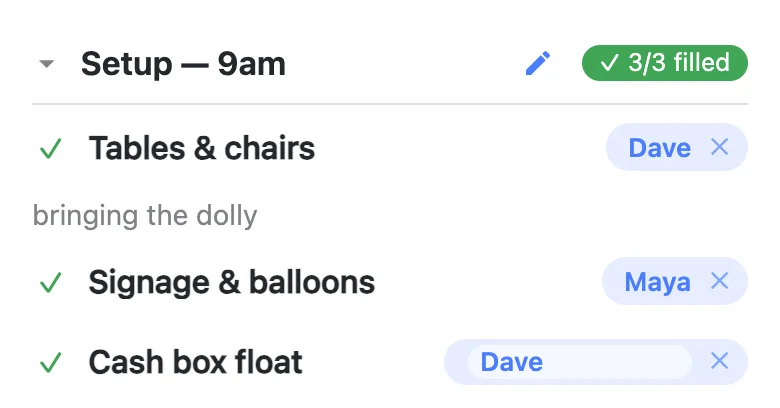
Press Enter, or tap anywhere else, and the new name is on the row — live, on every phone that has the sheet open. Escape backs out and leaves the name as it was. Leaving the box empty doesn’t clear the row either; it keeps the name that was already there, because emptying a row is the ✕’s job and shouldn’t happen by accident.
Names have room for about thirty characters, which is a name, or a name plus a hint — “Dave (carpool)” fits comfortably. Anything longer than that belongs in the note underneath.
One phone, a whole family
Nothing limits you to one row. The sheet below was filled in from a single phone at a kitchen table: Maya put herself on signage, her husband on the tables and the cleanup, and her son on the ring toss booth — and then sent the link to the group chat so everybody else could take what was left.
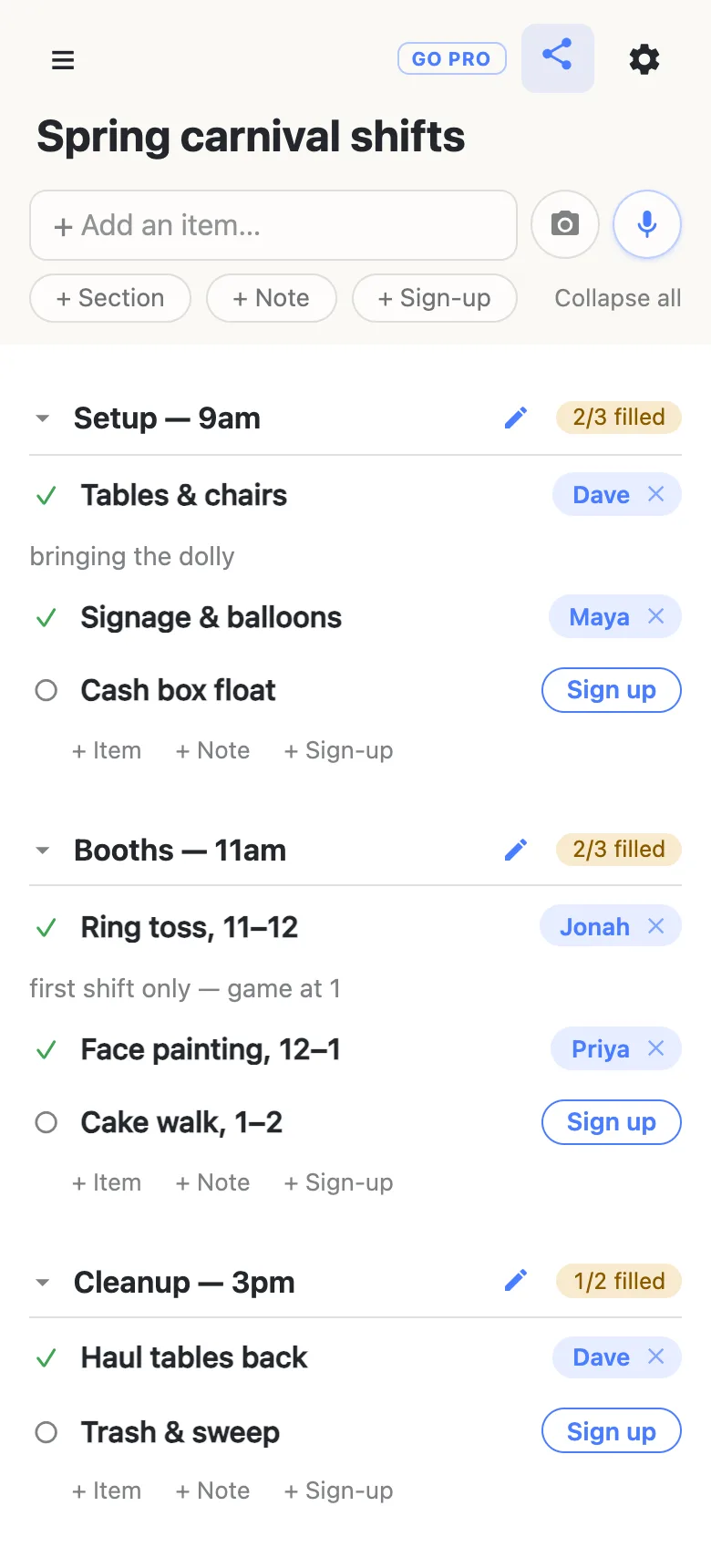
The “2/3 filled” counters beside each heading move exactly the same way whoever fills the row, so the organiser can still see at a glance where the gaps are. Nothing marks a row as second-hand, because there is nothing in the app that would know.
Changing a name that somebody else put there
The same tap works on a row you didn’t fill. Priya hands her booth shift to her sister; two people swap mornings; the booth captain swaps two names between shifts. Any of that is a tap on the name and a retype, by anyone holding the link, and the sheet doesn’t stop to ask — rewriting a name loses nothing. The row stays filled, the counter doesn’t move, and the note underneath stays exactly where it was.
What does ask is the ✕. Clearing a sign-up empties the row back to open and takes the note with it, so on somebody else’s claim it puts up a question first, naming them and saying the note goes too. Your own clears with one tap. It’s one of very few places in the app that stops you, and it’s there because dropping a person off a rota by accident is the mistake actually worth a second of friction.
One honest wrinkle follows from all this: once you’ve typed Dave’s name onto a row, the sheet considers that row Dave’s. Clearing it will ask you to confirm, even though you’re the one who signed him up — it knows the name on the row, and nothing else.
Put the caveat in the note
When you sign somebody up you usually know something about it that they’d have said themselves. The note under the row is where that goes: “first shift only — game at 1”, “can’t lift, will run the till”, “dropping the cooler the night before”. Tap the note to write or fix one — any note on the sheet is editable by anyone, which is the same trust the names run on and useful for the same reason.
Instructions the whole group needs — where to park, the gate code — don’t belong in one person’s note. Put those in a note block at the top of the sheet, where everyone reads them once.
Or just say it out loud
Every list has a microphone button beside the add box. “Sign my husband Dave up for the cake walk and say he’s bringing the folding table” does the whole thing — the name and the note both land on the right row, and everyone watching sees it appear. Say “sign me up for the cake walk” instead and it uses your own name. The assistant has no tool for deleting a row, so a misheard command can put a name somewhere you didn’t mean but can’t take the sheet apart — and a wrong name is a tap to fix.
Their name goes wherever the sheet goes
- Into a calendar. Give a row a date and the sheet’s calendar feed turns it into an event titled “Cake walk — Dave”, with the note as its description. Unclaimed rows show up as “OPEN —”, so the gaps are visible in the organiser’s own calendar.
- Into an export. The gear menu’s export writes a JSON file carrying every row, who’s on it and what they wrote. The sheet is its own record — there’s no responses tab to go and reconcile.
Why the sheet trusts you with it
The alternative is an account for every volunteer, so the sheet can tell that this row is yours and refuse everybody else. That works, and it is what the big sign-up tools do — but the accounts are precisely what stops people signing up. A parent who has to make a password to claim a tray of brownies mostly just doesn’t claim the tray of brownies, and the organiser ends up entering half the sheet by hand anyway, out of a group text.
So the trade here is deliberate: no accounts, everyone equal, names self-reported. It means anybody with the link can put a name on a row and take one off, including yours. For a sheet that travels around a team, a class or a street — where the link itself is the membership, and everyone can see every change as it happens — that’s a fair trade, and honestly stated it’s the reason the sheet fills up.
When the sheet goes wider than the group
Put the same link in a school-wide newsletter or a public flyer and the arithmetic changes. Signing each other up is exactly what you want to stay open; somebody renaming a row, or tidying a section away the week of the event, is not.
That’s what owning the list is for. The sheet stays yours and you pick what visitors can do with it: leave signing up switched on so any parent can still claim a shift for their spouse in one tap, and turn adding, editing, deleting and reordering off. You can add your co-organisers as admins by email, and claim a readable address for the flyer. Nothing changes for the people filling it in — same link, still no account.
See what anonylist pro does Only you need an account. Everyone else still just opens the link.
Questions
- Can I sign up my whole family from my own phone?
- Yes, and it takes no special mode. Tap Sign up on a row, then tap the name that lands there and type the person you mean — one row for your husband, one for your teenager, one for yourself. Nothing on the sheet marks them as second-hand sign-ups, because there are no accounts to check them against: a name on a row is text somebody typed. The people you signed up never have to open the link at all, though sending it to them is still the easiest way for them to see when they are on.
- What if somebody types the wrong name on a row?
- Tap the name and retype it. Any name on the sheet can be corrected by anyone holding the link, whether they put it there or not — plans move, shifts get swapped, and a rota that needed the original person to fix their own row would be stuck every time. Retyping a name keeps the row filled and keeps whatever note is attached to it; it is the ✕ beside the name that empties a row, and that one asks first when the sign-up is not your own.
- Does the sheet record which phone typed a name in?
- No. A sign-up row stores the name and the note, and nothing about the device that wrote them — there is no account behind a claim and no author kept beside it. One honest consequence: once you have typed somebody else’s name onto a row, the sheet treats that row as theirs, so clearing it will ask you to confirm even though you are the person who signed them up. It only knows the name on the row.
- Can one row hold two names?
- A sign-up row holds one name, because the counter beside each heading is counting needs that are covered rather than people who volunteered. The name is a text field, so “Dave & Jonah” does fit and is sometimes exactly right — but the row still counts as one filled. If you genuinely need two pairs of hands, two rows say so much more clearly, and each of them can carry its own note.