An angel tree sign-up sheet donors claim from one link
Last updated October 23, 2026
To make an angel tree sign-up sheet, start a list on anonylist, add a section for each tag with the child’s wishes as sign-up rows, and send the link to your church, school or office. Donors open it, tap Sign up on a wish and their name goes on it, so no gift is bought twice and nothing is left unclaimed. It’s free, and nobody needs an account or an app.
- Start a list and name it — Angel tree 2026.
- Add a note at the top with the drop-off date and place.
- Add a section per tag (Tag 01 · Boy, 4), and a sign-up row per wish under it.
- Share the link in the bulletin, the parent email or the team chat. Every heading counts what’s still open.
Christmas is Friday, December 25, 2026, which puts most angel tree drop-offs on the first Sundays of December. The paper tags on the tree still work beautifully — the sheet is what tells you which ones went home with someone, and which wishes are still waiting.
Opens instantly. No account, no email.
What the sheet looks like
Here is the example list from the screenshots below, as text. Each tag is a section; each wish is a row a donor claims.
Note: Pick a tag, tap Sign up on a wish, and say in the note what you’re getting. Gifts back unwrapped with the tag number taped on — the box by the fellowship hall door. Due Sunday, December 6, 2026, 12pm.
Tag 01 · Boy, 4
- Winter coat, 5T — Mia R.: “Navy puffer — in ✓”
- Dinosaur toys — Mia R.: “The big T-rex set”
- Pajamas, 5T — open
Tag 02 · Girl, 9
- Art set — The Parks: “Markers + sketchbook”
- Snow boots, kids 3 — open
- Chapter books — Deacon Ray: “Three, in by Sunday”
Tag 03 · Family of 4
- Grocery card, $50 — Office team: “Bought ✓”
- Board game — open
- Throw blankets x4 — open
Tag 04 · Boy, 15
- Hoodie, men’s M — Sam K.: “Grey, the team one”
- Basketball — A friend
- Earbuds — open
One section per tag, one sign-up per wish
Add a section for each tag and name it the way the paper tag reads: a number, then who it’s for — Tag 02 · Girl, 9. Inside it, use the + Sign-up link at the section’s end to add one row per wish, with the size right in the row: Winter coat, 5T, Snow boots, kids 3, Art set. Pressing Enter chains straight into the next one, so a tag takes seconds.
A sign-up row has no checkbox. It is a need with a Sign up button beside it, and being claimed is its whole state. A donor taps the button, their name lands on the row, and an optional note opens for what they’re actually buying — “Navy puffer”, “Markers + sketchbook”. Each row holds one name, so once the coat is taken, it’s taken.
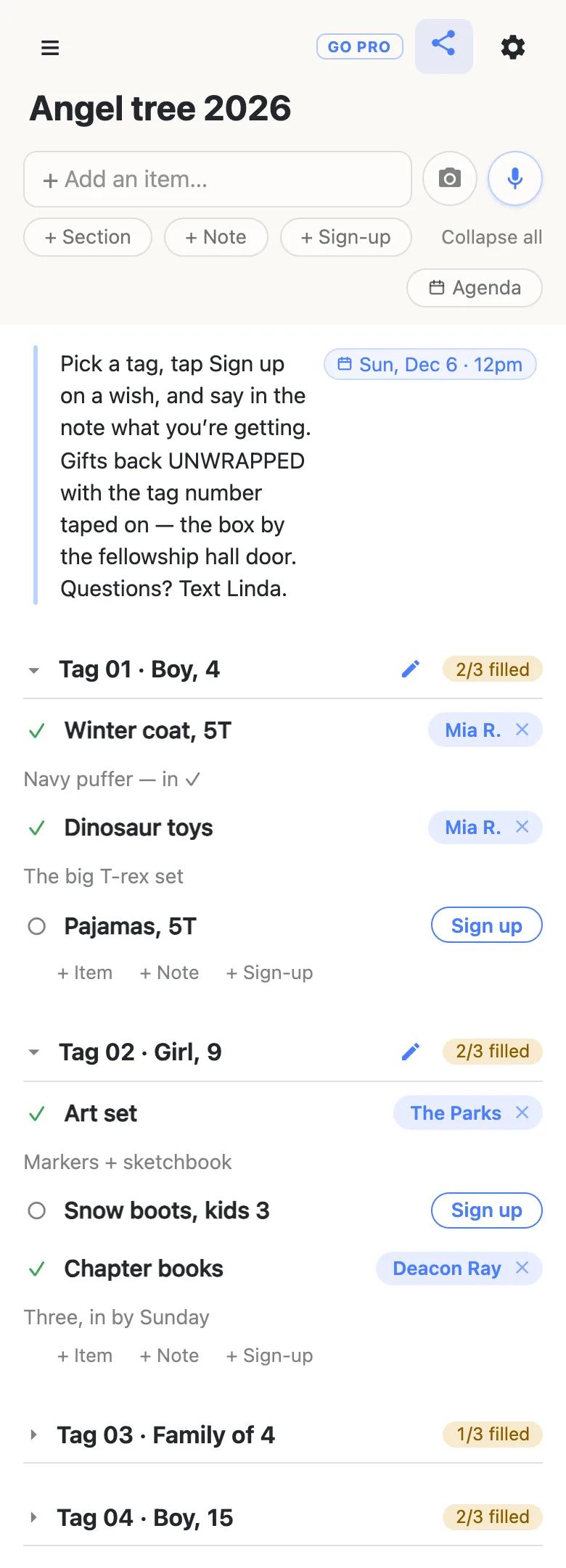
The counter on each heading — 2/3 filled — is how you run the tree without reading every row. A tag that’s fully covered turns green with a tick, and the ones still short stand out on their own.
Adopting a whole family works the same way. Make the section Tag 03 · Family of 4 and list what the family asked for: a grocery card, a board game, blankets. One donor can sign up for every row, or a small group can split it — an office team takes the grocery card, a grandparent takes the game.
The drop-off date goes in one note at the top
Tap the + Note pill under the add box. A note is a block of long text rather than a row, and it answers the questions you’d otherwise answer forty times: wrapped or unwrapped, tag taped on or not, where the box is, who to ask. Type the deadline into it — Dec 6 12pm — and the sheet offers to attach it as a date chip; tap the offer and the deadline sits pinned to the right of the note, Sun, Dec 6 · 12pm, where nobody can miss it.
Keep that note above every section. The first time somebody opens the link, the sections are folded shut with their counts on the headings and only what sits above the first section is open. So a new donor sees the instructions first, then a tidy list of tags and how much of each is still open — they tap a heading to open the tag they want.
One link for the whole congregation
Put the link in the church bulletin email, the school newsletter or the office chat. Whoever opens it gets the sheet and a Sign up button beside every open wish — no app, no account, no password to invent. The first time, it asks what to call them, and whatever they type is the name that appears on the rows they claim.
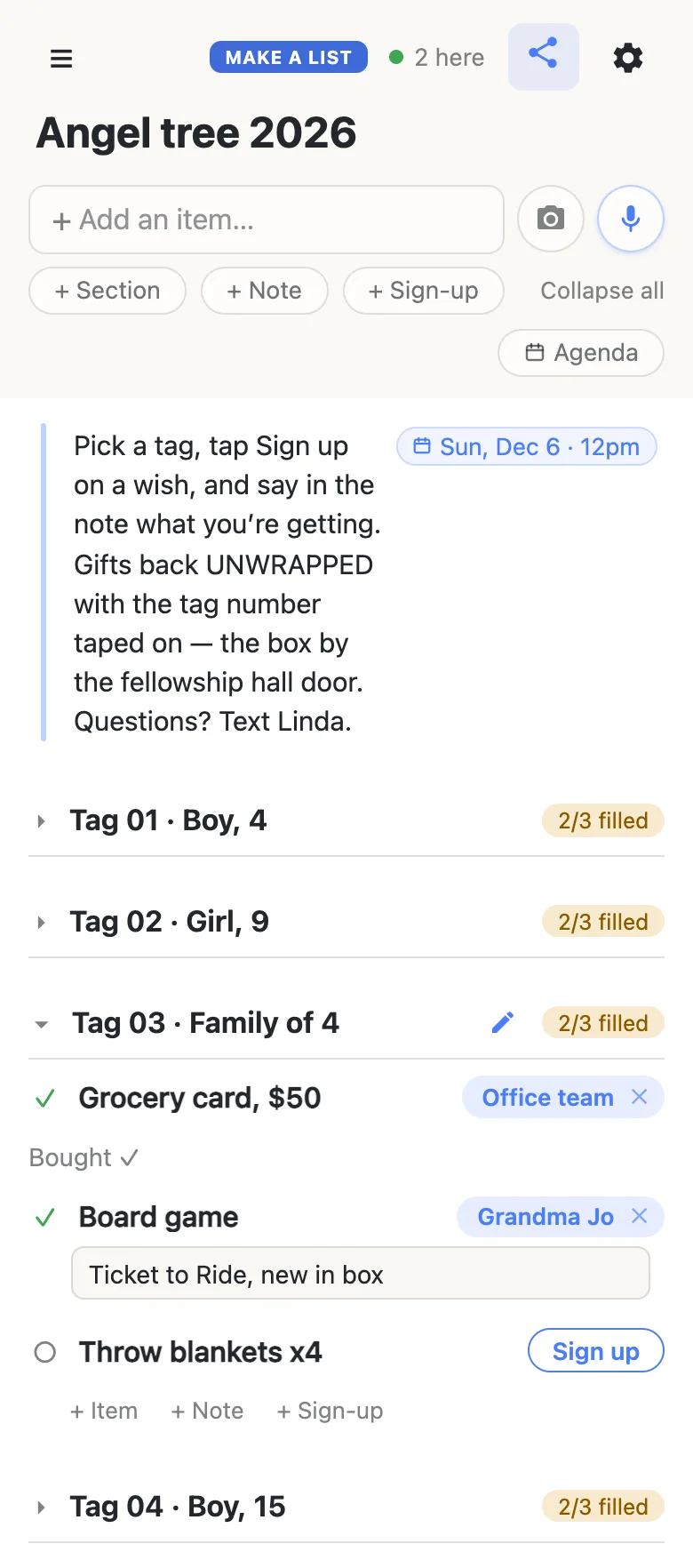
Claims appear on every open phone as they happen, so two families reading the sheet after the same service can’t both buy the snow boots. The 2 here chip in the header is live presence — tap it for the names.
Donors who’d rather stay quiet can. The name on a claim is whatever they type, and tapping the name chip on a row changes it for that row alone — A friend works as well as a real name. It works the other way too: an organizer taking tags back from the paper tree can sign up on a donor’s behalf and type their name in.
Know which gifts have come back
Anyone on the sheet can edit the note under a claim, which makes it a handy receipt. As bags come in, tap a donor’s note and add “in ✓” — “Navy puffer — in ✓” — and everyone looking at the sheet can see that gift is home. Ask donors to write what they’re buying when they sign up, and you get a running record for free.
A week before drop-off, open the sheet and look at the counters. Any tag that isn’t green is your list of wishes to mention from the front on Sunday, by name — “we still need snow boots in kids 3” gets a response where “a few tags are left” doesn’t.
Keep the tree running smoothly
- Tag numbers, never names. A number, an age and sizes are all a donor needs. Keep the children’s names, addresses and the family list with the organizer, not on a link that gets forwarded.
- Put the size in the row. “Boots, kids 3” gets bought right; “boots” gets a question.
- Fold, don’t delete. Fold a finished tag away rather than clearing it — the sheet is your record of who gave what.
- Keep the link handy. Pin it in the group chat and on the poster by the tree; your phone also keeps it in the ☰ drawer.
When the whole parish is on the sheet
A tree for a big church, a whole school or a company is a link going round hundreds of people, and you may want them signing up without rearranging the tags.
That is what owning the list is for. The sheet stays yours and you choose what visitors may do: leave signing up on, switch adding, editing, deleting and reordering off, and the link becomes sign-up-only for everyone but you. Donors notice nothing — same link, still no account, still one tap. Add a co-organizer as an admin by email so they can run drop-off day, and claim a short address you can print on the poster by the tree.
See what anonylist pro does Only you need an account. Everyone else still just opens the link.
Same sheet next December
Next year’s tree can start from this one. Before the first tag is claimed, open the gear icon → Export & import and save the file: it holds the note, every section and every row, and it’s your template. Next November, import it into a fresh list — or into this one with Overwrite ticked, which clears every row for everyone, so it asks first — and change the ages and sizes to the new tags. More on reusing a sheet.
Running more of the season off lists? The Christmas gift list you share with your spouse keeps your own shopping straight, and the Thanksgiving potluck sign-up sheet handles the dinner before it.
Questions
- What should go on an angel tree tag?
- A tag number, the age, and two or three wishes with sizes — “Tag 02 · Girl, 9: art set, snow boots in kids 3, chapter books”. That is everything a donor needs to shop. Leave off the child’s name, the family’s name and any address; the organizer keeps the list that matches tag numbers to families. On the sign-up sheet, each tag becomes a section and each wish a row a donor can claim.
- When should we open the angel tree sign-up?
- Have the sheet live by the first week of November and share it as the tags go on the tree, usually mid-November. Donors need two to three weeks to shop, and the gifts need time to reach families before Christmas — in 2026, Christmas is Friday, December 25, so a drop-off on Sunday, December 6 or 13 leaves room for sorting and delivery. Put that date in the note at the top of the sheet.
- Can one donor adopt a whole tag or family?
- Yes. A donor can sign up for every row under a tag, and the heading’s count fills up as they go. For adopt-a-family giving, make one section per family and list what they asked for; a household can take all of it, or an office team and a grandparent can split it between them.
- How do we keep track of which gifts have been dropped off?
- Use the note under each claim. When a donor signs up they can say what they are buying, and anyone on the sheet can edit that note later — so as bags come in, the organizer adds “in ✓” to it. The heading counts still show which wishes have no donor at all, which is the list to mention from the front the week before drop-off.
- Can donors give anonymously?
- Yes. The name on a claim is whatever the donor types, and tapping the name chip on a row changes it for that row only, so “A friend” is as good as a real name. Nobody needs an account, an email address or a phone number to sign up.
Opens instantly. No account, no email.