A free sign-up sheet with no ads on it
Last updated October 20, 2026
Nobody goes looking for an ad-free sign-up sheet in the abstract. You go looking after you’ve sent one out — after a parent mentions the video that played before they could put their name down, or after you open your own sheet on your phone and find a banner sitting above the thing you spent twenty minutes writing.
On an ad-supported free plan, somebody pays for the tool, and the somebody is your volunteers, in attention — a trade the organiser makes and the volunteers absorb, without ever being asked.
This is what the other shape looks like: a sheet with no ads on it at all, free, with nobody making an account — and a plain account of who pays for it instead.
Opens instantly. No account, no email.
The whole page, and nothing on it but the sheet
Here is a real sheet, top to bottom, on a phone: the note that explains the evening, the things that need doing, and the names of the people who took them. There’s no banner above it, no block between the sections, nothing in the corner that follows you down the page.
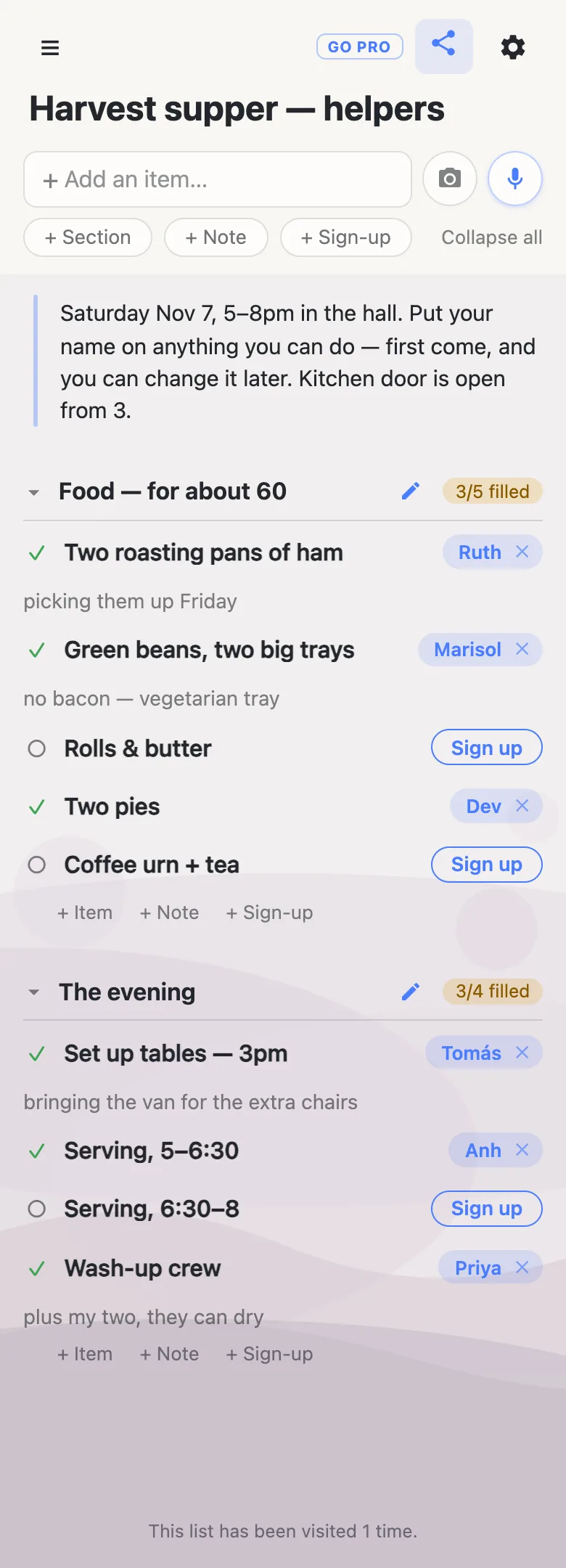
The part that matters most for filling a sheet isn’t the absence of a banner — it’s the absence of anything between a volunteer and their name being on it. They tap Sign up on the row they can take, and it’s theirs, live, for everyone else looking. No ad break, no account wall, no “verify your email to confirm your spot”.
A footnote, since you can see it in the picture: the small pill in the header is ours. It’s a link to our own paid tier, and which one you get depends on who’s looking — somebody who has never made a list is offered make a list instead, and if you already pay, there’s no pitch there at all. It sits still, it doesn’t follow you, and it isn’t an advertiser’s. It’s the only thing on the page that isn’t the sheet, and we’d rather point at it than have you find it.
So who pays for it?
One small server with a flat bill of a few dollars a month, and anonylist pro — $10 a year, bought by organisers who want a list they own rather than a link anyone can rewrite. That’s the whole model. A sheet with no accounts, no email sending and no ad tech in it costs almost nothing to run, which is what lets the free side stay free instead of being a trial that quietly ends.
What isn’t happening: there is no ad slot, no ad script and no advertiser relationship anywhere in the app, and nothing reads your rows to target anything at anybody. The third parties that do exist are named on the privacy page — aggregate analytics, with list links redacted before anything is sent, so the unguessable address of your sheet never reaches them; Stripe, if you ever pay; and Anthropic, only when you use the optional voice or photo features.
Two things we do count, both disclosed: the IP addresses of visits to a list, to keep anonymous storage from being abused, and the visit tally those produce — the quiet “this list has been visited N times” line you can see at the bottom of the screenshot above. It’s a number. It is never an address, and never a name.
How to tell whether a “free” sheet is really free
This part isn’t about us; it’s the test worth running on any tool before you send its link to eighty people.
- Open your own sheet in a private window, on a phone. The organiser’s logged-in view is often not the page a volunteer gets, and the difference is usually the ads.
- Count the taps between “sign up” and the name being on. Every screen in that gap — an ad break, a sign-in, an email confirmation — is a fill-rate tax, and you pay it in the people who start and don’t finish.
- See what it wants from them. A sheet that collects an email address from every person who signs up is, in part, an address list with a sheet around it. Ask what that address is used for afterwards.
- Find the limit before it finds you. Free tiers often cap sign-ups, sheets or dates. It’s a bad afternoon to discover the cap with a half-filled rota.
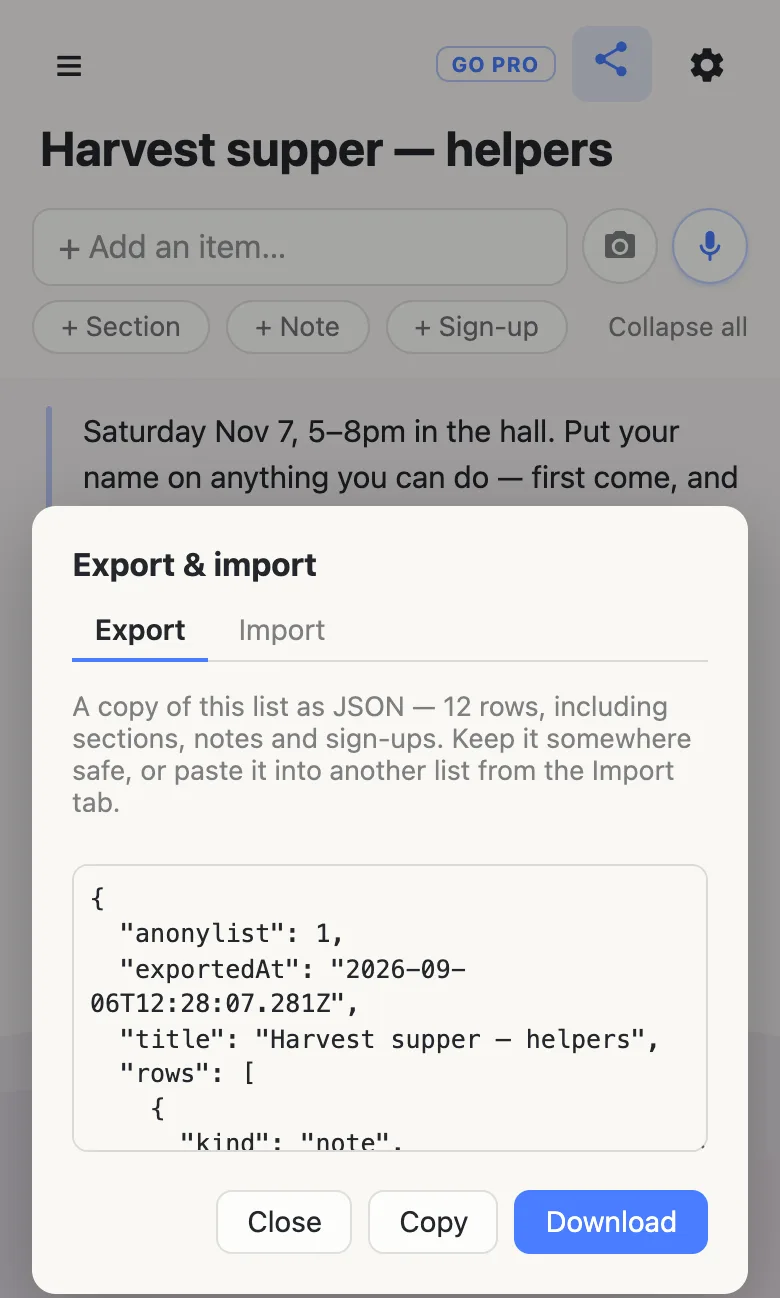
- Try to leave. Can you get everything out, today, as a file, without asking anyone? Here that’s the gear menu → Export & import: the list as JSON, downloaded or copied, sections and notes and sign-ups included.
The last question is the one the others are really asking. If you’re not the customer, an advertiser is, and the page will keep reminding you of it.
Making one takes about a minute
Start a list, which gives you a URL and nothing else to fill in. Put a note at the top with the date, the place and the ground rules — that’s the thing people read first. Add a section for each part of the job (Food, The evening), and inside each one tap + Sign-up for every need: one row per thing, worded the way you’d say it out loud. Then send the link to the group chat, the newsletter, the noticeboard — wherever the people are.
Each section keeps a small counter — 3/5 filled — so the gaps are visible without reading a single row, and anyone who takes something can leave a note against it (“picking them up Friday”) where the detail belongs. There’s a step-by-step version of this if you want it slower, and an explanation of what a sign-up row actually is.
If the sheet is going somewhere public
For a link printed in a bulletin, posted on a public page or forwarded past the people you know, you may want people to sign up without rewriting the sheet.
That’s what an owned list is for. The sheet stays yours, and you choose what visitors may do with it: leave signing up and claim notes switched on, turn adding, editing and deleting off, and people get a page they can fill in but not rewrite. Add a co-organiser as an admin by email so you aren’t the only one who can fix a typo, and claim a readable address so the bulletin can carry something a person could retype. Nothing changes for them: same link, still no account, still one tap.
It’s also, plainly, the thing that pays for the free sheets.
See what anonylist pro does Only the organiser needs an account. Everyone signing up still just opens the link.
Questions
- If there are no ads, how does anonylist pay for itself?
- One small server, a flat bill in single-digit dollars a month, and a paid tier: anonylist pro, $10 a year, bought by organisers who want a list they own and control. That is the whole business model. The free sheets cost close to nothing to run because there is no ad tech in them, no per-user account to store and no email to send — which is also why the free side can stay free rather than being a trial that ends.
- Will anonylist start showing ads later?
- It is not planned, and the shape of the product argues against it. Putting an ad network on a list page would mean handing somebody else’s script the page your rows are on, which is the opposite of what a sheet with no accounts is for. What we can tell you is what is true today and what would have to change: there is no ad slot, no ad script and no advertiser relationship anywhere in the app, and the paid tier exists precisely so the sheets do not have to carry one. Nothing here is a contract, so if you need a promise in writing rather than an economic argument, keep your own copy — every list exports to a file from the gear menu.
- Does an ad-free sheet still track the people who open it?
- There is no advertising or profiling of any kind, and no third-party ad script on a list page. Two things are measured and both are disclosed on the privacy page. Aggregate analytics run on the marketing pages and the app, with list links redacted before anything is sent — the unguessable URL of your sheet never reaches an analytics provider. And the IP addresses of visits to a list are logged to protect anonymous storage from abuse, which is also what produces the modest “this list has been visited N times” line at the bottom of every list. That count is a number, never an address and never a name.
- Do volunteers have to sit through an ad or hand over an email before signing up?
- No. They open the link, tap Sign up on the row they can take, and their name is on the sheet for everyone the same second. There is no interstitial, no account wall and nowhere on a sheet to put an email address — the app sends no email at all, to anybody. The name comes from the one they gave their own device the first time they opened a list, and they can change it whenever they like.
- How do I tell whether a “free” sign-up sheet is really free?
- Open your own sheet on a phone in a private window before you send it out — the organiser’s screen is often not the one volunteers get. Then count the taps between “sign up” and the name being on the page, since an ad break or an account wall in that gap is a fill-rate tax you pay in people who never finish. Ask whether it wants an email from them, what happens when you hit its free limit, and whether you can get everything out as a file today without asking anyone. If the answer to “who is the customer here” is not you, it is an advertiser, and the page will keep reminding you of it.
Opens instantly. No account, no email.