How to export a shared list — and what’s in the file
Last updated September 25, 2026
anonylist has no accounts, which means there’s no “download my data” page tucked away in a profile somewhere. The export is that page. From any list it writes the whole thing to a single file — sections, notes, sign-ups and who claimed them — laid out so that a person can open it and understand it, not just a machine.
This guide covers where the button is, what the file actually says line by line, and what is left out of it on purpose.
Opens instantly. No account, nothing to install. Export works from the first row.
Export in three taps
- Open the list and tap the gear in the top-right corner.
- Tap Export & import. The Export tab opens first, with a preview of the file and a count of its rows.
- Tap Download to save it as a
.jsonfile named after the list and the day —book-club-2026-2026-09-25.json— or Copy to put the same text on your clipboard.
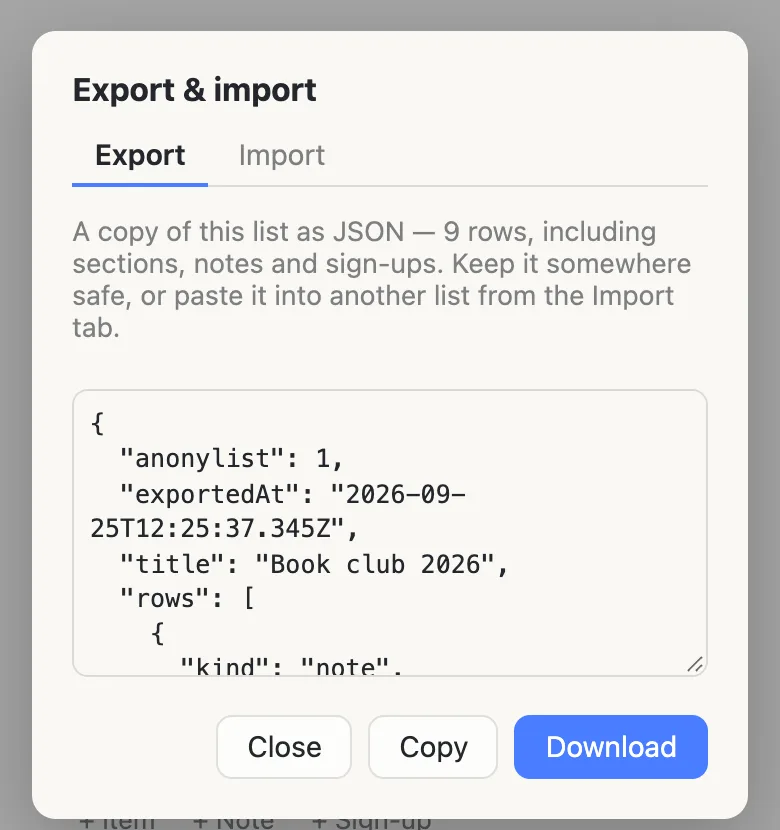
On a phone the file goes wherever your browser keeps downloads — usually the Files app on an iPhone and the Downloads folder on Android. If that’s awkward, Copy works just as well: paste it into a note, or an email to yourself, and you have the same thing.
Exporting is a read. It changes nothing on the list, and nobody else on it is told that you did it.
What the file says
Here is the list that export came from — a book club’s year, with a note at the top, a link, a section of hosting sign-ups with dates on them, and a couple of chores, one done.
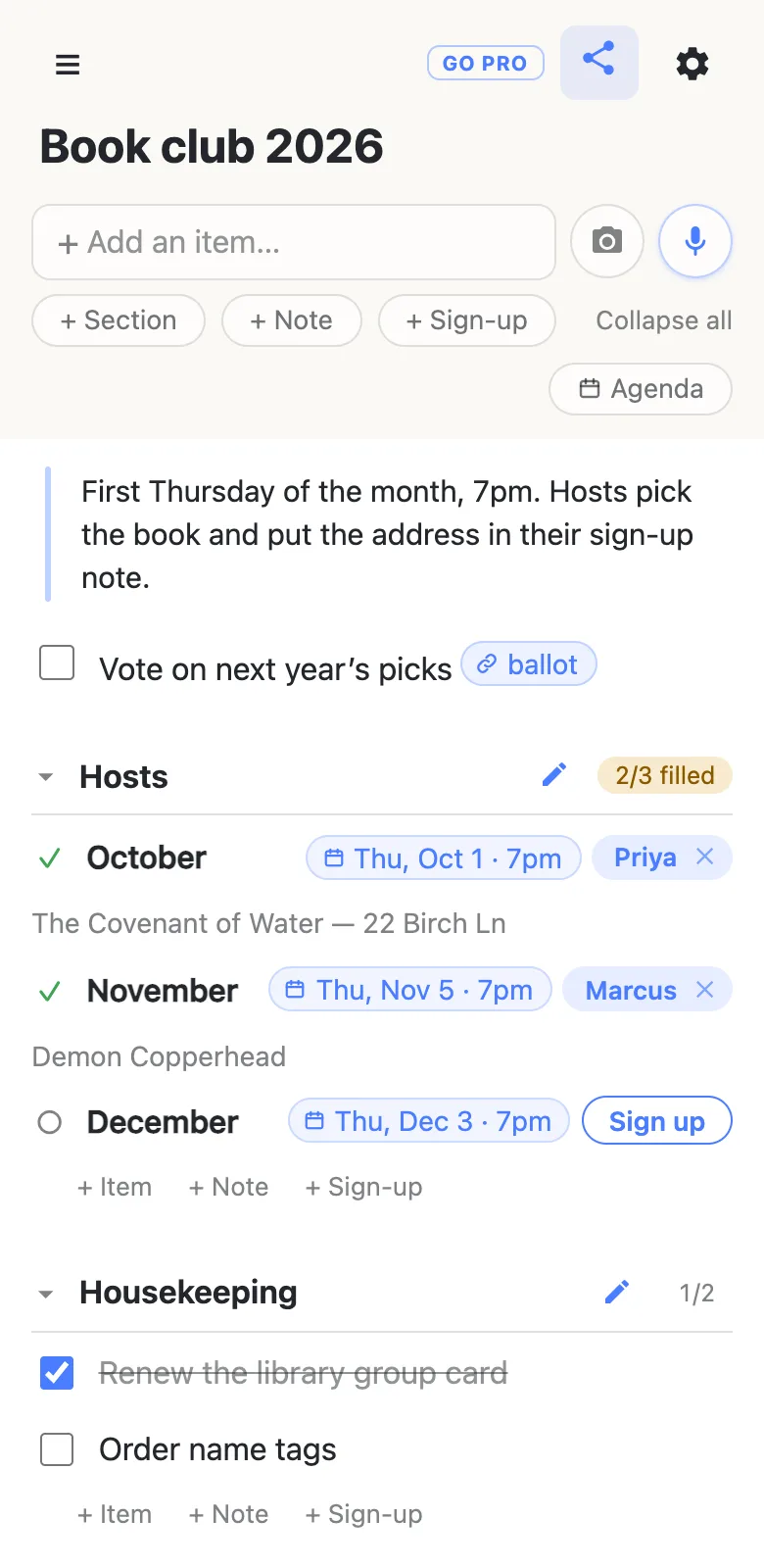
And here is the start of its export, exactly as downloaded, trimmed after the first sign-up:
{
  "anonylist": 1,
  "exportedAt": "2026-09-25T12:25:37.345Z",
  "title": "Book club 2026",
  "rows": [
    {
      "kind": "note",
      "text": "First Thursday of the month, 7pm. Hosts pick the book and put the address in their sign-up note."
    },
    {
      "kind": "item",
      "text": "Vote on next year’s picks [ballot](https://example.com/ballot)",
      "completed": false
    },
    {
      "kind": "section",
      "text": "Hosts",
      "rows": [
        {
          "kind": "slot",
          "text": "October @2026-10-01T19:00",
          "claimedBy": "Priya",
          "claimNote": "The Covenant of Water — 22 Birch Ln"
        },
Reading it from the top:
anonylistis the version of the file format, so a later anonylist knows how to read an older file.exportedAtis when you pressed the button, in UTC.titleis the list’s name.rowsruns in the order you see on screen: the rows that aren’t in any section first, then each section in turn, carrying its own rows inside it. The nesting is the point — you can tell which chore belongs under which heading without cross-referencing anything.- Every row has a
kind:itemfor a checkbox row,notefor a block of text,slotfor a sign-up,sectionfor a heading. - Items carry
completed, true or false. Sign-ups carryclaimedBy— the name that filled it — andclaimNote, what they said under it. An open sign-up hasnullin both. - Links and dates stay as the text the list actually stores: a named link is
[ballot](https://…), and a date is@2026-10-01T19:00. The app draws those as chips; the file keeps the words, so nothing is lost and nothing needs decoding.
What’s deliberately not in it
- The list’s link. The file is what’s on the list, not a way into it. Keep the link separately — the ☰ menu’s Manage lists has a Copy all button that copies every list link this browser remembers.
- Behind-the-scenes numbers. No row ids, ordering keys or edit counters. Importing a file always makes fresh rows, so carrying the old ids would either clash or pretend to a connection with the original list that doesn’t exist.
- The password and the background. Neither is content, so neither travels: a list filled from an import keeps its own settings, whatever the original had.
- A history of who typed what. anonylist doesn’t keep one, so there’s nothing to export. The only names in the file are the ones on sign-ups, because on a sign-up the name is the content.
- Which sections you had folded. That’s a setting on your own device, not part of the list.
Opening it, and putting it back
It’s plain text. TextEdit, Notepad, the Notes app, any code editor, or a browser tab will all open it; nothing special is needed and nothing is compressed.
To pour it back into a list — this one, a fresh one, somebody else’s — open that list’s gear menu, go to Export & import, and use the Import tab: choose the file or paste its text, and anonylist tells you how many rows it’s about to add before it adds any. Importing adds to the end and leaves what’s already there alone. (There is a separate, clearly marked option to replace a list’s contents instead, for resetting a sheet you reuse; it asks you to confirm before it will do it, because it deletes every row for everyone.)
You can edit the file before importing it — fix a typo, drop a section, rename a slot. An item or note left with no text is skipped and counted, rather than guessed at.
One honest limit: it’s JSON, not a spreadsheet. There’s no CSV or Excel export, so a file meant for a spreadsheet needs converting first.
When it’s worth pressing
- Before a big tidy-up. Deleting a row is permanent. The five-second undo covers one row; clearing a lot of them has no undo at all. An export first is the undo you give yourself.
- When the list has done its job. The season’s over, the house is moved into, the reunion happened. A file keeps the record without the live list having to.
- For anything you’d be sorry to lose. Nothing on anonylist is promised forever — there’s no account to recover a lost link from, and lists may be removed after long inactivity. A file on your own disk is yours regardless.
- When someone wants a copy, not the controls. On an ordinary list the link lets whoever holds it change anything. A file lets someone keep what the list said without being able to change it.
Questions
- Can anyone with the link export my list?
- On an ordinary list, yes. Anyone holding the link can already read every row, and the export only writes down what they can see. On a managed list — the kind an anonylist pro account owns — the owner decides whether visitors get Export, and it starts switched off for them.
- Can I export a shared list to CSV or Excel?
- No. The export is JSON only, a plain-text format that keeps sections nested and sign-up claims attached to their rows — structure a flat spreadsheet row would lose. It opens in any text editor, but a spreadsheet needs it converted first.
- Does exporting change the list or tell anyone?
- No. Exporting only reads the list as your screen already shows it. Nothing on the list changes, nothing is sent to the other people on it, and they are not told that you exported.
- Will an export I save today still import later?
- That is what the version number at the top of the file is for. anonylist keeps a frozen example of every file format it has shipped and checks on every change that those still import, so a newer anonylist reads an older file. The reverse is refused plainly: a file made by a newer version than the one you are using is declined with a message naming the version, rather than half-read.
- Does the file include the list’s link or its password?
- Neither. The file holds the list’s title and rows only — no link, no password, no background and no row ids. Keep the link somewhere separately; the ☰ menu’s Manage lists can copy every list link your browser remembers in one tap.
Opens instantly. No account, nothing to install.