A date poll with no ads — that turns into the plan on the same link
Last updated October 20, 2026
Doodle’s free plan comes with strings. Going by Doodle’s own comparison of its plans, it shows ads — to you and to everyone answering — and taking them away “for organizers or participants” is one of the things the paid plans are for. The free plan caps a group poll at 10 time slots, and keeps deadlines and automated reminders on the paid side too.
For dinner with friends, that means the ads land on the people you invited. anonylist shows no ads to anybody. It is a shared list: a section per date with a few sign-up rows makes the poll, and then comes the part a poll can’t do — the winning date becomes the plan, on the same link.
Opens instantly. No account, no ads.
The poll, in one paragraph
Add a section for each date you are offering, and under each one a sign-up row per person, all labelled I’m in. Everybody taps Sign up under every date they can make, and each heading keeps the count — 4/5 filled — live on every phone. The full walkthrough is here.
When the count is in, keep the link
A poll’s answer is a date, and then it’s done; everything that follows happens in a different thread. On a list, the poll and the plan are the same page, so the link everybody already has becomes the one with the details. Here is the same book club a few days later:
- Rename the list to the answer — Book club — Sat Nov 14, 7pm — and rewrite the note with the details: where, what to read, what to bring.
- Move the winner to the top. Press and hold its heading and drag it up; its votes come with it, which doubles as the guest list. A ✓ in the heading makes it unmistakable.
- Add a Bring section under it with a sign-up row per thing somebody could bring — snacks, wine, dessert. The optional note on each claim says what is actually coming: cheese + crackers.
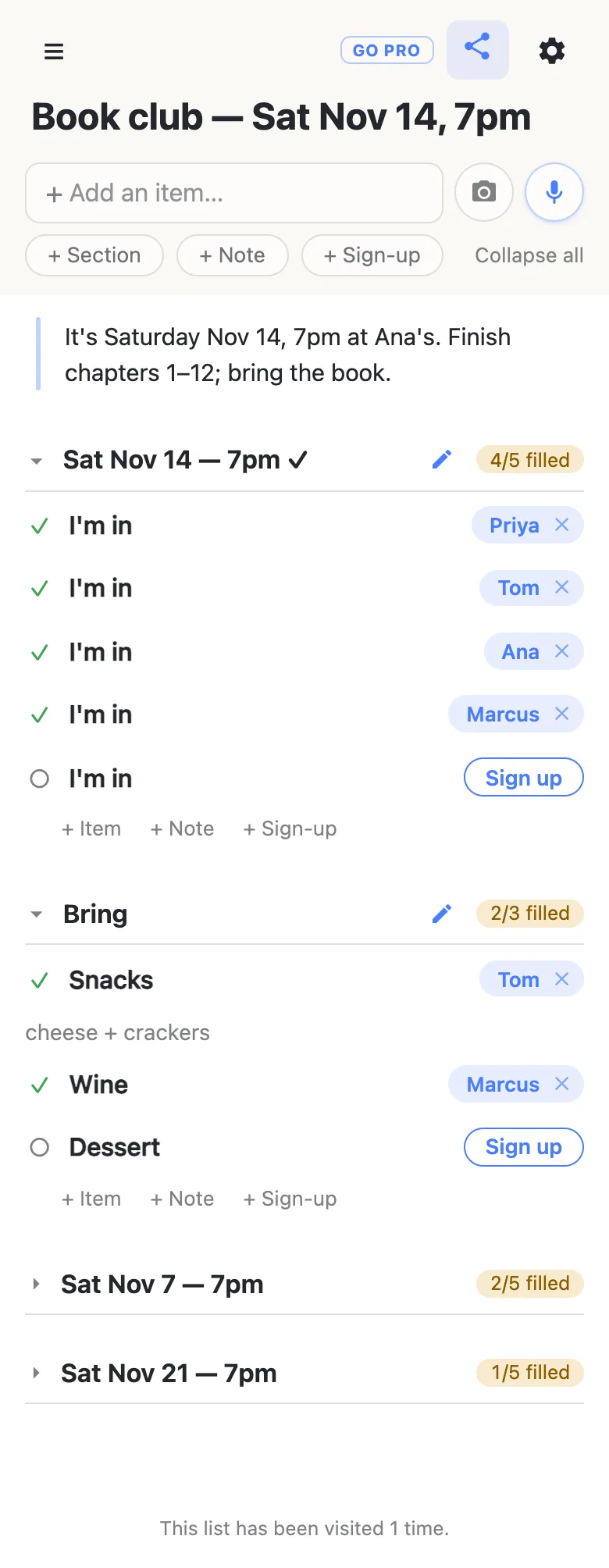
Leave the dates that lost folded at the bottom: they are a record of who could make what, handy the next time you are picking a date. Folding is per phone, and a phone opening the list for the first time sees every section folded, so newcomers get the short version automatically.
To get the date into calendars, add one row with the date in it — Book club Nov 14 7pm — and tap the offer that appears to turn it into a date. The list’s calendar feed then puts it in the calendar of anyone who subscribes.
Free, side by side
| Doodle, free plan | anonylist | |
|---|---|---|
| Ads | Shown to organizers and participants; removed on paid plans | None, for anyone |
| Options per poll | Up to 10 time slots | A section per date, up to 1,000 rows in all |
| Accounts | Organizer needs one to finish the poll | Nobody needs one |
| After the date is picked | The poll is done | The same link holds the plan |
Doodle details from Doodle’s help centre, checked October 20, 2026 (Free vs Professional comparison, updated July 28, 2026).
Same poll, every month
A book club picks a date every month. Instead of building the poll again, save the list’s shape once — the dates, the empty I’m in rows, the Bring section — and reset it in one tap when the month turns: names cleared, same link, same people. That is baseline, part of anonylist pro.
See what anonylist pro does Only you need an account. Everyone else still just opens the link.
Questions
- Does Doodle’s free plan show ads to the people voting?
- Going by Doodle’s comparison of its plans, removing ads “for organizers or participants” is a paid feature, so on the free plan the people answering your poll see them too. anonylist shows no ads to anybody, on any list.
- How many options can a free Doodle poll have?
- Doodle’s help centre lists a limit of 10 time slots for group polls on the free plan (sign-up sheets get 20). On a list each option is a section, and the whole list can hold up to 1,000 rows, though a list poll is easiest to read with a handful of dates.
- How do I turn the poll into the plan?
- Keep the link. Rename the list to the winning date, rewrite the note with the details, drag the winning date’s section to the top, and add a section underneath with sign-up rows for whatever people need to bring. Everyone who voted already has the link, so the plan reaches them without a new message.
- What happens to the dates that lost?
- Leave them folded at the bottom of the list. They keep a record of who could make which date — useful the next time you are choosing — and anyone opening the list for the first time sees every section folded, so the winning date and the plan are what stand out.
- Can the date go into everyone’s calendar?
- Yes, through the list’s calendar feed. Add a row with the date and time in it, tap the offer to turn the words into a date, and anyone who subscribes to the feed gets it as an event — and if the plan moves, the event moves with it.
Opens instantly. No account, no email.