How to add a sign-up sheet to Google Calendar — and keep it current
Last updated September 27, 2026
A sign-up sheet has a weak spot: people sign up and then forget. The shift they took lives on a web page, and their life lives in a calendar. Most sign-up tools bridge that with an “add to calendar” button, which drops one copy of one event into one calendar. When the shift moves, or they swap with someone, the copy doesn’t.
On anonylist the sheet itself is a calendar you can subscribe to. You add it once, in Google Calendar, Apple Calendar or Outlook, and every dated row turns up as an event. Taken shifts show who took them, open ones read OPEN, and when the sheet changes the calendar follows. Your calendar app decides how often it checks.
Opens instantly. No account for you or anyone who signs up.
1. Put the dates on the rows
A calendar can only show what has a date, so each shift needs one. Add a sign-up row and type the day and time the way you’d say them — Greeter Oct 10 9am. The list offers to turn “Oct 10 9am” into a date; tap the offer and the words become a chip on the row. Or type @ at the start of a word to pick a date from a small calendar. Dates on a shared list covers every way in.
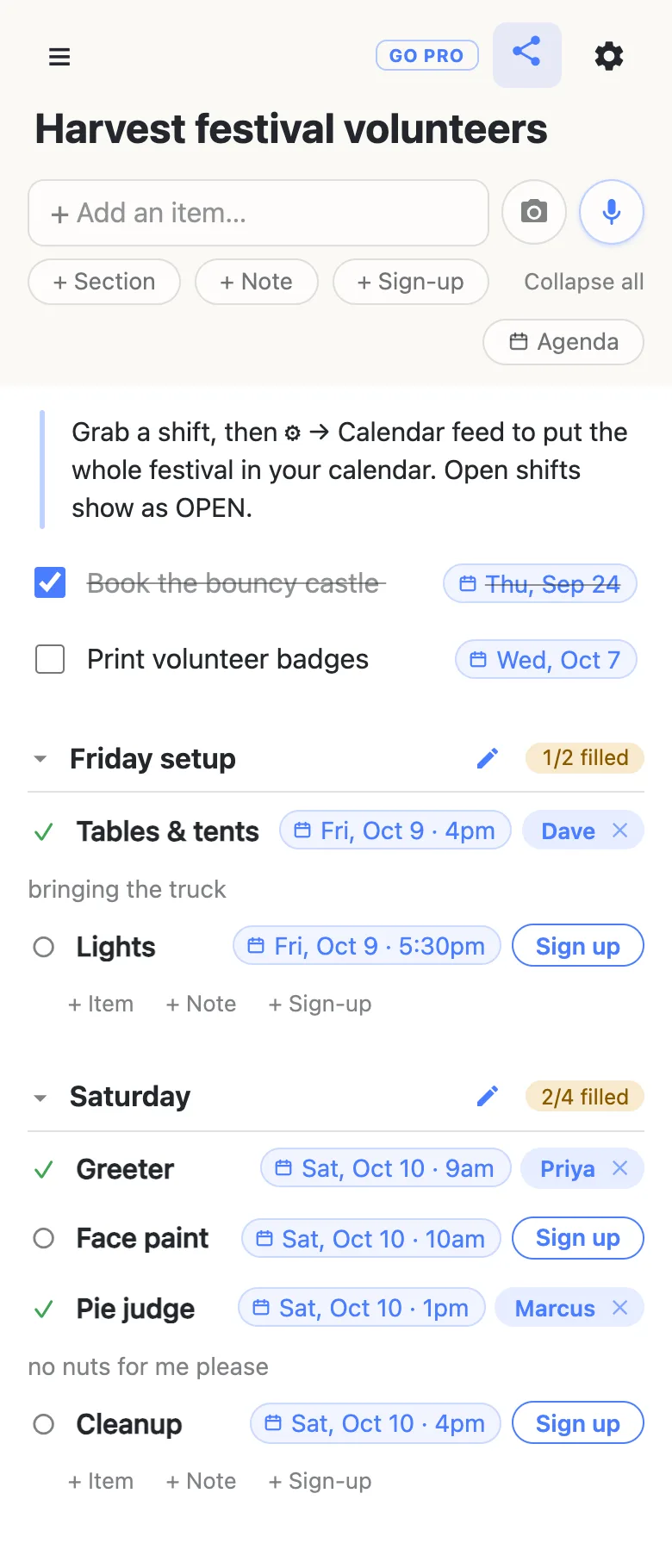
Put the date on the row itself, not in the section heading. A heading called “Saturday” is just a word to the calendar; a chip on each row is a date and time it can place.
2. Copy the calendar address
Tap the ⚙ at the top of the list and open Calendar feed. You get the sheet’s calendar address, a Copy button, and two one-tap links: Add to Google Calendar and Add to Apple Calendar.
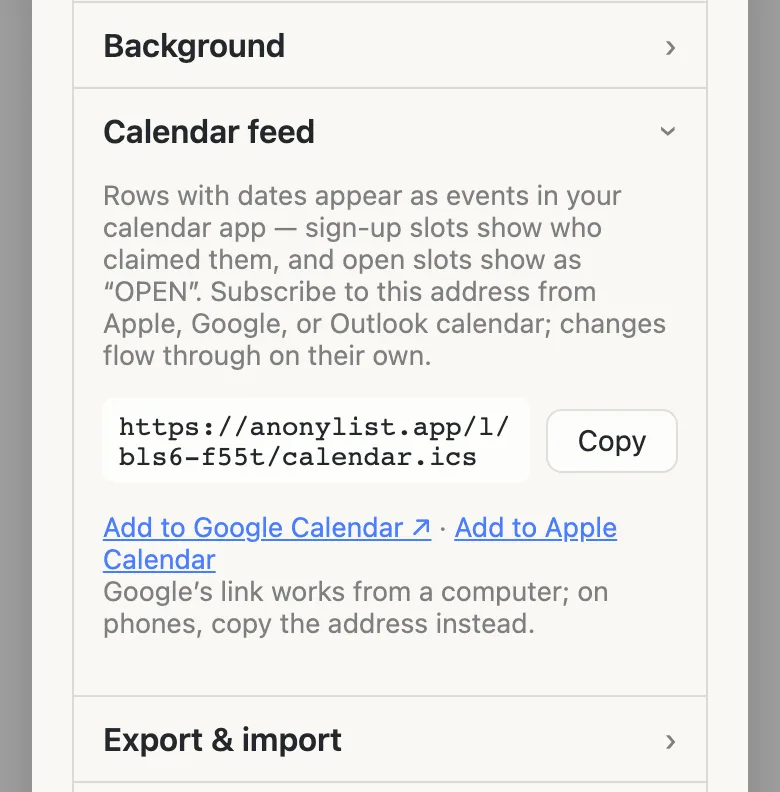
/calendar.ics on the end.Look closely at that address: it is the sheet’s link with /calendar.ics added. Anyone who has it can work out the sheet’s link, and anyone with the sheet’s link can edit the sheet. So share it wherever you’d share the sheet itself, and nowhere you wouldn’t.
3. Add it to Google Calendar
On a computer, the quick way is the Add to Google Calendar link in that panel. It opens Google Calendar and asks whether to add the calendar. The long way works everywhere Google Calendar does:
- Open Google Calendar in a browser on your computer.
- On the left, next to Other calendars, click + and choose From URL.
- Paste the calendar address and click Add calendar.
The sheet appears under Other calendars, named after the list’s title — which is one more reason to give the sheet a proper name.
On a phone, the Google Calendar app has no way to add a calendar by its address. Do it once on a computer, or in your phone’s browser with the desktop site, and the sheet then turns up in the app on its own. If it doesn’t, Google’s advice is to open the app’s Settings, tap the calendar’s name (under Show more if it’s hidden) and make sure Sync is on.
Apple Calendar and Outlook
- iPhone, iPad or Mac: tap Add to Apple Calendar in the panel and Calendar asks whether to subscribe. To do it by hand on an iPhone, open Calendar, tap Calendars, then Add Calendar → Add Subscription Calendar, and paste the address. On a Mac it’s File → New Calendar Subscription.
- Outlook: on Outlook.com, open the calendar, choose Add calendar → Subscribe from web, paste the address and give it a name.
What shows up in the calendar
Here is the festival sheet above, read back through its own calendar address:
| On the sheet | In your calendar |
|---|---|
| Tables & tents · Fri 4pm · taken by Dave, “bringing the truck” | Tables & tents — Dave, Fri 4–5pm, with “bringing the truck” as the event’s description |
| Lights · Fri 5:30pm · open | OPEN — Lights, Fri 5:30–6:30pm |
| Print volunteer badges · Wed, Oct 7 | Print volunteer badges, all day Wednesday |
| Book the bouncy castle · checked off | Nothing — a finished job drops out |
| The note, and the Friday setup and Saturday headings | Nothing — they have no date on them |
A few rules sit behind that table. A row with a time becomes a one-hour event, because the sheet stores when a shift starts and not when it ends. A row with only a day becomes an all-day event. Times are floating: 9am means 9am wherever the festival is, never converted into somebody else’s time zone. That is right for anything people physically turn up to, and wrong for a video call across time zones.
The OPEN events are the part organisers come to love. The gaps in your sheet appear in your own calendar, days ahead, next to everything else you’re looking at anyway. When somebody takes one, it becomes their name.
How fast changes reach the calendar
The sheet updates the moment somebody taps Sign up. The calendar updates when the calendar app next checks, and every app sets its own timetable:
- Google Calendar re-reads subscribed calendars on its own schedule. Expect hours, not minutes, and sometimes most of a day. There is no button to make it check sooner.
- Outlook usually updates about every three hours, according to Microsoft, and it can take more than 24.
- Apple Calendar on a Mac lets you choose how often a subscription refreshes, when you add it or later from the calendar’s info.
So the calendar is for knowing what’s coming, and the sheet is for what’s true right now. On the morning of the event, open the sheet.
Give your volunteers the calendar too
Anyone with the sheet can subscribe — it isn’t an organiser-only feature. Post the calendar address in the group chat right under the sheet’s link, or do what the example does and put one line at the top of the sheet saying where to find it. A volunteer who subscribes sees every shift, their own among them, with their name on it.
Two things it won’t do. It adds the whole sheet, not just one person’s shift, so a volunteer who only wants their own will see everyone else’s too. And nobody can sign up from the calendar: the events are a read-only copy, and changes happen on the sheet. Calendars that show an event’s link will take you there.
Nothing here sends reminders by itself. anonylist has no accounts, so it has no email address to send a nudge to. Whether a subscribed calendar can alert you before an event is up to your calendar app.
A password turns the feed off
If you put a password on the sheet, the calendar feed stops. A calendar app has no way to answer a password prompt, and the feed won’t quietly get round a gate you put up on purpose. The Calendar feed row says so instead of showing an address.
Publishing the calendar to strangers
Putting the calendar address on a public flyer or a school newsletter hands out the sheet’s link along with it. If that worries you, a password is the wrong tool here, because it switches the calendar off. Owning the list is the right one. With anonylist pro you choose what visitors may do. Leave signing up on, so people can still take shifts, and switch off renaming, adding, deleting and moving the rows. The dates and jobs stay the way you wrote them, and the calendar address keeps working for everyone.
See what anonylist pro does Only you need an account. Volunteers still just open the link.
Questions
- Can I add a sign-up sheet to Google Calendar from my phone?
- Not from inside the Google Calendar app — it has no way to add a calendar by its address. Add it once from Google Calendar in a browser on a computer (or your phone’s browser in desktop mode), and it then shows up in the phone app by itself. On an iPhone, Apple Calendar can subscribe directly: tap Add to Apple Calendar in the sheet’s Calendar feed panel.
- Why hasn’t my Google Calendar updated after someone signed up?
- Google Calendar re-reads subscribed calendars on its own schedule, which is usually hours rather than minutes and can be most of a day, and there’s no button to make it check sooner. The sheet itself is always current, so open the sheet when you need to know exactly who has what right now.
- Will volunteers see only their own shift in their calendar?
- No. Subscribing adds every dated row on the sheet, each taken shift showing the name of whoever took it and each open one reading OPEN. A volunteer sees their own shift among everyone else’s. There is no per-person calendar.
- Can people sign up for a shift from inside their calendar?
- No. The calendar events are a read-only copy of the sheet. Signing up, swapping and dropping out all happen on the sheet itself, and the calendar catches up the next time it checks.
- Why doesn’t my password-protected sign-up sheet have a calendar address?
- Because a calendar app can’t answer a password prompt, and the feed won’t get round a gate you set on purpose. A sheet with a password has its calendar feed switched off, and the Calendar feed row in the settings says so. To keep a public sheet from being rewritten while leaving the feed on, own the list and limit what visitors can change instead.