A meal train sign-up with the calendar built in
Last updated September 9, 2026
A meal train is a schedule wearing a list’s clothes. Somebody’s had a baby, or come home from surgery, or lost a parent, and a dozen people want to bring dinner — and the coordinating is always the same four questions. Which nights are covered? Who has Tuesday? What time do they turn up? And what is the family eating tonight? A group thread can answer all of that on day one and none of it by day five.
On anonylist a meal train is one link. Every meal is a row somebody claims in a single tap, and each row carries its own day and drop-off time — so the sheet reads back as a schedule, any calendar app can subscribe to it, and nobody cooking has to make an account to take a night.
Opens instantly. No account, no email — for you or for the cooks.
Every meal carries its own day and time
There is no date picker anywhere in this app, on purpose. You type the day the way you’d text it, and the app offers to make it official.
Tap + Sign-up under the add box to start a row, and type the meal with its day in it — dinner tue 6pm. A small chip appears beside it offering Tue, Sep 15 · 6pm — attach. Tap the chip and the date is on the row. Tap the × or just carry on typing and nothing happens: a row only ever gets a date because a person confirmed one, so a misread costs you a dismissed chip rather than a family waiting on a dinner that was booked for the wrong night.
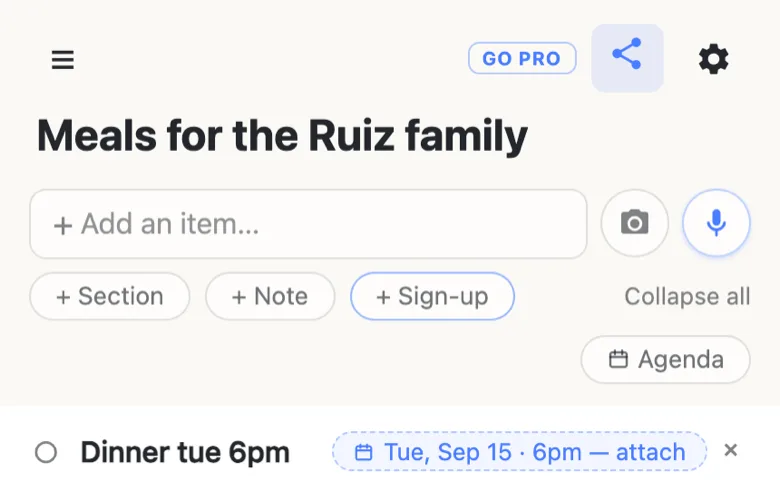
It reads the shapes people actually write: tue 6pm, friday, sept 15, 9/15, the 15th, weds 26th, next tuesday, in two weeks. A time is only read when it’s riding the day, so a row that just says “leave it by 6” is left alone.
Once you attach it, the date leaves the words and becomes a chip pinned to the right-hand end of the row. If you typed the day at the end — dinner tue 6pm — those words go with it, and the row is left reading simply Dinner, because the chip is saying that part now. A day sitting in the middle of a sentence stays where it is: friday night lasagna keeps every word and wears its chip beside them.
One thing worth knowing before you build a month of these: the times are floating. 5:30pm means 5:30pm at the family’s front door, with no timezone conversion anywhere in the chain. That’s exactly right for a meal train, where everyone involved is driving to the same house, and it’s the wrong tool for a call across three countries.
Sections for weeks, dates for days
When a heading is the only way to say “Tuesday”, a meal train needs a section per night and the sheet turns into a wall of headings. With the day on the row, the headings are free to do something more useful — one per week, so a month of meals stays scannable and you can add the next week when the last one fills.
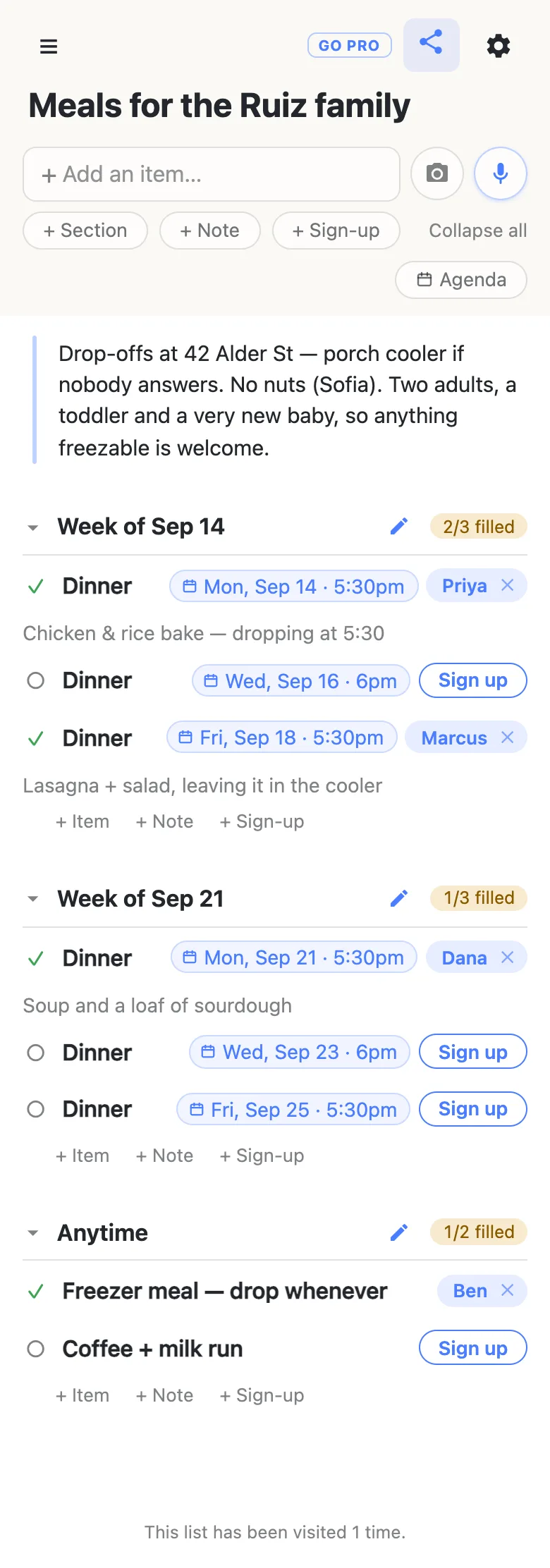
Each heading carries its own counter — 2/3 filled, turning green when every meal under it has a name — which is the number an organiser actually checks. Rows that don’t belong to a night can sit in a section of their own: a freezer meal somebody will drop whenever, a coffee run, a batch of muffins for the week.
The standing instructions go in a note block at the top, where everyone reads them once instead of nine times: the address, where to leave it if nobody answers, the allergy that matters, how many people are eating. That’s the paragraph in the picture above, and it’s the difference between a sheet people can use and a sheet that generates a dozen texts.
Claiming a night takes one tap
Whoever you send the link to opens it — no app, no account, no “continue with Google” — and taps Sign up beside the night they’re taking. Their name lands on the row live, on everyone’s screen, and a small box opens for the part that makes a meal train work: chicken & rice bake, dropping at 5:30, vegetarian chili and cornbread, I’ll leave it in the cooler.
People sign up their spouses, their kids and the neighbour who doesn’t text: tap a name to type a different one over it. The × clears a night back to open, and clearing somebody else’s asks you first, because dropping a cook by accident is the mistake worth a second of friction. Note that clearing a claim never deletes the row — the night stays, back to open, ready for the next person.
Nobody signing up ever sees a login screen, and that is the whole reason a sheet like this fills. Every account, verification email and “download the app to claim your slot” between a willing person and a Tuesday is a place where willing people quietly stop.
Read the run back as a schedule
As soon as one row has a date, an Agenda button appears in the header. Tap it and the same sheet regroups under day headings — Today and Tomorrow by name, then the dates — with timed rows in time order and everything undated collected at the bottom under No date.
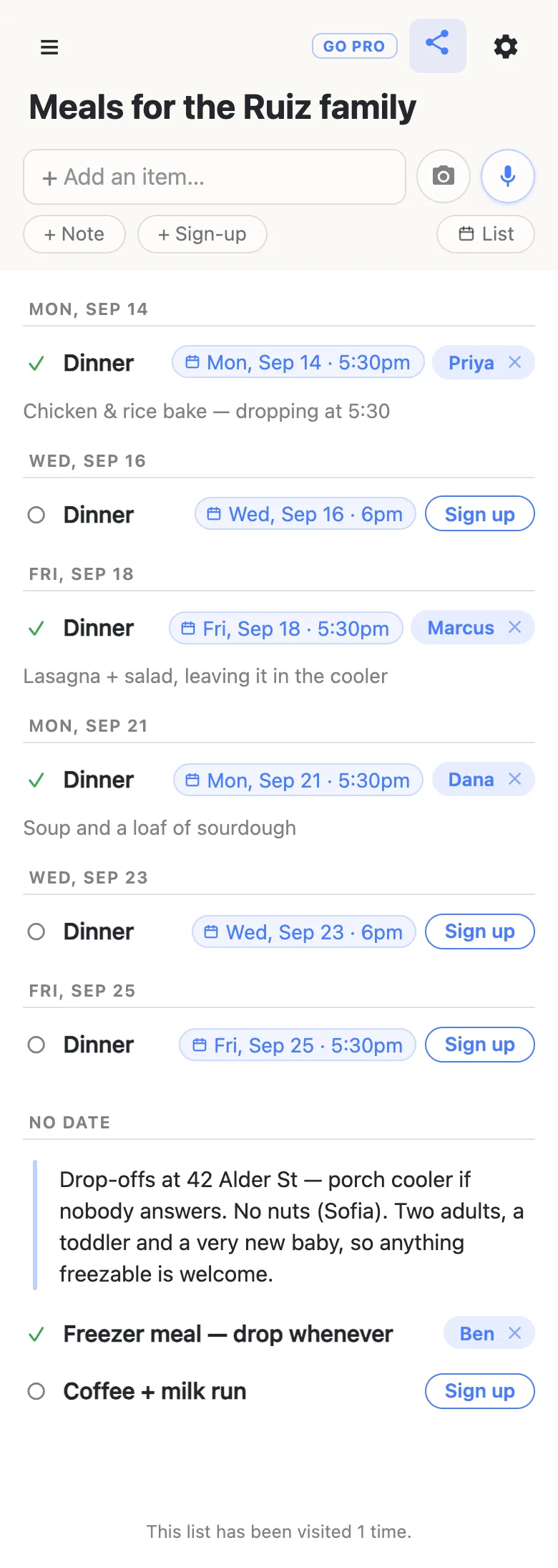
This is the view to send the family, and the one to check on a Sunday night: the open nights sit in the run in date order, so “we need somebody for Wednesday” is a thing you can see rather than work out. Sections drop out here, because the day is doing the organising, and dragging is off — the order is worked out from the dates, so there’s nothing to drag it into. Tap List and everything is exactly where you left it.
Days that have gone by dim rather than disappear. Nothing on a list ever removes itself, which is the honest version of “what happens to last Tuesday”: it sits there, faded, until somebody deletes it.
Put the meal train in everyone’s calendar
The dated rows are also a calendar subscription, which is what turns a sheet people have to remember to open into meals that turn up in the app they already look at every morning. Open the gear menu, find Calendar feed, and you get an address plus Add to Google Calendar and Add to Apple Calendar links. Google’s works from a computer; on a phone, copy the address and paste it into your calendar app’s “subscribe” box.
What lands there is the useful part:
- A claimed night appears under the cook’s name (Dinner — Priya), with what they’re bringing as the event’s description — so the reminder on the day carries the plan and not just a word.
- An open night appears as OPEN — Dinner. The holes in your sheet turn up in your own calendar, days ahead, with nobody going and looking.
- Changes flow through on their own. A night claimed this afternoon updates in the subscription — how quickly depends on how often your calendar app re-checks, which is its decision, not ours.
One small habit pays off here: name the rows so they read out of context. Dinner is perfectly clear on the sheet and says nothing at all in a cook’s work calendar three weeks out, where Dinner — Ruiz family is the same row and a far better event.
Two honest limits. The times stay floating, as above, so a subscription never shifts them to somebody’s timezone. And a list with a password on it refuses the feed outright: a calendar app has no way to answer a password prompt, so the feed declines rather than quietly handing the sheet to anything that asks for it.
What it deliberately doesn’t do
It doesn’t remind anybody. There are no notification emails, no texts and no nagging — a sheet with no accounts has no address to send them to, which is precisely why nobody had to hand one over to sign up. The calendar subscription above is the honest way to get an alert, and it works because your own calendar is doing it.
It doesn’t repeat, either: “every Tuesday for a month” is four rows you add, not a recurrence rule. And nothing is ever guessed after the fact — the app never re-reads your rows later and decides one of them meant Tuesday. A date exists because somebody tapped a chip.
When the sheet is going out further than a street
Everything above is the free product, and for a neighbourhood or a family it is the whole answer: anyone holding the link can claim a night, fix a name and add a dish, exactly like a clipboard passed round a room. That openness is also the thing to think about before the link goes into a church bulletin or a school newsletter, where the question stops being “can people sign up” and becomes “can people wreck it”.
That’s what anonylist pro is for: a sheet you own, where visitors can claim nights and write their notes but can’t delete anything, plus a readable address you can print. Same one-tap claiming, same link for everyone — you just get the say over what else can happen to it. How the permission switches work covers the detail.
Questions
- How far ahead should a meal train run?
- Two or three weeks of rows is plenty to start with, because the sheet isn’t a form you have to finish before sending. Add a section for the next week whenever the current one fills up — everyone’s link stays the same, so there’s nobody to re-invite and nothing to re-send.
- Does the time on a row mean dinner time or drop-off time?
- Whichever your sheet says it means — the app simply holds the time you attached and shows it on the row. Most meal trains use it as the drop-off time, and it’s worth saying so once in a note at the top rather than on every row. In a calendar subscription that time becomes the event’s start, with a one-hour default length.
- Can two people cover the same night?
- Yes — make two rows and give them the same date. A sign-up row holds one name, which is what makes “2/3 filled” mean something, so a night that needs a main and a pudding is two rows. In the agenda view they sit under the same day heading, in time order.
- Can I add more weeks after the sheet has gone out?
- Yes, and that’s the normal way to run one. Add a section, add rows, attach the dates: anyone with the sheet open sees them appear live, and anyone opening the original link gets the current version. There’s no second link to send and no copy to keep in step.
- How does the family see what’s coming without asking anybody?
- They open the same link. The agenda view reads the run back day by day, and if they subscribe to the calendar feed, tonight’s meal — with the cook’s name and their note — turns up in the calendar app they already use. Nothing is emailed to them and there’s nothing to sign into.