Doodle sign-up sheets vs a live shared list
Last updated October 20, 2026
Doodle doesn’t only do polls. Its sign-up sheets let people pick a slot — a shift, a session, a time to drop something off — and the people signing up don’t need an account. The organizer does: Doodle’s help centre says you must be logged in to create one. On the free plan a sheet is capped at 20 time slots, it shows ads, and deadlines and automated reminders are kept for the paid plans.
A shared list does the same job a different way. Every slot is a row with a Sign up button, anyone with the link claims one, and the whole sheet is live — every name lands on every open phone as it happens. Nobody makes an account, including you, and there are no ads. Here is a volunteer shift sheet built that way, and an honest look at which tool fits which job.
Opens instantly. No account, no email.
Days as sections, shifts as slots
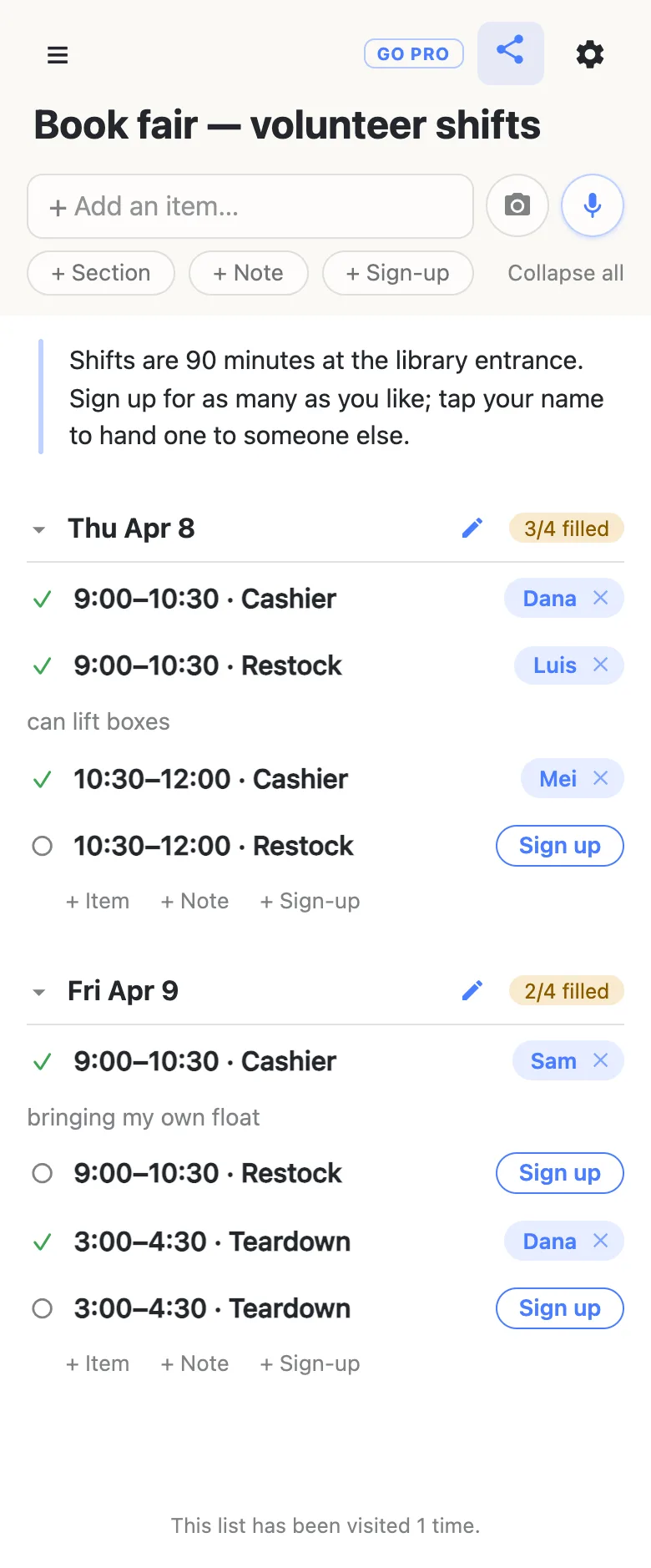
Make a list — Book fair — volunteer shifts — and put the logistics in a note at the top: how long a shift is, where to go, and that people may sign up for as many as they like. Then add a section per day and, under each, a sign-up slot per shift and role: 9:00–10:30 · Cashier, 9:00–10:30 · Restock. Two people on the same shift is two rows.
A time range in a row stays plain text on purpose, so 9:00–10:30 is a label, not a calendar event, and you can write it however your group writes times.
What a live sheet does well
- Everyone sees the gaps. Each day’s heading counts its shifts — 3/4 filled — so the empty Friday teardown is visible to every volunteer, not only to you.
- Swaps don’t go through you. A volunteer who can’t make it taps the × on their own name, or taps the name itself to hand the shift to somebody else. Clearing another person’s name asks first.
- Notes ride on the claim. Can lift boxes, bringing my own float — the detail lands under the name, where whoever is coordinating the day will see it.
- The sheet is also the instructions. The note, the to-dos for the organizers and the shifts share one link, so there is nothing to forward but that.
Side by side
| Doodle sign-up sheets | anonylist | |
|---|---|---|
| Organizer account | Required — you must be logged in to create one | None |
| People signing up | No account needed | No account needed |
| Ads | On the free plan; removed on paid plans | None |
| Slots on the free plan | Up to 20 time slots | Up to 1,000 rows per list |
| Calendar | Calendar integration | A calendar feed for any row with a date on it |
Doodle details from Doodle’s help centre, checked October 20, 2026: the sign-up sheet FAQ and the Free vs Professional comparison (updated July 28, 2026).
When the link goes on a public flyer
Putting the link on a poster in the library lobby? Own the list and choose what visitors may do: leave signing up on, switch adding, editing and deleting off, and the sheet becomes fill-in-only for everyone but you and the coordinators you add as admins.
See what anonylist pro does Only you need an account. Volunteers still just open the link.
Questions
- Do you need a Doodle account to make a sign-up sheet?
- Yes, as the organizer: Doodle’s help centre says you must be logged in to create one. The people signing up do not need an account. On anonylist nobody does — you make the sheet and share the link without signing in to anything.
- How many slots does a free Doodle sign-up sheet allow?
- Doodle’s comparison of its plans lists a limit of 20 time slots for sign-up sheets on the free plan, with unlimited slots on the paid plans. An anonylist list holds up to 1,000 rows, and every row can be a slot.
- Can volunteers swap shifts without asking me?
- Yes. A volunteer clears their own name with the × beside it, or taps the name to hand the shift to someone else, and the change appears on every open phone straight away. Clearing another person’s name asks for confirmation first.
- How do I see which shifts are still open?
- Each day’s heading keeps a count like “3/4 filled”, and every open shift shows a Sign up button, so the gaps are visible at a glance — to you and to every volunteer, which is usually what gets them filled.
- Can shifts go straight into volunteers’ calendars?
- Yes. Put the date on a shift row — type @ to pick it — and the list’s calendar feed, under the gear menu, turns it into an event for anyone who subscribes, with the volunteer’s name on it once the shift is claimed.
Opens instantly. No account, no email.