A group camping gear checklist that says who’s bringing what
Last updated October 20, 2026
Every group trip runs the same thread. Somebody posts a list of gear at nine on a Tuesday, four people reply “I can bring a stove”, two of those replies land on the same evening and are never read again, and on Friday the site has three stoves, two hatchets and no water jug. The list wasn’t wrong. It just had no room for the only thing that mattered — who.
A group camping gear checklist is really two lists doing different jobs. There is the shared kit, where the group needs exactly one of each thing and somebody has to own it. And there is the personal pile, where everybody brings their own and nobody needs to coordinate anything. Run them as one flat checklist and both go wrong. Here’s the version that works on a link anyone can open, with nothing to install and no accounts.
Opens instantly. No account, no email.
Start with the stuff that isn’t gear
Make a list and name it after the trip — Camping — Pine Hollow. Then, before a single item, put a note at the top. The + Note pill under the add box gives you a block of long text instead of a row with a checkbox, and it is the right home for everything that would otherwise be asked eleven times: the site numbers, the gate code, when you can roll in, when you have to be out, whether there’s water at the site, what firewood costs at the camp store.
It sits above every row, so nobody has to scroll for it, and it saves the version of this trip where two cars drive to the wrong loop.
The shared kit goes on as sign-up rows, not checkboxes
For the gear itself, use the + Sign-up pill rather than the ordinary one. A sign-up row has no checkbox at all: it is a need with a space beside it for a name, and being claimed is its state. “Two-burner stove + fuel” is either spoken for, or it shows a Sign up button — which is the only question anybody opening the link is actually asking.
That is the difference that fixes the thread. A tick on a flat checklist says something happened; it never says who, so the careful people in the group tick nothing and the confident ones all tick the stove. A name on the row says it out loud, to everyone, at the moment it’s claimed.
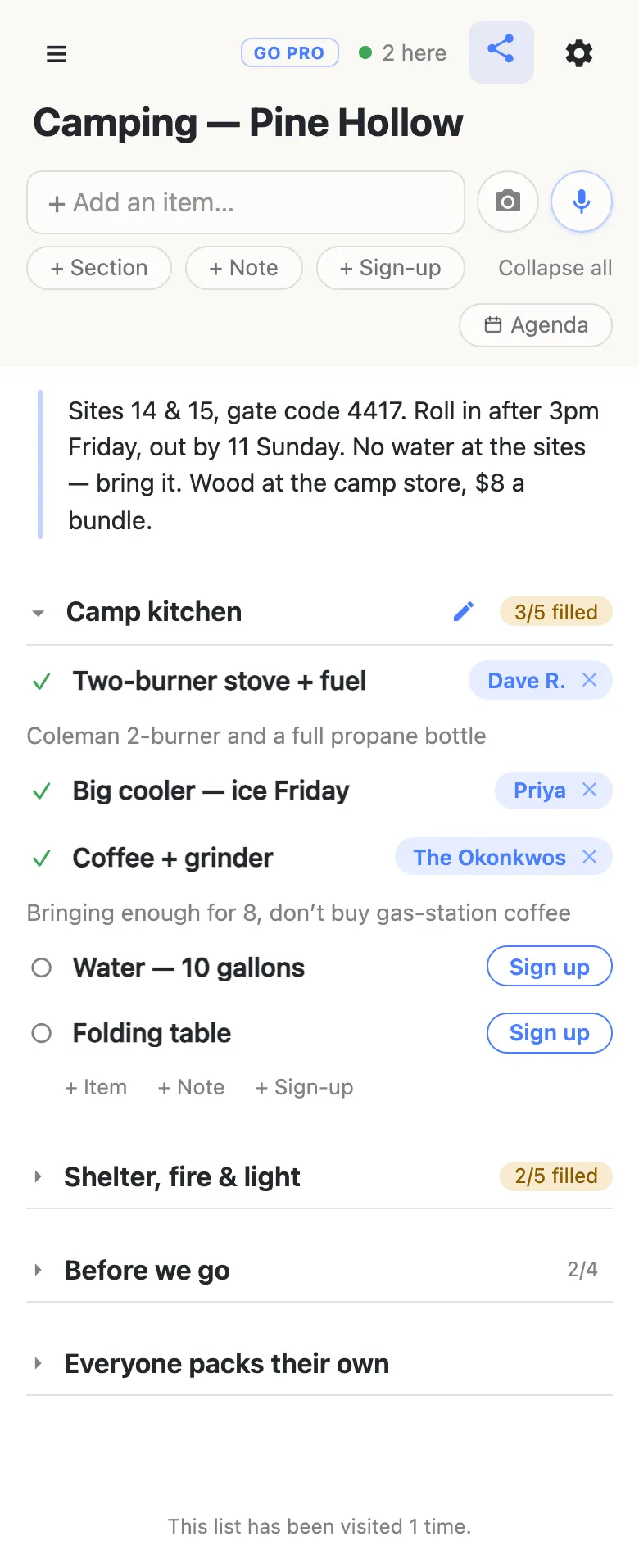
Claiming takes one tap and puts whatever that phone calls itself on the row. Then it offers an optional note, prompted with “What are you bringing? (optional)”, and that is where the detail belongs: “Coleman 2-burner and a full propane bottle” tells the next person not to bring fuel, and “3 bundles, picking them up at the camp store Friday” tells them not to stop on the way. Attached to the row it describes, instead of four replies deep in a thread.
Names aren’t verified and there are no accounts underneath them, which makes signing somebody else up normal rather than a workaround — half a camping group is couples, and one phone signs up two people. Tap a name chip to change it. Clearing a claim that isn’t yours asks first, because their note goes with it.
Sections shaped like the way you pack the car
Group the kit with sections — Camp kitchen, Shelter, fire & light, Water & cleanup. Each heading carries its own count, 3/5 filled, so one glance says the kitchen is nearly covered and nobody has taken a lantern. Each section also has quiet + Item + Note + Sign-up links at its end, so the person who notices there’s no can opener adds that row themselves instead of texting you to do it.
If you want a starting point, this is the shared half of a weekend for six to eight people. Add the rows, leave them unclaimed, send the link:
- Camp kitchen — two-burner stove + fuel · big cooler (and who’s buying ice) · water, 10 gallons · folding table · coffee and a grinder · a sharp knife and a cutting board · pot, pan, tongs, big spoon
- Shelter, fire & light — kitchen tarp + poles and guy lines · a spare tent for whoever’s short · firewood, by the bundle · fire kit: matches, starters, hatchet · lantern for the table · lantern for the path to the toilets
- Water & cleanup — wash bin and biodegradable soap · a couple of dish towels · trash and recycling bags · a full first-aid kit · sunscreen and bug spray for the table
Trim it to your trip rather than taking it whole — a list with rows nobody needs gets skimmed, and skimming is how the water jug gets missed.
Fold it down to the gaps
Once the claims start landing, the useful view isn’t the gear — it’s what’s still open. Tap Collapse all in the header and every section folds to a heading and its count. Five lines, five numbers, and the two that aren’t full are the whole of your Thursday-night message to the group.
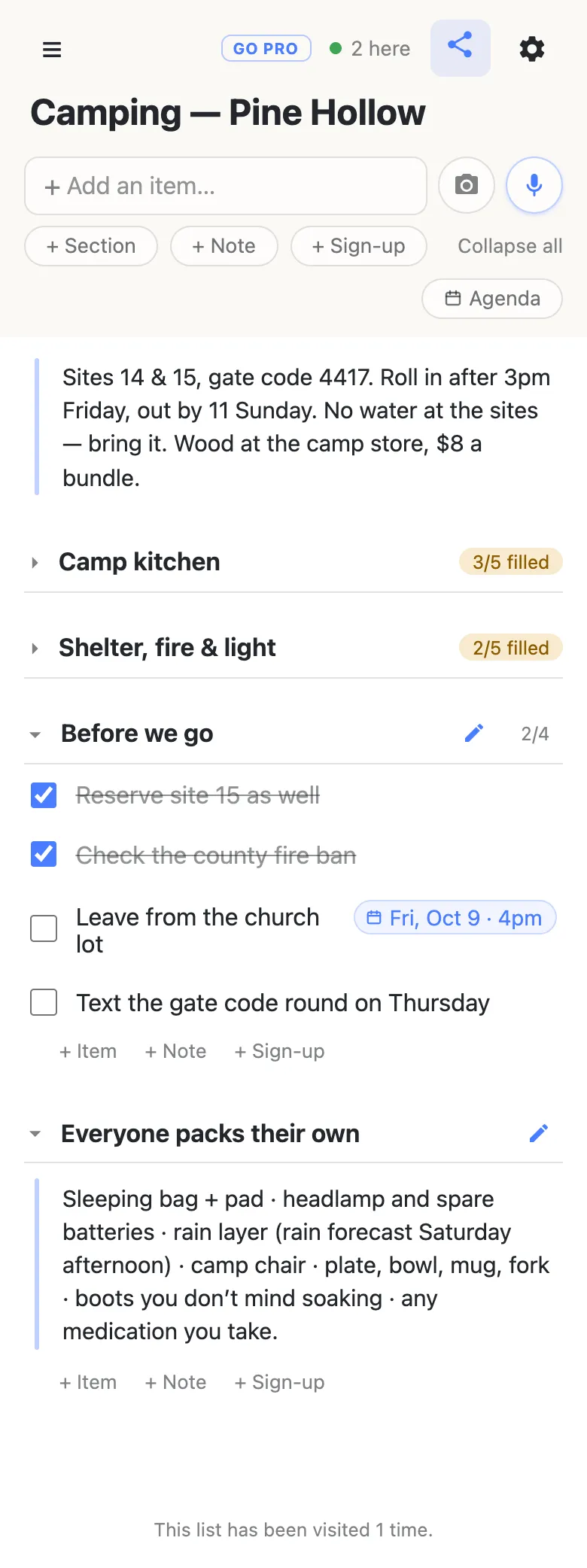
Folding is per device: tidying your own view moves nothing on anybody else’s phone. That 2 here chip is live presence — tap it for the names — and it matters most in the twenty minutes after you send the link, which is when most of the claiming happens.
The jobs that aren’t gear can go on the same list as ordinary checkable items: reserve the second site, check the county fire ban, text the gate code round. Write a day into one of those — “Leave from the church lot friday 4pm” — and a date chip is offered, Fri, Oct 9 · 4pm pinned to the row’s right edge, which you can attach with a tap or ignore. Once anything is dated, an Agenda toggle appears that regroups the list by day, and the gear icon offers a Calendar feed address you can subscribe to, so the departure time shows up in the calendar app you already check.
Don’t make the personal list checkboxes
This is the part people get wrong, and it’s worth saying plainly: a tick on a shared list is shared. If “sleeping bag” is a row and eight people are meant to pack one, the first person to tick it has told the other seven it’s done. The row can’t hold eight answers.
So put the personal pile in a note instead — one block of text, no checkbox, read by everyone and ticked by nobody. Sleeping bag and pad, headlamp and spare batteries, a rain layer, a camp chair, plate and bowl and mug and fork, boots you don’t mind soaking, any medication you take. If somebody wants to tick their own off, they can do it on their own list at home. This one is the group’s.
Before you head out of signal
anonylist is a live list: it syncs the moment anything changes, which is exactly what you want in the week before a trip, when the gear gets divided up.
The habit that works is simple. Do the dividing in the days beforehand, when everyone is at home on wifi. Then, in the last town with signal, screenshot the list or export it from the gear icon — either gives you a copy that needs no network. Whatever changes at camp gets typed in on the drive home, which is also when somebody remembers the thing you’ll need next year.
When the list outgrows one weekend
Running the trip every year, or posting the list in a club thread? You may want people to claim gear without rewriting the list.
That is what owning the list is for. The list stays yours and you choose what visitors may do with it: leave signing up on, turn deleting and reordering off, and it becomes claim-and-add for everyone but you. Nothing changes for the group — same link, no account, one tap. You can make your co-organizer an admin by email so they can fix their own section, and claim a readable address so next year’s message carries something a person could retype.
See what anonylist pro does Only you need an account. Everyone else still just opens the link.
Next year’s trip
An annual trip is the case for keeping one link rather than minting a new one — it’s the address the group already has. Before you reset it, export the list (gear → Export & import): the file carries the sections, the rows and the names on them, and it’s the only copy that doesn’t depend on us.
Then import it back with Overwrite ticked and the list returns to its unclaimed shape on the same address. That one clears every row for everyone, so it asks you to confirm and the button then reads “Replace with N rows” instead of pretending to be safe. If you’d rather keep last year’s as a record, start a new list and import the file into that — the old link stays exactly as it was, right down to who forgot the water.
Keep the list running smoothly
- Keep it to what it’s for. Stoves, tarps and firewood. Addresses and phone numbers belong in your contacts, not on the gear list.
- Fold, don’t delete. Fold a finished section away instead of clearing it, and next year’s trip starts from this year’s list.
- Keep the link handy. Text yourself the link the day you make it — your phone also keeps it in the ☰ drawer — and export a copy from the gear menu (Export & import) whenever you want a file of it.
Questions
- What belongs on a group camping gear list, and what should stay personal?
- Split it by how many the group needs. Anything the trip needs exactly one or two of — stove and fuel, the big cooler, water jugs, a kitchen tarp, lanterns, the fire kit, a first-aid kit, a folding table — is shared kit, and every one of those rows needs a name on it or it does not arrive. Anything each person needs their own of — sleeping bag and pad, headlamp, rain layer, camp chair, their own bowl and fork, medication — is personal, and belongs in one block of text people read rather than a set of rows they tick. Keeping the two apart is most of what makes a group gear list work: the shared half is a division of labour, the personal half is a reminder.
- How does a shared list stop three people bringing the same stove?
- Because the row itself holds the name, and everyone is looking at the same row at the same moment. On anonylist the shared kit goes in as sign-up rows: there is no checkbox on one, and being claimed is its whole state. “Two-burner stove + fuel” is either spoken for or it shows a Sign up button. When somebody taps it their name lands on that row on every phone that has the link open, within a second, so the second person to think of the stove sees it is already handled and goes looking for what isn’t. A flat checklist cannot do this — a tick says something happened, never who did it.
- How do I take the list to a campsite with no signal?
- Do the dividing in the days before, while everyone is on wifi, and in the last town with signal take a screenshot of the list or export it from the gear icon — either gives you a copy that needs no network. Once you are back in range, whatever changed at camp goes in then.
- Can the list track who owes what for the food and firewood?
- Not as money — there is no splitting, no totals and no settling up here, and pretending otherwise would be worse than saying so. What it does hold well is the record you settle from: each claim carries an optional note, so “3 bundles, $24 from the camp store” or “got the ice, $9” sits on the row it belongs to instead of scrolling away in the group chat. When you get home, that is the list you work from in whatever app you already use for splitting a bill.
- Can we use the same link for next year’s trip?
- Yes, and for an annual trip it is usually the better move, because the group already has it saved from last time. Before you reset it, export the list from the gear icon: the file carries the sections, the rows and the names, and it is the only copy that does not depend on us. Then import it back with Overwrite ticked and the list returns to its unclaimed shape on the same address. Overwrite clears every row for everyone, so it asks you to confirm first and the button then reads “Replace with N rows” rather than pretending to be safe.
Opens instantly. No account, no email.