A tailgate food sign-up sheet the whole lot can see
Last updated October 21, 2026
Every tailgate group chat ends up in the same place. Three people said they’d bring chips, two people are bringing a grill and nobody is bringing propane, and the ice is something everyone assumed somebody else had. The plan is in there somewhere — forty messages up, between the parking pass and a meme about the other team.
Put the plan on one link instead. Every dish, every bag of ice and the grill itself becomes a row somebody claims by name, a note at the top says where you’re parked, and a count on every heading shows what nobody is bringing yet. It updates on every phone as people claim, right up to the moment you light the grill. Nothing to install, nobody makes an account, free.
Opens instantly. No account, no email.
Where you’re parked goes in one note at the top
Make a list and name it after the game — Homecoming tailgate. Then tap the + Note pill under the add box. A note is a block of long text rather than a row with a checkbox, and it answers the questions you would otherwise get texted all morning: which lot and which row, what to look for (“the green canopy”), when the grill is lit, when kickoff is, what parking costs and how you’re splitting it.
Paste a map link into the note and the sheet offers to name it, so it reads Map pin rather than a wall of characters. Tap the note once to select it, then tap the chip, and the pin opens in a new tab — on most phones, straight into the maps app.
Keep the note above every section. The first time somebody opens the link, the sections are folded shut with their counts on the headings and only what sits above the first section is open — so the first thing a friend-of-a-friend sees is where to find you.
One section for food, one sign-up per dish
Add a section called Food, and inside it use the + Sign-up link at the section’s end to add a row per dish you need: Burgers & buns, Brats, Wings, Veggie option, Chips & dip, Dessert. Pressing Enter chains straight into the next one.
A sign-up row has no checkbox. It is a need with a Sign up button beside it, and being claimed is its whole state. Tapping the button puts the person’s name on the row and opens an optional note, which is where the quantity goes: “24 patties + cheese”, “50, hot in a slow cooker”, “Black bean burgers x6”. Each row holds one name, so once chips are taken, chips are taken — nobody else can quietly bring a fourth bag.
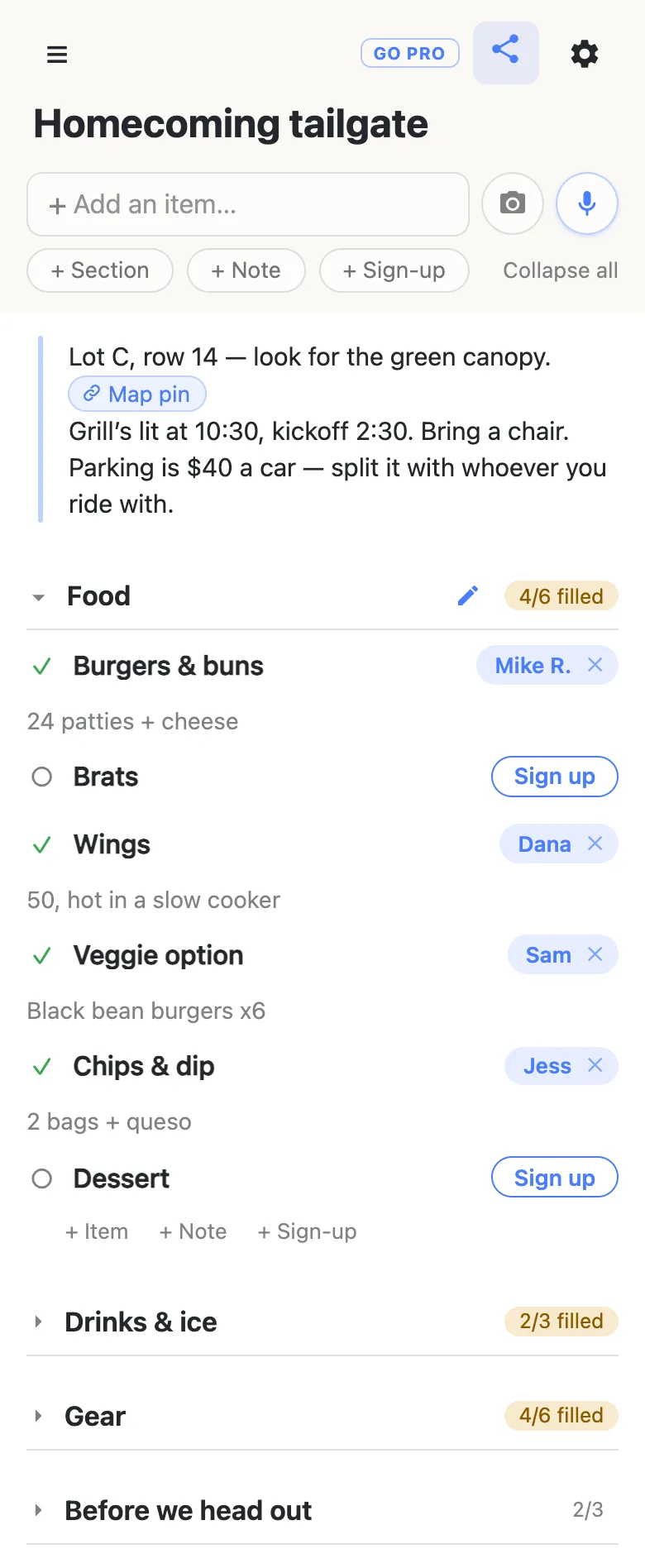
The counter on the heading — 4/6 filled — is the whole point. You don’t have to read every row to know the food is two dishes short, and you know exactly which two. A section that’s fully covered turns green with a tick.
Ice, drinks and the grill are sign-ups too
The things that ruin a tailgate are rarely the food. They’re the bag of ice nobody bought and the grill that showed up without propane. So give them rows of their own: a Drinks & ice section with Ice, Water & soda and Big cooler, and a Gear section with Grill + propane, Canopy, Folding table, Speaker, Cornhole and Trash bags. The claim note turns “I’ll bring a grill” into something you can plan around: “Full tank, the big Weber”, “4 bags, there by 10”.
The same person can sign up for as many rows as they like. Mike can bring the burgers and the grill, and the sheet shows both.
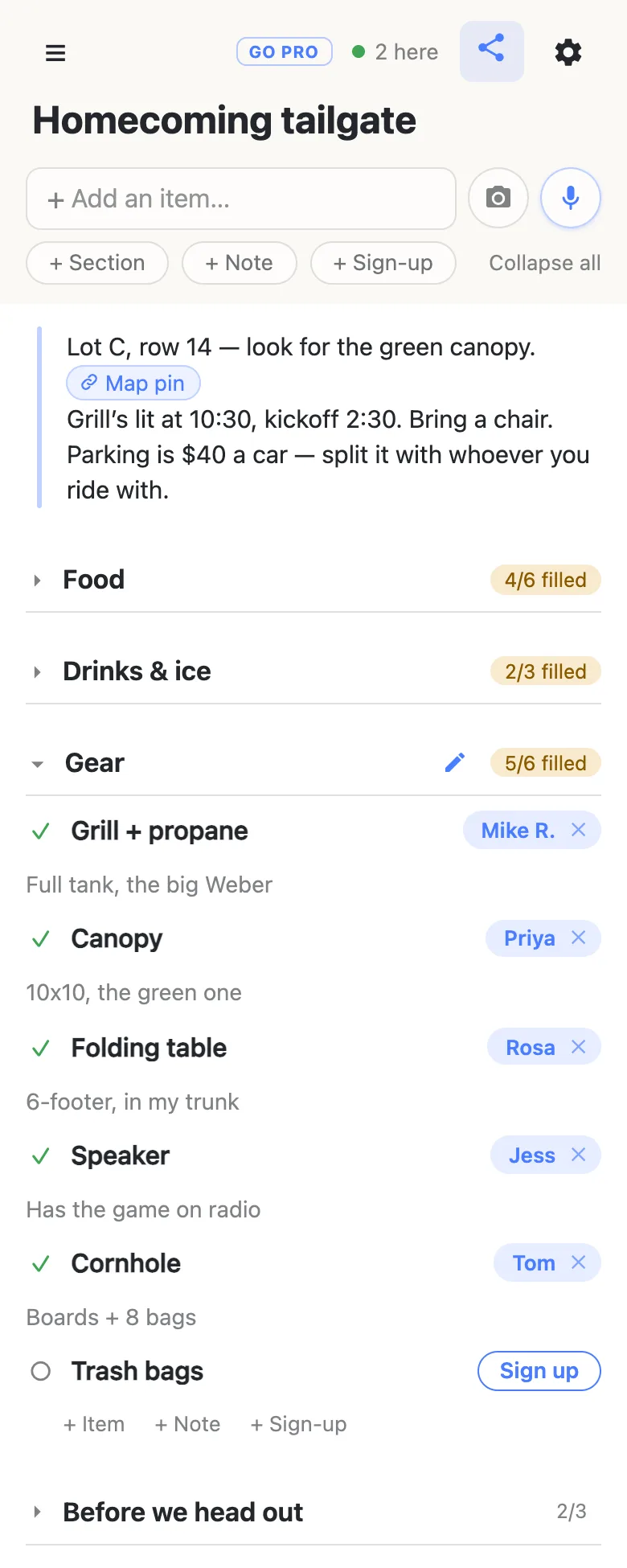
Folding is per device: tap a heading, or Collapse all in the header, and your view shrinks to a few headings and their numbers. Nobody else’s phone moves.
Your own errands can live on the same sheet. A Before we head out section of ordinary checkbox rows — buy the parking pass, text the lot number to the group, charge the speaker — gives whoever is organizing a shared to-do list with its own 2/3 on the heading.
One link in the group chat, updating all the way to the lot
Drop the link in the group text. Whoever opens it gets the sheet and a Sign up button beside every open row — no app, no account, no password to invent. The first time, it asks what to call them, and whatever they type is the name that appears on the rows they claim. That makes “put my brother down for brats, he never checks the chat” normal rather than a workaround: tap a name chip to change it, and if you clear somebody else’s claim the sheet asks first — “Clear Dana’s sign-up? Their note goes with it.”
Claims appear on every open phone as they happen, so two people reading at once don’t both grab dessert. The 2 here chip in the header is live presence — tap it for the names. And on game day, a phone that drops signal in a packed lot catches up on its own: the moment it reconnects, it reloads the whole sheet as it stands, so the person pulling in at 11 sees the same list as the people who got there at 9.
When the tailgate outgrows your crew
Running the tailgate for an alumni chapter, a fan club or the whole parents’ section? Once the link is going round a big group, you may want people to sign up without rewriting the sheet.
That is what owning the list is for. The sheet stays yours and you choose what visitors may do: leave signing up on, switch adding, editing, deleting and reordering off, and the link becomes fill-in-only for everyone but you. The group notices nothing — same link, still no account, still one tap. Add a co-organizer as an admin by email so they can fix things on game day, and claim a short address you can say out loud in the parking lot.
See what anonylist pro does Only you need an account. Everyone else still just opens the link.
Same link, every home game
A season of tailgates should run off one link — it’s the one the group chat already has. The trick is to export the sheet once while it’s still blank: the gear icon → Export & import gives you a small file with the note, the sections and every row, and that file is your template.
After each game, import it back with Overwrite ticked and the sheet returns to its blank shape at the same address, ready for next Saturday’s claims. Overwrite clears every row for everyone, so it asks first and the button reads “Replace with N rows”. Want this week’s sign-ups on record before you reset? Export again first and keep that file too. More on reusing a sheet.
Keep the sheet running smoothly
- Name the need, not the person. “Ice — 4 bags” fills itself; “Chris, can you get ice?” waits for Chris.
- Keep it to what it’s for. Food, gear, first names and where you’re parked. Phone numbers and home addresses are better kept in the group chat.
- Fold, don’t delete. Fold a finished section away rather than clearing it — next week’s sheet starts from this one.
- Keep the link handy. Pin it in the group chat; your phone also keeps it in the ☰ drawer.
Questions
- What should go on a tailgate food sign-up sheet?
- Split it into food, drinks and gear. Food is the mains (burgers, brats, wings), a vegetarian option, sides, chips and dip, and dessert. Drinks covers ice, water and soda, and the big cooler. Gear is the grill with a full propane tank, the canopy, a folding table, the speaker, a game like cornhole, and trash bags. Put where you are parked, when the grill is lit and what parking costs in one note at the top, above everything else.
- How do I make sure somebody actually brings the ice?
- Give the ice its own sign-up row instead of hoping it is covered. A row with nobody on it keeps its Sign up button, and the heading above it keeps a count like “2/3 filled”, so the gap is visible to everyone who opens the link. Ask about that one row in the group chat by name — “still need someone on ice” gets an answer where “bring stuff!” does not.
- Can two people sign up for the same dish?
- Each sign-up row holds one name, which is what stops three people quietly bringing chips. When a dish genuinely needs two people — burgers for forty, say — add two rows, “Burgers (1 of 2)” and “Burgers (2 of 2)”, and let the note on each claim say how many patties that person is bringing.
- What if the cell signal in the stadium lot is patchy?
- Get most of the signing up done in the days before, from home, so the plan is settled before anyone hits game-day traffic. On the day, a phone that loses signal in a packed lot catches up on its own: the moment it reconnects, it reloads the whole sheet as it stands, so nobody is reading an old copy. A screenshot before you leave home puts the gear list in your pocket either way.
- Can I use the same tailgate sheet for every home game?
- Yes, and keep the link — it is the one the group chat already has. Export the sheet once while it is still blank (gear icon → Export & import) and keep that file as your template. After each game, import it back with Overwrite ticked and the sheet returns to its blank shape at the same address. Overwrite clears every row for everyone, so it asks first.
Opens instantly. No account, no email.