A Friendsgiving sign-up sheet for the group chat
Last updated October 25, 2026
To make a Friendsgiving sign-up sheet, start a list on anonylist, add each dish as a sign-up row, and drop the link in the group chat. Friends open it, tap Sign up on what they’re bringing and their name goes on it — so you get one mac and cheese instead of three, and everyone can see which dishes are still open. It’s free, and nobody needs an account or an app.
- Start a list and name it — Friendsgiving 2026.
- Add a note at the top: whose place, what time, who’s vegetarian.
- Add a section for the food, dessert and drinks, with a sign-up row per dish.
- Paste the link into the group chat. Each section counts what’s still unclaimed.
Thanksgiving is Thursday, November 26, 2026, and most Friendsgivings land the weekend before — Saturday, November 21 — while everyone is still in town. Friends don’t need a seating chart or an RSVP form; they need to know where, when, and what to bring. That fits on one link.
Opens instantly. No account, no email.
What the sheet looks like
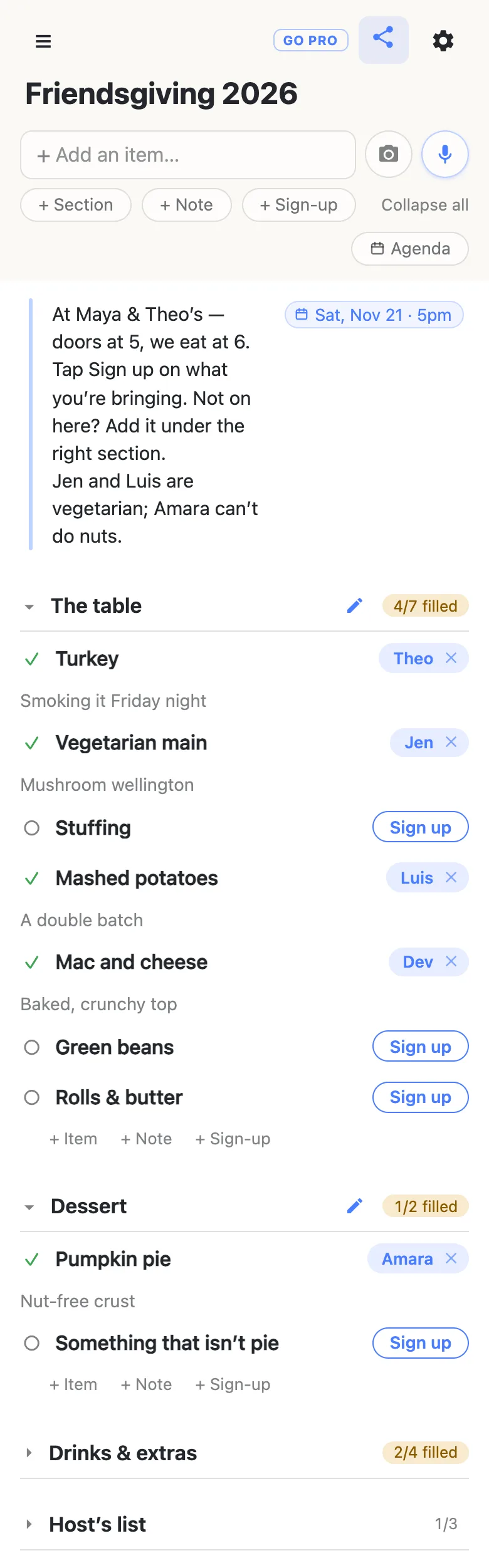
Here is the example sheet from the screenshots below, as text. Dishes are sign-up rows a friend claims; the host’s own jobs are plain checkboxes.
Note: At Maya & Theo’s — doors at 5, we eat at 6. Tap Sign up on what you’re bringing. Not on here? Add it under the right section. Jen and Luis are vegetarian; Amara can’t do nuts. Saturday, November 21, 2026, 5pm.
The table
- Turkey — Theo: “Smoking it Friday night”
- Vegetarian main — Jen: “Mushroom wellington”
- Stuffing — Sam: “Veggie, so Jen and Luis can have it”
- Mashed potatoes — Luis: “A double batch”
- Mac and cheese — Dev: “Baked, crunchy top”
- Green beans — open
- Rolls & butter — open
Dessert
- Pumpkin pie — Amara: “Nut-free crust”
- Something that isn’t pie — open
Drinks & extras
- Wine — Kai: “2 red, 1 white”
- Cider & fizzy water — open
- Ice — open
- Folding chairs x4 — Priya: “Bringing 4”
Host’s list
- ☑ Order the turkey
- ☐ Pick up the turkey — Thursday, November 19
- ☐ Clear the fridge — Friday, November 20
Every dish is a row somebody claims
Add a section for each part of the meal — The table, Dessert, Drinks & extras — and use the + Sign-up link at the end of each one to add the dishes. Pressing Enter chains straight into the next row, so the whole menu takes a minute.
A sign-up row has no checkbox. It’s a dish with a Sign up button beside it, and being claimed is its whole state: a friend taps the button, their name lands on the row, and a note opens for what they’re actually making — “Mushroom wellington”, “A double batch”. Each row holds one name, so once the mac and cheese is taken, it’s taken.
Spot the dish nobody has claimed
Every Friendsgiving has one: the stuffing everybody assumes somebody else is making. On the sheet it can’t hide. Each section heading carries a counter — 4/7 filled — that stays amber while anything in it is open and turns green with a tick once every dish has a name, and the open rows are the ones still showing a Sign up button.
So the nudge writes itself. A few days before, glance at the headings and post the gaps in the chat by name — “still need stuffing, green beans and ice” gets three replies where “anyone else want to bring something?” gets none. Whoever answers taps the row, and the counter moves on everyone’s phone.
Friends sign up from the group chat
Whoever taps the link gets the sheet and a Sign up button beside every open dish — no app, no account, no password to invent. The first time, it asks what to call them, and whatever they type is the name that appears on the rows they claim.
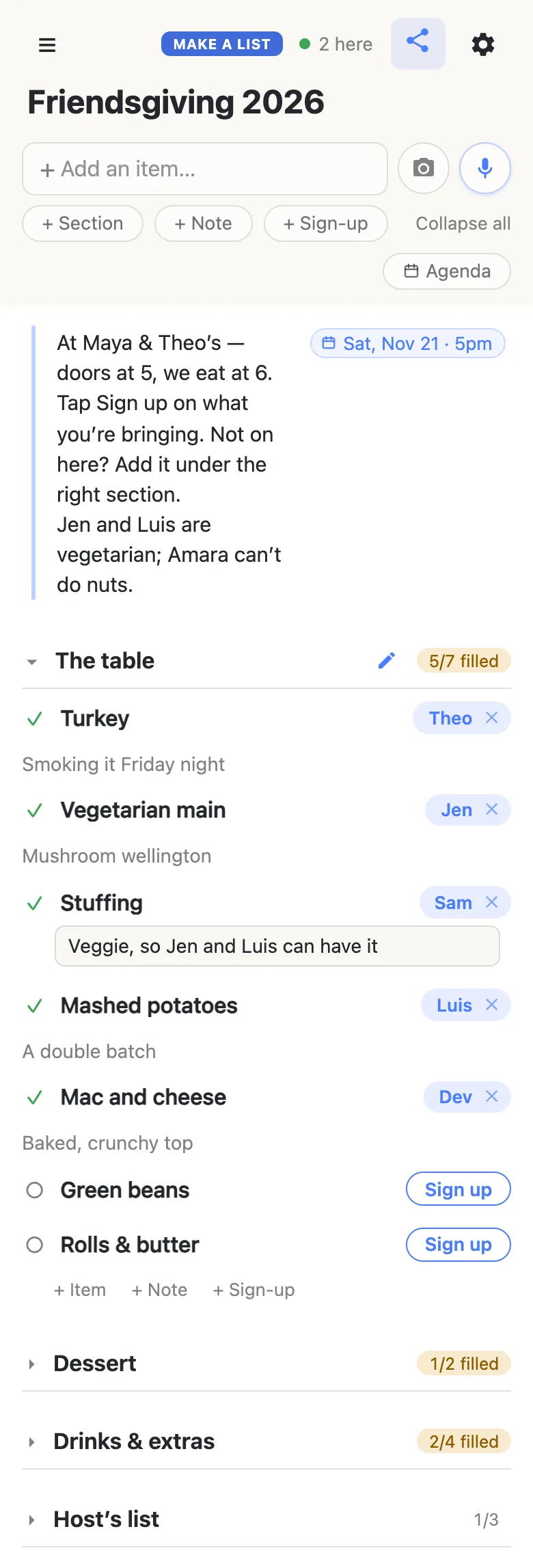
Claims appear on every open phone as they happen, so two friends reading the sheet on the same bus ride can’t both grab the green beans. The 2 here chip in the header is live presence — tap it for the names.
Plans change, and the sheet bends with them. Tap the ✕ beside your own name to give a dish back, or tap a name chip to move a sign-up to someone else — handy when one friend claims for a partner who isn’t in the chat. Clearing somebody else’s claim asks first, so nobody loses their dish by accident.
The first time a friend opens the link, the sections are folded shut with their counts showing, and only what sits above the first section is open. Keep the note at the very top, and it’s the first thing everyone reads.
Room for the dish you didn’t think of
Friends are going to bring things you never listed: somebody’s famous dumplings, a cheese board, a second pie. Say so in the note — “Not on here? Add it” — and anyone on the sheet can tap + Sign-up at the end of a section, type their dish, and then tap Sign up on it. The menu grows on its own, and the counter grows with it.
The same note is where dietary needs go, once, where everybody sees them: who’s vegetarian, who can’t do nuts, who’s gluten-free. Give the vegetarians their own Vegetarian main row so somebody actually claims it, and ask people to say in their claim note when a dish is veggie or nut-free — the cook says it once and the whole table can see.
The time and the address go in one note
Tap the + Note pill under the add box. A note is a block of longer text rather than a row, and it answers the questions you’d otherwise answer in the chat all week: whose place, what time to show up, when you eat, where to park. Type the start time into it — Nov 21 5pm — and the sheet offers to attach it as a date chip; tap the offer and it sits on the note as Sat, Nov 21 · 5pm. Typing @ at the start of a word opens a small calendar instead, if you’d rather pick. More on dates on a list.
The host’s own jobs fit on the same sheet as plain checkbox rows — Order the turkey, Pick up the turkey Nov 19, Clear the fridge Nov 20 — in a section of their own, ticked off as they’re done. Fold that section shut and the guests barely notice it; open it and it’s your countdown.
Keep Friendsgiving running smoothly
- Settle the host and the date first. Once those two are known, everything else is a dish. If the group can’t agree on a day, run the date poll on a list and turn it into the sign-up on the same link.
- Put the big three on the sheet yourself. Turkey, stuffing and potatoes go first, so nobody has to guess what counts as “the main stuff”.
- Ask for a word in the claim note. “Mashed potatoes — a double batch” tells you how much food is coming.
- Pin the link. Pin it in the group chat; your phone also keeps it in the ☰ drawer.
When the friend group is big
A Friendsgiving for thirty is a link going round a few group chats, and you may want everyone signing up without anyone renaming dishes or reshuffling sections.
That’s what owning the list is for. The sheet stays yours and you choose what visitors may do: leave signing up on, switch adding, editing, deleting and reordering off, and the link becomes sign-up-only for everyone but you. Your friends notice nothing — same link, still no account, still one tap. Add your co-host as an admin by email so they can run the sheet too.
See what anonylist pro does Only you need an account. Everyone else still just opens the link.
Same sheet next November
Next year’s Friendsgiving can start from this one. Open the gear icon → Export & import and save the file before the claims pile up: it holds the note, every section and every row, and it’s your template. Next fall, import it into a fresh list — or into this one with Overwrite ticked, which clears every row for everyone, so it asks first — and change the date. More on reusing a sheet.
Doing the family dinner on Thursday too? The Thanksgiving potluck sign-up sheet runs the same way for relatives, with the oven schedule in a note and the jobs nobody volunteers for as checkboxes.
Questions
- When should I send out the Friendsgiving sign-up?
- As soon as the host and the date are settled. For a dinner on Saturday, November 21, 2026 — the weekend before Thanksgiving on November 26 — aim for the first week of November. Two to three weeks gives friends time to pick a dish before family plans take over the week, and leaves you a few days to chase whatever is still open.
- Who usually brings the turkey to Friendsgiving?
- Usually the host, because a turkey needs an oven for hours and nobody wants to carry one across town. Put Turkey at the top of the sheet and have the host sign up for it first, so the group can see the hardest dish is covered before anyone picks a side.
- What if a friend wants to bring something that isn’t on the list?
- They add it. Anyone with the link can tap + Sign-up at the end of a section, type the dish — “Kai’s dumplings” — and then tap Sign up on it. The section’s count grows with it, so the menu stays accurate without the host typing anything.
- How do we decide who hosts Friendsgiving?
- Make the first row of the sheet a sign-up called Host, with a word about what it takes (“needs a big table and an oven”). Whoever signs up is hosting, and their claim note can carry the address. Once it is claimed, move the address into the note at the top where everyone reads it first.
- How do I make sure the vegetarians have something to eat?
- Name them in the note at the top, give them their own Vegetarian main row so somebody actually claims it, and ask everyone to say in their claim note when a dish is veggie, vegan or nut-free. The cook says it once and the whole table can see it.
Opens instantly. No account, no email.