A Thanksgiving planning checklist the whole house works from
Last updated October 27, 2026
To make a Thanksgiving planning checklist, start a list on anonylist, add a section for each stage — three weeks out, who’s coming, the menu, shopping, the week of, Thursday — and send the link to whoever is hosting with you. Everyone ticks things off from their own phone, guests claim their dishes on the same page, and each section counts what’s done. It’s free, and nobody needs an account or an app.
- Start a list and name it — Thanksgiving 2026.
- Add a note at the top with the time and the head count.
- Add a section per stage, and put the jobs under each, with a date on anything that has a deadline.
- Send the link to your co-host and the family chat. Tap Agenda any time to see what’s due next.
Thanksgiving is Thursday, November 26, 2026. Four weeks out is the right time to start the checklist: the guest list and the dish sign-up go out in the first week of November, the turkey gets ordered that weekend, and the last week is for the fridge, the grocery run and the table. This page is the plan for the whole thing, and it links to a guide for each part — every Thanksgiving guide is listed below.
Opens instantly. No account, no email — for anyone.
What the checklist looks like
Here is the example list from the screenshots below, as text. Jobs are checkboxes; dishes are sign-ups a guest claims; the day itself is a note.
Note: Thanksgiving at our place — doors at 2, we eat at 4. Fourteen of us. Claim a dish under Menu; the rest is our countdown, tick things off as you do them. Thursday, November 26, 2026, 2pm.
Three weeks out
- ☑ Settle the guest list — Thursday, November 5
- ☑ Send the dish sign-up to the family chat — Thursday, November 5
- ☐ Order the turkey — 20 lb — Saturday, November 7
- ☐ Borrow the folding table and 6 chairs
Who’s coming
- ☑ Grandma Jo & Grandpa Joe — staying over
- ☑ Aunt Linda, Ray and the boys
- ☑ Marcus & Priya
- ☐ Cousin Tess — maybe
Menu — claim a dish
- Turkey — Jess: “20 lb, dry brine”
- Stuffing — Marcus: “Sausage and sage”
- Mashed potatoes — open
- Green beans — Aunt Linda: “No almonds”
- Cranberry sauce — open
- Rolls — Ray: “Two dozen”
- Pumpkin pie — Grandma Jo
- Pecan pie — open
Shopping
- ☐ Potatoes, 10 lb
- ☐ Butter, 2 lb
- ☐ Heavy cream
- ☐ Fresh sage and thyme
- ☐ Ice, morning of
The week of
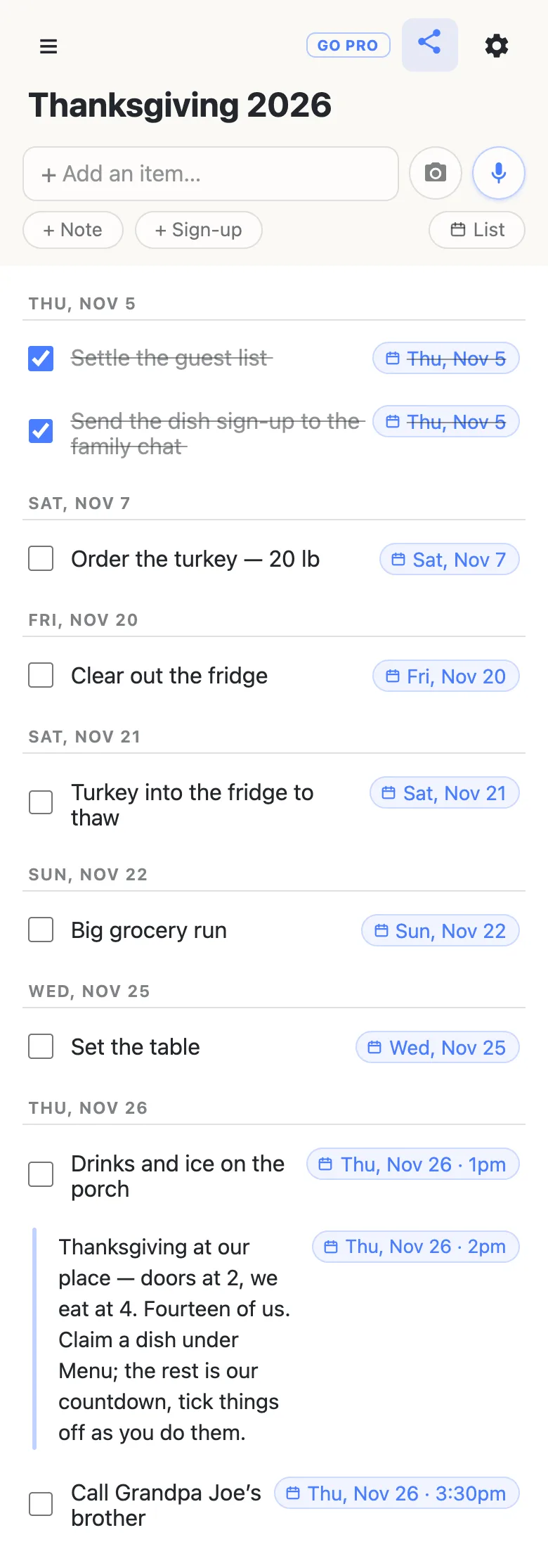
- ☐ Clear out the fridge — Friday, November 20
- ☐ Turkey into the fridge to thaw — Saturday, November 21
- ☐ Big grocery run — Sunday, November 22
- ☐ Set the table — Wednesday, November 25
Thursday
- Note: Oven: 10am turkey in · 2:30 out to rest · 2:45 sides reheat · 3:45 carve · 4pm eat · 6pm pie
- ☐ Drinks and ice on the porch — Thursday, November 26, 1pm
- ☐ Call Grandpa Joe’s brother — Thursday, November 26, 3:30pm
A section for each stage of the countdown
Thanksgiving is a dozen small deadlines that all land in one week, and most of them live in the host’s head. Write them down in the order they come due: tap the title and name the list, then use the + Section pill under the add box for each stage — Three weeks out, Who’s coming, Menu, Shopping, The week of, Thursday. More on sections.
At the end of every section sits a quiet + Item link. Type a job, press Enter, and a fresh row opens underneath for the next one, so a whole stage goes in at once. Each heading keeps its own counter — 2/4 — so a glance down the page tells you that the early jobs are half done and the shopping hasn’t started.
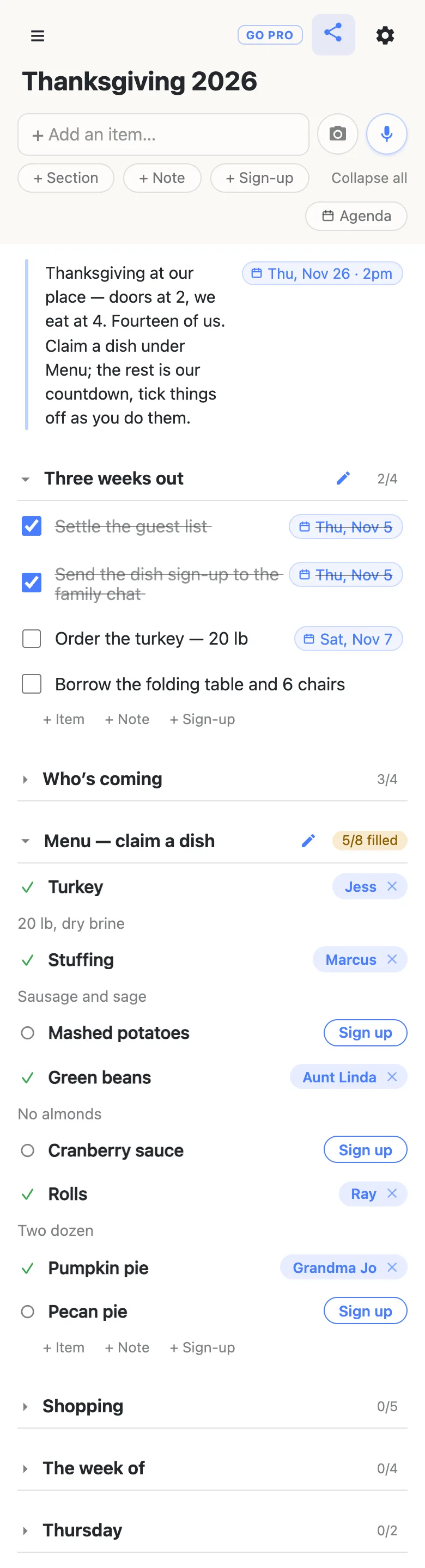
Folding a section is per phone: fold Shopping while you chase the menu and nobody else’s view changes. The first time somebody opens the link, every section starts folded with its counter showing, and only the note at the top is open — so the time and the head count are the first thing a guest reads.
Put a date on every deadline
Type a date into a row — Order the turkey Nov 7 — and the list offers to attach it; tap the offer and it pins to the end of the row as Sat, Nov 7. Typing @ at the start of a word opens a small calendar instead, with a time if you want one. Nothing gets a date unless a person chose it. More on dates on a list.
Once anything on the list has a date, an Agenda button appears under the add box. Tap it and the same rows regroup under date headings, soonest first, with timed rows in time order and everything undated parked under No date at the bottom. That’s the countdown read as a countdown: what’s due this week, what’s due Thursday, and what’s already ticked. Tap List to go back.
Prefer your own calendar? Open the gear icon and copy the Calendar feed link into your calendar app as a subscription. Every dated row that isn’t ticked off yet turns up there as an event, and when a date on the list changes, the calendar follows on its next refresh.
Run it with your co-host
Send the link to whoever is hosting with you. They open it on their phone — no app, no account — and every tick shows up on your phone the moment they make it, so “did you order the turkey?” answers itself. Ticking a row asks to confirm first, and a ticked row stays on the list with a line through it, so on Wednesday night you can both see what’s been handled rather than wondering what disappeared.
Type the month and day — Set the table Nov 25 — and the list works out that it’s a Wednesday. The mic button beside the add box takes plain instructions too: add a shopping section with potatoes, butter, cream and sage is one sentence instead of five rows.
Guests claim their dishes on the same list
The Menu section is the one part your guests touch. Each dish is a sign-up row with a Sign up button: a relative taps it, their name lands on the dish for everyone, and a box opens for a word about it — “No almonds”, “Two dozen”. The heading counts what’s still open, 5/8 filled, amber until every dish has a name. The Thanksgiving potluck sign-up sheet covers that half in detail, from the first claim to the dish nobody wants.
Keep the guest list as plain checkboxes under Who’s coming and tick each household as they confirm. It’s a rough count, not an invitation system, which is all a family dinner needs.
Every Thanksgiving guide
This checklist is the plan; each guide below covers one part of it in detail.
- The Thanksgiving potluck sign-up sheet — relatives claim a dish from the family chat, with the jobs and Thursday’s timeline on the same page.
- A Friendsgiving sign-up sheet — the friends’ dinner the weekend before, run from the group chat.
The weekend after Thanksgiving starts the next season: the family Christmas list collects everyone’s wishes on one link, with a wishes-in date of Sunday, November 29.
Keep the checklist running smoothly
- One job per row. “Clear the fridge and buy ice” can only be ticked once; two rows can be done by two people.
- Date what has a deadline, and only that. The turkey order, the thaw, the grocery run. The Agenda reads cleaner when “find the good tablecloth” stays undated.
- Put the day itself in a note. The oven schedule is a paragraph, not a task — a note under Thursday holds it where everyone in the kitchen can read it.
- Pin the link. Pin it in the family chat; every phone that opens it also keeps it in the ☰ drawer.
When the whole family has the link
The menu needs the family; the countdown is yours. Owning the list lets you choose what visitors may do: leave signing up on so guests can claim their dishes, and switch deleting and reordering off so nobody tidies your countdown away. Nothing changes for the family — same link, still no account. Add your co-host as an admin by email so they can run it with you.
See what anonylist pro does Only you need an account. Everyone else still just opens the link.
Next November, start from this one
A checklist you built once is worth keeping. Open the gear icon → Export & import and save the file: it holds every section, row and note. Next fall, import it into a fresh list and change the dates — the countdown is already written. More on exporting a list.
Questions
- How far ahead should I start planning Thanksgiving dinner?
- About four weeks. For Thursday, November 26, 2026, start the checklist at the end of October: settle the guest list and send the dish sign-up by Thursday, November 5, order the turkey that weekend, and keep the last week for clearing the fridge, the grocery run and setting the table. Put each of those on the list with a date and the Agenda view tells you what is due next.
- What should a Thanksgiving planning checklist include?
- Six things, in the order they come due: the early jobs three weeks out, who is coming, the menu and who is bringing each dish, the shopping, the jobs for the week of, and Thursday itself hour by hour. On one shared list each becomes a section, and each section heading counts what is done.
- Can my partner tick things off the checklist too?
- Yes. Send them the link; they open it on their phone with no account or app, and every tick shows up on your phone as it happens. Ticking asks to confirm first, and a ticked row stays on the list with a line through it, so you can both see what has already been handled.
- How do I see only what is due this week?
- Tap Agenda under the add box. It appears once anything on the list has a date, and regroups the same rows under date headings — Today, Tomorrow, then each day ahead — with undated rows collected under No date at the bottom. Tap List to go back to the sections.
- Can the Thanksgiving to-dos show up in my phone’s calendar?
- Yes. Open the gear icon and copy the Calendar feed link into your calendar app as a subscription. Every dated row that is not ticked off yet appears as an event, and when someone changes a date on the list, the calendar picks it up on its next refresh.
Opens instantly. No account, no email.