A family Christmas list everyone adds to — and nothing gets bought twice
Last updated October 26, 2026
To make a family Christmas list, start a list on anonylist, add a section for each person, and send the link to the family chat. Everyone types their own wishes under their name, and whoever buys a gift taps Sign up on it — so the list shows it’s taken and nobody buys it twice. It’s free, and nobody in the family needs an account or an app.
- Start a list and name it — Family Christmas 2026.
- Add a section for each person: Grandma, each parent, each kid.
- Send the link to the family chat. Everyone adds their wishes under their own name.
- Buying something? Tap Sign up on that wish. Each person’s section counts what’s still unclaimed.
Christmas is Friday, December 25, 2026. A family Christmas list works best when the wishes are in by the end of November, which leaves the first weeks of December for shopping and shipping — and one link means Grandma, the cousins in Ohio and your brother who never answers the group chat are all reading the same list.
Opens instantly. No account, no email — for anyone.
What the list looks like
Here is the example list from the screenshots below, as text. Each wish is a sign-up row; a name after it means someone is buying it.
Note: Christmas morning at Grandma & Grandpa’s. Add your wishes under your name — sizes help. Buying something? Tap Sign up on it so nobody else does. About $50 a person. Friday, December 25, 2026, 9am.
- ☐ Everyone’s wishes in — Sunday, November 29
Grandma Rose
- Large-print crossword books — Mike: “Got two”
- Window bird feeder — open
- Photo calendar of the grandkids — Sarah: “Making it this week”
Mike
- Note: Sweaters: L. The skillet I mean is this one (a link).
- 12-inch cast-iron skillet — Santa
- Wool hiking socks — open
- A good thermos — Dana: “Ordered”
Jonah (9)
- LEGO Technic set — Santa: “Ordered — arrives Dec 12”
- Soccer cleats, size 4 — Grandma Rose
- Glow-in-the-dark stars — open
Priya (6)
- Art easel — Dana: “Ordering tonight — arrives Dec 14”
- Unicorn slippers — Dana: “Size 11–12”
- Space picture books — open
A section for each person
Tap the title and name the list, then use the + Section pill under the add box to make a heading for everyone on it — Grandma Rose, Mike, Jonah (9). Putting the kids’ ages in their headings saves a lot of “what size is he now?” texts. More on sections.
At the end of every section sits a quiet + Sign-up link. Tap it, type a wish, press Enter, and a fresh row opens underneath for the next one, so a whole wish list goes in without stopping. Everyone does this under their own name, from their own phone — the parents fill in the little ones’ sections, or sit beside them while they type.
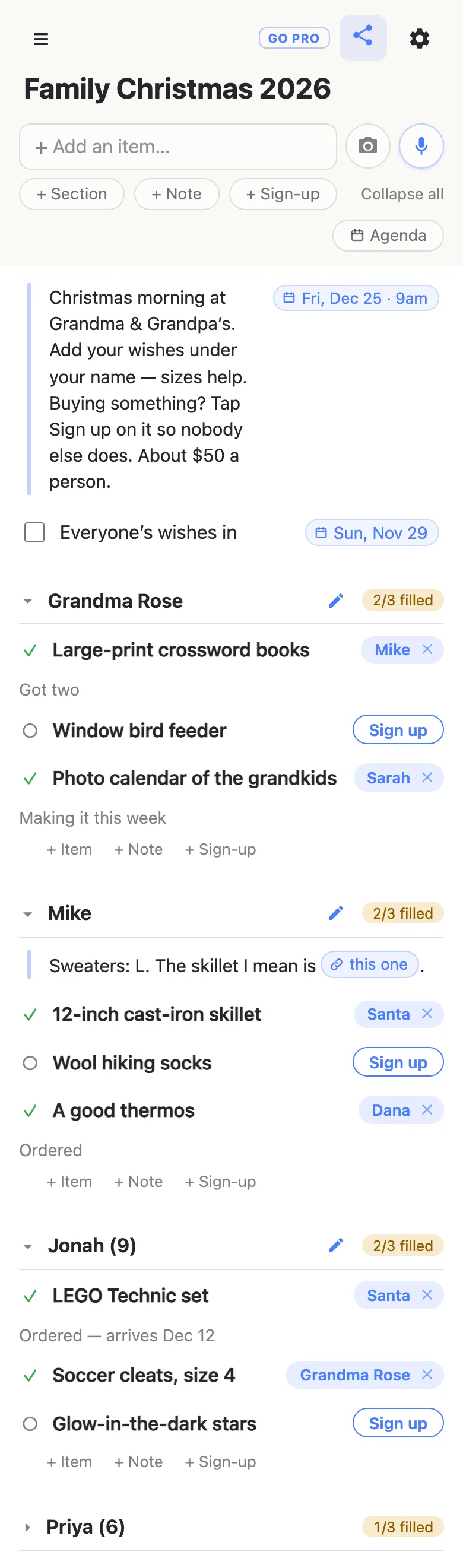
Sizes, colours and the link to the exact thing go in a note under your name — use the + Note link at the end of your section. Paste a shop link into a note and the list offers to name it, so it reads this one instead of sixty characters of tracking codes; tap the row, then the chip, and it opens the page. Notes hold whole paragraphs, so “anything from the garden centre” fits too.
Tap Sign up on the gift you’re buying
A wish on this list is a sign-up row: a gift with a Sign up button beside it. When you decide to buy it, tap the button. Your name lands on the row and a small box opens for a word about it — “Ordered — arrives Dec 14” — or tap away to skip. Each row holds one name, so once the LEGO set is taken, it’s taken, and nobody else turns up with the same box.
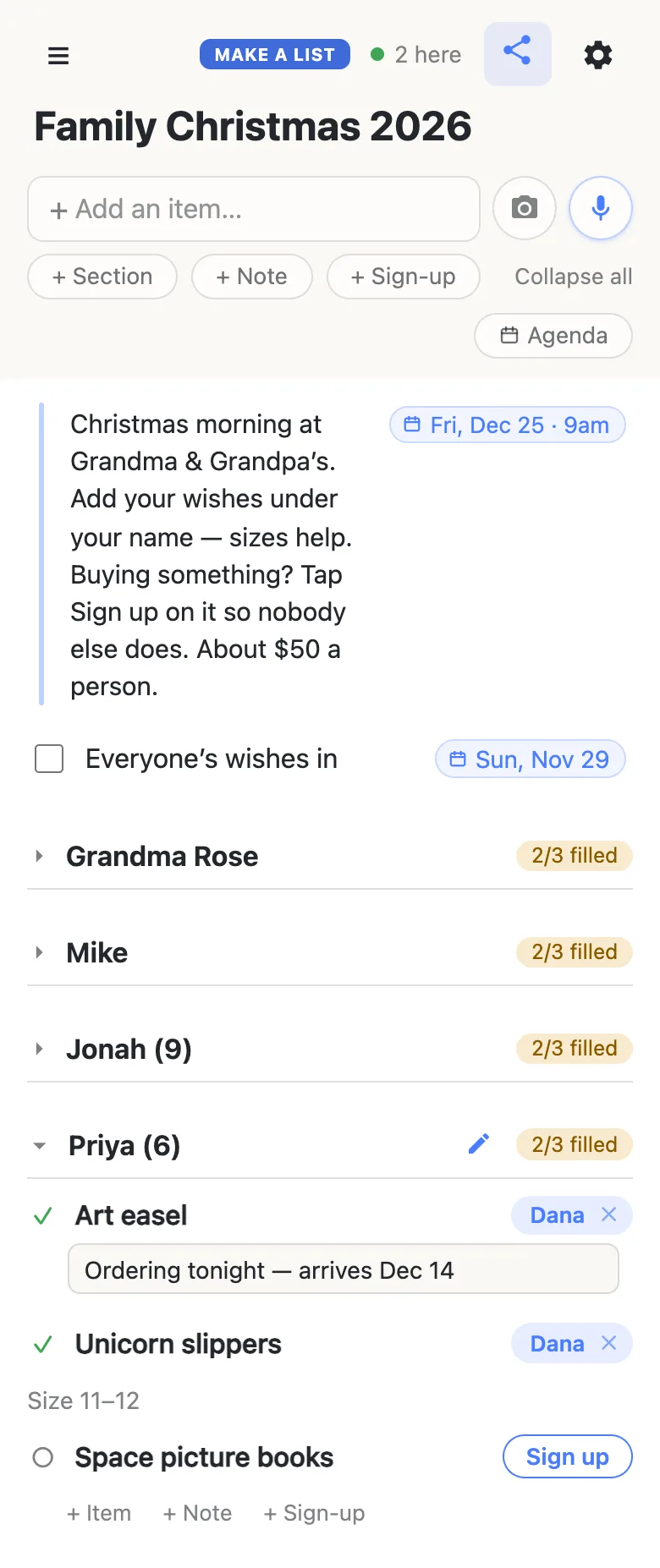
Claims show up on every open phone as they happen — there is nothing to refresh and nothing to re-send — and the 2 here chip in the header says who else is looking right now. Tap it for the names.
Plans change in December. Tap the ✕ beside your own name to give a gift back, or tap a name to move it to someone else — handy when one of you buys on behalf of a whole household. Clearing somebody else’s claim asks first, so a gift can’t be un-bought by a stray thumb.
Keep the buyer a surprise
Everyone on the link sees every claim, the person who made the wish included — which is exactly what stops the duplicates, and most families like knowing their list is covered. If you’d rather keep who is buying a secret, tap the name on your claim and change it to Santa. The wish still shows as taken, so nobody else buys it, and the name on it says Santa.
A gift nobody asked for — the real surprise — belongs off this list altogether. Keep those on a separate list that only the buyers share; a gift list for two is exactly that shape.
Spot whose wishes still need a buyer
Every section heading carries a counter — 2/3 filled — that stays amber while any wish in it is open and turns green with a tick once every one has a name. Glance down the headings and you can see that Grandma is covered and Priya isn’t, without opening anything.
The first time somebody opens the link, the sections are folded shut with their counters showing, and only what sits above the first section is open. That’s handy here: the note and the deadline are the first thing everyone reads, and each person taps their own name to add to it.
Put the dates on the list
Type a date into a note or a row — Dec 25 9am, Nov 29 — and the list offers to attach it; tap the offer and it pins to the end of the row as Fri, Dec 25 · 9am. Typing @ at the start of a word opens a small calendar instead. A row like Everyone’s wishes in, dated Sunday, November 29, tells the whole family when to have their list done. More on dates on a list.
Keep the family list running smoothly
- One wish per row. “Socks and a scarf” can only be claimed once; two rows can be claimed by two people.
- Add a few small things too. Grandparents and cousins on a budget look for the five-dollar wishes.
- Claim when you decide, not when it arrives. The name on the row is what stops someone else buying it.
- Pin the link. Pin it in the family chat; every phone that opens it also keeps it in the ☰ drawer.
When the whole extended family is on it
Twenty relatives on one link is a lot of thumbs, and a wish deleted by accident is gone for everyone. That’s what owning the list is for: you choose what visitors may do. Leave adding and signing up on, switch deleting off, and nobody’s wishes can vanish — the family notices nothing, it’s the same link with no account. Add your co-organizer as an admin by email so they can run it too.
See what anonylist pro does Only you need an account. Everyone else still just opens the link.
Next Christmas, start from this one
Before the claims pile up, open the gear icon → Export & import and save the file: it holds every section, wish and note, and it’s next year’s starting point. Next November, import it into a fresh list and everyone edits their own wishes instead of starting from nothing. More on exporting a list.
More of the season: an angel tree sign-up for the church or office giving tree, and the Thanksgiving potluck sign-up sheet for the dinner before it all starts.
Questions
- When should we start the family Christmas list?
- In the first week of November, with a deadline for wishes around the weekend after Thanksgiving — Sunday, November 29, 2026. That gives everyone a few weeks to think of what they want and leaves the first half of December for shopping and shipping before Christmas on Friday, December 25. Put the deadline on the list as a dated row so nobody has to remember it.
- Can the person who made a wish see who is buying it?
- Yes. Everyone with the link sees every claim, including the person whose wish it is — that is what stops two people buying the same thing. If you want to keep who is buying a secret, tap the name on your claim and change it to Santa: the wish still shows as taken, and the name on it says Santa.
- How do young kids add their Christmas wishes?
- A parent adds them. Open the link, tap the child’s section, and use + Sign-up at the end of it to type each wish while the child dictates — Enter opens the next row. Putting the age in the section name, like Jonah (9), saves relatives asking about sizes.
- Where do sizes and links to the exact gift go?
- In a note under your name. Tap + Note at the end of your section and write sizes, colours and anything else a buyer needs. Paste a shop link into the note and the list offers to give it a short name, so the note reads “this one” instead of a long web address.
- What if two relatives want to go in on one big gift together?
- One of you signs up for it and the other is named in the claim note — “Mike and Dana, splitting it”. The row shows it is taken, so nobody else buys it, and the note tells the family it is a joint gift.
Opens instantly. No account, no email.