A work potluck sign-up sheet for the team channel
Last updated October 31, 2026
To run a work potluck sign-up sheet, start a list on anonylist, add a sign-up row for every dish, drink and supply the table needs, and post the link in the team channel. Coworkers tap Sign up on a row and say what they’re bringing, and every section counts what’s still open. It’s free, there’s nothing to install, and nobody makes an account.
- Start a list and name it — Team Potluck.
- Add a note at the top: the day, the time, the room, and how to label a dish (vegetarian, gluten-free, nuts).
- Add a section per course — mains, sides, desserts, drinks & supplies, setup & cleanup — with one sign-up row per dish.
- Paste the link in Slack, Teams or the team email. Each heading counts what’s still open.
Thanksgiving is Thursday, November 26, 2026, and plenty of people are off that week, so the example office potluck below runs the Thursday before: November 19, 2026, at 12pm in the 4th-floor kitchen. The same sheet works for any potluck at work, from the Thanksgiving lunch through the year-end party. (The basics of any potluck sheet are on the potluck sign-up sheet page; this guide is about running one for a team.)
Opens instantly. No account, no email.
What the sheet looks like
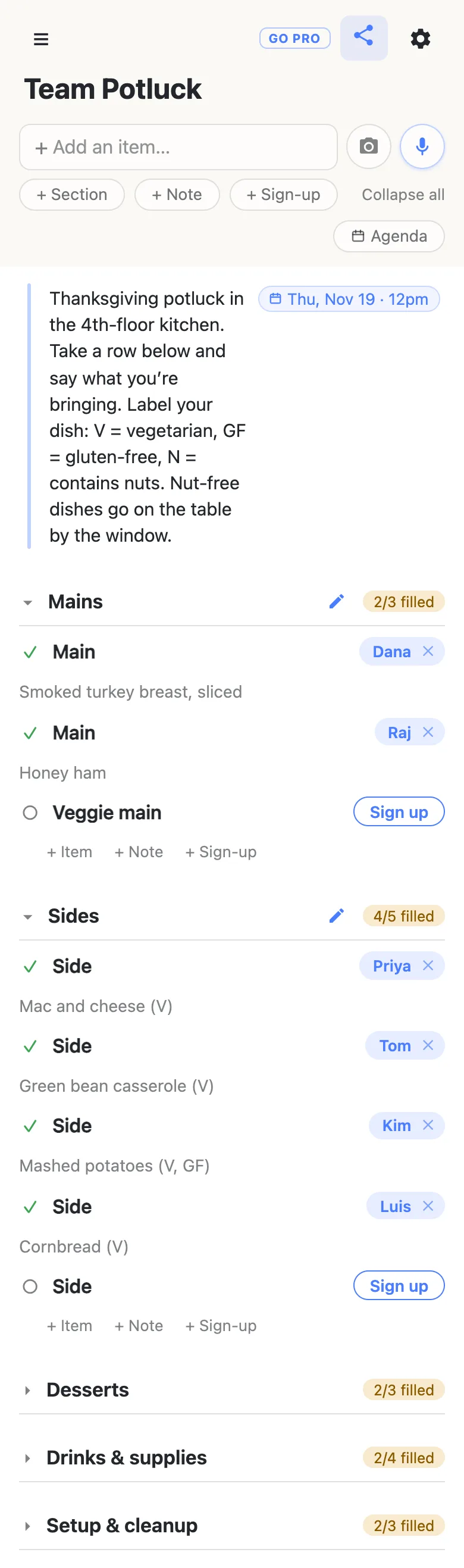
Here is the example sheet from the screenshots below, as text. Every dish is a sign-up row a coworker claims, with what they’re bringing in the note under their name.
Note: Thanksgiving potluck in the 4th-floor kitchen. Take a row below and say what you’re bringing. Label your dish: V = vegetarian, GF = gluten-free, N = contains nuts. Nut-free dishes go on the table by the window. Thursday, November 19, 2026, 12pm.
Mains
- Main — Dana: “Smoked turkey breast, sliced”
- Main — Raj: “Honey ham”
- Veggie main — open
Sides
- Side — Priya: “Mac and cheese (V)”
- Side — Tom: “Green bean casserole (V)”
- Side — Kim: “Mashed potatoes (V, GF)”
- Side — Luis: “Cornbread (V)”
- Side — open
Desserts
- Pie — Mo: “Pumpkin pie (V)”
- Pie — Jen: “Pecan pie (V, N)”
- Dessert — Owen: “Apple crumble (V)”
Drinks & supplies
- Drinks — Ben: “Cider + sparkling water”
- Plates & cups — Alex: “Plates, cups, napkins, forks”
- Serving spoons — open
- Ice — open
Setup & cleanup
- Setup, Thursday, November 19, 11:30am — Sam
- Cleanup, Thursday, November 19, 1pm — Nia
- Cleanup, Thursday, November 19, 1pm — open
One row per dish, so the table balances
The classic office potluck problem is seven desserts and one main. Decide the mix before the link goes out: add a section per course and give it the number of rows you want filled — three mains, five sides, three desserts. Use the + Sign-up link at the end of each section to add them; pressing Enter chains straight into the next row, so the whole sheet takes a couple of minutes.
Each sign-up row holds one name, and each heading counts its rows — 4/5 filled stays amber while something is open and turns green with a tick once every row has a name. When Desserts reads 3/3, the next person’s eye goes to the side or the veggie main that still shows a Sign up button.
Dietary labels go in the notes
Put the house rules in a note at the top of the sheet, where everyone reads them first: the room, the time, and a short labelling key — V for vegetarian, GF for gluten-free, N for contains nuts. When a coworker signs up, a box opens under their name for what they’re bringing, and the label goes right there: “Mashed potatoes (V, GF)”. Anyone scanning the sheet can see at a glance whether the vegetarians are covered, and a dedicated Veggie main row makes sure somebody covers them.
Give the note the day and time by typing them into it — Nov 19 12pm — and tapping the offer that appears. The words become a chip on the note, Thu, Nov 19 · 12pm. Typing @ at the start of a word opens a small calendar instead. More on dates on a list.
Post it in Slack or Teams
The sheet is a link, so it goes wherever the team already talks: the Slack channel, the Teams chat, the all-staff email. Chat apps that show link previews show the list’s name. Coworkers open it in the browser on whatever is in front of them, laptop or phone — no app to install, no account, no password to invent. The first time, it asks what to call them, and that is the name that appears on the rows they claim.
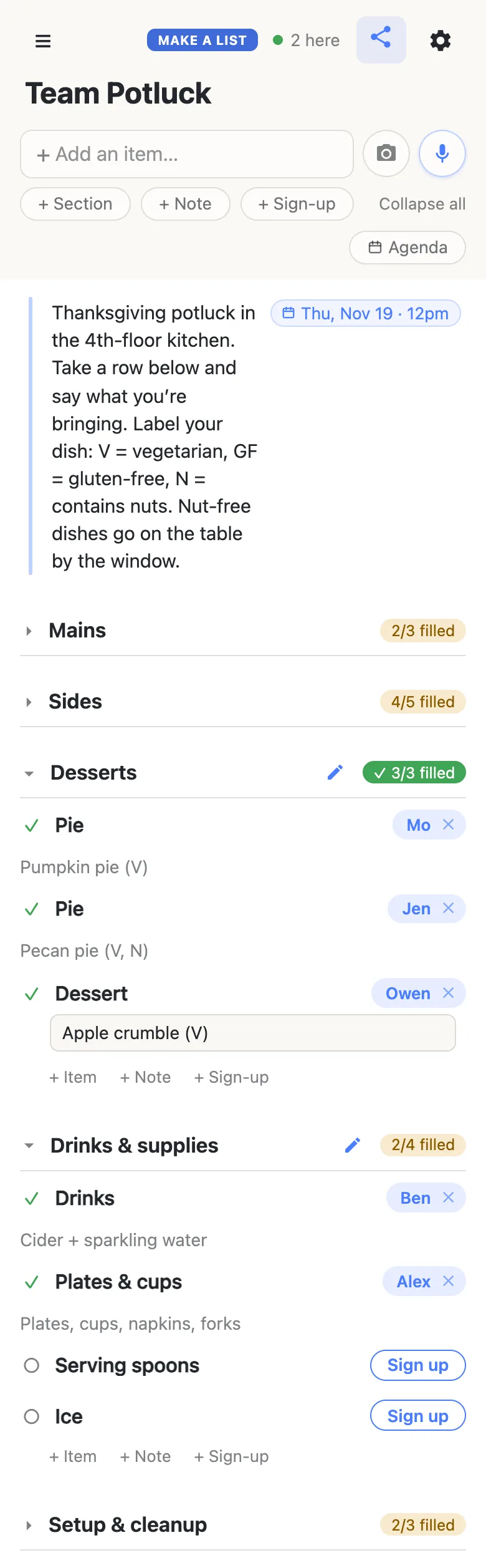
Sign-ups appear on every open screen as they happen, so two people reading the sheet during the same meeting can’t both take the last main. The 2 here chip in the header is live presence — tap it for the names.
The first time a coworker opens the link, the sections are folded shut with their counts showing, and only what sits above the first section is open. That is why the note belongs at the very top: the room, the time and the labelling key are the first thing everyone reads.
When plans change before Thursday
A coworker who can’t make it taps the ✕ beside their own name, and the row is open again for everyone. To sign up somebody else — the manager who said “put me down for rolls” in standup — tap Sign up, then tap the name chip and type theirs. Swapping a dish is just as quick: tap the note under the name and change it. Clearing somebody else’s sign-up asks first, so nobody loses their row by accident.
A few days out, glance at the headings and post the gaps by name in the channel — “still need a veggie main, one side, serving spoons and ice” gets answers where “don’t forget the potluck!” gets an emoji. Whoever answers taps the row, and the count moves on everyone’s screen.
Plates, ice and the cleanup crew
The food is half the potluck. Put the rest on the same sheet as sign-up rows: a Drinks & supplies section for drinks, plates and cups, serving spoons and ice, and a Setup & cleanup section with times on the rows — Setup Nov 19 11:30, Cleanup Nov 19 1pm. The kitchen is somebody’s job before anyone opens a dish, and cleanup has a name on it before the last slice of pie goes.
Once rows have dates, an Agenda button appears under the add box and reads the day in time order. And the gear icon → Calendar feed gives the sheet an address Google Calendar or Apple Calendar can subscribe to, so the setup and cleanup shifts land in people’s calendars titled with the name of whoever claimed them. How to subscribe.
Every potluck of the year
The Thanksgiving lunch is rarely the last one. For the December holiday party, the chili cook-off or a farewell lunch, start a new list — it takes a minute — and post the new link in the channel. Every list you open is kept in the ☰ drawer on that device, so the organizer finds each one again without searching the chat history.
Keep the potluck running smoothly
- Labels, not health details. Anyone with the link can open the sheet, so it carries dish labels and a nut-free table, never a coworker’s allergy or diagnosis by name.
- One dish per row, one name per dish. Five sides is five rows; the count then tells the truth.
- Pin the link in the channel. Every browser that opens the sheet also keeps it in the ☰ drawer, so people find their way back without scrolling for the message.
- Post the gaps, not a general reminder. Name the open rows a few days out, and they fill.
When the whole floor is invited
A sign-up posted to a big channel reaches people you barely know, and you may want every one of them able to sign up without anyone renaming the courses or deleting a row.
That’s what owning the list is for. The sheet stays yours and you choose what visitors may do: leave signing up on, switch adding, editing, deleting and reordering off, and the link becomes sign-up-only for everyone but you. Coworkers notice nothing — same link, still no account, still one tap. Add your co-organizers as admins by email so they can run it with you, and claim a short, readable address for the all-staff email.
See what anonylist pro does Only you need an account. Everyone else still just opens the link.
The rest of the season
The office lunch is one part of the season; the Thanksgiving planning checklist is the host’s whole countdown at home, and links every Thanksgiving guide. The same sign-up rows run the other tables of November: the Thanksgiving potluck sign-up sheet for relatives on Thursday, and a Friendsgiving sign-up sheet for friends the weekend before. A potluck after a service runs the same way on the church potluck sign-up sheet.
Questions
- How far ahead should the office potluck sign-up go out?
- About two weeks. For a potluck on Thursday, November 19, 2026 — the week before Thanksgiving on November 26, when more of the team is still in — post the link by Thursday, November 5, then post the open rows by name a few days before. Two weeks leaves time for a grocery run, and the sheet fills before people start taking leave.
- Can I post the sign-up in Slack or Microsoft Teams?
- Yes. The sheet is a link, so paste it into the channel or chat like any other; apps that show link previews show the list’s name. Coworkers open it in the browser on their laptop or phone and sign up there, with nothing to install and no account.
- How do coworkers mark a dish as vegetarian or gluten-free?
- In the note under their name. Signing up opens a box for what they are bringing, so a coworker writes “Mashed potatoes (V, GF)” there. Put the labelling key — V, GF, N for nuts — in the note at the top of the sheet so everyone uses the same letters.
- How do we stop everyone bringing dessert?
- Decide the mix before the link goes out: give each course its own section with a fixed number of sign-up rows, such as three mains, five sides and three desserts. Each heading counts its rows, so once Desserts reads 3/3 filled people pick from the courses still showing a Sign up button.
- Who brings the plates, cups and ice?
- Whoever signs up for them. Add a Drinks & supplies section with rows for plates and cups, serving spoons and ice, and a Setup & cleanup section with times on the rows, so the things nobody volunteers for unprompted each get a name on the sheet.
Opens instantly. No account, no email.