A Thanksgiving menu planner: every dish, who’s cooking it, and its shopping
Last updated November 1, 2026
To plan a Thanksgiving menu with everyone who’s coming, start a list on anonylist, add a sign-up row for every dish, and send the link to the family chat. Each guest claims the dish they’re cooking and says how they’ll make it, and every dish you cook yourself gets its own shopping list underneath, ticked off as it’s bought. It’s free, there’s no app, and nobody makes an account.
- Start a list and name it — Thanksgiving Menu.
- Add a note at the top: the day, the time you eat, and how many are coming.
- Add a The menu section with one sign-up row per dish, then a section for each dish you’re cooking, with its ingredients as checkboxes.
- Send the link to the family chat. Guests claim dishes; you and whoever shops with you tick off ingredients.
Thanksgiving is Thursday, November 26, 2026. The example menu below is for twelve people eating at 4pm: ten dishes, seven already claimed, the turkey and the mashed potatoes cooked at home with their shopping under them, and Thursday’s oven timeline in a note at the bottom.
Opens instantly. No account, no email.
What the menu looks like
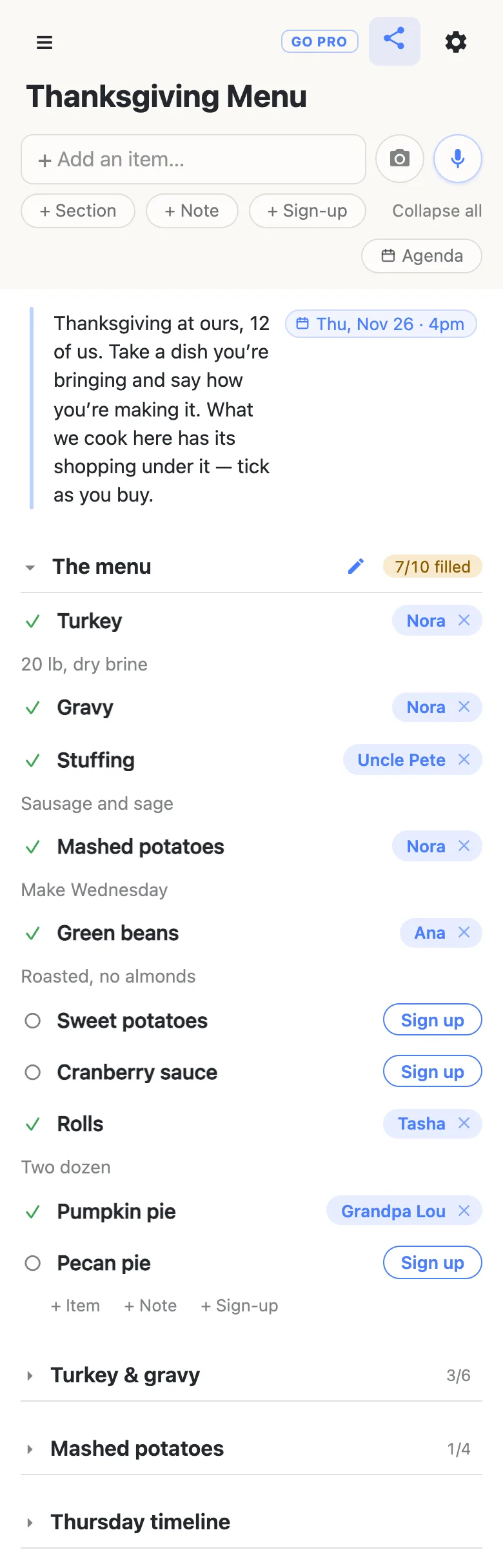
Here is the example menu from the screenshots below, as text. Dishes are sign-up rows with the cook’s name and a word about how they’re making it; ingredients are checkboxes, struck through once they’re bought.
Note: Thanksgiving at ours, 12 of us. Take a dish you’re bringing and say how you’re making it. What we cook here has its shopping under it — tick as you buy. Thursday, November 26, 2026, 4pm.
The menu
- Turkey — Nora: “20 lb, dry brine”
- Gravy — Nora
- Stuffing — Uncle Pete: “Sausage and sage”
- Mashed potatoes — Nora: “Make Wednesday”
- Green beans — Ana: “Roasted, no almonds”
- Sweet potatoes — open
- Cranberry sauce — open
- Rolls — Tasha: “Two dozen”
- Pumpkin pie — Grandpa Lou
- Pecan pie — open
Turkey & gravy
Note: Dry brine Monday night. Thursday: in at 11 at 325°, out about 3, rest under foil while the sides bake.
- Pick up the 20 lb turkey — Tuesday, November 24
Kosher saltButter, 2 lbFresh thyme and sageChicken stock, 2 quarts- Onions, carrots, celery
Mashed potatoes
Note: Make Wednesday, reheat in the slow cooker. Recipe (a link)
- Yukon Gold potatoes, 8 lb
- Heavy cream
Cream cheese- Chives
Thursday timeline
Note: 11:00 turkey in · 1:00 baste · 3:00 turkey out, rests · 3:15 stuffing and sweet potatoes in at 375° · 3:40 reheat the mash · 3:45 rolls in, make the gravy · 4:00 carve and eat
Every dish, with a cook’s name on it
Write the menu first, before anyone claims anything: add a section called The menu, then use the + Sign-up link at the end of it to add a row per dish. Pressing Enter chains straight into the next row, so ten dishes take a minute. Writing the whole menu down is what stops three people bringing pie and nobody bringing cranberry sauce.
Each dish is a sign-up row with a Sign up button. A guest taps it, their name lands on the dish for everyone, and a box opens under it for how they’re making it — “Roasted, no almonds”, “Two dozen”. Claim your own dishes the same way, so the menu shows who is cooking everything, the host included. The heading counts the dishes with a name on them, 7/10 filled, amber until every one is covered.
Each dish you cook gets its own shopping
For every dish made at home, add a section named after it — Turkey & gravy, Mashed potatoes — and list its ingredients as plain rows with a checkbox. The ingredients stay with the dish they’re for, so nothing gets bought for a dish a guest has already taken, and each heading counts what’s in the bag: 4/6 under the turkey, 1/4 under the potatoes.
Ticking an ingredient asks “Check off Fresh thyme and sage?” first, so a stray tap in the aisle doesn’t count. A ticked row stays on the list with a line through it, and unticking is one tap with no question asked.
Anything with a deadline can carry its date. Type Pick up the turkey Nov 24 and tap the offer that appears, and the row wears a chip reading Tue, Nov 24; typing @ at the start of a word opens a small calendar instead. Once something is dated, an Agenda button appears under the add box and lists the dated rows by day. More on dates on a list.
The recipe goes in a note at the top of its dish: paste the link and it becomes a chip you tap to open. Pasting a link on its own offers Name this link…, so it can read Recipe rather than a long address.
Shop together, from one menu
Send the same link to whoever is doing the shopping with you. They open it in their phone’s browser — no app, no account — and every tick shows up on your screen as they make it. Split the shop by dish, one of you at the store and one at home, and neither of you buys the cream twice.
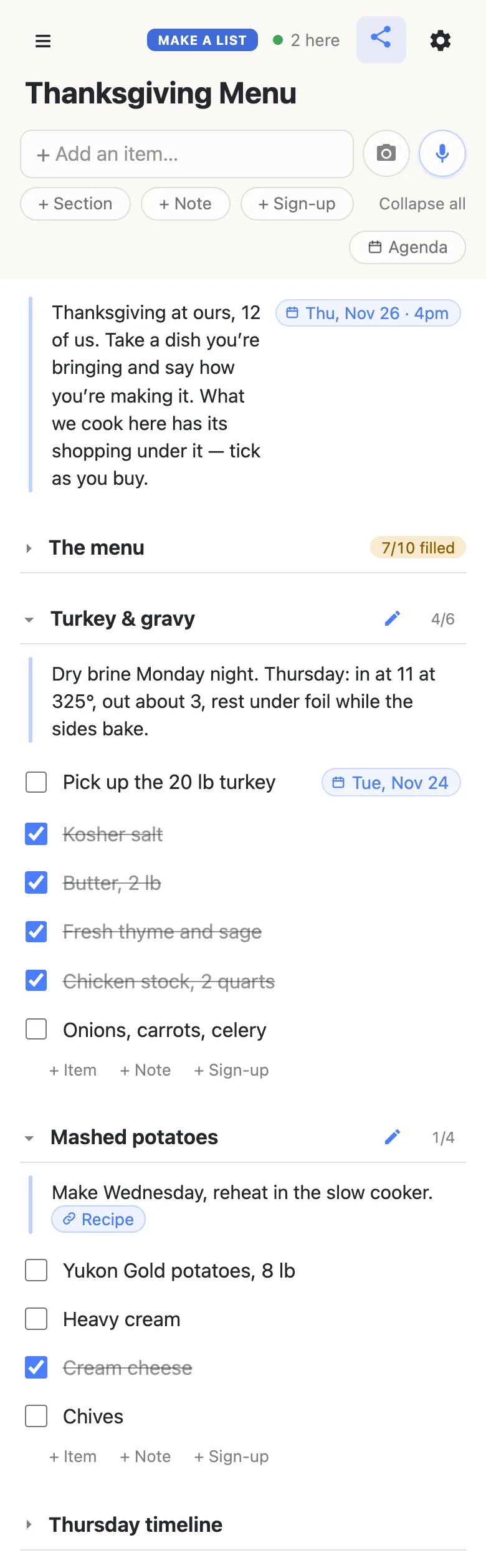
The 2 here chip in the header is live presence — tap it for the names. Folding a section is per phone, so the shopper can fold The menu away and keep only the ingredients open without changing anybody else’s view.
Thursday’s timeline in a note
The oven schedule is a paragraph, not a task. Add a Thursday timeline section with one note in it, and write the day out: when the turkey goes in, when it comes out to rest, when the sides take the oven, when the rolls go in. Notes hold up to 5,000 characters, and Enter starts a new line in one, so the timeline can run a line per step if that reads better.
Anyone in the kitchen can open the link on their phone and read it, so the person minding the stuffing knows it goes in at 3:15 without asking the host with both hands in the turkey. A note per dish holds its method the same way, as the turkey’s dry brine Monday night does.
When the menu changes
A guest who can’t make their dish taps the ✕ beside their own name and the dish is open again for everyone. To sign up somebody else — the aunt who said “I’ll do the sweet potatoes” on the phone — tap Sign up, then tap the name chip and type hers. Clearing somebody else’s claim asks first, so nobody loses a dish by accident. A late addition to the menu is one more row from the + Sign-up link at the end of the section.
A week out, look at what still shows a Sign up button and post those dishes by name in the family chat — “still need sweet potatoes, cranberry sauce and a pecan pie”. Whoever answers taps the row, and the count moves on every phone.
Keep the menu running smoothly
- The whole menu first, then the link. A list of dishes gets claimed; an empty sheet gets seven desserts.
- Sign-ups for dishes, checkboxes for shopping. A name on a dish means someone is cooking it; a tick on an ingredient means it’s bought. Keeping the two apart keeps both counts honest.
- One ingredient per row. “Cream and butter” can only be ticked once; two rows can be bought by two people.
- Put the method where the cook will look. A note at the top of each dish, and the day’s timeline in its own section at the bottom.
When the whole family has the link
The menu needs everyone; the shopping and the timeline are yours. Owning the list lets you choose what visitors may do: leave signing up on so relatives can claim their dishes, and switch deleting and reordering off so nobody tidies your ingredients away. Nothing changes for the family — same link, still no account. Add your co-host as an admin by email so they can run it with you.
See what anonylist pro does Only you need an account. Everyone else still just opens the link.
The rest of the season
The menu is one part of the host’s November; the Thanksgiving planning checklist is the whole countdown — guest list, shopping, the week of, Thursday — and links every Thanksgiving guide. When the dishes are the whole job, the Thanksgiving potluck sign-up sheet covers relatives claiming them from the family chat, and a Friendsgiving sign-up sheet does the same for friends the weekend before. For the rest of the year’s dinners, a weekly meal plan and grocery list keeps the plan and the shopping in step.
Questions
- When should the Thanksgiving menu be settled?
- About two weeks before. For dinner on Thursday, November 26, 2026, write the menu and send the link by Thursday, November 12, so guests have a week to claim their dishes. That leaves the weekend of November 14–15 for the pantry shopping and Monday or Tuesday, November 23–24, for fresh produce and picking up the turkey.
- How do I keep each dish’s ingredients with the dish?
- Give every dish you cook at home its own section, named after it, and list its ingredients inside as checkbox rows. Each heading counts what has been bought, such as 4/6 under the turkey, so you can see which dish is still short without reading the whole list.
- Can I put a recipe link on the menu?
- Yes. Add a note at the top of the dish’s section and paste the link into it; it becomes a chip that opens the recipe. When the link is the only thing you paste, a Name this link… box appears, so the chip can read Recipe or Grandma’s stuffing instead of the full address.
- Can the oven timeline sit on the same list as the menu?
- Yes. Add a Thursday timeline section at the bottom with a single note in it and write the day out: turkey in, turkey out to rest, sides in, rolls in, carve. A note holds up to 5,000 characters and Enter starts a new line, and anyone with the link can read it from their phone in the kitchen.
- Can two of us shop from the menu at the same time?
- Yes. Both open the same link, and each tick appears on the other phone as it happens, with a line through the ingredient. Split the shopping by dish, and the count on each heading shows what is left; an ingredient ticked by mistake is unticked with one tap.
Opens instantly. No account, no email.