A Christmas planning checklist for the whole house
Last updated October 28, 2026
To make a Christmas planning checklist, start a list on anonylist, add a section for each part of December — cards, gifts, decorating, baking, travel, Christmas dinner — put a date on every deadline, and send the link to everyone in the house. Each person ticks things off from their own phone, the kids claim what they’re baking on the same page, and the Agenda view reads the whole month back day by day. It’s free, and nobody needs an account or an app.
- Start a list and name it — Christmas 2026.
- Add a note at the top with who’s coming and when.
- Add a section for each job of the season, with a date on anything that has a deadline.
- Send the link to the household. Tap Agenda to see December in date order.
Christmas is Friday, December 25, 2026. The weekend after Thanksgiving — November 28 and 29 — is the natural start: four weeks is enough for the cards to go out by the middle of December, for anything that ships to arrive, and to keep the last week for the grocery run, the guest room and the wrapping. This page is the plan for the whole month, and it links to a guide for each part — every Christmas guide is listed below.
Opens instantly. No account, no email — for anyone.
What the checklist looks like
Here is the example list from the screenshots below, as text. Jobs are checkboxes; the cookie batches are sign-ups somebody claims; the plan for the day itself is a note.
Note: Christmas at ours — Grandma and Grandpa land on the 23rd, eleven of us for dinner on the 25th. Tick things off as you do them, and claim a batch under Cookie day. Friday, December 25, 2026.
Cards
- ☑ Update the card list — Sunday, November 29
- ☑ Order the photo cards — Tuesday, December 1
- ☐ Address and stamp — Saturday, December 12
- ☐ Mail the cards — Monday, December 14
Gifts
- ☑ Everyone’s wishes in — Sunday, November 29
- ☐ Ship Grandma Ruth’s parcel — Friday, December 11
- ☐ Kids’ gifts bought — Sunday, December 13
- ☐ Teacher gifts
- ☐ Wrapping night — Sunday, December 20
Decorating
- ☑ Tree up — Saturday, November 28
- ☑ Advent calendars out — Tuesday, December 1
- ☐ Lights on the porch
- ☐ Wreath on the door
Cookie day — claim a batch
- Note: Cookie day is the Saturday before — aprons on at 10. Saturday, December 19, 10am.
- Gingerbread — Mia: “With icing”
- Sugar cookies — Sam: “Extra sprinkles”
- Shortbread — Dad
- Peanut butter blossoms — open
Travel & guests
- ☑ Book the dog sitter — Saturday, December 5
- ☐ Guest room made up — Tuesday, December 22
- ☐ Airport: Grandma and Grandpa — Wednesday, December 23, 3:40pm
Christmas dinner
- ☐ Order the ham — Saturday, December 12
- ☐ Big grocery run — Tuesday, December 22
- ☐ Set the table — Thursday, December 24
- Note: Christmas Day: stockings at 7 · brunch at 10 · ham in at 1 · dinner at 4 · games after
A section for every job of the season
December isn’t one deadline, it’s six running side by side — the cards, the gifts, the house, the baking, the people arriving and the dinner — and each has its own last possible day. Give each one a heading: tap the title and name the list, then use the + Section pill under the add box for Cards, Gifts, Decorating, Cookie day, Travel & guests and Christmas dinner. More on sections.
Each section ends in a quiet + Item link: type a job, press Enter, and the next row opens underneath, so a whole section goes in at one sitting. Every heading keeps its own count — 2/4 on the cards, 1/5 on the gifts — so a glance down the page says which part of Christmas is on track and which one hasn’t started.
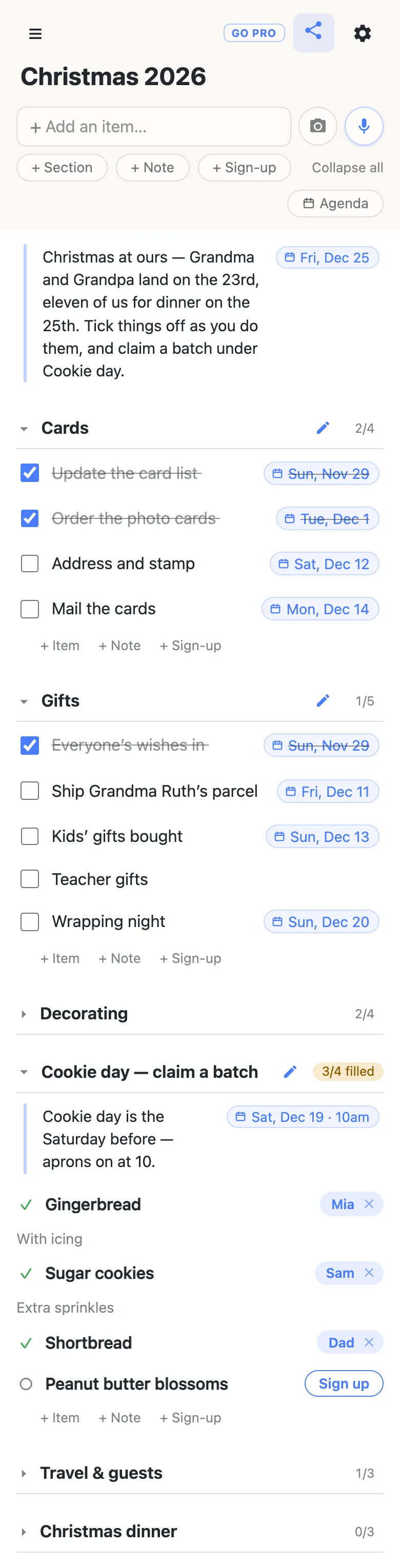
Folding is per phone: fold Decorating once the tree is up and nobody else’s view changes. The first time somebody opens the link, every section starts folded with its count showing and only the note at the top is open — so the dates that matter to everyone are the first thing they read.
Date every deadline, then read December day by day
Type the month and day into a row — Mail the cards Dec 14 — and the list offers to attach the date; tap the offer and it pins to the end of the row as Mon, Dec 14. Add a time and it carries that too: Airport Dec 23 3:40pm. Typing @ at the start of a word opens a small calendar instead. Nothing gets a date unless a person chose it. More on dates on a list.
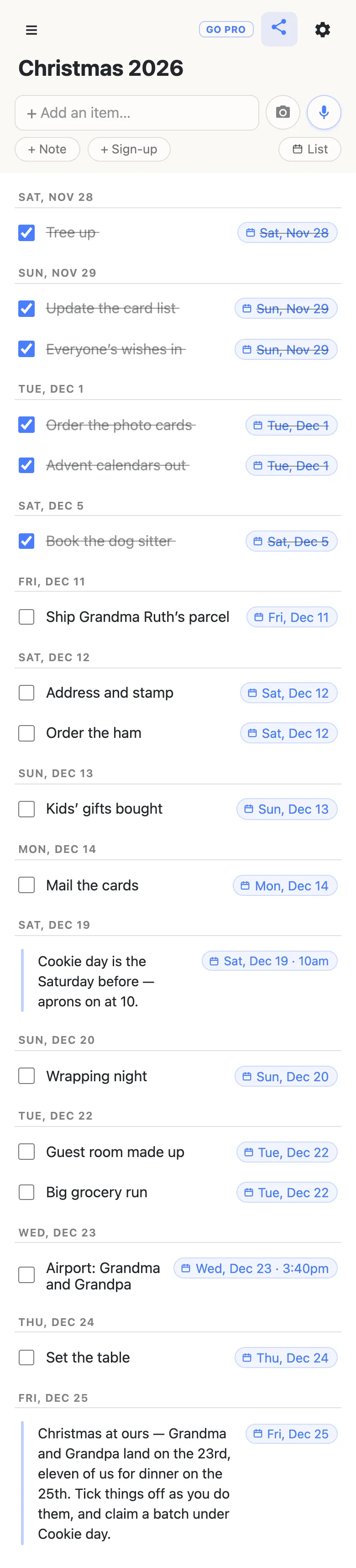
Once anything is dated, an Agenda button appears under the add box. Tap it and the same rows regroup under date headings, soonest first, with undated jobs collected under No date at the bottom. Six sections become one countdown: the photo cards and the advent calendars on the 1st, the parcel on the 11th, cookie day on the 19th, the airport run on the 23rd. Tap List to go back. More on the Agenda view.
Rather see it in your own calendar? Open the gear icon and copy the Calendar feed link into your calendar app as a subscription. Every dated row that isn’t ticked off yet appears there as an event, and when a date on the list moves, the calendar follows on its next refresh. More on the calendar feed.
The whole house works from one link
Send the link to everyone who lives with you. They open it on their phone — no app, no account — and every tick lands on everyone else’s screen the moment it’s made, so “did anyone order the ham?” answers itself. Ticking a row asks to confirm first, and a ticked row stays on the list with a line through it: by the 20th, the struck-through half is the record of what December already took care of.
The baking is where the kids come in. Cookie day is a section of sign-up rows, one per batch: whoever wants the gingerbread taps Sign up, their name lands on it for everyone, and a box opens for a word about it — “With icing”. The heading counts what’s claimed, 3/4 filled, so nobody needs to ask what’s left. The same works for any job you’d rather people chose than were given: the lights, the wreath, the airport run.
The mic button beside the add box takes plain instructions too: add a decorating section with the tree, the porch lights and the wreath is one sentence instead of four rows.
The gifts get their own lists
On the household checklist, the gifts are deadlines — wishes in, the parcel shipped, wrapping night. What’s actually being bought belongs on its own list: the family Christmas list collects everyone’s wishes on one link and lets a buyer claim each one so nothing is bought twice, and the gift list you share with your spouse keeps the two of you straight on who has bought what. Keeping those apart means the kids can tick off the advent calendars without seeing what’s under the tree.
Running a giving tree at church, school or work this year? The angel tree sign-up sheet turns each wish into a need a donor claims.
Every Christmas guide
This checklist is the plan; each guide below covers one part of it in detail.
- The family Christmas list — everyone’s wishes on one link, a section per person, each gift claimed by whoever’s buying it.
- An angel tree sign-up sheet — a church, school or office giving tree where donors claim a wish and the drop-off date sits at the top.
- A Christmas gift list you share with your spouse — two people shopping for the same family, ticking off each gift as it’s ordered.
Thanksgiving comes first: the Thanksgiving planning checklist runs the host’s countdown to Thursday, November 26, the same way.
Keep the checklist running smoothly
- One job per row. “Address and mail the cards” can only be ticked once; two rows show which half is done.
- Date the deadlines, not the wishes. The shipping cutoff, the ham order, the airport run. The Agenda reads cleaner when “find the tree skirt” stays undated.
- Put the day itself in a note. Christmas morning is a timeline, not a task — a note under Christmas dinner holds it where everyone can read it.
- Pin the link. Pin it in the family chat; every phone that opens it also keeps it in the ☰ drawer.
When the whole household has the link
A list everyone can change is the point in December — until a well-meaning tidy-up removes the row you needed. Owning the list lets you choose what visitors may do: leave ticking and signing up on, and switch deleting and reordering off, so the kids claim their cookies and the checklist itself stays as you built it. Nothing changes for them — same link, still no account. Add your partner as an admin by email so the two of you run it together.
See what anonylist pro does Only you need an account. Everyone else still just opens the link.
Next December starts from this one
The hard part of a Christmas checklist is remembering everything that goes on it, and this year you will have written it all down. Open the gear icon → Export & import and save the file: every section, row and note is in it. Next November, import it into a fresh list and move the dates. More on exporting a list.
Questions
- When should I start a Christmas planning checklist?
- The weekend after Thanksgiving. For Friday, December 25, 2026, that is November 28 and 29: four weeks out, which leaves the first half of December for cards and anything that has to ship, and the last week for the grocery run, the guest room and the wrapping. Start the list then, put a date on each deadline, and the Agenda view shows what is due next.
- What belongs on a Christmas planning checklist?
- Six things: the cards, the gifts, the decorating, the baking, travel and guests, and Christmas dinner. Give each its own section on one shared list, date anything with a real deadline, and put the plan for Christmas Day itself in a note. Each section heading counts how much of it is done.
- Can everyone in the house work from the same checklist?
- Yes. Send the link to each person; they open it on their phone with no account or app, and every tick shows up on the other phones as it happens. Ticking asks to confirm first, and a ticked row stays on the list with a line through it, so everyone can see what is already done.
- Can I see all the December deadlines in date order?
- Yes. Tap Agenda under the add box once anything on the list has a date. Every dated row, from every section, regroups under its day — soonest first, timed rows in time order — and undated jobs collect under No date at the bottom. Tap List to return to the sections.
- How do the kids pick what they are baking?
- Make the baking a section of sign-up rows, one per batch. Each child taps Sign up on the cookie they want; their name appears on it for everyone, and a box opens for a note such as “with icing”. The section heading counts how many batches are claimed, so it is easy to see what is still open.
Opens instantly. No account, no email.