An ugly sweater party sign-up sheet: food, drinks and the contest judges
Last updated November 3, 2026
To make an ugly sweater party sign-up sheet, start a list on anonylist, add a sign-up row for every dish, drink and contest job you need, and send the link to the group chat. Guests tap Sign up on the thing they’ll bring and type what it is, and everyone sees what’s still open. It’s free, and nobody needs an account or an app.
- Start a list and name it — Ugly Sweater Party.
- Add a note at the top: whose place, the date and time, and how the sweater contest works.
- Add a section each for food, drinks, the contest and the help you need, with a sign-up row for every job.
- Send the link. Guests sign up for one thing each, and the count on every heading shows what’s left.
Christmas is Friday, December 25, 2026, and the weekends before it fill up fast — the example below is a party on Saturday, December 12, at 7pm. One link means the friend who only reads the group chat, the neighbor you texted and the coworker you emailed are all signing up on the same sheet, so nobody turns up with a fourth tray of cookies.
Opens instantly. No account, no email — for anyone.
What the sign-up sheet looks like
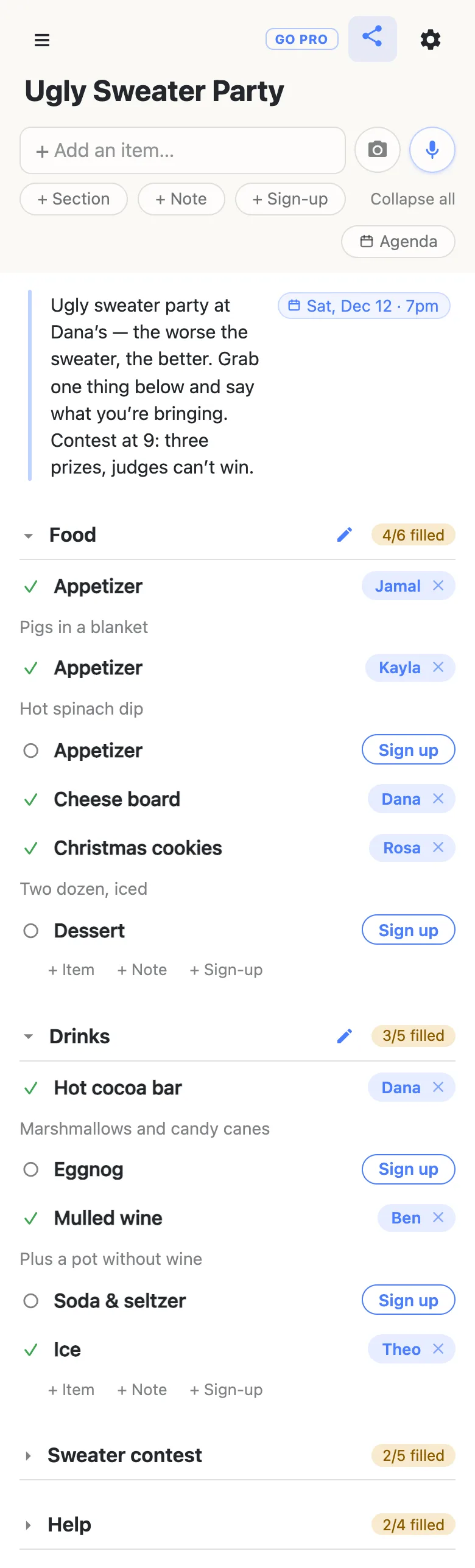
Here is the example list from the screenshots below, as text. Each heading is a section; a name after a row means someone has signed up for it.
Note: Ugly sweater party at Dana’s — the worse the sweater, the better. Grab one thing below and say what you’re bringing. Contest at 9: three prizes, judges can’t win. Saturday, December 12, 2026, 7pm.
Food
- Appetizer — Jamal: pigs in a blanket
- Appetizer — Kayla: hot spinach dip
- Appetizer — open
- Cheese board — Dana
- Christmas cookies — Rosa: two dozen, iced
- Dessert — open
Drinks
- Hot cocoa bar — Dana: marshmallows and candy canes
- Eggnog — open
- Mulled wine — Ben: plus a pot without wine
- Soda & seltzer — open
- Ice — Theo
Sweater contest
- Note: Prizes: Ugliest overall · Most homemade · Best lights (they have to blink). Judges can’t win. Winners announced at 9.
- Judge — Marcus: fair but harsh
- Judge — Sofia: bringing a clipboard
- Judge — open
- Three prizes — Leo: dollar-store trophies
- Ballots & pens — open
Help
- Setup, 6pm — Dana
- Playlist — Priya: every cheesy Christmas song
- Photo corner — open
- Cleanup, 11pm — open
The party details go in a note at the top
Tap + Note under the add box and write the details once: whose place, what to wear, how the contest works, anything guests should know about allergies or parking. A note holds whole paragraphs and sits above everything else, so it’s the first thing anyone reads when they open the link.
Put the date on it too. Type Dec 12 7pm into the note and the list offers to attach it; tap the offer and it pins to the note as Sat, Dec 12 · 7pm. Typing @ at the start of a word opens a small calendar instead. More on dates on a list.
A sign-up row for every dish and drink
Tap the + Section pill and name it Food. At the end of every section sit three quiet links — + Item, + Note and + Sign-up. Tap + Sign-up, type Appetizer, press Enter, and a fresh sign-up row opens underneath for the next one, so the whole food list goes in without stopping. Do the same for Drinks.
Mix two kinds of row. A plain Appetizer three times over leaves the choice to your guests while still capping it at three; a specific row — Cheese board, Ice — is for the things the party can’t go without. Either way, a party that needs one dessert gets one dessert row, not five people bringing brownies.
Guests sign up and say what they’re bringing
A guest opens the link, finds something open and taps Sign up. Their name goes on the row for everyone, and a small box opens underneath asking What are you bringing? — they type hot spinach dip and tap away, or skip it. The name and the dish appear on every other phone that has the list open, with nothing to refresh.
The count on each heading does the chasing for you: 4/6 filled in amber means the section still needs people, and it turns green with a tick when the last row is taken. The first time someone opens the link on a new phone, every section starts folded, so those counts are the first thing they see.
Got a better idea than anything on the sheet? The + Sign-up link at the end of a section adds a new row, and the guest signs up for it. Signing up a partner who isn’t on the group chat works too: tap the name on a row to change it. More on signing someone else up.
Run the sweater contest from the same link
Give the contest its own section. A note at the top of it holds the prize categories and the rules — Ugliest overall, Most homemade, Best lights (they have to blink), and whether judges can win. Under the note, three Judge rows, a row for whoever brings the prizes, and one for the ballots and pens if the room votes instead. The judges sign up exactly the way the food does.
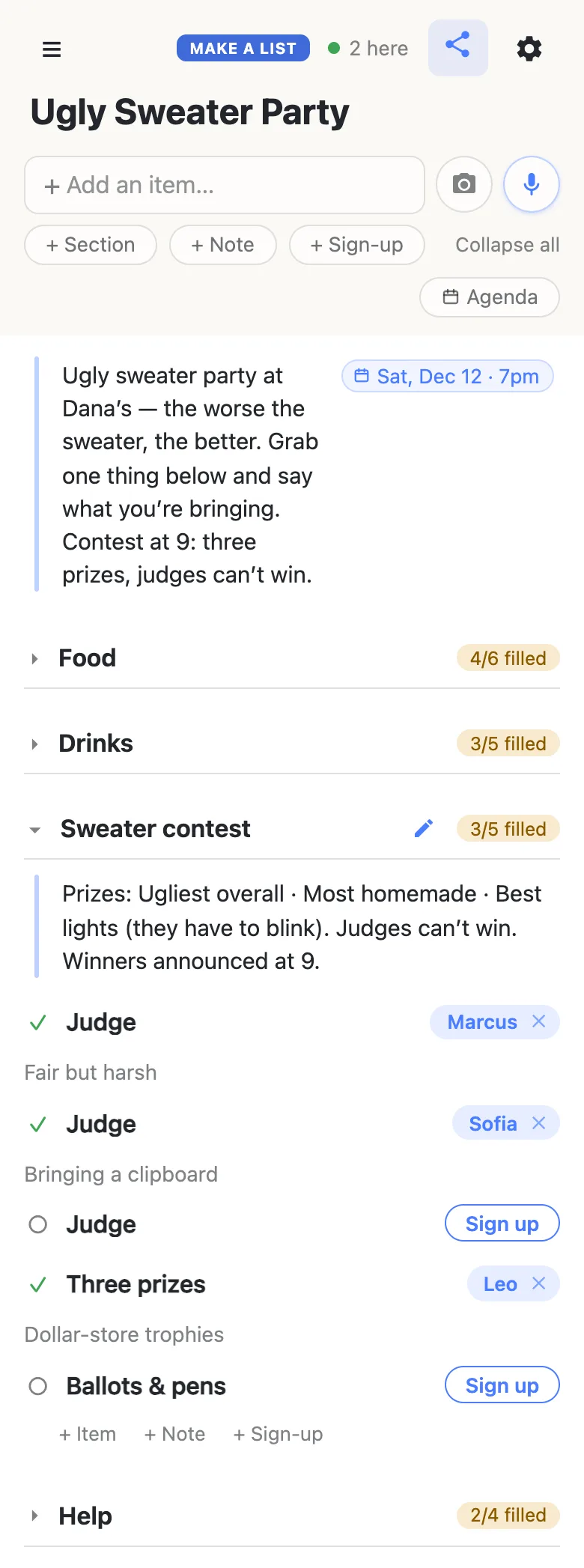
The 2 here chip in the header says how many people have the list open right now; tap it for their names. When the judges have decided, type the winners into the contest note — anyone with the link can edit it — and the guests who left early see who took Ugliest overall.
Setup and cleanup, with times on them
A Help section covers the jobs that aren’t food: setup, the playlist, a photo corner, cleanup. Type Setup Dec 12 6pm and tap the offer, and the row wears a Sat, Dec 12 · 6pm chip, so whoever signs up knows when to arrive. Keep these labels short — a one-word job reads best beside a time on a phone.
Keep the party running smoothly
- One thing per row. “Chips and dip” is one sign-up; two rows let two people help.
- Ask for the dish in the note. “Appetizer — Kayla” is good; “Appetizer — Kayla: hot spinach dip” stops a second dip.
- Allergies at the top. One line in the party note is read by everyone before they choose.
- Pin the link. Pin it in the group chat; every phone that opens it also keeps it in the ☰ drawer.
- Addresses for invited guests. If the party is at home, the street address can go by message to the people you invited rather than on the list, since anyone who has the link can read it.
When it’s the office party
Forty coworkers on one link is a lot of thumbs, and a row deleted by accident is gone for everyone. Owning the list lets you choose what visitors may do: leave signing up on, switch deleting and editing rows off, and the sheet stays exactly as you laid it out right up to the party. Everyone else notices nothing — same link, still no account. Add your co-organizer as an admin by email so the two of you run it together.
See what anonylist pro does Only you need an account. Everyone else still just opens the link.
More of the season
Swapping gifts at the party? A Secret Santa list holds the budget, the swap date and everyone’s wishes on a link of its own. Hosting at home means decorating first, and the Christmas decorating checklist splits that room by room. For a team lunch rather than an evening party, the work potluck sign-up sheet runs it from the team channel. The Christmas planning checklist is the household’s whole December, and links every Christmas guide.
Questions
- How far ahead should the ugly sweater party sign-up go out?
- About three weeks. For a party on Saturday, December 12, 2026, send the link by Saturday, November 21, before Thanksgiving week takes over everyone’s attention, and ask for sign-ups by Saturday, December 5. Three weeks also gives guests time to find, or make, a properly terrible sweater.
- What are good ugly sweater contest categories?
- Three is plenty: Ugliest overall, Most homemade, and Best lights for a sweater that actually blinks. Other favorites are Best couple or matching pair, Most festive pet sweater, and Most likely to be worn again on purpose. Write the categories in a note at the top of the contest section so every guest knows what they are dressing for.
- Can a guest bring something that isn’t on the sign-up sheet?
- Yes. At the end of every section there is a + Sign-up link; the guest taps it, types what they are bringing, and signs up for the new row. It appears on everyone else’s phone straight away, so the host sees the extra dish without a text.
- How do I stop five people bringing dessert?
- Give dessert one or two sign-up rows, not an open invitation. Once those rows carry a name, their Sign up buttons are gone, and the section’s heading shows how many are filled. Guests who want to bake can see at a glance that the sweets are covered and pick an open appetizer or drink instead.
- How should the room vote for the ugliest sweater?
- Either way works with one list. For judges, add three Judge rows to the contest section and let people sign up; for a room vote, add a Ballots and pens row so someone brings slips and a bowl. When the votes are in, type the winners into the contest note, where everyone with the link can read them.
Opens instantly. No account, no email.