A Christmas decorating checklist the whole house works through
Last updated October 30, 2026
To make a Christmas decorating checklist, start a list on anonylist, add a section for each part of the house — the tree, outside, the living room, the kitchen — put each job on its own row, and send the link to everyone helping. On decorating day each person ticks jobs off from their own phone, claims the outside ones by name, and adds anything missing to a shopping section as they find it. It’s free, and nobody needs an account or an app.
- Start a list and name it — Decorating 2026.
- Add a note at the top with the day, the start time and where the boxes are.
- Add a section per room, and one job per row: Tree skirt, Stockings on the mantel.
- Send the link to the household chat, and tick jobs off as they’re done.
Christmas is Friday, December 25, 2026, and Thanksgiving is Thursday, November 26, so the weekend after — Saturday, November 28 and Sunday, November 29 — is the natural decorating weekend. Write the checklist a week or two before it, so the bulbs and hooks on the shopping section are bought before the boxes come down. This page is one part of the Christmas planning checklist, the plan for the whole of December.
Opens instantly. No account, no email — for anyone.
What the checklist looks like
Here is the example list from the screenshots below, as text. Inside jobs are checkboxes; the outside jobs are sign-ups somebody claims; where everything lives is a note.
Note: Decorating day! Boxes come down from the attic at 9. Red bins are ornaments, green bins are lights, the long box is the tree. Tick a job when it’s done, and grab one under Outside. Saturday, November 28, 2026, 9am.
Tree
- ☑ Tree up and straight
- ☑ Test the lights, then on the tree
- ☐ Ornaments — glass ones up high
- ☐ Star on top (Mia’s turn)
- ☐ Tree skirt
Outside — grab a job
- Porch lights — Dad: “Need the ladder”
- Wreath on the door — Sam
- Roofline lights — Grandpa: “I’ll bring my tall ladder”
- Lights on the timer — open
Living room
- ☐ Stockings on the mantel
- ☐ Garland on the stairs
- ☐ Nativity on the bookshelf
- ☐ Advent calendar up — Tuesday, December 1
Kitchen & dining
- ☐ Table runner and centerpiece
- ☐ Christmas mugs out
- ☐ Candles in the windows
To buy
- ☑ Replacement bulbs
- ☐ Ornament hooks
- ☐ Outdoor extension cord
- ☐ Stocking holders
Packing up
- ☐ Take-down day — Saturday, January 2, 2027
- ☐ Glass ornaments in tissue
- ☐ Lights wound, bins labeled
- Note: Anything that broke goes under To buy, so it’s on next year’s list.
A section for every room
Decorating goes room by room, so the list should too. Tap the title and name the list, then use the + Section pill under the add box for Tree, Outside, Living room, Kitchen & dining and whichever rooms your house dresses up — a hallway, the kids’ rooms, the front window. Add To buy and Packing up while you’re there. More on sections.
Each section ends in a quiet + Item link: type a job, press Enter, and the next row opens underneath, so a whole room goes in at one sitting. Every heading keeps its own count — 2/5 on the tree, 0/4 in the living room — so a glance down the page says which room is finished and which one hasn’t been opened yet.
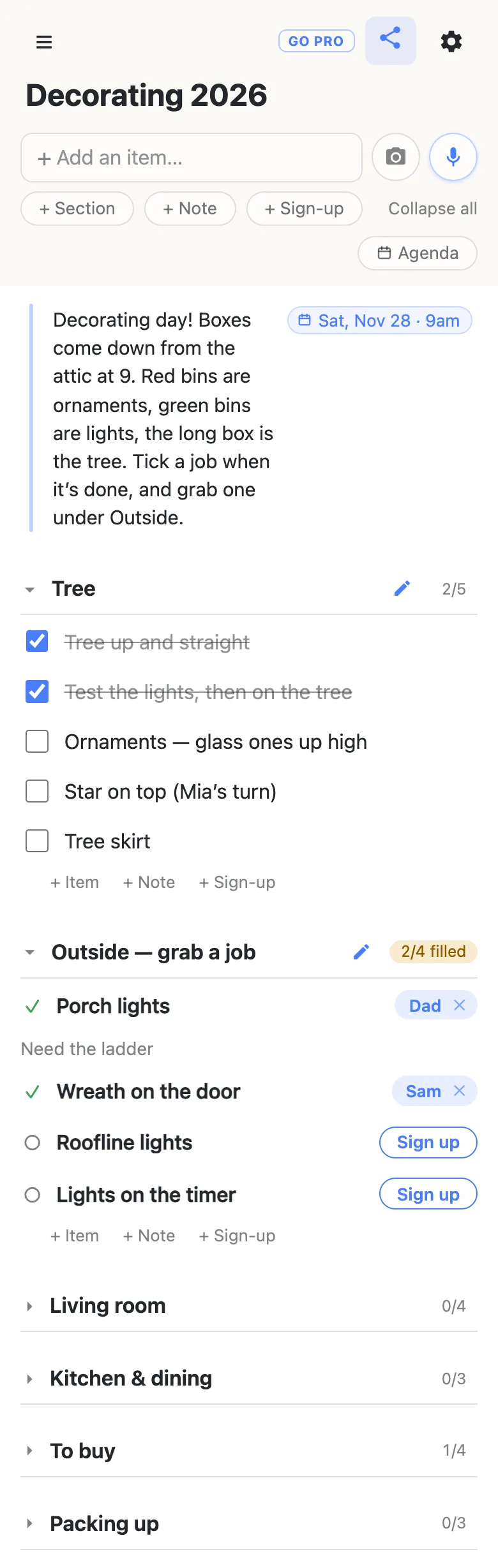
Folding is per phone: fold the rooms you aren’t working on and nobody else’s view changes. The first time somebody opens the link, every section starts folded with its count showing and only the note at the top is open — which is why the day, the time and which bin holds what belong in that note.
Who’s on the ladder: let people claim the big jobs
Some jobs need one named person — the roofline, the porch, the lights that go on a timer. Make those sign-up rows with the + Sign-up link at the end of the section instead of checkboxes. Whoever takes one taps Sign up, their name lands on the row for everyone, and a box opens for a word about it — “Need the ladder”. The heading counts what’s taken, 3/4 filled, so the last open job is obvious to whoever’s free.
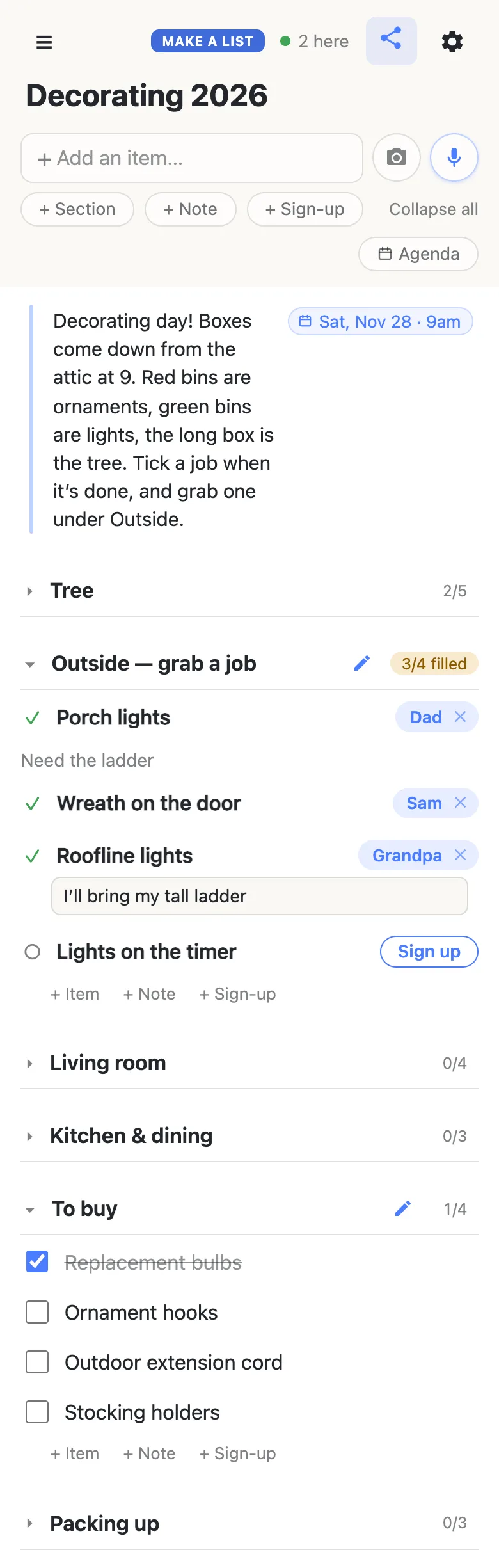
Grandparents, cousins and the neighbor who always helps with the lights can all have the link. They open it in the browser on their phone — no app, no account — and every tick and every claim shows up on everyone else’s screen the moment it’s made, so two people never end up untangling the same strand.
Decorating day, live
Ticking a row asks to confirm first, then strikes it through for everyone — the row stays put, so by lunchtime the struck-through half of each room is the record of what’s done. Tick something by mistake and tap it again: unticking never asks.
The To buy section is what keeps decorating day moving. A dead strand, a bag of hooks that ran out, a stocking with no holder: whoever finds it types it in, from wherever they’re standing, and whoever goes to the store reads the same list in the aisle and ticks each one off as it goes in the cart.
Only a few rows need a date — the day itself, the advent calendar on December 1, take-down day in January. Type the month and day into a row — Advent calendar up Dec 1 — and the list offers to attach the date; tap the offer and it pins to the end of the row as Tue, Dec 1. Add a time and it carries that too: Decorating day Nov 28 9am. Typing @ at the start of a word opens a small calendar instead. Nothing gets a date unless a person chose it. More on dates on a list.
The mic button beside the add box takes plain instructions too: add a kitchen section with the table runner, the mugs and the window candles is one sentence instead of four rows.
Part of the whole of December
Decorating is one weekend of a busy month. The Christmas planning checklist holds the rest — cards, gifts, baking, travel and Christmas dinner — dated and shared the same way, with a guide for each part. The wishes have their own link too: the family Christmas list puts everyone’s wishes on one page where a buyer claims each gift, and the gift list you share with your spouse keeps the two of you straight on who has bought what.
Keep the checklist running smoothly
- One job per row. “Lights and garland” can only be ticked once; two rows show which half is done.
- Write where things are, once. Which bin holds what, where the extension cords live — in the note at the top, not in anybody’s memory.
- Glass and ladders first. Name the careful jobs in the row (glass ones up high) and give the ladder jobs a sign-up, so a grown-up claims them.
- Pin the link. Pin it in the family chat; every phone that opens it also keeps it in the ☰ drawer.
When small hands have the link too
A list the kids can tick is half the fun of decorating day — until an eager tidy-up removes the rows for the rooms nobody has started. Owning the list lets you choose what visitors may do: leave ticking and signing up on, and switch deleting and reordering off, so everyone joins in and the checklist stays as you built it. Nothing changes for them — same link, still no account.
See what anonylist pro does Only you need an account. Everyone else still just opens the link.
The same list comes back out next year
The hard part of a decorating checklist is the first one: remembering that the star needs a new bulb, which bin the stocking holders went in, that the roofline needs the tall ladder. Write it down once and it’s done. In January the Packing up section takes the house apart in order, and anything that broke goes straight onto To buy.
Before the bins go back in the attic, open the gear icon → Export & import and save the file: every section, row and note is in it. Next November, open the same link from the ☰ drawer — or import the file into a fresh list — untick the rows, move the dated ones, and the checklist is ready for the next decorating day. More on exporting a list.
Questions
- When should we put up the Christmas decorations this year?
- The weekend after Thanksgiving is the usual choice: in 2026 that is Saturday, November 28 and Sunday, November 29, four weeks before Christmas on Friday, December 25. Write the checklist a week or two before it — mid-November — so anything on the To buy section, such as bulbs, hooks or an outdoor extension cord, is in the house before the boxes come down.
- What goes on a Christmas decorating checklist?
- A section for each area you decorate — the tree, outside, the living room, the kitchen and dining room — with one job per row, plus a To buy section for anything missing and a Packing up section for January. Put the day, the start time and which bins hold what in a note at the top, where everyone sees it first.
- How do we split the decorating jobs between everyone?
- Make the jobs that need one named person, like the roofline lights or the porch, into sign-up rows. Each helper taps Sign up on the job they want, their name appears on it for everyone, and a box opens for a note such as “need the ladder”. The rest stay as checkboxes anyone can tick when they finish one.
- Where do we write down which box the ornaments are in?
- In the note at the top of the list. The first time someone opens the link, every section starts folded and only that note is open, so “red bins are ornaments, green bins are lights” is the first thing a helper reads. Update it in January as the bins go back.
- How do we keep track of decorations that need replacing?
- Give the list a To buy section. Whoever finds a dead strand or runs out of hooks adds a row for it from their own phone, and whoever goes to the store ticks each one off in the aisle. When packing up in January, put anything that broke on the same section, so it is waiting there next year.
Opens instantly. No account, no email.