A Secret Santa list: who’s in, the budget, and everyone’s wishes
Last updated November 2, 2026
To make a Secret Santa list, start a list on anonylist, put the budget and the exchange date in a note at the top, and send the link to the group. Everyone adds a section with their own name and their wishes under it; once names are drawn, each person opens the section of whoever they got and shops from it. It’s free, and nobody needs an account or an app.
- Start a list and name it — Secret Santa 2026.
- Add a note at the top: the budget, when and where you’re swapping gifts, and when names get drawn.
- Send the link to the group chat. Everyone adds a section with their name and three to five wishes under it.
- Draw names the way your group always does, then open the section of the person you got and go shopping.
Christmas is Friday, December 25, 2026, and most Secret Santa exchanges land the weekend before — the example below swaps gifts on Saturday, December 19. One link means the cousin who never answers the group chat, the coworker on the other floor and the friend three time zones away are all reading the same rules and the same wishes.
Opens instantly. No account, no email — for anyone.
What the list looks like
Here is the example list from the screenshots below, as text. Each name is a section; the wishes under it are that person’s list.
Note: Secret Santa at Jess’s — $30 limit, wrapped, name tag on it. Add a section with your name: 3–5 wishes, sizes in a note. Names drawn Nov 22, Jess texts you yours. Shopping? Don’t tick anything. Saturday, December 19, 2026, 6pm.
- ☐ Names and wishes in — Friday, November 20
- ☐ Draw names — Sunday, November 22
Elena
- Note: Sweater: M. Tea over coffee. This candle (a link) or anything like it.
- Cedar candle
- Loose-leaf tea sampler
- A book you loved this year
- Fuzzy socks
Jess
- Note: Gloves: S. Anything for the garden.
- Nice olive oil
- Running headlamp
- Bookstore gift card
Marcus
- Note: Gloves: L. No more mugs, please!
- Touchscreen gloves
- Hot sauce sampler
- Board game: Cascadia
Priya
- Note: Shirt: S. Ring size 6.
- Watercolor brush pens
- A plant for a dark corner
- 1,000-piece puzzle
Sam
- Sourdough starter kit
- Wool beanie
- Records: anything Motown
Tom
- Note: Size L. New to climbing.
- Chalk bag
- Climbing gym day pass
- Belay gloves, size L
The rules go in a note at the top
Tap + Note under the add box and write the rules once: the spending limit, where and when you’re swapping, whether gifts come wrapped, and how the names will be drawn. A note holds whole paragraphs and sits above everything else, so it’s the first thing anyone reads when they open the link.
Put the dates on it too. Type Dec 19 6pm into the note and the list offers to attach it; tap the offer and it pins to the note as Sat, Dec 19 · 6pm. Typing @ at the start of a word opens a small calendar instead. Two dated rows under the note — Names and wishes in on Friday, November 20, and Draw names on Sunday, November 22 — tell everyone the deadlines without a single reminder text. More on dates on a list.
Everyone adds their own section
Each person taps the + Section pill under the add box and types their name. At the end of every section sits a quiet + Item link: tap it, type a wish, press Enter, and a fresh row opens underneath for the next one, so a whole wish list goes in without stopping. Sizes, colours and the things to avoid go in a note under your name — the + Note link sits right beside it. Paste a shop link into that note and the list offers to name it, so it reads candle instead of a long web address.
New sections arrive at the top of the list. To keep the names in alphabetical order, press and hold a heading and drag it into place; its wishes move with it. More on sections.
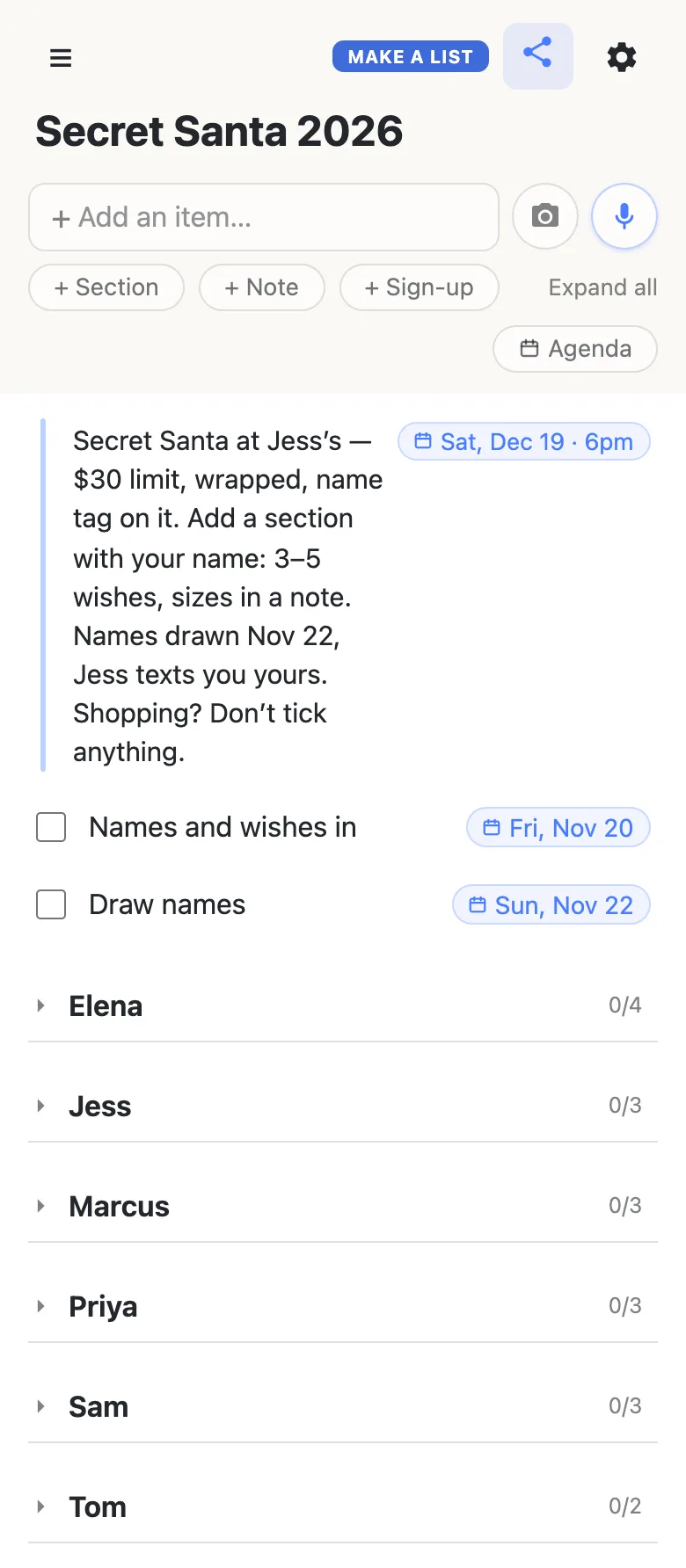
That folded view is the roll call. Before the draw, count the headings — six sections, six people in — and chase whoever is missing. The count beside each heading is the number of wishes under it — 0/4 is four wishes, none ticked — and a section nobody has filled in yet shows no count at all, so it stands out.
Draw names, then open the one you got
Draw names however your group always has: slips in a hat at Thanksgiving dinner, folded paper passed round the office, or one organizer drawing and texting each person their name. Keep the pairings themselves off the list — anyone with the link can read it, and the surprise is the whole point.
Then open the link and tap the name you drew. The section unfolds with that person’s wishes and the note with their sizes; the rest stay folded, and a heading you tap stays the way you left it on your phone, on nobody else’s.
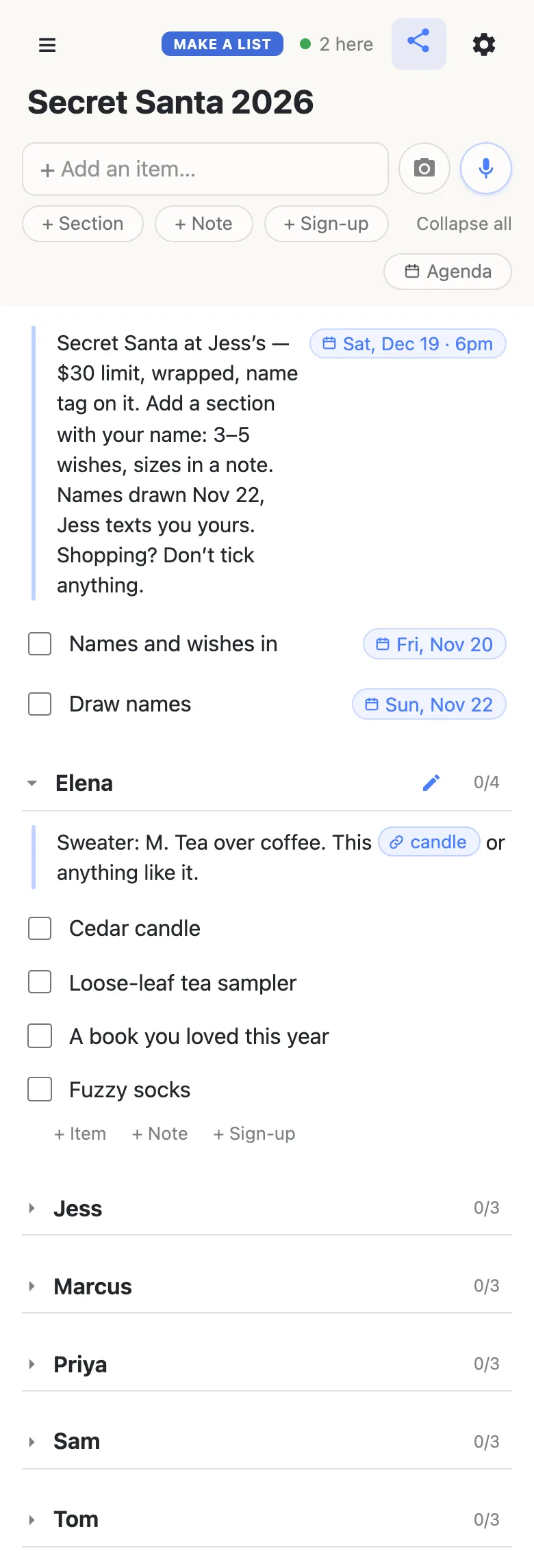
Wishes keep coming in right up to the exchange: a row added on one phone appears on every other one as it happens, with nothing to refresh, and the 2 here chip in the header says who else has the list open. Tap it for the names.
Shop without giving it away
Don’t tick the wish you buy. Only one person is shopping for each name, so there is nothing to coordinate, and a tick shows on every phone with the link — your recipient’s included. Ticking asks to confirm first, so a stray tap in a shop queue can’t do it by accident.
The two deadline rows are different: those are the organizer’s to tick. Once the names are drawn, ticking Draw names tells the whole group the draw is done.
Keep the Secret Santa running smoothly
- Give a range of prices. A five-dollar wish next to a thirty-dollar one gives whoever drew you a real choice.
- One wish per row. “Socks or a scarf” reads as one thing; two rows read as two options.
- Sizes in the note. Your Santa shouldn’t have to ask — that gives the game away.
- Addresses by message. For gifts that ship, send your address privately to the organizer, never on the list.
- Pin the link. Pin it in the group chat; every phone that opens it also keeps it in the ☰ drawer.
When the whole office is in on it
Thirty coworkers on one link is a lot of thumbs, and a wish list deleted by accident is gone for everyone. Owning the list lets you choose what visitors may do: leave adding sections and wishes on, switch deleting off, and nobody’s list can vanish the week before the swap. Everyone else notices nothing — same link, still no account. Add your co-organizer as an admin by email so the two of you run it together.
See what anonylist pro does Only you need an account. Everyone else still just opens the link.
More of the season
A Secret Santa covers one gift each. For the family’s whole wish list — where several people buy for everyone — the family Christmas list lets each buyer claim a gift so nothing is bought twice, and a gift list you share with your spouse keeps the two of you straight on what’s ordered. The Christmas planning checklist is the household’s whole December, and links every Christmas guide.
Questions
- When should we draw names for Secret Santa?
- Three to four weeks before the exchange. For a gift swap on Saturday, December 19, 2026, send the link in mid-November, ask for everyone’s name and wishes by Friday, November 20, and draw on Sunday, November 22. That leaves four weeks to shop and to ship anything ordered online. An office exchanging in the last week before the holiday break can draw as late as the first days of December.
- Can the person I drew find out I’m their Secret Santa?
- Not from the list. It holds names, wishes and sizes, never who drew whom: the draw happens off the list and the pairings stay there. Read your person’s wishes without ticking anything, because a tick shows on every phone that has the link, theirs included.
- Does it work for an office Secret Santa?
- Yes. Post the link in Slack, Teams or the team email; chat apps that show link previews show the list’s name. Coworkers open it in the browser with no account and nothing to install, add a section with their name, and put their wishes under it. The budget, the exchange date and the meeting room go in the note at the top.
- What should go on a Secret Santa wish list?
- Three to five wishes at different prices inside the budget, one per row, so whoever drew you has a real choice. Add a note under your name with sizes and anything to avoid, such as no more mugs, and paste a link to anything specific; the note shows it as a short named link.
- How do people who live far away join in?
- With the same link. They add their section from wherever they are, and it appears on everyone else’s phone as soon as it is added. Send mailing addresses privately, by message, rather than putting them on the list, because anyone who has the link can read it.
Opens instantly. No account, no email.