A Thanksgiving grocery list the whole household adds to, sorted by aisle
Last updated November 4, 2026
To make a Thanksgiving grocery list the whole household can add to, start a list on anonylist, add a section per aisle, and send the link to the family chat. Everyone adds what their dish needs, whoever is at the store ticks things off as they go into the cart, and every tick shows up on every phone the moment it happens. It’s free, there’s no app, and nobody makes an account.
- Start a list and name it — Thanksgiving Groceries.
- Add a note at the top: the day, how many are coming, and when the shopping trips are.
- Add a section per aisle — Produce, Meat & dairy, Bakery, Pantry & baking, Drinks — and put each ingredient under its aisle.
- Send the link to the family chat. Everyone adds what they need; whoever shops ticks it off in the store.
Thanksgiving is Thursday, November 26, 2026. The example list below is for twelve people: the big pantry run on Saturday, November 21, already done and ticked, the fresh run and the turkey pick-up on Tuesday, November 24, still ahead, and 29 ingredients sorted into five aisles with a count on each.
Opens instantly. No account, no email.
What the list looks like
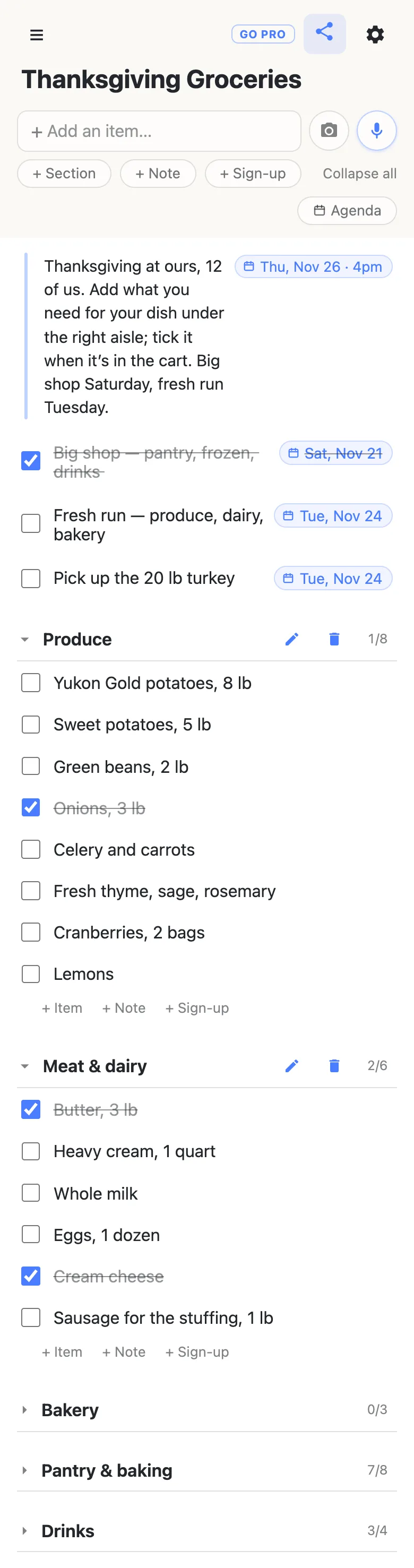
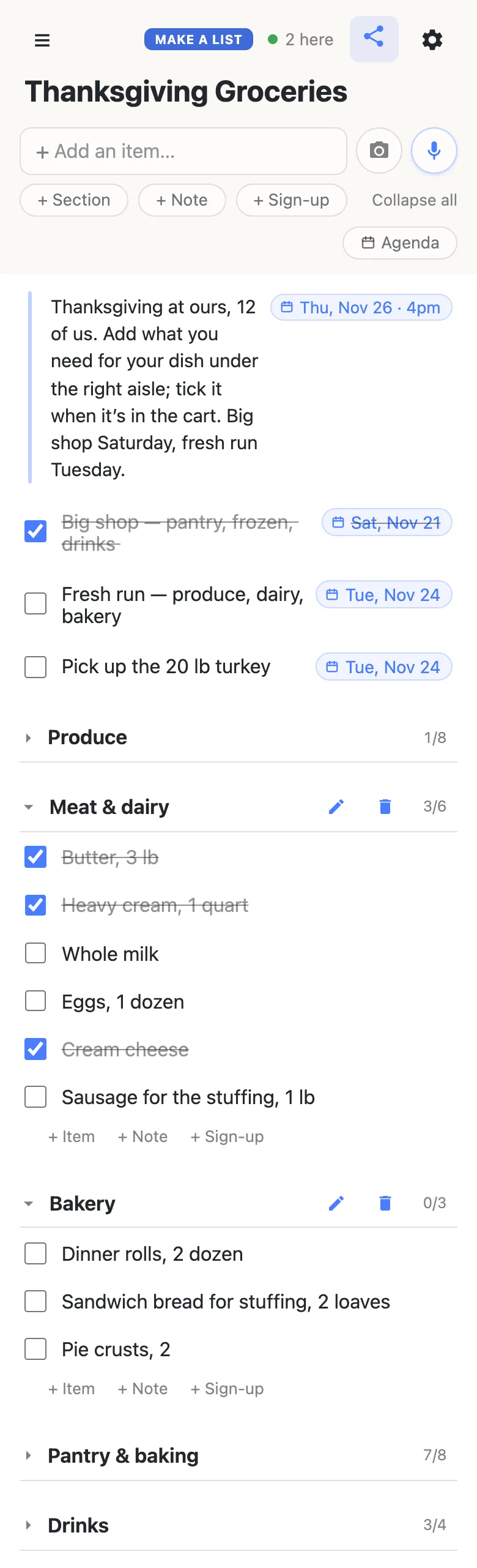
Here is the example list from the screenshots below, as text. The shopping trips are dated rows at the top; each aisle is a section whose heading counts what’s already in the cart; a ticked ingredient is struck through.
Note: Thanksgiving at ours, 12 of us. Add what you need for your dish under the right aisle; tick it when it’s in the cart. Big shop Saturday, fresh run Tuesday. Thursday, November 26, 2026, 4pm.
Big shop — pantry, frozen, drinks— Saturday, November 21- Fresh run — produce, dairy, bakery — Tuesday, November 24
- Pick up the 20 lb turkey — Tuesday, November 24
Produce 1/8
- Yukon Gold potatoes, 8 lb
- Sweet potatoes, 5 lb
- Green beans, 2 lb
Onions, 3 lb- Celery and carrots
- Fresh thyme, sage, rosemary
- Cranberries, 2 bags
- Lemons
Meat & dairy 2/6
Butter, 3 lb- Heavy cream, 1 quart
- Whole milk
- Eggs, 1 dozen
Cream cheese- Sausage for the stuffing, 1 lb
Bakery 0/3
- Dinner rolls, 2 dozen
- Sandwich bread for stuffing, 2 loaves
- Pie crusts, 2
Pantry & baking 7/8
Chicken stock, 3 quartsPumpkin purée, 2 cansEvaporated milkPecans, 2 cupsBrown sugar- Marshmallows
Kosher saltRoasting pan and foil
Drinks 3/4
Wine, 2 red 2 whiteSparkling cider, 2 bottlesCoffee- Ice, 2 bags
One section per aisle
Sort the list the way the store is laid out, not the way the menu is. Tap + Section for each aisle — Produce, Meat & dairy, Bakery, Pantry & baking, Drinks — and use the quiet + Item link at the end of each one to add its ingredients; Enter chains straight into the next row, so an aisle of eight takes under a minute. In the store you walk each section once and never double back for the cranberries. More on sections.
Every heading counts what’s in the cart — 1/8 under Produce, 7/8 under Pantry & baking — so a glance at the folded list says which aisles are done. Folding is per phone: fold the aisles you’ve finished and keep the one you’re standing in open, and nobody else’s view changes.
Everyone adds what their dish needs
Send the link to the family chat and the list belongs to everyone on it. Whoever is making the green beans types Lemons into the box at the top and it lands on the list for the whole household; press and hold it for a moment and drag it into Produce, or add it straight into the aisle with that section’s + Item link. Nobody signs up, and nobody texts you “can you add almonds” — they add almonds.
Already written on paper? Tap the camera beside the add box, photograph the list, and tick which lines to keep; headings on the page become sections. The whole thing is on the link in a minute, and the handwriting stays in the kitchen.
Ticked off in the aisle, seen at home
Whoever is at the store opens the same link in their phone’s browser and ticks things as they go into the cart. Ticking asks “Check off Heavy cream, 1 quart?” first, so a bumped screen in the dairy aisle doesn’t count; a ticked row stays on the list with a line through it, and unticking is one tap with no question asked.
Every tick appears on every other phone as it happens. Send one of you to the warehouse store for the pantry and drinks and the other to the supermarket for the fresh things, and each sees the other’s aisles fill in — the 2 here chip in the header shows who’s on the list right now, and tapping it gives the names.
The shopping trips, dated
Two trips get most Thanksgiving shopping done: a big run the weekend before for everything that keeps, and a fresh run on Tuesday for produce, dairy and bread. Put each on the list as a dated row above the aisles. Type Fresh run Nov 24 and tap the offer that appears, and the row wears a chip reading Tue, Nov 24; typing @ at the start of a word opens a small calendar instead. The turkey pick-up gets a row of its own the same way, so the one thing that can’t be bought late is never buried under the lemons. More on dates on a list.
Once something is dated, an Agenda button appears under the add box and lists the dated rows by day — Saturday’s run, Tuesday’s run and the turkey, then Thursday itself from the note at the top. Tick the trip off when you’re home and unpacked; the aisles underneath keep their own counts.
Keep the list running smoothly
- Aisles, not dishes. The menu already says what goes in the stuffing; the grocery list says where in the store to find it. One ingredient under one aisle, and the shopper walks the store once.
- One ingredient per row. “Cream and butter” can only be ticked once; two rows can land in two carts.
- Quantities in the row. Butter, 3 lb — whoever is at the store shouldn’t have to text home.
- Tick in the aisle, not at the checkout. The count on the heading is only as current as the last tick, and the person at home is reading it.
- Keep the menu on its own list. The Thanksgiving menu planner holds dishes and cooks; this one holds the cart.
When the whole family has the link
Adding and ticking need everyone; the aisles themselves are yours. Owning the list lets you choose what visitors may do: leave adding and checking on so relatives can add their ingredients and tick them, and switch deleting and reordering off so nobody tidies an aisle away from the store. Nothing changes for the family — same link, still no account. Add whoever shops with you as an admin by email so they can run it too.
See what anonylist pro does Only you need an account. Everyone else still just opens the link.
The rest of the season
The groceries are one part of the host’s November; the Thanksgiving planning checklist is the whole countdown — guest list, menu, the week of, Thursday — and links every Thanksgiving guide. The Thanksgiving menu planner is where the dishes get a cook’s name and each home-cooked dish its own ingredients, and the Thanksgiving potluck sign-up sheet covers relatives claiming what they bring. For the ordinary weeks, a shared grocery list works exactly the same way, year round.
Questions
- When should I start the Thanksgiving grocery list?
- The moment the menu is settled, about two weeks out. For Thanksgiving on Thursday, November 26, 2026, have the aisles and the first ingredients on the list by Thursday, November 12, so relatives have a week to add what their dishes need; order the turkey then too. Do the big pantry run on Saturday, November 21, and the fresh run for produce, dairy and bread on Tuesday, November 24, with the turkey pick-up the same day.
- How do I sort a Thanksgiving grocery list by store aisle?
- Add a section per aisle, such as Produce, Meat and dairy, Bakery, Pantry and baking, and Drinks, and put each ingredient under the aisle where the store keeps it. Each heading counts how many of its rows are ticked, so the folded list shows which aisles are finished, and a row in the wrong aisle is moved by pressing and holding it and dragging it under the right heading.
- Can relatives add their own ingredients to the list?
- Yes. Anyone with the link can type an ingredient into the box at the top, and it appears on the list for everyone, or add it straight into an aisle with the + Item link at the end of that section. Nobody makes an account, and the person doing the shopping sees the new row the moment it is added.
- What if two of us shop at two different stores?
- Open the same link on both phones and split the aisles between you, one at the warehouse store for the pantry and drinks and one at the supermarket for the fresh things. Each tick shows up on the other phone as it happens, the heading counts move for both of you, and the chip in the header shows that two of you are on the list.
- Can I turn my handwritten Thanksgiving grocery list into a shared one?
- Yes. Tap the camera beside the add box, photograph the paper list, and tick which lines to keep before anything is added. Headings on the page become sections, so a list already written by aisle comes in sorted, and the result is an ordinary list on a link the whole family can open.
Opens instantly. No account, no email.