A reusable checklist you never have to copy
Last updated August 16, 2026
The usual advice for a repeating checklist is: keep a template, duplicate it each time. It works, and it quietly costs you something every single run.
Each copy is a new link. The one pinned in the staff chat is last Tuesday’s. Someone ticks items on a copy nobody else is looking at. And when the routine changes you update the template, while eleven copies of the old one carry on existing. The list stops being the checklist and becomes a pile of checklists.
The alternative is to keep one list and clear it between runs. Same list, same link, ticks reset. Nothing to duplicate, nothing to re-share, nothing to drift.
Where a repeating checklist earns its keep
- Opening and closingCafé, shop, studio, gym — the same routine every shift, run by whoever is on.
- Cleaning rotasWeekly deep clean, end-of-day wipe-down, changeover between guests.
- Packing listsThe kit that goes to every match, every gig, every camping trip.
- Pre-flight and safetyVehicle checks, equipment checks, anything with a fixed order that matters.
- Onboarding stepsThe same sequence for every new starter or new client.
- Event set-upDoors, signage, chairs, sound — the same run-through each time you host.
What it looks like mid-run
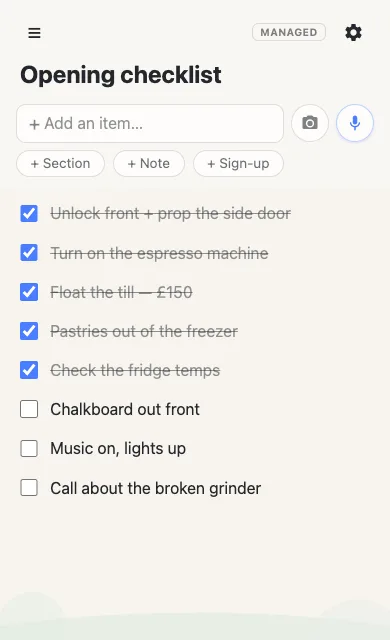
Everyone with the link can tick things off, and no one needs an account to do it. Two people closing up together see each other’s ticks appear, which is the difference between splitting a routine and accidentally doing it twice.
Clearing it for the next run
Save the clean version once — before the first run — from ⚙ → Baseline. That’s the state every run starts from. When you’re done, reset the list to it.
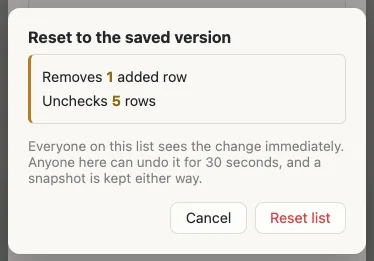
Notice what the reset removes: the ticks and the “call about the broken grinder” line somebody added mid-shift. A run picks up notes that belong to that run. Clearing takes them with it, so tomorrow’s checklist is the checklist rather than an archaeology of last week.
Copying a template vs. resetting one list
| Duplicate a template | Reset one list | |
|---|---|---|
| The link | New one every run | Never changes |
| Sharing | Re-send each time | Send once |
| Old runs | Pile up as copies | Kept as restore points |
| Changing the routine | Old copies keep the old steps | Edit the saved version once |
| Wrong list open | Easy — they all look alike | There’s only one |
Nothing is lost when it clears
Every reset keeps a restore point first, and the last ten sit in the same menu — so “what did we actually do on Saturday” is still answerable, and a reset fired by mistake is 30 seconds from being undone. Clearing a list full of ticks shouldn’t require faith.
Let it clear itself overnight
For a daily routine, give it a schedule: 4am, say, so the morning shift opens a fresh checklist without anyone remembering to reset it. A scheduled clear gets a five-minute undo window rather than thirty seconds, keeps its restore point, and the list says plainly that it reset automatically — so nobody arrives at an empty checklist and assumes something broke.
When the routine changes
Routines change: a new step, a step that turned out to be pointless. Open Edit the saved version and change the template in place, using the list exactly as you always do. Only you see it — everyone else carries on with the live checklist, and your change takes effect at the next reset.
Start one
The checklist itself is free, for you and for everyone you share it with, and needs no account either way.
Make a checklist Free, no account, about a minute.
Saving a clean version and resetting to it — by hand or on a schedule — is part of anonylist pro, on lists you own. See how baseline works.
Questions
- How do I reuse a checklist instead of copying a template?
- Save the clean version once, then reset the list to it when you’re done. The ticks clear, anything added gets removed and anything deleted comes back — at the same address. There’s no second copy, so there’s nothing to re-share and nothing to drift out of date.
- What happens to the ticks when a checklist resets?
- They all come off. A saved version stores the shape of the list, not the progress on it, so resetting returns the checklist unticked and ready to run again.
- Can two people run the same checklist at once?
- Yes. Everyone with the link sees ticks appear live as they happen, so two people working through a closing routine can see what the other has already done rather than duplicating it.
- Can a shift checklist reset itself overnight?
- Yes — set a day and hour and it clears on that schedule in your time zone, so the morning shift finds a fresh list. The list says it reset automatically, keeps a restore point, and can be undone for five minutes afterwards.
- What if the routine itself changes?
- Edit the saved version. You change the template in place, using the list as you normally would, while everyone else keeps using the live one — nothing changes on their screen until the next reset.